 DriftEngine
Article · · Drift Technologies
Six 3D engines measured in the browser
DriftEngine beside Three.js, Babylon.js, PlayCanvas, Godot and Bevy: five scenes timed on WebGPU and WebGL2, on a desktop GPU and a phone, with a picture of every scene, what each engine ships for a game, and where DriftEngine is behind.
We make DriftEngine. This is our comparison with Three.js, Babylon.js, PlayCanvas, Godot and Bevy. The results page has the method and tables; we welcome corrections from people who know the other engines better than we do.
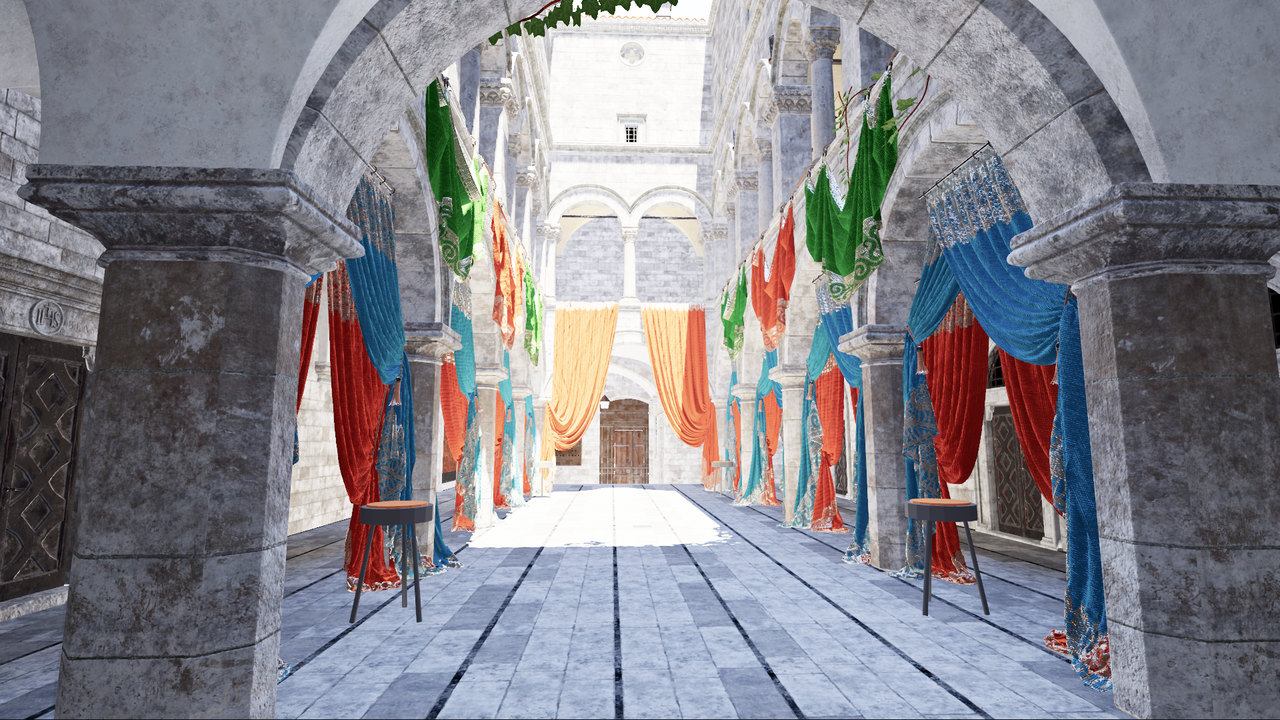
The opening picture comes from DriftEngine's own Sponza demo, separate from the benchmark. Intel Sponza (2022) is from the Intel Sample Library under Creative Commons Attribution; see the model credits.
DriftEngine is a 3D game engine written in TypeScript. It renders through WebGPU, falls back to WebGL2 when a browser has no usable WebGPU device, and packages the same game for the web, Linux, Windows, macOS and Android.
We built it for browser games, including games ported from elsewhere. Here we explain what it provides and measure it alongside the other engines. Every scene's timing table has pictures of what each engine drew beside it: a fast frame only counts if it shows the scene. We print the numbers that favour DriftEngine and those that favour the others.
What a game gets
Install the packages your game needs. @driftengine/core provides the fixed-step loop, both
renderers, cameras, an input action map, the scene graph, geometry, text and physics. Separate
packages add animation, audio, model loading, navigation meshes, terrain, lockstep and rollback
netcode, Gaussian splats, a 2D layer for sprites and menus, and native packaging. We publish them
on npm under Apache-2.0.
Core includes rigid bodies, joints, ray and shape queries, sensors, a character controller with air control and a jump buffer, a raycast vehicle with tyre curves, ragdolls and cloth. The matrix below records built-in rigid-body physics, character controllers, vehicles and ragdolls for both DriftEngine and Godot, and lists the dependencies the other engines use.
The renderer supports directional, point and spot lights through clustered shading, plus rectangular area lights with shadows that soften as the emitter grows. It provides image-based lighting, exposure, ambient occlusion, temporal antialiasing, bloom, depth of field, motion blur, tone mapping and colour grading. The sky follows a latitude and season. Fog, rain and water share wind with other systems. WebGPU also offers an optional GPU-driven pipeline with instance and cluster culling, and temporal reconstruction from a lower resolution.
Our baker reads glTF, OBJ, STL, USD, 3MF, FBX and Blender files and writes .drft containers.
It quantises geometry, recovers repeated meshes as instances, keeps textures in GPU compression
formats and divides scenes into regions that stream nearest first. The benchmark loads a container
baked from Intel's Sponza glTF and renders its main pass through the loader's draw() method.
That API call can submit several GPU draws; the scene also has a shadow pass.
The engine imposes no character type or level format. Its functions take positions, colours, sizes and time, leaving you to organise the game.
Built for an agent to write
We provide unattended project setup and checks that a coding agent can run after a change.
npm create @driftengine@latest my-game creates a project without prompts. It includes an
AGENTS.md with project instructions, the engine's skill in the locations agents look for it,
and npm run check.
That command typechecks the project, runs its tests in Node, then opens and photographs the game on WebGPU and WebGL2 using the machine's GPU. It rejects console errors and warnings, a flat-colour canvas, or a different backend from the one requested. The image check can catch an empty frame even when compilation and unit tests pass.
The simulation is plain TypeScript, so game rules can be tested in Node without a GPU. An agent
can check a jump's height or a score calculation before rendering anything. Every export carries
its documentation; we also publish the manual as Markdown, an llms.txt index and an installable
skill.
Orbfall is a small 3D arcade game an agent built from one prompt using this setup. Its page includes the original prompt and the agent's log of its checks.
Two backends, one picture
WebGPU and WebGL2 share one API. We try WebGPU first, draw a probe frame and read its pixels back before accepting the device. Checking for the API alone would miss a device that uses a software rasteriser or draws nothing. If we reject it, we fall back to WebGL2 and return a reason the game can display or log.
We write shaders once and generate the WebGPU versions from them; the WebGL2 path does not need a translator. In the still scenes here, instancing, lights and Sponza, DriftEngine's two backends draw nearly identical pictures, with nearly every pixel the same.
Determinism
The simulation advances in fixed steps of a sixtieth of a second, and rendering interpolates between them. Our seeded random generator keeps its sequence across releases; a new distribution gets a new function. Physics computes a world fingerprint at each step.
Replays and rollback also need reproducible arithmetic and game logic that uses recorded inputs instead of external time or unseeded randomness. With those conditions met, rollback can rewind, apply a late input and simulate forward to the same state. Tests can compare fingerprints from the same initial state and inputs to find the step where runs diverge. The matrix below describes the simulation support and integrations available in each engine.
The numbers
How they were taken
We wrote five scenes from each engine's documentation and examples:
- Cube: one lit, spinning cube, used to measure download size, time to first frame and memory.
- Separate objects: individually transformed cubes. Bevy batches these automatically, so an object count is not a draw-call count across engines.
- Instances: a cube repeated through each engine's instancing path.
- Lights: a floor and 64 pillars under coloured point lights.
- Sponza: Intel's 2022 base scene, with textures capped at 1,024 pixels and a sun casting shadows through the same size of shadow map in each engine.
The desktop has an AMD Radeon RX 9070 XT, with Chrome using Vulkan. Vsync and the frame-rate cap are off. Each canvas is 1280 by 720, with a pixel ratio of one and no multisampling. Fixed-count runs discard 120 warm-up frames, then record up to 600 frames within 15 seconds. The probe tracks GPU completion and allows 2 frames in flight. Each timing reading averages 4 frames; tables show the median and 95th percentile of those readings. Desktop fixed-count cells take the median of each metric from 3 interleaved runs. Desktop searches and all phone cells ran once.
For counts at sixty frames a second, we double the count while the 95th percentile is at or under 18 milliseconds, then narrow the interval to the greater of 5% or 16 objects. The search also checks for a flat image and GPU errors; it cannot verify that every object or light was drawn. The results page gives the full timing and search method.
All engines use pinned release builds: DriftEngine 4.13.0, Three.js r186, Babylon.js 9.30.0, PlayCanvas 2.23.2, Godot 4.7.2 and Bevy 0.20.0. Each uses its default output encoding. Godot exports only WebGL2; Bevy needs a build for each backend. For Sponza, Godot imports the model ahead of time and DriftEngine bakes it; the other engines load the glTF.
We exclude runs that use another backend or a software renderer, report GPU errors or produce a flat canvas. Repeating DriftEngine and Three.js desktop cube and separate-object measurements in two sessions gave a median difference of 2.0% and a largest difference of 4.9%. These repeats cover only those engines and desktop scenes.
Bold marks the best value and timings within 2.0% or counts within 5% of it. These bands group nearby results without establishing a tie. Download, first-frame and memory columns bold only the best value. If every value falls within a column's band, none is bold. A plus sign means the search reached its cap, leaving the maximum unknown. A figure an engine reached by shading fewer lights than it was given is never bold.
The pictures beneath the timing tables are separate desktop captures at the fixed counts being timed. They show neither the search ceilings nor the phone runs. The results page explains the lighting settings that changed between measurement and photography.
Download and first frame
| Engine | Backend | Brotli | gzip | First frame | Memory |
|---|---|---|---|---|---|
| DriftEngine | WebGPU | 544.5 KB | 928.1 KB | 456 ms | 26.6 MB |
| DriftEngine | WebGL2 | 304.1 KB | 378.6 KB | 148 ms | 13.7 MB |
| Three.js | WebGPU | 241.7 KB | 300.3 KB | 156 ms | 13.1 MB |
| Three.js | WebGL2 | 163.6 KB | 198.9 KB | 81 ms | 10.6 MB |
| Babylon.js | WebGPU | 317.5 KB | 368.6 KB | 258 ms | 10.4 MB |
| Babylon.js | WebGL2 | 318.7 KB | 370.2 KB | 237 ms | 13.5 MB |
| PlayCanvas | WebGPU | 485.3 KB | 624.8 KB | 169 ms | 20.5 MB |
| PlayCanvas | WebGL2 | 485.3 KB | 624.8 KB | 149 ms | 19.5 MB |
| Godot | WebGL2 | 6.8 MB | 9.8 MB | 1430 ms | 63.0 MB |
| Bevy | WebGPU | 4.3 MB | 6.2 MB | 813 ms | 65.1 MB |
| Bevy | WebGL2 | 4.3 MB | 6.2 MB | 736 ms | 48.0 MB |
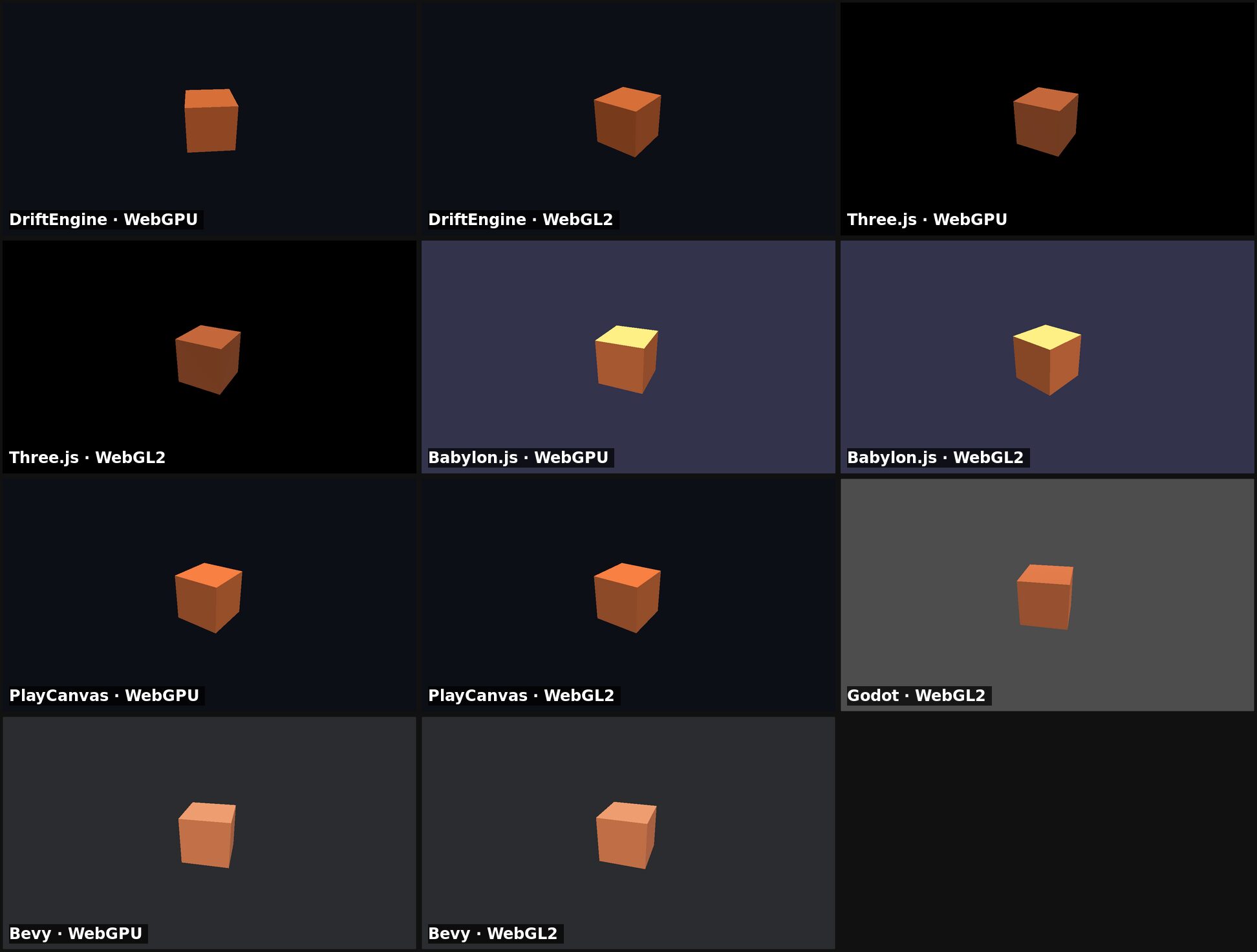
The cube measures the cost of a small application. Three.js on WebGL2 has the smallest Brotli download, 163.6 KB, and the earliest first frame, 81 ms. DriftEngine downloads 304.1 KB on WebGL2 and 544.5 KB on WebGPU. Its WebGPU first frame is 456 ms, the latest among the JavaScript builds. That includes our device probe, whose individual cost we did not measure. Godot and Bevy download WebAssembly engines and have larger page totals.
Many separate objects
| Engine | Backend | 1,000: median | 1,000: p95 | 10,000: median | 10,000: p95 | Most at 60 fps |
|---|---|---|---|---|---|---|
| DriftEngine | WebGPU | 2.67 ms | 3.24 ms | 22.39 ms | 25.34 ms | 7,168 |
| DriftEngine | WebGL2 | 2.67 ms | 3.21 ms | 21.68 ms | 24.49 ms | 7,424 |
| Three.js | WebGPU | 4.71 ms | 6.45 ms | 55.29 ms | 62.17 ms | 2,688 |
| Three.js | WebGL2 | 1.47 ms | 1.93 ms | 12.51 ms | 14.11 ms | 9,472 |
| Babylon.js | WebGPU | 7.67 ms | 8.93 ms | 87.99 ms | 93.07 ms | 1,792 |
| Babylon.js | WebGL2 | 4.10 ms | 6.21 ms | 61.86 ms | 64.71 ms | 2,688 |
| PlayCanvas | WebGPU | 1.35 ms | 1.77 ms | 16.60 ms | 21.43 ms | 8,192 |
| PlayCanvas | WebGL2 | 1.48 ms | 2.03 ms | 18.37 ms | 21.83 ms | 7,424 |
| Godot | WebGL2 | 3.04 ms | 3.46 ms | 29.14 ms | 31.48 ms | 5,376 |
| Bevy | WebGPU | 3.12 ms | 4.02 ms | 10.58 ms | 11.75 ms | 16,896 |
| Bevy | WebGL2 | 2.41 ms | 3.29 ms | 10.77 ms | 12.04 ms | 15,360 |
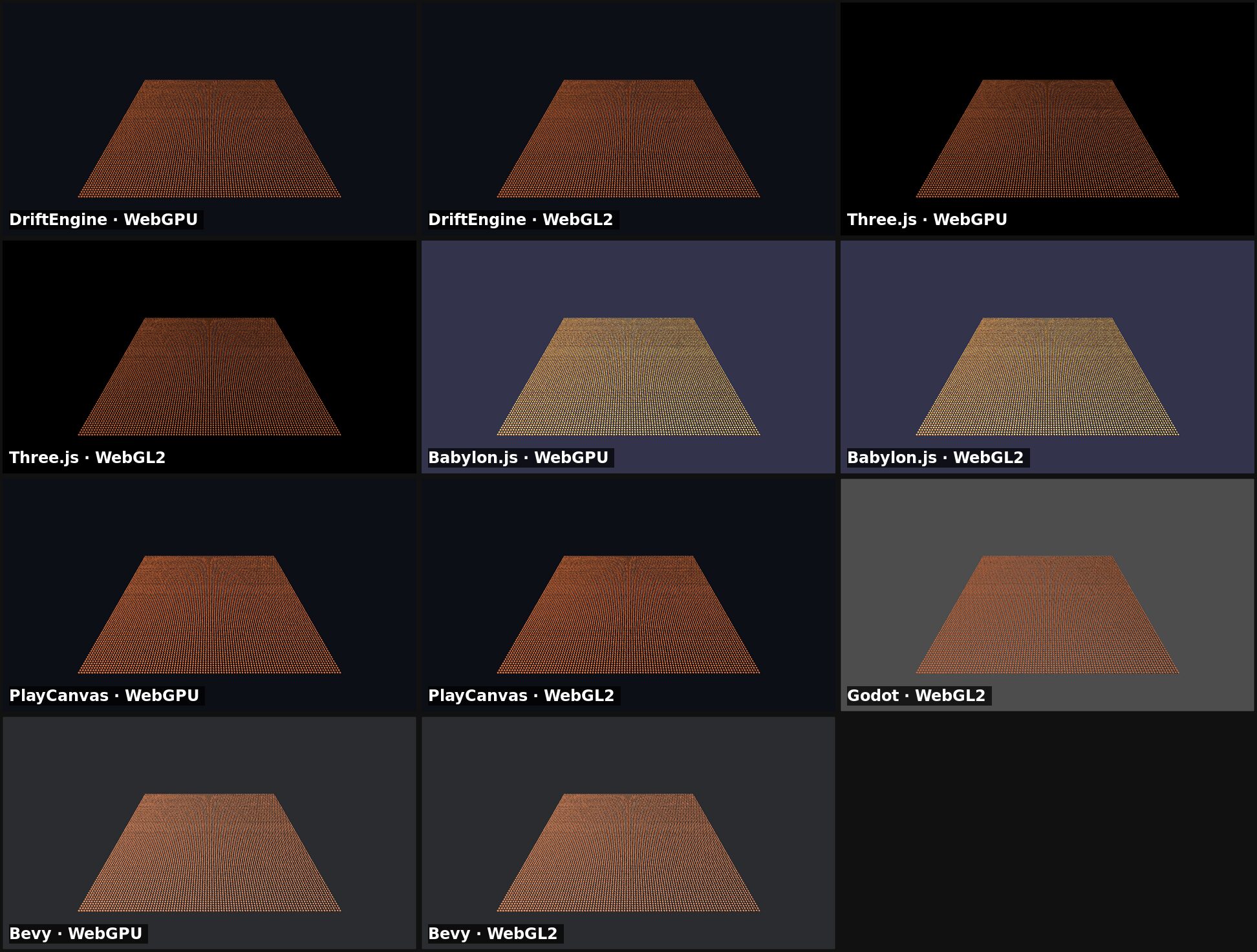
This scene measures updating and rendering ten thousand separate objects. Bevy's WebGPU build has the lowest median, 10.6 ms, and holds 16,896 objects at sixty frames a second. Its automatic batching matters when interpreting these counts.
DriftEngine is third on WebGPU, behind Bevy and PlayCanvas, at 22.4 ms. Three.js takes 55.3 ms and Babylon.js 88.0 ms. On WebGL2, Three.js takes 12.5 ms, PlayCanvas 18.4 ms and DriftEngine 21.7 ms.
One object, many times
| Engine | Backend | 100,000: median | 100,000: p95 | 1,000,000: median | 1,000,000: p95 | Most at 60 fps |
|---|---|---|---|---|---|---|
| DriftEngine | WebGPU | 0.45 ms | 0.55 ms | 1.08 ms | 1.64 ms | 4,194,304+ |
| DriftEngine | WebGL2 | 0.47 ms | 0.65 ms | 3.15 ms | 4.04 ms | 3,801,088 |
| Three.js | WebGPU | 0.37 ms | 0.55 ms | 1.49 ms | 2.20 ms | 4,063,232 |
| Three.js | WebGL2 | 0.33 ms | 0.56 ms | 1.12 ms | 1.43 ms | 4,194,304+ |
| Babylon.js | WebGPU | 0.31 ms | 0.46 ms | 1.13 ms | 1.70 ms | 4,194,304+ |
| Babylon.js | WebGL2 | 0.30 ms | 0.47 ms | 1.14 ms | 1.40 ms | 4,194,304+ |
| PlayCanvas | WebGPU | 0.37 ms | 0.59 ms | 1.13 ms | 1.71 ms | 4,194,304+ |
| PlayCanvas | WebGL2 | 0.33 ms | 0.53 ms | 1.32 ms | 2.02 ms | 4,194,304+ |
| Godot | WebGL2 | 0.51 ms | 0.65 ms | 2.05 ms | 3.03 ms | 4,194,304+ |
| Bevy | WebGPU | 24.12 ms | 25.65 ms | 211.10 ms | 218.15 ms | 71,680 |
| Bevy | WebGL2 | 94.71 ms | 97.27 ms | 895.04 ms | 908.40 ms | 15,872 |
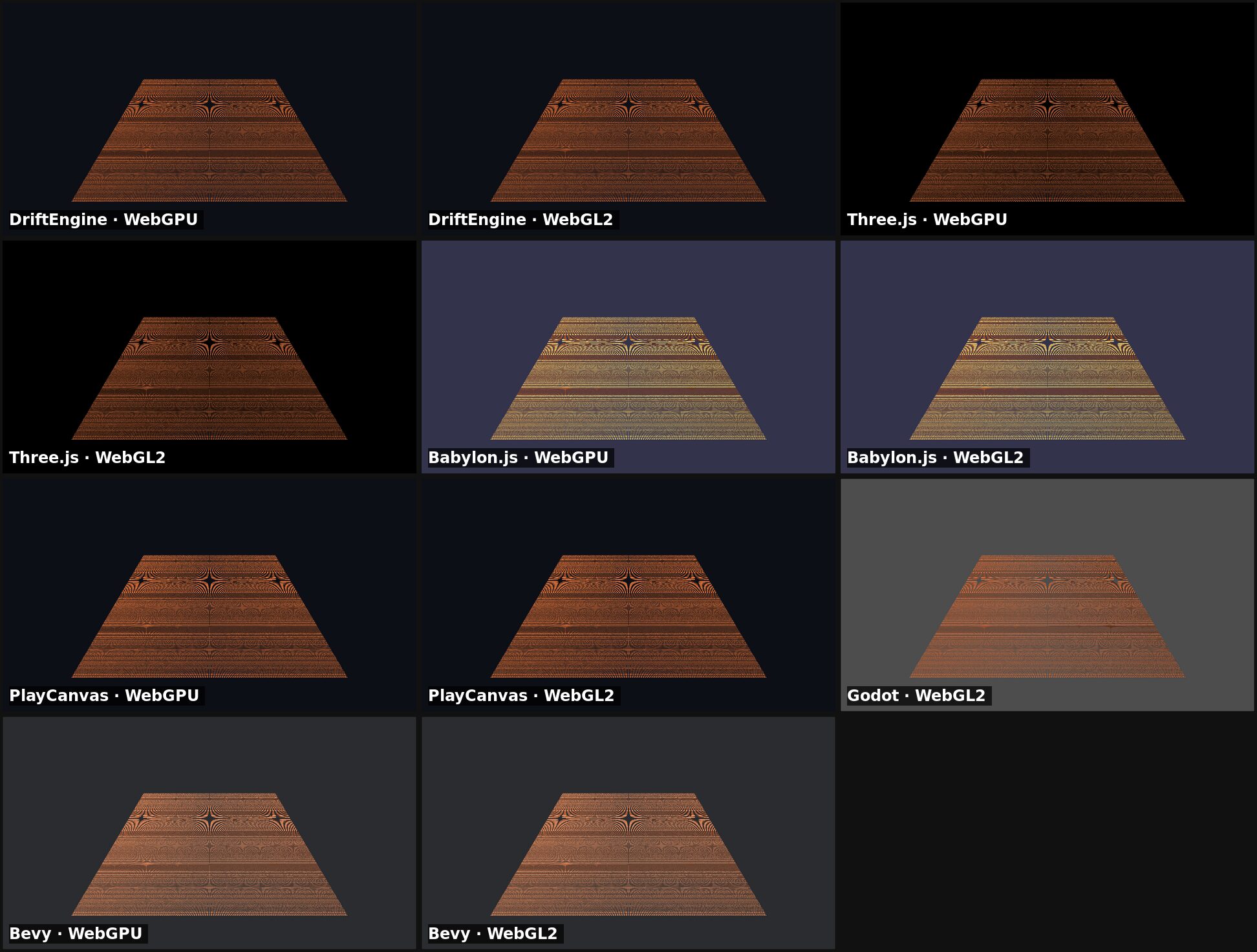
Instancing lets a game repeat a mesh efficiently, as in a forest or crowd. At a million copies, DriftEngine on WebGPU has the lowest median, 1.1 ms. Babylon.js on WebGL2 has the lowest 95th percentile, 1.40 ms, against DriftEngine's WebGPU 1.64 ms. Our WebGL2 median, 3.1 ms, is the highest of the JavaScript builds.
Several builds reach the search cap. Three.js on WebGPU accepts 4,063,232 copies. Bevy creates an entity for each cube and uses automatic instancing, so its figures include entity processing as well as rendering. We did not measure those costs separately.
Many lights
DriftEngine's desktop lights figures include point-light shadows, which none of the other engines draws here. We turned them off on the phone.
| Engine | Backend | 64 lights | 256 lights | Most lights at 60 fps | Limits |
|---|---|---|---|---|---|
| DriftEngine | WebGPU | 0.48 ms | 0.70 ms | 4,096+ | shades the nearest 320 of 4096 lights |
| DriftEngine | WebGL2 | 0.57 ms | 0.92 ms | 4,096+ | shades the nearest 320 of 4096 lights |
| Three.js | WebGPU | 0.51 ms | 0.57 ms | 4,096+ | |
| Three.js | WebGL2 | 0.45 ms | 1.21 ms | 992 | forward: every light is evaluated for every fragment |
| Babylon.js | WebGPU | 0.72 ms | 0.78 ms | 4,096+ | |
| Babylon.js | WebGL2 | 0.59 ms | 0.64 ms | 4,096+ | |
| PlayCanvas | WebGPU | 0.52 ms | 0.77 ms | 4,096+ | |
| PlayCanvas | WebGL2 | 0.48 ms | 0.72 ms | 4,096+ | |
| Godot | WebGL2 | 0.62 ms | 0.69 ms | 4,096+ | Compatibility renderer: at most 32 lights per object |
| Bevy | WebGPU | 2.52 ms | 2.46 ms | 4,096+ | |
| Bevy | WebGL2 | 2.01 ms | 2.39 ms | 4,096+ | WebGL2: at most 256 clusterable lights |
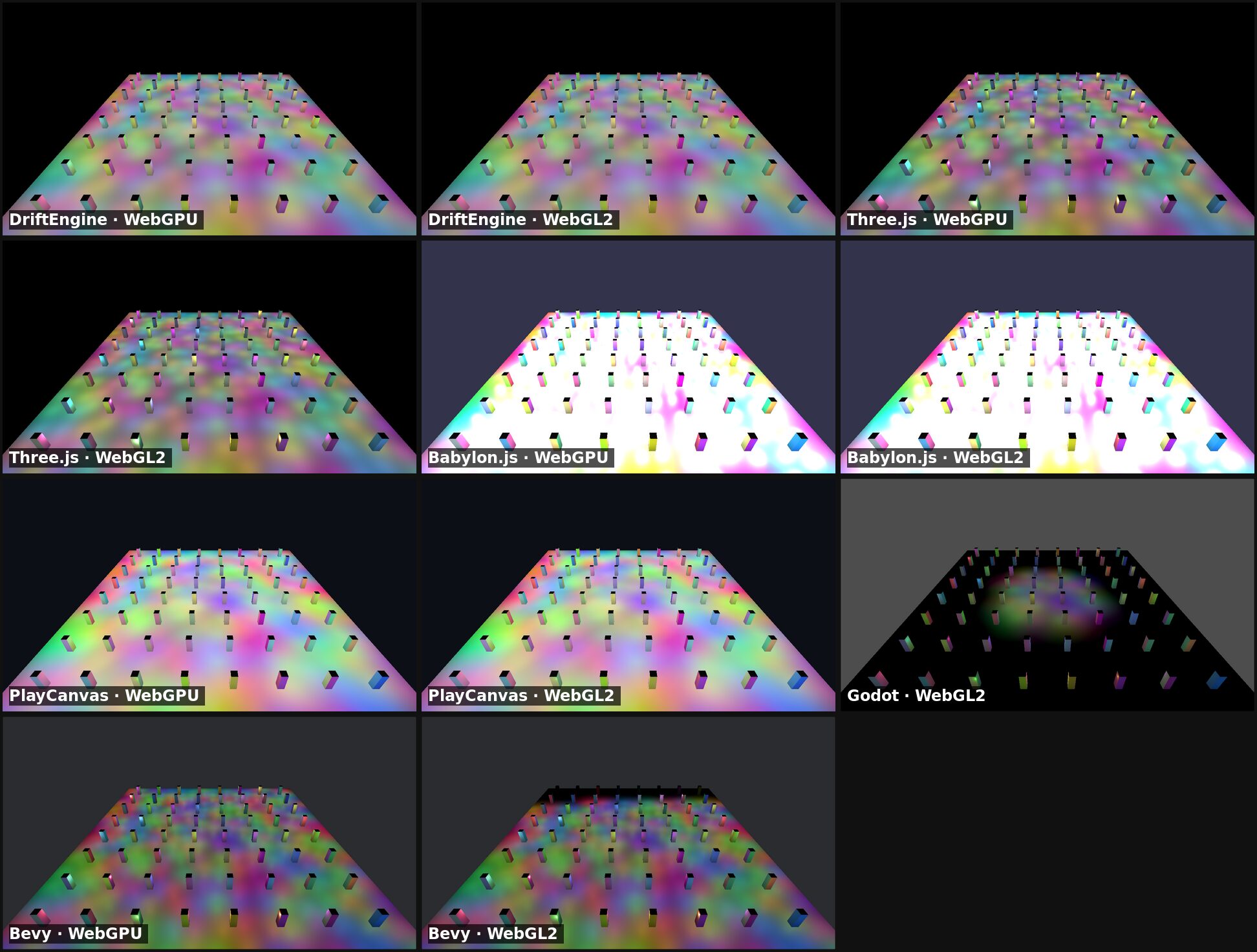
At 256 requested lights, Three.js on WebGPU has the lowest median, 0.57 ms. DriftEngine takes 0.70 ms on WebGPU and 0.92 ms on WebGL2. Three.js on WebGL2 has the highest median among the JavaScript builds and accepts 992 lights in the desktop search.
Read the limits column alongside the counts. DriftEngine, Godot and Bevy on WebGL2 limit the lights they shade at once, so reaching the search cap does not mean shading every requested light. The pictures show how those choices affect the floor; we discuss them below.
Sponza
| Engine | Backend | Download | Load to first frame | Frame |
|---|---|---|---|---|
| DriftEngine (baked) | WebGPU | 44.2 MB | 2445 ms | 1.09 ms |
| DriftEngine (baked) | WebGL2 | 44.0 MB | 1974 ms | 1.25 ms |
| Three.js | WebGPU | 73.7 MB | 1778 ms | 2.71 ms |
| Three.js | WebGL2 | 73.6 MB | 1638 ms | 1.85 ms |
| Babylon.js | WebGPU | 74.0 MB | 2108 ms | 4.27 ms |
| Babylon.js | WebGL2 | 74.0 MB | 2722 ms | 2.47 ms |
| PlayCanvas | WebGPU | 73.9 MB | 1753 ms | 1.00 ms |
| PlayCanvas | WebGL2 | 73.9 MB | 1678 ms | 1.44 ms |
| Godot (imported) | WebGL2 | 230.1 MB | 6386 ms | 2.71 ms |
| Bevy | WebGPU | 77.8 MB | 5680 ms | 4.17 ms |
| Bevy | WebGL2 | 77.7 MB | 5515 ms | 9.45 ms |
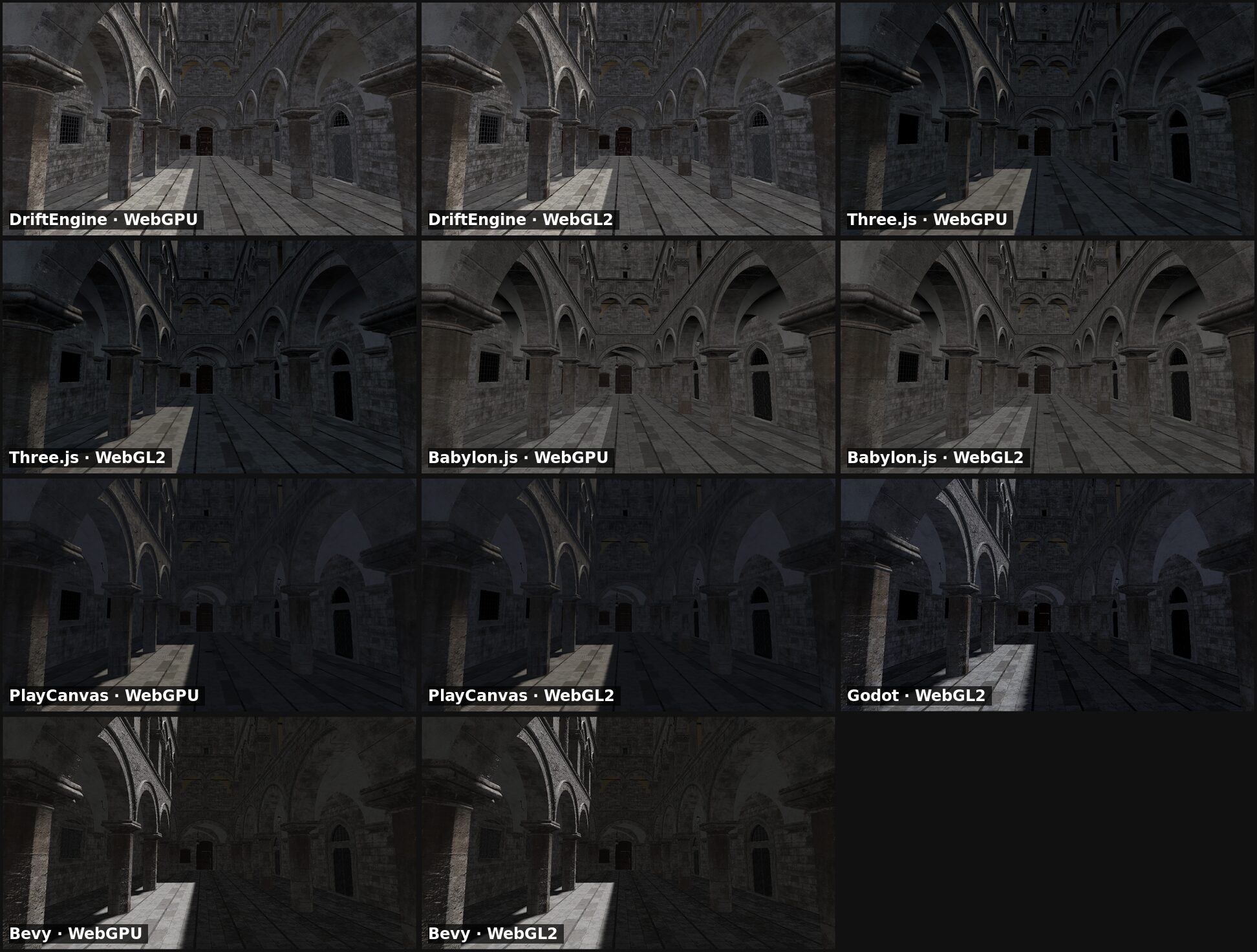
We chose each engine's sun and sky settings separately for the benchmark. The pictures show those settings and do not rank rendering quality.
Sponza brings a more varied workload: detailed geometry, many materials, alpha-tested foliage, blended decals and sun shadows. DriftEngine's median is 1.1 ms on WebGPU, behind PlayCanvas at 1.0 ms, and the lowest on WebGL2 at 1.2 ms. DriftEngine also has the smallest total page download: 44.2 MB on WebGPU and 44.0 MB on WebGL2. Three.js on WebGPU downloads 73.7 MB. These totals include engine and page resources as well as the model. DriftEngine reaches its first frame later than Three.js and PlayCanvas on both backends.
On a phone
| Engine | Backend | Most draws at 60 fps | Most instances at 60 fps | Most lights at 60 fps | Sponza frame | Sponza first frame |
|---|---|---|---|---|---|---|
| DriftEngine | WebGPU | 1,728 | 63,488 | 160 | 37.5 ms | 6386 ms |
| DriftEngine | WebGL2 | 2,688 | 262,144 | 192 | 33.3 ms | 3001 ms |
| Three.js | WebGPU | 1,024 | 688,128 | 4,096+ | 16.7 ms | 3226 ms |
| Three.js | WebGL2 | 8,704 | 753,664 | 48 | 16.7 ms | 2561 ms |
| Babylon.js | WebGPU | 1,280 | 753,664 | 1,792 | 16.7 ms | 3309 ms |
| Babylon.js | WebGL2 | 4,096 | 786,432 | 4,096+ | 16.7 ms | 3326 ms |
| PlayCanvas | WebGPU | 7,168 | 540,672 | 4,096+ | 16.7 ms | 3034 ms |
| PlayCanvas | WebGL2 | 7,936 | 819,200 | 4,096+ | 16.7 ms | 2933 ms |
| Godot | WebGL2 | 3,712 | 360,448 | 4,096+ | 16.7 ms | 38643 ms |
| Bevy | WebGPU | 12,288 | 53,248 | 624 | 25.0 ms | 6850 ms |
| Bevy | WebGL2 | 12,288 | 13,824 | 4,096+ | 20.8 ms | 7659 ms |
We ran the same pages on a Samsung Galaxy S23 Ultra with an Adreno 740, using Chrome on Android over USB. The canvas remains 1280 by 720 at a pixel ratio of one. Vsync stays on, so the cube mostly measures the display's refresh. The useful comparisons are the counts held at sixty frames a second and the heavier Sponza scene. Phone temperature can move the ceilings; we measured the lights column in one sitting.
DriftEngine has the highest Sponza median on each backend: 37.5 ms on WebGPU and 33.3 ms on WebGL2. Three.js, Babylon.js, PlayCanvas and Godot keep up with the display. DriftEngine's WebGPU instancing holds 63,488 copies at sixty frames a second, against 688,128 for Three.js. Our desktop lead at a million copies does not carry over to this phone's search.
DriftEngine holds 160 lights on WebGPU and 192 on WebGL2. Most engines reach the search cap; Godot and Bevy's WebGL2 light limits still apply. Bevy on WebGPU holds the most separate objects, 12,288. DriftEngine's 1,728 exceeds Three.js and Babylon.js on that backend, but trails PlayCanvas's 7,168.
Godot takes 38643 ms to reach Sponza's first frame. Its export packs the scene into one download; the total page transfer is 230.1 MB.
What the pictures show
Godot's Compatibility renderer shades at most 32 lights per object. Beyond that count, its floor is lit only around the middle. Bevy's WebGL2 build leaves the far end of the floor dark at 256 lights. Babylon.js's standard material fades each light linearly to its range; with this many overlapping lights, the floor runs to white. That is a difference in appearance, with the floor still present.
Three.js's WebGL2 renderer drew a blank frame at 1,024 lights on the desktop and at 64 on the phone. Its WebGPU renderer lost the device at the step after 4,063,232 copies on the desktop.
Every DriftEngine picture shows the whole scene at the photographed count, on both backends. No DriftEngine step on either device drew a blank frame or lost its device. Babylon.js, PlayCanvas, Godot and Bevy had none either; Three.js was the only engine with either outcome in these runs.
A fast frame is only worth having if it shows the scene. Our backend rules aim to preserve that: anything added to one backend must reach the other, and a capability the device cannot provide must be refused with a clear message when the renderer starts. We photograph rendering changes on both backends before shipping them.
Where DriftEngine loses
For a minimal scene on WebGPU, DriftEngine downloads more and reaches its first frame later than Three.js and PlayCanvas. On WebGL2 its download is larger than Three.js's and smaller than PlayCanvas's. It also trails several JavaScript builds when drawing separate objects or a million instances on WebGL2, and takes longer than Three.js and PlayCanvas to show Sponza's first frame.
Our strongest desktop results are on WebGPU: the lowest median at a million instances, and second at 256 lights and in Sponza. Those rankings depend on the count; they do not apply across every row of the tables.
The phone leaves us more work. DriftEngine has the highest Sponza median, and its WebGPU instance count and light counts on both backends trail several other engines. These are priorities for our phone work.
What each engine ships
The feature matrix shows what each engine provides and what you would need to add. The table puts every engine in one of four states for each capability: built in, an official add-on from the engine's own organisation, a community plugin from someone else, or none found, where we found neither and the game would build it. An official add-on is not an absence. Every state links to the page that shows it, and the results page has the note on each cell.
DriftEngine has gaps of its own in that table, and the largest is the editor.
And Unreal
Unreal Engine has no official browser target, so it is outside these measurements. We have not compared native rendering performance. The practical differences for a browser project are:
| DriftEngine | Unreal Engine | |
|---|---|---|
| Runs in a browser | Yes, it is the first target | Not since version 4.24, when HTML5 moved out of the engine to a community-supported extension (Epic's forum) |
| Native apps | Linux, Windows, macOS and Android, from the same project | Desktop, console and mobile platforms |
| Language | TypeScript, and DriftScript for scripts | C++ and Blueprints (Epic) |
| Terms | Apache-2.0 | A five per cent royalty on a product's revenue past its first US$1 million, three and a half per cent for qualifying Launch Everywhere releases, with the exclusions the EULA lists. Some other uses need paid seats. See the EULA, section 3 and the Royalty Addendum. |
| Editor | Early: a scene tree, an inspector and play-in-editor | An established visual editor with level design, animation and profiling tools |
Our editor is still a substantial gap. It provides a scene tree, an inspector and play-in-editor; a full visual editor is our next major step. Teams that rely on an editor for daily development will find much more in Unreal. For teams targeting browsers with TypeScript, we offer a workflow built around code, with agent instructions and automated browser checks.
Porting a game to the browser
An existing game's language, assets and target platforms determine how much of it can carry over.
What language is the game in? Godot and Bevy export supported projects to the browser through WebAssembly. Both have web restrictions, including Godot 4's lack of C# web export. DriftEngine uses TypeScript, so game code written in another language needs rewriting. You can carry over the design and data, then test the port's rules in Node against results from the original. An existing fixed-step simulation fits our loop naturally.
Where are its assets? Our baker reads glTF, FBX, OBJ, STL, USD, 3MF and Blender files and converts them into streaming containers. Textures retain GPU compression; when a phone does not support the desktop format, a worker re-encodes them.
Must it still run outside a browser? Our packager builds desktop and Android apps from the same project. The native host runs the game on Dawn and SDL without a browser. Browser and native pictures match in measurements made in the engine's own repository.
For ports from another JavaScript engine, our guides map the concepts: from Three.js, from Babylon.js and from PlayCanvas.
Start here
npm create @driftengine@latest my-game
cd my-game
npm install
npm run devAdd -- --template first-game after the project's name to start from a complete 3D game with
physics, a character, shadows and sound rather than a lit cube. To give an existing project's agent
the engine's skill, run npx skills add drftrun/driftengine in it.
- The manual, from installation to every system, with code that runs in the page.
- The examples, one complete program per capability.
- Building with an agent, the chapter on the project, the skill and the check.
- The results page: the method, measurements and feature notes.
Unreal and Unreal Engine are trademarks or registered trademarks of Epic Games, Inc. Three.js, Babylon.js, PlayCanvas, Godot and Bevy are the names of their projects, used only to say which engine each figure belongs to. DriftEngine and Drift Technologies are not affiliated with, endorsed by or partnered with any of them.