 DriftEngine
Simulation
Vehicles
A raycast vehicle of a chassis body and wheels that are rays on springs, gripping by tyre curves you supply, on bodies or an analytic road.
npm install @driftengine/physics @driftengine/script
A Vehicle is a chassis, an ordinary dynamic body, and wheels that are rays and not bodies.
Each wheel casts down from its anchor, compresses a spring and a damper against what it finds, and
pushes the chassis with its load, its drive and its grip, all as impulses at the anchor, so roll,
pitch and weight transfer come out of the solver without being modelled. A raycast wheel cannot
wedge in geometry or catch on another wheel, and it is stable at ordinary substep counts, which
wheels made of bodies on joints are not. In exchange a car on its side behaves as a box.
The example is a car on a ring of cones, with a ramp across its line. The driver is a DriftScript module: the keys or a stick, or a lap the car drives by itself until a key is pressed. Switch the tyres to ice.
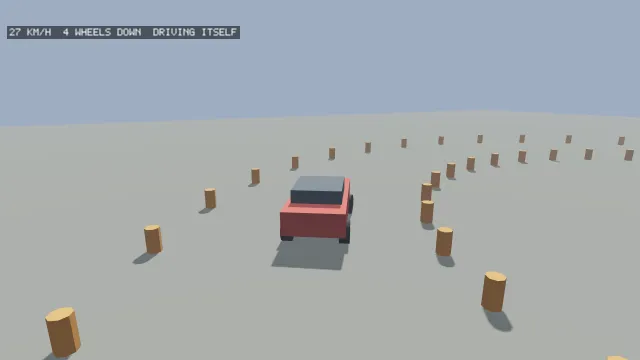
Starts examples/vehicle in this page, on WebGPU where your browser has it.
The car
/**
 * The chassis, a box of about 1,200 kilograms, and four wheels: the front ones steer, all drive.
 *
 * It starts on the line through the middle of the ramp, facing it, so the first press of W goes
 * straight up and off the end. Seven metres short of the ramp the chassis clears the outer ring of
 * cones by almost a metre; started at twelve, it overlapped one and came to rest propped on it with
 * two wheels in the air, and no key moved it.
 */
const chassis = world.addBody({
  type: BODY_DYNAMIC,
  shape: boxShape(0.9, 0.35, 2),
  x: 18,
  y: 1.2,
  z: -7,
  density: 240,
});
const WHEELS = [
  { x: -0.85, y: -0.2, z: 1.3, steers: true, driven: true },
  { x: 0.85, y: -0.2, z: 1.3, steers: true, driven: true },
  { x: -0.85, y: -0.2, z: -1.3, driven: true },
  { x: 0.85, y: -0.2, z: -1.3, driven: true },
];
const TYRES: Record<string, Pick<VehicleOptions, 'longitudinal' | 'lateral'>> = {
  tarmac: { longitudinal: defaultTyreCurve(1.2), lateral: defaultTyreCurve(1.4) },
  ice: { longitudinal: defaultTyreCurve(0.25), lateral: defaultTyreCurve(0.3) },
};
let tyres = flag('tyres', 'tarmac');
let car = new Vehicle(chassis, { wheels: WHEELS, ...TYRES[tyres] });new Vehicle(chassis, options) takes the chassis's body index and:
wheels, each aWheelOptions: its anchorx,y,zin the chassis's frame,radius(0.35),suspensionTravel(0.3), springstiffnessin newtons a metre (40,000) anddamping(4,000), and whether itsteersand isdriven.maxSteerTangent, the largest steering angle as its tangent, 0.6.engineForce, newtons at full throttle shared across the driven wheels (6,000), andbrakeForce(9,000).longitudinalandlateraltyre curves.filter, which bodies the wheels see; the chassis is always ignored.ground, a ground surface consulted where a wheel's ray found no body, so an analytic road is a road for wheels as well as feet.
update(world, dt, input) runs one tick and is called before world.step. The input is throttle
from −1 to 1, brake from 0 to 1 and steer from −1 to 1. Afterwards grounded, compression and
contact say, per wheel, whether it touched, how far its spring is compressed and where.
Compression stops at the suspension's travel: past it the wheel has bottomed out, and the chassis takes the load through its own collider, as a bump stop does.
Tyres
Grip is a table you supply: a TyreCurve is slip against force, the fraction of the wheel's load
available as grip at that slip, read by linear interpolation and held past its last point.
defaultTyreCurve(peak) rises to peak at a slip of 0.2 and falls away to 70% of it, which is what
a tyre past its limit does, and sampleTyreCurve reads one. The tick may not use sin or atan, so
the closed-form tyre models are out, and a table is edited by moving a point, which is easier to
reason about than a coefficient.
The example's tarmac is the defaults, 1.2 along and 1.4 across, and its ice a fifth of that; the
curves are the vehicle's options, so the switch builds a new Vehicle on the same chassis.
The driver, in DriftScript
// Forward on the stick is throttle, back is reverse, sideways is steering, and Space brakes.
fn drive(pedals: mut Pedals, actions: Actions) {
    pedals.throttle = 0 - input.axisY(actions, "move")
    pedals.steer = 0 - input.axisX(actions, "move")
    if input.down(actions, "brake") {
        pedals.brake = 1
    } else {
        pedals.brake = 0
    }
}and, until a key is pressed, the lap it drives by itself:
// Steer toward a point ahead on a circle, at a steady throttle: the car laps by itself.
fn lap(pedals: mut Pedals, x: f32, z: f32, heading: f32, radius: f32) {
    // The point a third of a radian further round the circle than the car is now.
    let around = math.atan2(z, x) + 0.35
    let tx = math.cos(around) * radius - x
    let tz = math.sin(around) * radius - z
    // The turn from where the car points to the target, wrapped to half a turn either way.
    let turn = math.atan2(tx, tz) - heading
    let wrapped = math.atan2(math.sin(turn), math.cos(turn))
    pedals.steer = math.clamp(wrapped * 2, -1, 1)
    pedals.throttle = 0.6
    pedals.brake = 0
}/** The driver, hosted, and the pedals it sets each tick. */
const driver = hostScript(driveScript);
interface Pedals {
throttle: number;
brake: number;
steer: number;
}
const pedals = exported<() => Pedals>(driver, 'createPedals')();
type Drive = (pedals: Pedals, actions: ActionMap) => void;
type Lap = (pedals: Pedals, x: number, z: number, heading: number, radius: number) => void;
if (import.meta.hot) {
import.meta.hot.accept('./drive.drs', (next) => {
if (next !== undefined)
patchModule(driver, next as Record<string, unknown>, { Pedals: [pedals] });
});
}