 DriftEngine
Simulation
Ragdolls and cloth
Ragdolls built from a skeleton's joints and driven toward an animated pose, and cloth that hangs, blows, drapes and pushes what it lands on.
npm install @driftengine/physics @driftengine/core
A ragdoll turns a skeleton into bodies and joints, so a character can fall, be knocked about, or stagger and try to stand. Cloth is a sheet of particles held together by constraints, for a flag, a cape or a tablecloth. Both live in the physics world and collide with its bodies.
The example shoves a figure down a flight of stairs every six seconds, flies a flag in a gusting wind, and drops a sheet over a crate. Choose what the figure does after each shove: go limp, stagger, or hold its pose.
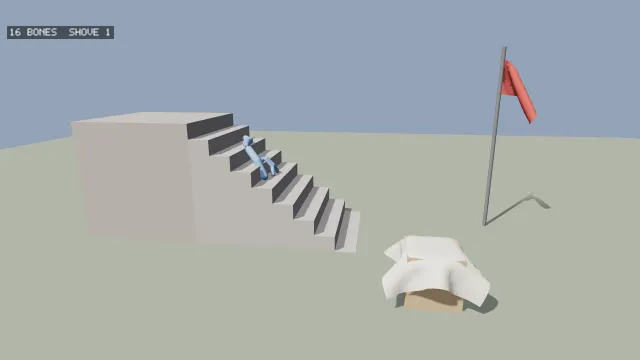
Starts examples/ragdoll in this page, on WebGPU where your browser has it.
A ragdoll from a skeleton
/** A standing figure as joints: where each is, and which joint it hangs from. */
const JOINTS: [number, number, number, number][] = [
  [-1, 0, 1.0, 0], // hips
  [0, 0, 1.3, 0], // spine
  [1, 0, 1.55, 0], // chest
  [2, 0, 1.72, 0], // neck
  [3, 0, 1.95, 0], // head
  [2, 0.2, 1.6, 0], // left shoulder
  [5, 0.45, 1.6, 0], // left elbow
  [6, 0.7, 1.6, 0], // left hand
  [2, -0.2, 1.6, 0], // right shoulder
  [8, -0.45, 1.6, 0], // right elbow
  [9, -0.7, 1.6, 0], // right hand
  [0, 0.1, 0.95, 0], // left hip
  [11, 0.1, 0.5, 0], // left knee
  [12, 0.1, 0.06, 0], // left foot
  [0, -0.1, 0.95, 0], // right hip
  [14, -0.1, 0.5, 0], // right knee
  [15, -0.1, 0.06, 0], // right foot
];
const parents = JOINTS.map(([parent]) => parent);

/** The standing pose as world matrices, sixteen floats a joint, placed on the platform. */
function standing(x: number, y: number, z: number): Float32Array {
  const matrices = new Float32Array(JOINTS.length * 16);
  JOINTS.forEach(([, jx, jy, jz], j) => {
    matrices.set([1, 0, 0, 0, 0, 1, 0, 0, 0, 0, 1, 0, x + jx, y + jy, z + jz, 1], j * 16);
  });
  return matrices;
}

/** The same pose as each joint relative to its parent, which is what `drive` steers toward. */
const pose = {
  translation: new Float32Array(JOINTS.length * 3),
  rotation: new Float32Array(JOINTS.length * 4),
  scale: new Float32Array(JOINTS.length * 3).fill(1),
};
JOINTS.forEach(([parent, jx, jy, jz], j) => {
  const [, px, py, pz] = JOINTS[parent] ?? [0, 0, 0, 0];
  pose.translation.set(parent < 0 ? [jx, jy, jz] : [jx - px, jy - py, jz - pz], j * 3);
  pose.rotation[j * 4 + 3] = 1;
});ragdollFromBones(world, parents, worldMatrices, options) takes a skeleton as plain data: a parent
index per joint, −1 for a root, and each joint's world matrix, sixteen floats a joint. A skeleton
from @driftengine/animation already has both, and neither package imports the other.
/** A capsule a bone and a joint between each bone and its parent's, with knees nearly hinges. */
const swing = new Float32Array(JOINTS.length).fill(Math.SQRT1_2);
for (const knee of [12, 13, 15, 16]) swing[knee] = 0.9;
const doll = ragdollFromBones(world, parents, standing(-4, 3, 0), {
  density: 600,
  swingCos: swing,
});

/** Put the doll back on its feet at the top of the stairs and push it toward them. */
function shove(count: number): void {
  doll.sync(world, standing(-4, 3, 0));
  for (const body of doll.bodyOf) {
    if (body < 0) continue;
    world.setVelocity(body, 3.5, 0.5, (hashToUnit(count) - 0.5) * 1.5);
  }
}A bone is a joint and its parent. Each bone becomes a capsule standing along the bone, and each joint between two bones a cone-twist joint anchored at the end they share. Bones hanging from a joint that has no bone of its own, such as the spine and thighs under a root at the hips, are jointed to one another at the head they share. The options:
radiusRatio, a capsule's radius as a fraction of its bone's length (0.22), withminRadiusas a floor, andminLength, below which a bone gets no body, which skips a rig's leaf tips.density.swingCosandtwistSin, the cone each joint may swing in and how far it may twist, as one number for every joint or one per joint, indexed asparentsis. A knee is nearly a hinge and a shoulder nearly a ball, so one number for a whole body is wrong somewhere: too loose, and a landing body folds a limb through its torso. Write the numbers out, sinceMath.cosmay differ by a last digit between two engines and a limit is compared every tick.selfCollision, on by default: bones collide with the rest of their own doll, except bones that share an end, which overlap there by construction. Off is cheaper and lets a foot reach inside a ribcage, so keep it for a crowd nobody looks at closely.layerandmask.
The Ragdoll it returns has bodyOf, the body each joint's bone is or −1, and boneCount.
Driving it
sync(world, worldMatrices)puts every body back on its bone and clears its velocity. A ragdoll is built once, so between reactions its bodies sit where the last one left them; a reaction starts withsync, from the pose the character is in now.drive(world, pose, weight)steers the bodies toward an animated pose: 1 tracks it, 0 goes limp, and between is a hit reaction, a body knocked off its pose that tries to return. The pose is anything withtranslation,rotationandscaleper joint, relative to its parent, which an animationPoseis.writePose(out)writes the ragdoll's shape back into a pose, so the skinned character is drawn where the bodies are. Each joint is turned by the bone that starts at it, the one a skinned limb follows: the forearm's body turns the elbow. Each joint is placed along its own bone as that bone's body holds it, so where a joint has several bones below it, the hips over a spine and two thighs, every branch is drawn on its own body and not swung by the first one's turn. A bone shorter thanminLength, such as a collar sitting on the chest joint, gets no body and is transparent: what hangs below it is jointed to the bone above it, and does not collide with the bones it meets there. A root's rotation is written in the frame of the node placed atrootX,rootYandrootZ, so that node carries no rotation of its own.
Cloth
/** A flag twenty cells by twelve, hanging from a pole: the cells along the pole are pinned. */
const FLAG_COLUMNS = 20;
const FLAG_ROWS = 12;
const flagGrid = makeClothGrid(FLAG_COLUMNS, FLAG_ROWS, 0.08);
for (let i = 0; i < flagGrid.positions.length; i += 3) {
  /* Turned to hang: columns run out from the pole along +z, rows run down. */
  const along = flagGrid.positions[i] ?? 0;
  const down = flagGrid.positions[i + 2] ?? 0;
  flagGrid.positions.set([5, 4.5 - down, along - 0.8], i);
}
const flagCloth = new ClothBody(flagGrid.positions, flagGrid.links, flagGrid.bendLinks, {
  damping: 0.05,
});
for (let row = 0; row < FLAG_ROWS; row += 1) flagCloth.pin(row * FLAG_COLUMNS);

/** A sheet dropped over a crate, handing it back the momentum it loses on it. */
const crates = [
  world.addBody({
    type: BODY_DYNAMIC,
    shape: boxShape(0.5, 0.5, 0.5),
    x: 3,
    y: 0.5,
    z: 3.2,
    density: 40,
  }),
];
const SHEET = 18;
let sheet = dropSheet();
function dropSheet(): ClothBody {
  const grid = makeClothGrid(SHEET, SHEET, 0.12);
  for (let i = 0; i < grid.positions.length; i += 3) {
    grid.positions[i] = (grid.positions[i] ?? 0) + 2;
    grid.positions[i + 1] = 2.5;
    grid.positions[i + 2] = (grid.positions[i + 2] ?? 0) + 2.2;
  }
  return new ClothBody(grid.positions, grid.links, grid.bendLinks, {
    /* Cloth contacts carry no friction, so air and floor alike are this damping: enough that a
       sheet settles where it lands and falls the way a sheet falls. */
    damping: 2,
    coupling: 1,
    particleMass: 0.2,
    selfDistance: 0.1,
    thickness: 0.05,
  });
}makeClothGrid(columns, rows, spacing) builds a grid of particles in the XZ plane with its
links, stretch and shear constraints, and bendLinks, constraints that skip a particle and so
resist folding. new ClothBody(positions, links, bendLinks, options) makes cloth of them, and
step(world, dt) advances it after the world, colliding its particles with the world's bodies;
pass null for cloth in empty space. pin(index) holds a particle where it is, as the flag's
edge is held to its pole, and pin(index, false) lets it go.
The cloth is solved by XPBD, so its stiffness is a compliance and means the same at any iteration count:
stretchComplianceandbendCompliance, metres of give a newton; zero is inextensible.iterations, solver passes a tick (8).damping, how much velocity it loses a second. Its contacts carry no friction, so damping is what stops a sheet sliding across a floor; the example's sheet uses 2.thickness, how far a particle is held off a surface.gravityX,gravityYandgravityZ.coupling, from 0 to 1, how much of the momentum a particle loses against a body is handed back to that body, at the contact, so a sheet landing on one end of a plank tips it; andparticleMass, in kilograms, which the coupling measures that momentum in (50 grams).selfDistance, in metres, how close two particles not joined by a link may come, so a sheet does not pass through itself. A little under the grid spacing is the place to start.
position, velocity and invMass are the particles' state, count their number. The example's
wind is a velocity added to every free particle each tick.
Bending resists bowing, not orientation, so cloth will not hold itself out like a cantilever.
Drawing it
A cloth's particles change every frame, so the mesh drawing it is created with { dynamic: true }
and rewritten with updateMesh(mesh, positions, normals), which reuses the buffer instead of
allocating one a frame. The example computes normals from each particle's neighbours, and draws
both sides of every triangle.
Cloth on a character
A cape, a skirt or the tails of a coat is cloth that also follows a skeleton: most of it moves with the body, some of it swings free, and none of it may pass through the legs. That is a skinned cloth, and it is two things a model carries for each garment: a coarse simulation, and the finer mesh drawn, each of whose vertices is told which simulation triangle to follow.
The simulation is a SkinnedClothSetup from @driftengine/physics: particles in the bind pose and
their inverse masses, 0 for one that follows its skinning exactly; up to eight bone influences a
particle with the inverse binds; stretch and bending constraints, each with a compliance in metres
per newton, the inverse of a stiffness; tethers to fixed particles; limits that keep a particle
within a sphere of its skinned place, or behind or in front of one; spheres and tapered capsules on
bones for it to collide with; and parameters, every one with a default. validateClothSetup
refuses a malformed set-up by name. A garment with variations has a set-up for each.
The mesh is an ordinary skinned mesh with a ClothBindingData: for every vertex, the triangle it
follows, where on it, how far off it along its normal, and how much, from 0 for skinned to 1 for
cloth. renderer.createClothBinding(mesh, data) checks it against the mesh.
createSkinnedCloth(renderer, setup), from @driftengine/core, builds the solver. On WebGPU it runs
on the device, and under WebGL2 the CPU solver it is checked against runs instead; runsOn says
which. Once a frame, before the draws:
advanceWindField(wind, profile, time, dt, 1);
cloth.setWind(wind.velocityX, 0, wind.velocityZ);
cloth.step(globals, model, dt);step takes the joints' global matrices, not the palette, because a collider sits on a joint's own
frame. It advances in whole fixed steps and draws on the remainder, as the rest of the simulation
does. A jump past the set-up's teleport distance or angle resets the cloth by itself; a cut in a
cinematic is reset(). The wind is the scene's one wind, sampled once and handed over.
Every whole step dt holds is run, so a slow frame hands the next one more steps to take and can
make it slower in turn. A caller handing the cloth each frame's time sets maxSteps in the set-up's
parameters, two to four, and the time past them is dropped rather than owed: the cloth then runs
slower than the clock for as long as the frames do. Unset, advance(1) is a whole second of cloth.
Several garments step as one with createSkinnedClothSet(renderer, setups): one compute pass and
one submit a frame for all of them, and a step costs one garment's dispatches however many the set
holds. Each garment is named by its index; pose each, then step the set once:
/** Every garment of a character in one set, each held to two steps a frame. */
export function wardrobe(renderer: RendererApi, garments: readonly SkinnedClothSetup[]) {
  return createSkinnedClothSet(
    renderer,
    garments.map((setup) => ({ ...setup, parameters: { ...setup.parameters, maxSteps: 2 } })),
  );
}

/** Once a frame, before the draws: each garment's rig, then one step for all of them. */
export function stepWardrobe(
  set: SkinnedClothSet,
  globals: Float32Array,
  model: Float32Array,
  dt: number,
): void {
  for (let g = 0; g < set.particles.length; g += 1) set.setPose(g, globals, model);
  set.step(dt);
}The garments of a set step together, so they share step, substeps, iterations and maxSteps,
and a set whose garments disagree on one is refused by name. Everything else is each garment's own,
its settle and blend steps included: a garment reset alone settles while the rest wait for it. A
colour of constraints is dispatched over the most any garment has, so a set gains most where its
garments are alike. Measured on a desktop GPU, fifteen capes took 0.79 ms a frame as a set and
8.9 ms as fifteen solvers; particles[g] is what setCloth draws garment g by.
The draw places the mesh's vertices by the cloth in its vertex stage:
renderer.setSkinPalette(palette);
renderer.drawMesh(body, model);
if (bound) renderer.setCloth(binding, cloth.particles);
renderer.drawMesh(capeHandle, model);
renderer.setCloth(null);
renderer.setSkinPalette(null);The shadow takes the same binding, through sink.skinnedMesh(mesh, model, palette, material, { binding, particles }), or the garment casts the shadow of its skinning. Self-collision is accepted
in a set-up and not simulated: a garment its colliders and backstops hold looks right without it.
examples/garment/ builds a cape by hand, and the handbook maps a garment cooked elsewhere onto
these two arrays.