 DriftEngine
Content
Sound and music
A mix of buses and snapshots, sounds by name, music whose kick drives lights, sounds placed among rooms and walls, and scripts that play it all.
npm install @driftengine/audio
@driftengine/audio is the engine's sound: a mix built as a tree of buses, sounds addressed by
name, layered music with live kick detection, sounds placed in the world with rooms and walls
between them, and synthesis, so a game is never silent while its files are missing. It is 6.1 KB
gzipped on top of core, and a build that never places a sound in the world does not carry the
panner.
The example is a courtyard at dusk, and the camera is the listener. A bell strikes on a clock a DriftScript file keeps, and the music ducks under it. A cart rolls past behind a house, muffled while the house is in the way, its pitch falling as it goes by. Stand in the crypt and its reverb takes over, while the lanterns keep time with the kick. Every sound in it is synthesised, so it loads no audio file. Click the page to hear it: a browser starts sound only after a gesture.
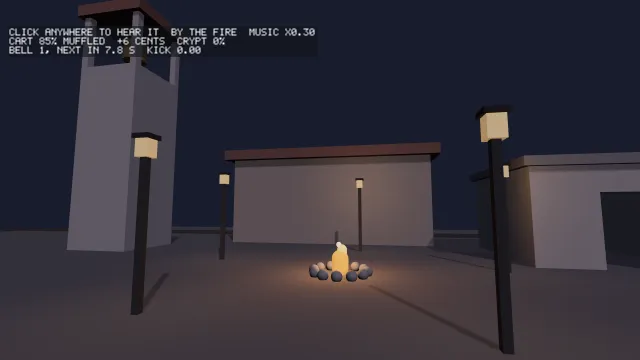
Starts examples/audio in this page, on WebGPU where your browser has it.
A graph and a gesture
/* The graph: one music stem into a mix of buses. A browser that will give no audio at all still
   gets a graph, on a context that never plays, so the page and its script run the same. */
const graph =
  (await AudioGraph.create({ stemCount: 1 })) ??
  (await AudioGraph.create({ stemCount: 1, context: new OfflineAudioContext(2, 1, 48000) }));
if (graph === null) throw new Error('no audio graph, even offline');
const mix = graph.console;

/* Every sound is a named slot: its files are tried first and its synth stands in when none loads.
   This page lists no files, so all five are made here. */
const sounds = graph.registry;
sounds.register('bell', { urls: [], synth: (context) => metalBuffer(context, 5, 155, 0.9) });
sounds.register('wheels', { urls: [], synth: (context) => noiseBuffer(context, 3, 0, () => 0.05) });
sounds.register('fire', { urls: [], synth: (context) => fireLoopBuffer(context) });
sounds.register('wind', { urls: [], synth: (context) => windLoopBuffer(context) });
sounds.register('beat', { urls: [], synth: beatBuffer });
await sounds.load(graph.context);
const slot = (name: string): AudioBuffer => {
  const buffer = sounds.get(name);
  if (buffer === undefined) throw new Error(`the ${name} slot did not build`);
  return buffer;
};
graph.loadStem(0, slot('beat'));
graph.setStemGain(0, 0.8);AudioGraph.create(options) builds the graph, and returns null only when the browser has no audio
at all. A context made before the person has clicked or pressed a key is suspended, which is not a
failure: nothing is lost, its clock waits, and wake() on the first gesture starts it. audible
says whether it is producing sound. On an iPhone the graph also claims the playback session, so a
phone with its ringer switched off still plays the game; an application building its own context
calls claimPlaybackSession() and audioContextConstructor() for the same reason.
/* A context only plays after a gesture on the page, so the first click or key wakes it and starts
   the music and the loops. Started before one, each would only add a warning to the console. */
let started = false;
const listen = (): void => {
  graph.wake();
  if (started) return;
  started = true;
  graph.start();
  gusts.start();
  fire.start();
  cart.start();
};
addEventListener('pointerdown', listen);
addEventListener('keydown', listen);Sounds by name
A sound is a slot, registered with the files it may be and a synthesised stand-in, then loaded
once. The files are tried in order and the first that decodes wins. A slot nothing loads gets its
synth, and resolved says which each slot got, so a game is audible from its first day and a file
dropped into the folder replaces the stand-in with no change to the code. audioCandidateUrls(name)
lists a name in every format in AUDIO_FORMATS, Opus first, so a sound can arrive in whatever it
was saved as.
A slot registered without a synth is required: a score that has to be the file or nothing.
When none of its files loads, load still settles every other slot, then rejects with an error
naming each missing required slot and the files it tried, and unbuilt lists it.
The stand-ins are ordinary functions of a context: noiseBuffer and toneBuffer, metalBuffer
for a struck bar, fireLoopBuffer, waterLoopBuffer and windLoopBuffer, ambienceBuffer,
driftScrapeBuffer and silentBuffer. A folder whose contents are not known in advance announces
them in a manifest written at build time:
/**
 * A folder of sounds announcing itself: a manifest written at build time names them, and each
 * becomes a slot that tries every format it might have been saved in, silent if none loads.
 */
export async function registerFolder(sounds: SoundRegistry): Promise<string[]> {
  const names = await fetchAudioManifest('/audio/manifest.json');
  for (const name of names) {
    sounds.register(name, { urls: audioCandidateUrls(name), synth: silentBuffer });
  }
  return names;
}The mix
/* The yard's own sounds on a bus of their own, under the effects, so the crypt can turn them down. */
const yard = mix.bus('yard', { parent: graph.layout.effects });
/* Two mixes the script recalls by name: the yard as it is, and the crypt, where the music and the
   yard are far away. */
mix.snapshot('yard');
graph.layout.music.setLevel(0.35);
yard.setLevel(0.4);
mix.snapshot('crypt');
graph.layout.music.setLevel(1);
yard.setLevel(1);
/* The wind, on a bus made after both snapshots: a recall leaves alone a bus it never saw, so the
   weather belongs to the script's `fade` and to nothing else. */
const wind = mix.bus('wind', { parent: graph.layout.effects, level: 0 });
const gusts = graph.context.createBufferSource();
gusts.buffer = slot('wind');
gusts.loop = true;
gusts.connect(wind.input);The mix is a tree of buses on a MixConsole, graph.console. The graph's own layout,
graph.layout, is a music bus and an effects bus into a master filter, with two reverbs and a
delay fed from the music; mix.bus(name, options) adds one of your own under any parent. Each bus
has a fader, setLevel and fadeLevel, which is the player's setting, and a duck over it,
duck(factor, seconds), which is the game's: a duck comes back to wherever the fader is, including
a level the player changed in the meantime. A bus can be muted, soloed, sent to a return with
send, and given inserts. liftInsert, slamInsert and masterFilterInsert are the ones the
layout uses; convolverInsert and delayInsert build returns, and impulseResponse the room a
convolver plays.
snapshot(name) captures every fader, mute and send, and recall(name, seconds) crossfades back to
it. Insert parameters are left out, because something per frame usually writes them. A bus made
after a snapshot was taken is untouched by its recall, which is why the example's wind has a bus
made afterwards: the crypt's snapshot turns the yard down and leaves the weather to the script.
Music is a set of stems played in lockstep: loadStem(index, buffer), setStemGain to bring layers
in and out, start, hold and release, and setPlaybackRate, with the transport kept where the
tape actually is. restart(fromSec) starts every stem again from a point in the track, locked
together, for music held to a clock of the game's own, such as a frame counter that resumes after a
skip; it returns how long until that point is heard. createLoop(buffer) starts a looping bed through the effects, and
play(buffer, gain, pan) plays a one-shot. cutoffForSpeed gives the master filter's cutoff for a
speed, so the sound opens up as something goes faster.
Where a sound is
There are two ways to place a sound, at very different prices. The cheap one is arithmetic:
distanceGain(distance, radius) and stereoPan(dx, dz, yaw), applied to a loop or a one-shot. It
is right for anything diffuse, a fire, a shoreline, rain on a roof, where how near and which side
is all a player reads.
/**
 * A fire heard the cheap way: a loop through the effects, louder as you near it and on its side
 * of your head. Right for anything diffuse, where how close and which way is all a player reads.
 */
export function hearFire(
  loop: AmbientLoop,
  fire: readonly [number, number],
  ears: readonly [number, number],
  yaw: number,
): void {
  const dx = fire[0] - ears[0];
  const dz = fire[1] - ears[1];
  loop.setGain(distanceGain(Math.hypot(dx, dz), 25));
  loop.setPan(stereoPan(dx, dz, yaw));
}The other is a listener and sources placed in the world:
/* The ears, and the things heard from a place: a room the listener can stand in, the fire, and a
   cart that passes. A placed source is the expensive path, for when the direction is information. */
const listener = createListener(mix);
const crypt = addReverbZone(
  listener,
  'crypt',
  { x: 9.5, y: 1.5, z: -7.5, radius: 2.2, blend: 1.5 },
  { seconds: 3.4, decay: 2.2, wet: 0.85 },
);
const fire = createSpatialSource(listener, slot('fire'), { loop: true, bus: yard, refDistance: 2 });
const cart = createSpatialSource(listener, slot('wheels'), {
  loop: true,
  bus: yard,
  doppler: true,
  refDistance: 4,
});
fire.place(1.5, 0.4, -3, 0);

/* What a line from a sound to the ears can be blocked by: the house, the tower and the crypt's
   walls, as boxes. The listener asks, spread over the sources, and the answer is smoothed. */
const SOLIDS: readonly (readonly number[])[] = [
  [-5, 0, -12.2, 5, 4.4, -9.8],
  [-10.4, 0, -8.4, -7.6, 8, -5.6],
  [7, 0, -10, 12, 3, -9.65],
  [7, 0, -10, 7.35, 3, -5],
  [11.65, 0, -10, 12, 3, -5],
  [7, 0, -5.35, 8.8, 3, -5],
  [10.2, 0, -5.35, 12, 3, -5],
];
const walls: OcclusionProbe = (ax, ay, az, bx, by, bz) => {
  for (const box of SOLIDS) if (crosses(box, ax, ay, az, bx, by, bz)) return 0.85;
  return 0;
};
listener.probe = walls;createListener(mix) is the ears, set each frame from the camera with
set(x, y, z, yaw, pitch, dt). Its velocity is derived from its movement, and warp moves it
without travelling, for a cut. createSpatialSource(listener, buffer, options) is a sound through
an HRTF panner, for when the direction is information: a footstep behind you, a voice through a
doorway. With doppler its pitch moves with relative speed, up to maxDopplerCents. place it
each frame, and warp it to jump.
Occlusion is a function you give the listener as its probe, answering how blocked the line
between two points is, from 0 to 1. The engine never sees your walls: you close the probe over
whatever you have, a collider set or a tile map. Probes are spread across frames and the answer is
smoothed, and setOcclusion states it outright for a source whose answer you already know.
addReverbZone(listener, name, shape, options) is a space with its own tail: a sphere, full inside
its radius and fading out over blend. The zones the listener stands in decide the reverb of
everything heard there, at most MAX_OPEN_ZONES of them, the one being left and the one being
entered. Its convolver is built with the zone, never on entry. A sound inside a space heard from
outside it attaches the zone itself:
/**
 * A voice inside the crypt carries the crypt's tail even to a listener outside it, which a
 * listener-based zone alone cannot do. One gain node, since the zone's convolver already exists.
 */
export function listenInto(voice: SpatialSource, crypt: ReverbZone): void {
  voice.attachZone(crypt);
}A four-channel ambisonic recording is a whole soundfield, decoded around the listener through six virtual speakers at one fixed cost however much is in it:
/**
 * A four-channel ambisonic recording, a forest at night, decoded around the listener's head at a
 * fixed cost however many birds are in it. It follows the listener; turning the head turns it.
 */
export function forest(listener: AudioListenerGraph, recording: AudioBuffer): () => void {
  const field = createAmbisonicSoundfield(listener, recording, { loop: true });
  field.setGain(0.6);
  field.start();
  return () => field.follow();
}encodeFoa, foaDecodeGain and foaDecodeMatrix are the arithmetic underneath, for a consumer
encoding its own.
Rhythm
graph.createKickDetector() listens to the music bus, never to the game's own sounds, and its
update(nowMs) advances it once a frame. pulse spikes on each kick and falls back, which is what
a light should follow. level is the low end left once the bassline is masked out, which keeps
moving with the kick on a loud master where energy, the raw low end, sits at its ceiling. The
bands it listens to are RHYTHM_BANDS.
Ahead of time, analyseTrack(samples, sampleRate) finds where the kicks are in a whole track: a
BeatMap of beats and their strengths, a tempo and how sure it is, and a loudness envelope for
finding drops. It looks ahead, so a cut placed on a beat lands on the transient, and a track gives
the same map every time. Syncopated music can read at twice its tempo, as the example's beat does,
so beatGrid(bpm, offsetSec, durationSec) makes a grid from a tempo you know, and TapTempo from
one a player tapped.
/**
 * Where the kicks are in a whole track, found once ahead of time; the same pulse a live detector
 * would give, read at any instant of a rendered clip; and, for music whose tempo is known, a grid.
 */
export function beatsOf(
  track: AudioBuffer,
  bpm: number,
): { map: BeatMap; pulse: RenderedPulse; grid: BeatMap } {
  const map = analyseTrack(track.getChannelData(0), track.sampleRate);
  const pulse = new RenderedPulse(track);
  const grid = beatGrid(bpm, 0, track.duration);
  return { map, pulse, grid };
}

/** Or the player taps along, and the tempo is what they tapped. */
export const tapper = new TapTempo();
export function tapped(nowMs: number): number | null {
  tapper.tap(nowMs);
  return tapper.bpm;
}RenderedPulse reads the live detector's pulse out of a finished buffer at any instant, so a clip
rendered offline flashes exactly as the game did.
Rendering offline
A graph built on an OfflineAudioContext renders the mix to a buffer, faster than real time, for a
clip or a test. Offline there is no "now", so at(seconds) puts every move that follows at that
instant of the clip:
/**
 * A mix rendered to a buffer, for a clip: the same graph on an offline context, every move
 * scheduled at the instant it belongs to rather than at a clock that is not running.
 */
export async function renderClip(score: AudioBuffer, seconds: number): Promise<AudioBuffer> {
  const context = new OfflineAudioContext(2, Math.ceil(seconds * 48000), 48000);
  const graph = await AudioGraph.create({
    stemCount: 1,
    context,
    levels: { music: 0.8, effects: 1 },
  });
  if (graph === null) throw new Error('no graph on an offline context');
  graph.loadStem(0, score);
  graph.setStemGain(0, 1);
  graph.at(0);
  graph.start();
  /* Halfway through, the score goes under for two seconds. */
  graph.at(seconds / 2);
  graph.layout.music.duck(0.2, 0.3);
  graph.at(seconds / 2 + 2);
  graph.layout.music.duck(1, 0.5);
  return context.startRendering();
}levels starts the faders where a player had them, and random seeds the noise the reverbs are
made of, so two renders agree sample for sample. captureStream() taps the live mix for a
MediaRecorder instead, which aligns its tracks by when they arrive and so cannot be frame-exact.
From DriftScript
drift/audio gives a script nine capabilities. sound(slot) answers a Sound?, absent when the
slot holds nothing, so a script cannot play silence and believe it played; play and playPanned
play it. distanceGain and stereoPan are the cheap arithmetic, and deterministic, so a
@deterministic function can use them. duck, fade and recall turn the mix by the names the
host gave its buses and snapshots, and answer false when nothing has that name. pulse reads the
host's kick detector, and is 0 without one. The courtyard's bell:
// The bell strikes on its own clock and is heard the cheap way: louder the nearer you stand, and
// on the side it is on. The music steps aside for it and comes back as the ring dies away.
fn toll(yard: mut Courtyard, ears: Ears) {
    if yard.next > yard.clock + yard.every {
        yard.next = yard.clock + yard.every
    }
    if yard.returns >= 0 && yard.clock >= yard.returns {
        audio.duck("music", 1, 2.5)
        yard.returns = -1
    }
    if yard.clock < yard.next {
        return
    }
    yard.next = yard.clock + yard.every
    yard.since = 0
    yard.strikes += 1
    let dx = BELL_X - ears.x
    let dz = BELL_Z - ears.z
    let near = audio.distanceGain(math.sqrt(dx * dx + dz * dz), 80m)
    if let clang = audio.sound("bell") {
        audio.playPanned(clang, near, audio.stereoPan(dx, dz, ears.yaw))
    }
    audio.duck("music", 0.3, 0.12)
    yard.returns = yard.clock + 2.5
}Sound is outside the determinism boundary: playing one, moving the mix
or reading the kick is an effect a @deterministic function may not have. A simulation decides
that a door opened, and something outside the fixed step decides what it sounds like. The host
binds the module with its graph, its registry and, when it runs one, its kick detector:
/* The script, bound to the mix and the sounds, and to the kick detector listening to the music. */
const kick = graph.createKickDetector();
const script = hostScript(courtyardScript, {
  audio: { graph, registry: sounds, ...(kick === null ? {} : { kick }) },
});
interface Courtyard {
  every: number;
  next: number;
  since: number;
  strikes: number;
  clock: number;
  windy: boolean;
  glow: number;
}
interface Ears {
  x: number;
  z: number;
  yaw: number;
  indoors: boolean;
}
const court = exported<() => Courtyard>(script, 'createCourtyard')();
const ears = exported<() => Ears>(script, 'createEars')();
type Tick = (yard: Courtyard, ears: Ears, dt: number) => void;
if (import.meta.hot) {
  import.meta.hot.accept('./courtyard.drs', (next) => {
    if (next !== undefined) {
      patchModule(script, next as Record<string, unknown>, { Courtyard: [court], Ears: [ears] });
    }
  });
}The listener, placed sources and reverb zones cannot be scripted yet. Each is an object with a lifetime, and handing one to a script is a design about who disposes of it. A script works out where and how loud a sound should be, as the courtyard's does for its bell, and the page places it.