 DriftEngine
DriftScript
DriftScript in a game
What the engine's scripting language is for, what belongs in a script and what stays in TypeScript, and how the two share one game.
npm install @driftengine/script
DriftScript is the engine's scripting language, and a game on DriftEngine is written in two. The
TypeScript holds the engine's objects: the renderer, the physics world, meshes, sounds, cameras, the
page. The DriftScript holds the game's rules: the decisions and the numbers that make it this game
and not another. The engine is built around that split, and every example in this manual that has
behaviour keeps the behaviour in a .drs file beside its main.ts.
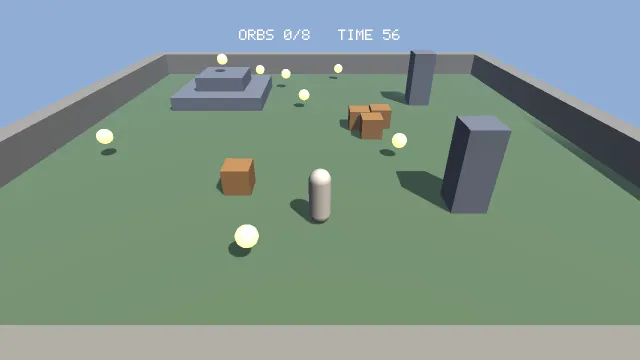
Starts examples/first-game in this page, on WebGPU where your browser has it.
Your first game is the split at its smallest. The page moves the player
and draws the arena; round.drs decides how long a round lasts, when an orb is close enough to
take, and when the round is won or lost.
Why a second language
A rule needs three things that TypeScript in a browser does not give it.
Changing it while the game runs. Saving a .drs file replaces its functions in the running
page, and the records the game keeps its state in stay as they were: the player is where they were,
the clock reads what it read. Most of what makes a game feel right is found by playing it. A jump
that floats too long, an enemy that gives up too early, a round a few seconds too short: each is
changed by saving the file with the game still going. The same change in TypeScript reloads the
page and starts the game again.
Knowing what a rule touches. Every engine function a script can call is declared with its
effects: reading input, writing physics, playing a sound, reading the wall clock. The compiler works
out from the calls which effects a function has. A function marked @deterministic that reaches
input or the clock does not compile, and the error names the call, which is how a rule that has to
replay the same way on every machine stays one.
Checked before it runs. Types are strict, a value is never null unless its type says it may be
absent, integer overflow is defined, a match has to cover every case, and units such as ms,
m and degC are checked and then erased. A mistake is an error in the terminal, with a code and
the line, before the page loads.
What goes where
| In DriftScript | In TypeScript |
|---|---|
| Rules: when a round ends, what a pickup does, who an enemy chases | Anything that holds an engine object: the renderer, meshes, the physics world, sounds |
| Tuning: speeds, durations, distances, weights, odds | The frame: beginFrame, the draws, endFrame |
| Decisions: which shot to cut to, which animation to blend to, when to give up | Loading: models, textures, sounds, levels |
| State machines, and the state they keep | The platform: the page, storage, the network, a desktop shell |
| Per-entity behaviour, as systems over components | Wiring: the loop, and binding each script to what it needs |
The test for a piece of code is one question: does it have to hold an engine object, or draw? If it does, it is TypeScript. If it does not, it is a rule, and it goes in a script, even a short one. A rule left in TypeScript is a rule tuned by reloading.
How the two share a game
// The clock, once a step. Every orb taken wins the round; the clock reaching zero first loses it.
// Deterministic: the same round and the same step give the same answer on every machine, so a
// recorded round replays exactly. Reading input or the wall clock here would not compile.
@deterministic
fn tick(round: mut Round, dt: f32) {
    if round.phase != Phase.Playing {
        return
    }
    round.remaining = round.remaining - dt
    if round.gathered == round.total {
        round.phase = Phase.Won
    } else if round.remaining <= 0 {
        round.remaining = 0
        round.phase = Phase.Lost
    }
}A script keeps nothing of its own between calls. The game's state lives in records the page owns:
data Round is declared in the script, the compiler makes a createRound for it, the page calls
that once and passes the record to every rule. A rule changes the record it is handed; the page
reads it to draw the HUD. Because the page holds the record, a save that replaces tick leaves the
round exactly where it was.
// The stick, the keys or a thumb on the screen, whichever is pushed furthest: a keyboard and a
// touch screen at once never add up to more than one stick.
fn steer(puck: mut Puck, actions: Actions, touch: Touch, dt: f32) {
    var sx = input.axisX(actions, "move")
    var sz = input.axisY(actions, "move")
    if puck.raw {
        sx = input.rawAxisX(actions, "move")
        sz = input.rawAxisY(actions, "move")
    }
    if math.abs(input.touchX(touch)) > math.abs(sx) {
        sx = input.touchX(touch)
    }
    if math.abs(input.touchY(touch)) > math.abs(sz) {
        sz = input.touchY(touch)
    }
    if puck.rest > 0 {
        puck.rest -= dt
    }
    let tapped = input.touchTap(touch)
    if (input.pressed(actions, "boost") || tapped) && puck.rest <= 0 {
        puck.boost = 0.5
        puck.rest = 1.2
    }
    var push = PUSH
    if puck.boost > 0 {
        push = PUSH * 2.6
        puck.boost -= dt
    }
    puck.braking = input.down(actions, "brake") || input.touchHeld(touch)
    var drag = DRAG
    if puck.braking {
        drag = DRAG * 5
    }
    puck.vx += (sx * push - puck.vx * drag) * dt
    puck.vz += (sz * push - puck.vz * drag) * dt
    puck.x += puck.vx * dt
    puck.z += puck.vz * dt
}A script reaches the engine through what it is given. The puck's rules read the player's controls
through input.axisX(actions, "move"), where actions is the page's ActionMap, passed in as an
argument. A script can use an engine object it is handed, and it cannot make one or find one: what
a rule can touch is exactly what its caller gave it, which is what makes a rule safe to replace
while the game runs. A few modules need something from the page as a whole, such as the entity
world or the mixer, and the page gives those once, when it binds the script.
Where to learn the language
The language has a site of its own, script.driftengine.dev, with a guide whose every example compiles and runs in the page: values and types, records and enums, options and results, units, effects and capabilities. This section is about using it with the engine:
- Setting up scripts: the build, loading and binding, the services a host gives, and hot reload.
- Patterns: how the examples divide the work, from a record the page owns to systems over components.
- What a script can reach: every engine module and function a script can import.
- Determinism, testing and shipping: what the annotations promise, testing a script with no page, and what reaches the bundle.