 DriftEngine
Interface
Cameras and cinematics
The camera, a rig that cuts between shots for replays and cinematics, cinematics written as data, keyed camera paths, and re-timing a stretch of play.
npm install @driftengine/core
A game usually has one camera that never surprises anybody, following the player so they can read where they are going. A replay, a trailer or a cutscene wants the opposite: a director, whose whole vocabulary is choosing a new angle at the right moment. The engine has both, and a third thing for moves that have no subject at all, a path flown through the world.
The example is a buggy lapping a track with a jump, filmed three ways. A DriftScript director watches it and picks the shot, the page cuts to it. A cinematic written as data plays its shots and its lines. A keyed path flies round the track. The jump switch slows the buggy in the air and pays the time back after it lands, so a lap still takes sixteen seconds.
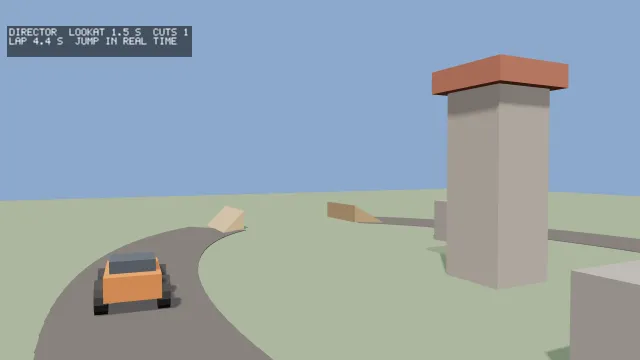
Starts examples/cinematic in this page, on WebGPU where your browser has it.
The camera
Camera is a position, a yaw and pitch and roll, a vertical field of view fovYDeg, and
near and far planes. Yaw 0 looks down negative z. lookAt(x, y, z) turns it toward a point,
updateMatrices(aspect) builds its view, projection and viewProjection, and project and
rayThrough go from the world to the screen and back, which is what
picking uses. adoptView takes matrices made elsewhere, such as a
headset's.
A camera that cuts
/* The shots, as records the page owns, under the names of the director script's `Shot` variants. */
type ShotName = 'Chase' | 'LowWide' | 'Orbit' | 'Flyby' | 'Overhead' | 'LookAt';
const SHOTS: Readonly<Record<ShotName, ShotParams>> = {
  Chase: { kind: 'chase', distance: 7, height: 2.2, fovDeg: 62 },
  LowWide: { kind: 'lowWide', distance: 9, height: 0.7, fovDeg: 48 },
  Orbit: { kind: 'orbit', distance: 8, height: 3, fovDeg: 55, orbitRate: 0.7 },
  Flyby: { kind: 'flyby', distance: 10, height: 1.6, fovDeg: 45 },
  Overhead: { kind: 'overhead', distance: 14, height: 16, fovDeg: 50 },
  LookAt: { kind: 'lookAt', distance: 11, height: 3, fovDeg: 42, anchor: TOWER },
};
/* The rig keeps its boom out of the rocks, so it is given them. */
const ROCKS: Vec3[] = [
  [6, 0.8, 3],
  [-5, 0.8, -4],
  [9, 0.8, -12],
];
const rocks = new ColliderSet(ROCKS.map(([x, y, z]) => boxCollider(x, y, z, 1, 0.8, 1)));
const rig = new CinematicCamera(rocks);
/* The rig's own clock, which a cut is stamped with: a shot's age, and an orbit's angle, count
   from it. */
let rigClock = 0;CinematicCamera is a rig that moves a camera onto shots. A shot is a placement rule relative to a
subject: chase behind its heading, lowWide across its line of travel and near the ground, the
shot that sells a gap, orbit circling it at orbitRate, flyby from a station it passes,
overhead above, and lookAt framing a fixed anchor while keeping the subject in frame. Each
takes a distance, a height and a fovDeg, and holdSec when the caller knows how long the
shot will last, so a move inside it arrives instead of being cut off.
cut(shot, atSec) changes the shot at once. A cut is instantaneous, because a cut that eases is a
swoop and loses the edit's sync with the beat, while the motion inside a shot is smoothed by
springs, so footage does not judder when somebody steps through it frame by frame. atSec is the
shot's start on the rig's own clock, which the time passed to update counts. A cut keeps the
subject's speed, so the new shot opens already moving with it; snap() drops it, for a subject
that teleported to a checkpoint. update(dt, x, y, z, yaw) moves the rig after the subject each
frame, shotAgeSec is how long the current shot has held, and camera is the camera it moves.
The colliders it is built with keep its boom out of walls and rocks.
Directing from a script
// A take-off cuts at once, across the line of travel and low, the shot that sells a gap; a landing
// cuts to an orbit round it. Otherwise a shot holds its time, the tower is framed when the buggy
// passes it, and a long shot gives way to the next in turn. Answers the shot to cut to, or `none`
// to hold the one on screen.
fn direct(director: mut Director, cam: Camera, airborne: bool, nearTower: bool) -> Shot? {
    let age = camera.shotAge(cam)
    var want = director.shot
    if airborne && !director.flying {
        want = Shot.LowWide
    } else if !airborne && director.flying {
        want = Shot.Orbit
    } else if age < director.least {
        want = director.shot
    } else if nearTower && director.shot != Shot.LookAt {
        want = Shot.LookAt
    } else if age > director.most {
        want = next(director.shot)
    }
    director.flying = airborne
    if want == director.shot {
        return none
    }
    director.shot = want
    director.cuts += 1
    return some(want)
}drift/camera gives a script shotAge, how long the current shot has held, and snap. A script
cannot build a shot's record, so cut is not bound: the page keeps each shot's record under the
name of a variant of the director's Shot enum, the director answers with the variant to cut to,
and the page makes the cut.
const script = hostScript(directorScript);
/* A variant reaches the page as `{ tag }`, and an option as `{ tag: 'some', value }` or `none`. */
interface Director {
  shot: { tag: ShotName };
  cuts: number;
}
const director = exported<() => Director>(script, 'createDirector')();
type Direct = (
  director: Director,
  camera: CinematicCamera,
  airborne: boolean,
  nearTower: boolean,
) => { tag: 'none' } | { tag: 'some'; value: { tag: ShotName } };
if (import.meta.hot) {
  import.meta.hot.accept('./director.drs', (next) => {
    if (next !== undefined) {
      patchModule(script, next as Record<string, unknown>, { Director: [director] });
    }
  });
}caption = '';
if (mode === 'director') {
const shot = exported<Direct>(script, 'direct')(director, rig, airborne, nearTower);
if (shot.tag === 'some') rig.cut(SHOTS[shot.value.tag], rigClock);
} else if (mode === 'timeline') {
player.update(dt);
if (player.shotChanged && player.shot !== null) rig.cut(player.shot, rigClock);
caption = player.line?.text ?? '';
if (player.finished) player.reset();
}
if (mode === 'path') {
pathSec += dt;
sampleCameraPath(flight, pathSec, along);
camera.position[0] = along.eye[0];
camera.position[1] = along.eye[1];
camera.position[2] = along.eye[2];
camera.lookAt(along.target[0], along.target[1], along.target[2]);
camera.fovYDeg = along.fovDeg;
} else {
rigClock += dt;
rig.update(dt, position[0], position[1], position[2], yaw);
camera.position[0] = rig.camera.position[0] ?? 0;
camera.position[1] = rig.camera.position[1] ?? 0;
camera.position[2] = rig.camera.position[2] ?? 0;
camera.yaw = rig.camera.yaw;
camera.pitch = rig.camera.pitch;
camera.fovYDeg = rig.camera.fovYDeg;
}A cinematic as data
/* A cinematic written as data: when the camera cuts, a shot that moves while it holds, and the
   lines shown under the picture. Checked when it is defined, so a malformed one fails on load. */
const TRAILER = defineCinematic('trailer', {
  durationSec: 16,
  shots: [
    { atSec: 0, camera: { kind: 'overhead', distance: 16, height: 18, fovDeg: 48 } },
    { atSec: 3.5, camera: { kind: 'chase', distance: 6, height: 1.8, fovDeg: 64 } },
    {
      atSec: 7,
      camera: [
        {
          atSec: 0,
          camera: { kind: 'lookAt', distance: 14, height: 2, fovDeg: 40, anchor: TOWER },
        },
        { atSec: 4, camera: { kind: 'lookAt', distance: 8, height: 5, fovDeg: 50, anchor: TOWER } },
      ],
    },
    { atSec: 11.5, camera: { kind: 'flyby', distance: 9, height: 1.2, fovDeg: 44 } },
  ],
  lines: [
    { atSec: 0.5, holdSec: 2.5, text: 'ONE TRACK', look: 'title' },
    { atSec: 4, holdSec: 2.5, text: 'ONE JUMP', look: 'title' },
    { atSec: 8, holdSec: 3, text: 'EVERY LAP THE SAME LENGTH', look: 'title' },
    { atSec: 12, holdSec: 3, text: 'CUT ON THE MOMENT', look: 'title' },
  ],
});
const player = new CinematicPlayer(TRAILER, 'trailer');A cinematic is a file, never a function, so a new trailer or a different cut of the same footage
is a change of data. defineCinematic(name, script) checks it when it is defined and throws naming
the entry and the times, for two lines up at once, an entry out of order, or a keyframe past the
end of its shot, so a malformed one fails on load and is never played half right.
A script is a duration, its shots and its lines. A shot cuts at atSec to a fixed placement, or
to a list of CameraKeyframes it moves through while it holds; keyframes are a move and never a
second cut. A line is text shown from atSec for holdSec, with a look your presentation
resolves. CinematicPlayer plays it: update(dt) each frame, shot and shotChanged for the
camera, line for what is up, timeSec and finished, and skip() and reset(). Everything is
derived from accumulated time, so a cinematic plays the same at any frame rate.
A path through the world
/* A move through the world with no subject: an eye and a point it looks at, keyed in time and
   passed through smoothly, looping round the track. */
const flight = createCameraPath(
  [
    { atSec: 0, eye: [22, 6, 16], target: [0, 1, 0], fovDeg: 50 },
    { atSec: 5, eye: [-8, 3, 14], target: [-15, 1, 0], fovDeg: 45 },
    { atSec: 10, eye: [-24, 9, -6], target: [-14, 1, 2], fovDeg: 40 },
    { atSec: 15, eye: [0, 20, -22], target: [0, 0, 0], fovDeg: 55 },
  ],
  { loop: true, periodSec: 20 },
);
const along = createCameraPathSample();A walk through a building has no subject to frame: it is a route and a gaze. createCameraPath(keys, options) takes keys of an eye, a target and a fovDeg at a time, and passes through every key
with no kink: a cubic through each, Catmull-Rom with the keys' own times as its knots, so an evenly
timed straight run is a constant velocity. The eye and the target are interpolated apart, so a pan
and a dolly are written as what they are. A looped path wraps back through its first key after
periodSec. sampleCameraPath(path, timeSec, out) fills a sample made once with
createCameraPathSample(), allocating nothing.
Re-timing a stretch
/* The stretch of a lap the buggy spends over the jump, found once, and a curve that re-times it:
   slower in the air, quicker after, the same length in all. */
function lapSecAt(angle: number): number {
  let low = 0;
  let high = LAP / 2 + 2;
  for (let step = 0; step < 40; step += 1) {
    const mid = (low + high) / 2;
    if (angleAt(mid) < angle) low = mid;
    else high = mid;
  }
  return low;
}
const flightStart = lapSecAt(JUMP[0] - RAMP);
const flightEnd = lapSecAt(JUMP[1] + RAMP);
const slowMotion = timeCurve('ramp', flightEnd - flightStart, { amount: 0.75 });
let retimed = flag('time', 'real') === 'slow';
/** Where in its lap the buggy is, from the lap's clock, through the curve where it applies. */
function sourceSec(lapClock: number): number {
  if (!retimed || lapClock < flightStart || lapClock > flightEnd) return lapClock;
  return flightStart + curveOffsetSec(slowMotion, lapClock - flightStart);
}A TimeCurve re-times a segment: given a time into it, how far the source has moved.
timeCurve(kind, durationSec, options) makes one, and curveOffsetSec(curve, localSec) reads it.
hold freezes part of the segment, ramp slows and then speeds, stutter freezes and catches up
in steps of stepSec, and reverse runs part of it backwards, as far as the reversibleSec the
caller can actually rewind. amount is how much of the segment the effect takes, at most
MAX_TIME_CURVE_AMOUNT, and every kind is speed-neutral: whatever it takes it pays back, so
curveSpanSec is always the segment's own length and a re-timed clip is as long as the one asked
for. linearCurve is a segment played straight. One curve drives a fixed-step simulation, a
recorded stream or a video alike.