 DriftEngine
Simulation
Animation
Skeletons, clips sampled at a time you supply, blend trees, state machines, two-bone IK, retargeting, root motion, springs and morph targets.
npm install @driftengine/animation @driftengine/script
@driftengine/animation is skeletons, clips, poses and the graphs over them, for 6.3 KB gzipped on
top of core. Everything in it is a function of a time you hand it, and nothing in it reads a clock,
so an animated character replays exactly and a playhead can scrub it backwards. It never touches
the GPU either: it produces a palette, sixteen floats a joint, and core's renderer skins a mesh by
it.
The example builds a figure in code: a skeleton, a mesh bound to it a piece a bone, and three clips
written as keys. It walks a circle and reaches for a lantern with its right hand as it passes.
Switch it between idle, walk and run, and it eases from one to the other mid-stride. The pace and
the reach are a DriftScript module: under npm run examples, edit it and save, and the figure
takes the change without the page reloading.
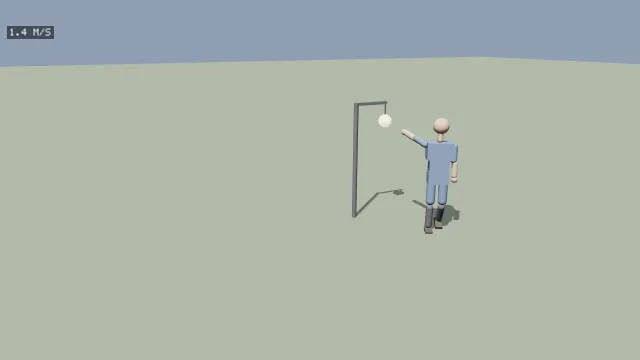
Starts examples/animation in this page, on WebGPU where your browser has it.
A skeleton and a pose
/** Seventeen joints in a relaxed standing pose, each with its parent and a name. */
const JOINTS: [string, number, number, number, number][] = [
  ['hips', -1, 0, 1.0, 0],
  ['spine', 0, 0, 1.25, 0],
  ['chest', 1, 0, 1.5, 0],
  ['neck', 2, 0, 1.68, 0],
  ['head', 3, 0, 1.82, 0],
  ['leftShoulder', 2, 0.22, 1.55, 0],
  ['leftElbow', 5, 0.25, 1.27, 0],
  ['leftHand', 6, 0.27, 1.0, 0],
  ['rightShoulder', 2, -0.22, 1.55, 0],
  ['rightElbow', 8, -0.25, 1.27, 0],
  ['rightHand', 9, -0.27, 1.0, 0],
  ['leftHip', 0, 0.1, 0.95, 0],
  ['leftKnee', 11, 0.1, 0.52, 0],
  ['leftFoot', 12, 0.1, 0.08, 0],
  ['rightHip', 0, -0.1, 0.95, 0],
  ['rightKnee', 14, -0.1, 0.52, 0],
  ['rightFoot', 15, -0.1, 0.08, 0],
];
/** The inverse of each joint's place in the bind pose: here only a translation, undone. */
const inverseBind = new Float32Array(JOINTS.length * 16);
JOINTS.forEach(([, , x, y, z], j) => {
  inverseBind.set([1, 0, 0, 0, 0, 1, 0, 0, 0, 0, 1, 0, -x, -y, -z, 1], j * 16);
});
const skeleton = new Skeleton(
  JOINTS.map(([name, parent]) => ({ name, parent })),
  inverseBind,
);
/** The bind pose as each joint relative to its parent, which a clip leaves where it does not reach. */
const bind = createPose(JOINTS.length);
JOINTS.forEach(([, parent, x, y, z], j) => {
  const [, , px, py, pz] = JOINTS[parent] ?? ['', -1, 0, 0, 0];
  bind.translation.set(parent < 0 ? [x, y, z] : [x - px, y - py, z - pz], j * 3);
});new Skeleton(joints, inverseBind) takes each joint's name and parent, −1 for a root, and an
inverse bind matrix a joint: sixteen floats, column-major, taking a vertex from the model's space
into that joint's. Parents come before their children, and the constructor refuses a list that is
out of order, since the palette is resolved in one pass in index order. A rig imported from glTF or
read from a .drft file arrives as the same joints and matrices.
A Pose is three flat arrays, each joint relative to its parent: translation, three floats a
joint, rotation, a quaternion of four, and scale, three. createPose(jointCount) makes one at
rest and restPose(jointCount, out) puts one back. skeleton.applyPose(pose) resolves it: world
then holds each joint's matrix in the model's space and palette the matrices a skinned mesh is
drawn by.
Skinning
/** A piece of the body a bone, each bound rigidly to the joint the bone hangs from. */
const SKIN: Vec3 = [0.85, 0.66, 0.52];
const CLOTH: Vec3 = [0.3, 0.42, 0.62];
const body = new MeshBuilder();
body.setJoint(0).addBox([0, 1.0, 0], [0.17, 0.1, 0.11], CLOTH);
body.setJoint(1).addBox([0, 1.2, 0], [0.16, 0.13, 0.1], CLOTH);
body.setJoint(2).addBox([0, 1.45, 0], [0.21, 0.14, 0.12], CLOTH);
body.setJoint(3).addCapsule([0, 1.68, 0], 0.045, 0.05, SKIN);
body.setJoint(4).addSphere([0, 1.86, 0], 0.13, SKIN, 0, 16, 10);
for (const [shoulder, side] of [
  [5, 1],
  [8, -1],
] as const) {
  body.setJoint(shoulder).addCapsule([side * 0.235, 1.41, 0], 0.055, 0.11, CLOTH);
  body.setJoint(shoulder + 1).addCapsule([side * 0.26, 1.14, 0], 0.05, 0.1, SKIN);
  body.setJoint(shoulder + 2).addSphere([side * 0.27, 0.97, 0], 0.055, SKIN);
}
for (const [hip, side] of [
  [11, 1],
  [14, -1],
] as const) {
  body.setJoint(hip).addCapsule([side * 0.1, 0.74, 0], 0.075, 0.15, CLOTH);
  body.setJoint(hip + 1).addCapsule([side * 0.1, 0.3, 0], 0.06, 0.16, [0.25, 0.25, 0.28]);
  body.setJoint(hip + 2).addBox([side * 0.1, 0.04, 0.05], [0.06, 0.04, 0.11], [0.2, 0.18, 0.16]);
}
const figure = renderer.createMesh(body.build());MeshBuilder.setJoint(index) binds every vertex added after it to one joint at full weight, which
is rigid skinning: right for a figure made of solid pieces, a robot, or a lamp on an arm. A model
from a modelling tool carries smooth skinning instead, up to four joints a vertex with a weight
each, in the mesh's joints and weights.
/* The palette is each joint's world matrix times its inverse bind; the mesh deforms by it. */
renderer.setSkinPalette(skeleton.palette);
renderer.drawMesh(figure, model);
renderer.setSkinPalette(null);setSkinPalette(palette) chooses the palette the following draws skin by, and null stops. A
shadow is cast by the same palette, through the caster sink's
skinnedMesh(mesh, model, palette): a skinned mesh handed to mesh casts its bind pose, so a
running figure would throw the shadow of a statue. Both backends skin in the vertex shader, and a
mesh with no joints carries none of it.
Clips
/** A rotation about x as a quaternion: positive swings a hanging limb forward. */
const pitch = (a: number): number[] => [-Math.sin(a / 2), 0, 0, Math.cos(a / 2)];

/** A looping clip from keys spread evenly over its duration, a joint's angles at a time. */
function clip(
  name: string,
  durationSec: number,
  angles: Record<number, number[]>,
  bob: number[],
): AnimationClip {
  const tracks: JointTrack[] = [];
  for (const [joint, keys] of Object.entries(angles)) {
    const times = Float32Array.from(keys, (_, i) => (i / (keys.length - 1)) * durationSec);
    tracks.push({
      joint: Number(joint),
      path: 'rotation',
      times,
      values: Float32Array.from(keys.flatMap(pitch)),
    });
  }
  const times = Float32Array.from(bob, (_, i) => (i / (bob.length - 1)) * durationSec);
  tracks.push({
    joint: 0,
    path: 'translation',
    times,
    values: Float32Array.from(bob.flatMap((y) => [0, y, 0])),
  });
  return { name, durationSec, tracks };
}
/** One way, back through the middle, and the other way: a leg or an arm across a stride. */
const swing = (a: number): number[] => [a, 0, -a, 0, a];
/** A stride a second: legs and arms swing opposite, a knee folds as its foot passes, the hips dip. */
const WALK = clip(
  'walk',
  1,
  {
    11: swing(0.45),
    14: swing(-0.45),
    12: [0, -0.15, 0, -0.6, 0],
    15: [0, -0.6, 0, -0.15, 0],
    5: swing(-0.35),
    8: swing(0.35),
  },
  [1.0, 0.97, 1.0, 0.97, 1.0],
);An AnimationClip is a name, a durationSec and its tracks. A JointTrack names a joint
and a path, 'translation', 'rotation' or 'scale', with times ascending in seconds and
values, three floats a key, or four for a rotation. Clips usually come from a file; these are
written by hand to show there is nothing more to one.
sampleClip(clip, seconds, out) brings the time into the clip, so a clip loops, interpolates
between the keys either side, slerping rotations, and writes into out. A joint no track names is
left as it was, so a clip that moves one arm can be sampled over a pose holding the rest of the
body.
Below a tree, three functions combine poses, each into a pose you own:
blendPoses(a, b, t, out)interpolates every channel of two poses, sooutdecides what a joint neither pose moved blends from.addPose(base, delta, weight, out)layers a delta on a base: a breath, a flinch, a lean.setJoint(pose, joint, translation, rotation, scale)writes one joint.
Nothing here allocates per frame; every sampler and blend fills a target you made once.
Blend trees
/** Idle, walk and run over one speed parameter. The walk and run take distance as their clock. */
const tree = new BlendTree(
  {
    kind: 'oneDimensional',
    parameter: 'speed',
    children: [
      { at: 0, node: { kind: 'clip', clip: IDLE } },
      { at: 1.4, node: { kind: 'clip', clip: WALK, clock: 'walkClock' } },
      { at: 4, node: { kind: 'clip', clip: RUN, clock: 'runClock' } },
    ],
  },
  JOINTS.length,
  bind,
);
const pose = createPose(JOINTS.length);new BlendTree(root, jointCount, bind) takes a tree of BlendNodes:
clip, a clip, sampled at the tree's time or at the value of itsclock.lerp, two nodesaandbblended by aparameterfrom 0 to 1.oneDimensional,childrenat stops along aparameter, ascending; a value between two stops blends the two either side. This is a blend space over one axis, the usual shape for locomotion.
set(parameter, value) sets one and throws on a name no node takes, since a misspelt parameter
would otherwise do nothing visible. evaluate(seconds, out) samples the whole tree. Give it the
bind pose whenever the clips rotate and do not translate, which is most clips: a blend interpolates
every channel, so without one the joints a clip leaves alone blend toward zero and fold onto their
parents.
Clocks
A stride has to advance with distance, or the feet slide while the body passes over them; an idle
has to advance with time, since someone standing still still breathes. So a clip node may name a
clock, a parameter holding its own time in seconds, and a node without one keeps the time given
to evaluate. The example's walk and run keep metres walked, scaled to each clip's pace, and its
idle keeps the frame clock. A name is either a weight or a clock, and the tree refuses one used as
both.
The rig's logic, in DriftScript
// One frame: ease the pace, sample the blend, and reach where the lantern is near.
// The lantern's position is given in the figure's own frame, which is where its joints are.
fn animate(gait: mut Gait, tree: Blend, skeleton: Skeleton, pose: Pose, at: f32, dt: f32,
           lanternX: f32, lanternY: f32, lanternZ: f32) {
    // A metre a second of change in pace a second, either way.
    gait.speed = gait.speed + math.clamp(gait.wanted - gait.speed, 0 - dt, dt)
    gait.travelled = gait.travelled + gait.speed * dt
    animation.blendSet(tree, "speed", gait.speed)
    // Each clip's time is distance: the walk plays at its own pace at 1.4 metres a second, the
    // run at 4, so a foot stays where it was put whatever the pace.
    animation.blendSet(tree, "walkClock", gait.travelled / 1.4)
    animation.blendSet(tree, "runClock", gait.travelled / 4)
    animation.blendAt(tree, at, pose)

    // The right shoulder, elbow and hand are joints 8, 9 and 10. Reach within a metre and a half,
    // elbow bending down and back.
    let dx = lanternX + 0.2
    let dy = lanternY - 1.6
    let dz = lanternZ
    let near = math.sqrt(dx * dx + dy * dy + dz * dz) < 1.5
    gait.reached = false
    if gait.reaching && near {
        gait.reached = animation.reach(skeleton, pose, 8, 9, 10, lanternX, lanternY, lanternZ, -0.4, 0.8, -1)
    }
}/** The rig's logic, hosted, and its record of the pace. */
const rig = hostScript(rigScript);
interface Gait {
wanted: number;
speed: number;
travelled: number;
reaching: boolean;
reached: boolean;
}
const gait = exported<() => Gait>(rig, 'createGait')();
type Animate = (
gait: Gait,
tree: BlendTree,
skeleton: Skeleton,
pose: Pose,
at: number,
dt: number,
x: number,
y: number,
z: number,
) => void;
if (import.meta.hot) {
import.meta.hot.accept('./rig.drs', (next) => {
if (next !== undefined) patchModule(rig, next as Record<string, unknown>, { Gait: [gait] });
});
}A script drives a tree its host built: the host holds the skeleton and knows the bind pose, so
building trees stays in TypeScript, and a script sets parameters and samples. drift/animation
offers:
blendSetandblendAt, a tree's parameter and its evaluation.sample, a clip at a time, andblend, two poses into a third.poseandtoRest, a pose at rest and a pose put back to rest.reach, the two-bone solve below.motion,rootMotionandstripRoot, root motion, withmotionX,motionYandmotionZfor its step andmotionTurnXtomotionTurnWfor its turn.
The switches set gait.wanted and gait.reaching on the record the page holds, and a save of the
module keeps the record, so the figure carries on from where it was.
Reaching
solveTwoBone(skeleton, pose, root, mid, tip, target, pole) bends a chain of two bones, a shoulder,
elbow and hand or a hip, knee and foot, so its tip lands on a target, writing the two rotations
into the pose. The target and the pole are points in the skeleton's own space, which is why the
example turns the lantern into the figure's frame first. It answers whether the target was in
reach; one out of reach straightens the chain toward it, as an arm reaching too far extends.
The pole is a point the middle joint leans toward. A straight chain has no plane to bend in, and without a pole the elbow would flip as the character turned; the example's points down and behind the shoulder. The solve is closed form, so its answer does not depend on an iteration count. Limits and twist are left to the game, which knows how far its knees may bend.
State machines
/** Ground and air: a locomotion tree, a jump clip, and the fades between them. */
export function locomotion(
  walk: AnimationClip,
  run: AnimationClip,
  jump: AnimationClip,
  jointCount: number,
  bind: Pose,
): { machine: AnimationStateMachine; gait: BlendTree } {
  const gait = new BlendTree(
    {
      kind: 'lerp',
      parameter: 'speed',
      a: { kind: 'clip', clip: walk },
      b: { kind: 'clip', clip: run },
    },
    jointCount,
    bind,
  );
  const air = new BlendTree({ kind: 'clip', clip: jump }, jointCount, bind);
  const machine = new AnimationStateMachine(
    [
      { name: 'ground', tree: gait },
      { name: 'air', tree: air },
    ],
    [
      { from: 'ground', to: 'air', durationSec: 0.1, when: (p) => (p.grounded ?? 1) === 0 },
      { from: 'air', to: 'ground', durationSec: 0.2, when: (p) => (p.grounded ?? 1) === 1 },
    ],
    jointCount,
    bind,
  );
  return { machine, gait };
}

/** Each tick: the machine reads its own parameters, and each tree reads its own. */
export function animateLocomotion(
  rig: { machine: AnimationStateMachine; gait: BlendTree },
  speed: number,
  grounded: boolean,
  dt: number,
  out: Pose,
): void {
  rig.gait.set('speed', Math.min(1, speed / 4));
  rig.machine.set('grounded', grounded ? 1 : 0);
  rig.machine.advance(dt);
  rig.machine.evaluate(out);
}new AnimationStateMachine(states, transitions, jointCount, bind) takes states, each a name and a
tree, and transitions, each from, to, a durationSec to crossfade over and a when, your own
predicate over the parameters. The first state is where it starts, and a transition naming a state
that does not exist is refused at construction.
set(parameter, value)sets a parameter the predicates read, any name, since the predicates are yours. A state's tree keeps its own parameters, set on the tree.advance(dt)moves the active state's clock and any fade, and takes the first transition out of the active state whose condition holds. A fade, once started, runs to its end, so a parameter sitting on a threshold does not flick between two states.evaluate(out)writes the pose, crossfaded while a fade runs.currentnames the active state andtransitioningsays whether a fade is running.
Each state keeps its own clock, so a looping clip is not restarted when something else changes, and a zero-length transition is a cut.
Retargeting
/** A clip authored on one rig, worn by another of different proportions. */
export function wear(
  clip: AnimationClip,
  source: Skeleton,
  target: Skeleton,
  at: number,
  scratch: Pose,
  out: Pose,
): void {
  const map = buildRetargetMap(source, target);
  if (map.unmatched.length > 0) console.warn('joints the target lacks:', map.unmatched);
  sampleClip(clip, at, scratch);
  retargetPose(map, source, scratch, target, out);
}buildRetargetMap(from, to) matches two skeletons by exact joint name, and lists in unmatched
the joints of the source the target lacks; build it once. retargetPose(map, from, source, to, out)
plays a pose on the other rig. Rotations transfer and translations do not, since two rigs of
different proportions share joint orientations and not bone lengths; the root's translation is the
exception, as that is where a walk travels. A joint the target has and the source does not, a tail,
is left as it was.
Root motion
/** A walk whose clip carries the travel: the body is moved by it, and the pose stays put. */
const motion = createRootMotion();
export function stepWithRootMotion(
  clip: AnimationClip,
  from: number,
  to: number,
  body: { x: number; z: number; heading: number },
  pose: Pose,
): void {
  extractRootMotion(clip, 0, from, to, motion);
  /* The step is in the root's own frame at `from`, so turn it by the body's heading first. */
  const c = Math.cos(body.heading);
  const s = Math.sin(body.heading);
  const dx = motion.translation[0] ?? 0;
  const dz = motion.translation[2] ?? 0;
  body.x += c * dx + s * dz;
  body.z += -s * dx + c * dz;
  sampleClip(clip, to, pose);
  /* Without this the root moves in the pose as well, and the character goes twice as far. */
  stripRootMotion(clip, 0, pose);
}Some clips carry their own travel: the root walks forward in the clip, and the character should
move exactly as far. extractRootMotion(clip, rootJoint, from, to, motion) answers how far the root
went between two times, in the root's own frame at from, as a translation and a rotation.
Loops are accumulated, so a clip that wraps between the two times still answers a step forward.
stripRootMotion(clip, rootJoint, pose) then pins the pose's root to where the clip has it at time
zero.
The two go together. Extract without stripping and the character moves twice, at double speed.
A bob authored on the root leaves the pose along with the travel and arrives in
motion.translation[1], so a game whose height is held by a character controller has to put it
back in the pose if it wants it.
Springs
/** A ponytail's tip, two hertz and a little under critical, trailing a head that sways. */
export function ponytail(time: number, out: Float32Array): void {
  sampleSpring(
    { frequencyHz: 2, damping: 0.6, maxOffsetM: 0.3 },
    (t, at) => {
      /* A pure function of the time it is handed: called for times before `time` too. */
      at[0] = Math.sin(t * 1.5) * 0.2;
      at[1] = 1.7;
      at[2] = 0;
    },
    time,
    out,
  );
}

/** A chain of four links hanging from the same head: a braid, three floats a link. */
const BRAID: SpringLink[] = [0, 1, 2, 3].map(() => ({
  frequencyHz: 3,
  damping: 0.5,
  restOffsetM: [0, -0.08, -0.02],
}));
export function braid(time: number, out: Float32Array): void {
  sampleSpringChain(
    BRAID,
    (t, at) => {
      at[0] = Math.sin(t * 1.5) * 0.2;
      at[1] = 1.7;
      at[2] = 0;
    },
    time,
    out,
  );
}Secondary motion, hair, a coat, an antenna, is a damped spring trailing what it hangs from.
sampleSpring(settings, anchorAt, seconds, out) answers where the spring's mass is at a time, and
like a clip it is sampled, not stepped, so a playhead dragged backwards gets the same answer the
forward pass got. The settings:
frequencyHz, how fast it would ring with no damping: a few hertz for hair, under one for a heavy coat.damping, the damping ratio: below 1 overshoots, 1 settles without overshooting, above 1 sags in. Zero throws, since a spring that never forgets cannot be sampled at a time.maxOffsetM, how far the mass may fall behind, for the frame a fast pan would otherwise leave a braid in the air.
anchorAt(t, out) is where the spring is pulled, and it must be a pure function of the t it is
handed: it is called for earlier times, back as far as springSettleSec(settings), how long the
spring takes to forget. An anchor that reads a clock breaks the sampling without failing. If the
anchor comes from a clip, sample the clip at the time it is handed.
sampleSpringChain(links, rootAt, seconds, out) is a chain, three floats a link, each SpringLink
a spring with a restOffsetM from the link above, so the chain hangs. Each link trails where the
one above it actually is, so a chain remembers longer than any link, and
springChainSettleSec(links) is its lookback.
Rigid animation
/** A door on a hinge node: a clip with one rotation track drives the node, no skeleton at all. */
export function swingDoor(clip: AnimationClip, hinge: SceneNode): RigidAnimation {
  return new RigidAnimation(clip, [hinge]);
}
/* Each frame, at the door's own time: `door.apply(seconds)`. */Much of what moves in a game moves whole: a door, a lift, a turntable. new RigidAnimation(clip, nodes) binds a clip to scene nodes, one per joint its tracks name, null for one not in the
scene, and apply(seconds) writes each node's position, rotation and scale. applyPoseToNode(pose, joint, node) does it for one joint of a pose you sampled yourself. Both mark the node moved, so
its world matrix follows. This is the one part of the package that touches core, and it needs no
shader at all.
Morph targets
/** A face with two expressions: deltas per vertex, interleaved, and a weight for each per draw. */
export function face(
  renderer: RendererApi,
  head: MeshData,
  smile: Float32Array,
  blink: Float32Array,
): MeshHandle {
  const vertices = head.positions.length / 3;
  const deltas = new Float32Array(vertices * 2 * 3);
  for (let v = 0; v < vertices; v += 1) {
    deltas.set(smile.subarray(v * 3, v * 3 + 3), (v * 2 + 0) * 3);
    deltas.set(blink.subarray(v * 3, v * 3 + 3), (v * 2 + 1) * 3);
  }
  return renderer.createMesh({ ...head, morphTargets: deltas, morphTargetCount: 2 });
}

const weights = new Float32Array(2);
export function drawFace(
  renderer: RendererApi,
  mesh: MeshHandle,
  model: Float32Array,
  time: number,
): void {
  weights[0] = 0.8;
  weights[1] = time % 4 < 0.15 ? 1 : 0;
  renderer.setMorphWeights(weights);
  renderer.drawMesh(mesh, model);
  renderer.setMorphWeights(null);
}A morph target is a shape a mesh can lean toward: a smile, a blink, a dent. A mesh carries its
targets as morphTargets, position deltas interleaved by vertex, so target t of vertex v starts
at (v * morphTargetCount + t) * 3, and morphTargetCount says how many, up to
MAX_MORPH_TARGETS, eight. setMorphWeights(weights) chooses a weight a target for the following
draws. The deltas belong to the mesh and the weights to the draw, so two characters sharing a head
wear different expressions from one copy of it. Targets move positions and leave normals alone,
which costs some shading accuracy on a strongly morphed surface. glTF morph targets import into
the same fields.