 DriftEngine
Worlds
Hierarchical detail
Drawing each region of a world at the level its distance deserves, crossfading between levels, and baking proxies and impostors offline.
npm install @driftengine/core @driftengine/assets @driftengine/drft
A distant block of a city does not need its window fins, and a city drawn whole at its finest detail is more than a million triangles. Hierarchical detail draws each region of a world at the coarsest level that still looks right from where the camera is, and fades from one level to the next so nothing pops.
The example is a city of 144 blocks flown over from street level to above the roofs. Paint the levels to watch them change as the camera climbs, loosen the tolerance to bring coarse levels closer, and switch the selection off to see what drawing every block at its finest costs.
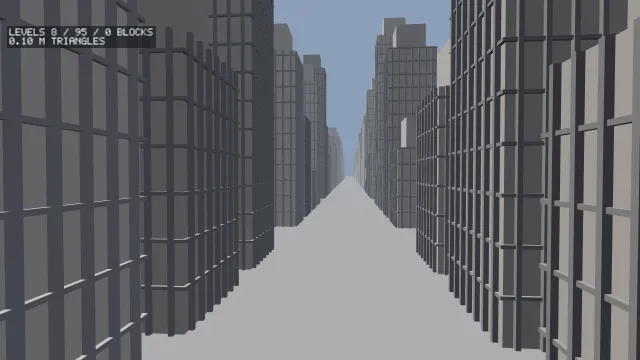
Starts examples/hlod in this page, on WebGPU where your browser has it.
Levels and their errors
/**
 * Sixteen buildings on a block of 100 metres, at three levels. The coarser two wear the facade's
 * average shade, so dropping the fins does not read as the city brightening.
 */
function block(ox: number, oz: number, random: () => number): MeshData[] {
  const fine = new MeshBuilder();
  const plainer = new MeshBuilder();
  const boxes = new MeshBuilder();
  for (let lot = 0; lot < 16; lot += 1) {
    const cx = ox + 20 + (lot % 4) * 20;
    const cz = oz + 20 + Math.floor(lot / 4) * 20;
    const h = 12 + random() * 60;
    const grey = 0.45 + random() * 0.35;
    const wall: Vec3 = [grey, grey * 0.96, grey * 0.9];
    const fin: Vec3 = [grey * 0.6, grey * 0.6, grey * 0.62];
    const average: Vec3 = [wall[0] * 0.9, wall[1] * 0.9, wall[2] * 0.9];
    fine.addBox([cx, h / 2, cz], [7, h / 2, 7], wall);
    fine.addBox([cx, h + 4, cz], [4.5, 4, 4.5], wall);
    for (let y = 4; y < h; y += 4) fine.addBox([cx, y, cz], [7.3, 0.15, 7.3], fin);
    for (let i = 0; i < 7; i += 1) {
      const along = -6 + i * 2;
      fine.addBox([cx + along, h / 2, cz - 7.2], [0.2, h / 2, 0.25], fin);
      fine.addBox([cx + along, h / 2, cz + 7.2], [0.2, h / 2, 0.25], fin);
      fine.addBox([cx - 7.2, h / 2, cz + along], [0.25, h / 2, 0.2], fin);
      fine.addBox([cx + 7.2, h / 2, cz + along], [0.25, h / 2, 0.2], fin);
    }
    plainer.addBox([cx, h / 2, cz], [7, h / 2, 7], average);
    plainer.addBox([cx, h + 4, cz], [4.5, 4, 4.5], average);
    boxes.addBox([cx, h / 2, cz], [7, h / 2, 7], average);
  }
  return [fine.build(), plainer.build(), boxes.build()];
}

/** What each level claims: the fins stand half a metre out, the setbacks eight metres up. */
const ERRORS = [0, 0.5, 8];A region is a box and one or more levels, finest first. Each level states its geometric error: how far, in metres, its surface may stand from the real one. The example's middle level drops the fins, which stand half a metre proud of the walls, so it claims 0.5; the coarsest drops the setbacks on the roofs, which are eight metres tall, so it claims 8.
A level is good enough once its error projects to fewer than pixelTolerance pixels on screen, so
the distance at which it takes over is error × projectionScale / pixelTolerance. The file carries
errors, and the distances follow from the screen: a distance would be a decision about one screen,
and an error is a fact about the geometry.
The coarser levels here wear the average shade of the finer one's facade. A level that drops dark detail and keeps the bright wall colour makes the city look as though it brightens as it recedes.
Choosing a level for every region
/** Twelve blocks by twelve, each a region: a box, its levels' meshes and their errors. */
const GRID = 12;
const SIZE = 100;
interface Region {
  levels: MeshHandle[];
  triangles: number[];
}
const regions: Region[] = [];
const hlod = new HlodSet({ capacity: GRID * GRID, fadeSec: 0.4 });
const draws = createHlodDraws(GRID * GRID);
const random = mulberry32(17);
for (let id = 0; id < GRID * GRID; id += 1) {
  const ox = (id % GRID) * SIZE;
  const oz = Math.floor(id / GRID) * SIZE;
  const meshes = block(ox, oz, random);
  regions.push({
    levels: meshes.map((mesh) => renderer.createMesh(mesh)),
    triangles: meshes.map((mesh) => mesh.indices.length / 3),
  });
  hlod.add(id, [ox, 0, oz, ox + SIZE, 90, oz + SIZE], ERRORS);
}new HlodSet(options) holds the regions:
capacity, the most regions it holds at once.maxLevels, the most levels a region may carry, 4 by default.pixelTolerance, the pixels of error a level may show, 1.5 by default.hysteresis, the band around each switch as a fraction of its distance, 0.15 by default. A region coarsens only once the camera is that much past the switch and refines only once it is that much inside, so a camera standing on a threshold, or wobbling across it, keeps the level it has.fadeSec, how long a crossfade takes, 0.4 seconds by default. 0 switches at once.farDistance, beyond which a region is drawn at no level at all. Unbounded by default.
add(id, box, errors) adds a region: its box as minimum then maximum corner, and an error per
level that never shrinks from finer to coarser. A region arrives at no level and fades into the
first one chosen. remove(id) takes one out, has(id) and levelOf(id) ask about one, and size
is how many there are. HLOD_NONE is the level of a region drawn at none of its own.
/* Each block hides what is behind it, up to its lowest roofs. */
for (let id = 0; id < GRID * GRID; id += 1) {
  const ox = (id % GRID) * SIZE;
  const oz = Math.floor(id / GRID) * SIZE;
  renderer.addOccluder([ox + 13, 0, oz + 13], [ox + 87, 12, oz + 87], IDENTITY);
}
renderer.drawMesh(ground, IDENTITY);

/* The switch distance is error · scale / tolerance, so a looser tolerance is a smaller scale. */
const scale = (projectionScaleOf(camera.fovYDeg, stage.canvas.height) * 1.5) / tolerance;
const count = selecting ? hlod.select(eye, scale, frustum, renderer, dt, draws) : 0;
shown.fill(0);
let triangles = 0;
const drawRegion = (id: number, level: number, dither: number): void => {
  const region = regions[id];
  const mesh = region?.levels[level];
  if (region === undefined || mesh === undefined) return;
  if (dither !== 0) renderer.setDitherFade(dither);
  renderer.drawMesh(mesh, IDENTITY, undefined, paint === 'levels' ? LEVEL_TINTS[level] : null);
  if (dither !== 0) renderer.setDitherFade(0);
  triangles += region.triangles[level] ?? 0;
  if (dither >= 0) shown[level] = (shown[level] ?? 0) + 1;
};
if (selecting) {
  for (let i = 0; i < count; i += 1)
    drawRegion(draws.region[i] ?? 0, draws.level[i] ?? 0, draws.dither[i] ?? 0);
} else {
  for (let id = 0; id < GRID * GRID; id += 1) drawRegion(id, 0, 0);
}select(eye, projectionScale, frustum, occluder, dtSec, out) decides every region's level for this
view and writes what to draw into an HlodDraws from createHlodDraws(capacity), returning how many
draws there are. projectionScaleOf(fovYDeg, heightPx) is the pixels a metre spans at a metre's
distance. Distance is measured to the region's box, so the region under the camera is always at its
finest. A region outside the frustum, or hidden behind the occluders declared so far this frame
when the renderer is passed as occluder, is skipped.
Each draw carries a region, a level and a dither. A settled region is one draw with a dither of 0.
A region changing level is two: the level arriving at +t and the one leaving at -t, and
setDitherFade with those two amounts keeps complementary cells of a screen-door pattern, so the
pair covers every pixel exactly once. Reset it to 0 after the draw. t runs over fadeSec of the
dtSec you pass, so a held clock never finishes a fade, and a capture that holds the clock wants
fadeSec: 0.
A region is one decision, so a long region seen end-on is drawn all the way along at the level its nearest corner asks for. Smaller regions are the lever.
Baking the levels
Coarse levels can be authored, as the example's are, or baked. @driftengine/assets bakes two
kinds offline, where nothing runs per frame.
Proxies
/** A yard of two hundred crates, and the one mesh that stands in for it from a distance. */
const random = mulberry32(3);
const yard = new MeshBuilder();
for (let i = 0; i < 200; i += 1) {
  const x = random() * 40;
  const z = random() * 40;
  const s = 0.4 + random() * 0.6;
  yard.addBox([x, s, z], [s, s, s], [0.5, 0.4, 0.3]);
}
const crates = yard.build();
/** Level 1: a 16-cell outline. `null` when the outline would not be under half the crates' cost. */
export const yardProxy = buildProxy([{ id: 0, meshes: [crates] }], 1);buildProxy(cells, level) merges a group of cells into one mesh by outlining the space they
occupy on a grid: proxyResolution(level) cells along the longest axis, 32 at level 0
(PROXY_BASE_CELLS) and halving with each level down to 4 (PROXY_MIN_CELLS). Each ProxyCell is
a cell's identifier from the cell grid and its meshes.
A proxy is a budget, so it can be refused. An outline's triangle count grows with the group's
surface area, not with the triangles it replaces, so buildProxy returns null for a group whose
outline would not be under half its cost, as well as for an empty group and one that does not span
a cell of the grid. The yard of crates above outlines into 1,152 triangles against its 2,400. A
block of plain towers is nearly all surface and outlines into more triangles than the towers, which
is why the example's coarse levels are simpler versions of its own buildings.
Impostors
/** A tree baked as eight by eight pictures, one for each direction it may be seen from. */
const tree = new MeshBuilder()
  .addCylinder([0, 1.5, 0], 0.2, 1.5, 'y', [0.35, 0.25, 0.18])
  .addSphere([0, 4, 0], 1.8, [0.2, 0.42, 0.18])
  .build();
export const treePictures = buildImpostor(tree, 8);

/** What the tree looks like from the east, at the middle of its picture: RGBA. */
export const fromTheEast = new Float32Array(4);
sampleImpostor(treePictures, [1, 0, 0], 0.5, 0.5, fromTheEast);buildImpostor(mesh, directions) renders a mesh from directions × directions directions, laid out
octahedrally, into one RGBA atlas of IMPOSTOR_TILE-texel tiles. The Impostor carries the atlas,
its size, the direction count and the frame, the sphere the views were framed on, which is what
places the sprite it is drawn on. frameOf(meshes) computes that sphere, and octahedralDirection
and octahedralCoord convert between a direction and its place in the atlas.
The edges are the hard part. Colour is pushed outward past the silhouette and every tile carries a
gutter of IMPOSTOR_GUTTER texels repeating its edge, so a filtered sample at the silhouette or at
a tile's border never blends in the clear colour or the next direction's picture: a distant tree
does not glow at its seams.
sampleImpostor(impostor, direction, u, v, out) samples it as a shader would, blending the four
tiles around a direction. There is no parallax correction, so between two baked directions a shape
with depth ghosts slightly: measured on a tree at eight directions a side, the silhouette agrees
exactly on a baked direction and to 0.91 between two. More directions cost their square.
rasteriseView is the single-view renderer the bake uses.
The engine bakes impostors and does not yet draw them view-dependently, which needs a sprite pipeline. A card impostor, one picture on a quad, is an ordinary level of a region.
Regions in a container
/** One block as a region in a container: its levels name the meshes they draw, finest first. */
const fine = new MeshBuilder().addBox([50, 30, 50], [7, 30, 7], [0.6, 0.6, 0.6]).build();
const coarse = new MeshBuilder().addBox([50, 30, 50], [7.3, 30, 7.3], [0.55, 0.55, 0.55]).build();
export const city = writeDrft({
  head: { name: 'city' },
  meshes: [fine, coarse],
  regions: [
    {
      id: 0,
      bounds: [0, 0, 0, 100, 60, 100],
      levels: [
        { error: 0, meshes: [0] },
        { error: 0.5, meshes: [1] },
      ],
      instances: [],
      occluders: new Float32Array([43, 0, 43, 57, 60, 57]),
      collision: null,
    },
  ],
});A .drft file carries regions in its REGN chunk: each region's id, box, levels as lists of mesh
ordinals with their errors, its props as instanced groups drawn at its finest level, its occluder
boxes, and its collision triangles. A region is written ahead of the meshes it introduces, so a
loader knows what a mesh belongs to as it arrives.
/** Stream the container; each region is handed over ahead of the meshes it draws. */
export async function openCity(renderer: RendererApi, url: string): Promise<DrftLoader> {
  const loader = new DrftLoader(renderer);
  await loader.load(url, { fit: 'none' });
  return loader;
}

/** Once a frame: upload what has arrived, and admit each region whose meshes are all up. */
export function admitRegions(loader: DrftLoader, hlod: HlodSet, dtSec: number): void {
  loader.update(dtSec);
  for (const region of loader.regions.values()) {
    if (region.pending !== 0 || hlod.has(region.id)) continue;
    hlod.add(
      region.id,
      region.bounds,
      region.levels.map((level) => level.error),
    );
  }
}DrftLoader.regions hands the regions over by id, kept apart and never merged into the rest of the
model. Each LoadedRegion has its placed bounds, its levels, each with the parts to draw, its
props as instanced batches, its occluders ready for addOccluder, and pending, the meshes and
props still to arrive. Admit a region to the HlodSet once pending is 0.
Measured on the engine's own test city, 1.2 kilometres across and seen from above, hierarchical detail takes the frame from 1.1 million triangles to 60 thousand and from 0.92 to 0.13 milliseconds of GPU time.