 DriftEngine
Rendering
Lights
Point lights, spots, rectangular lights, measured photometric profiles and cookies, how a frame picks the lights it shades, and thousands of them.
npm install @driftengine/core @driftengine/assets
A scene is lit by the environment, which carries one directional light and a hemispheric ambient fill, and by any number of fixtures: point lights, spots and rectangles. Emissive surfaces add light of their own colour. This chapter is about the fixtures; the sun, the sky and the air are in Sky and atmosphere, and the shadows the sun casts are in Shadows.
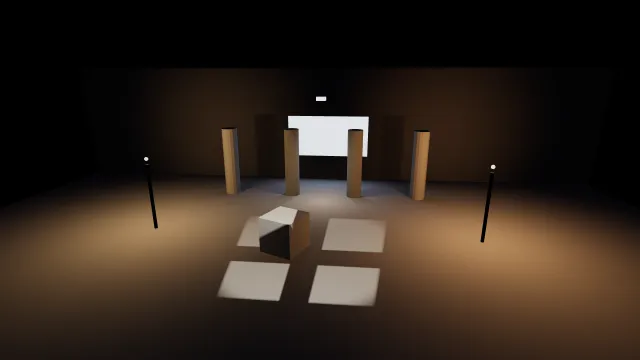
Starts examples/lights in this page, on WebGPU where your browser has it.
Point lights
/** Two lamps on posts, one of them flickering, and a downlight aimed at the floor between pillars. */
const lamps: PointLightSource[] = [
  {
    x: -6,
    y: 2.7,
    z: 1.5,
    r: 2.4,
    g: 1.5,
    b: 0.7,
    radius: 10,
    flicker: 0,
    shadowNear: 0.2,
    sourceRadius: 0.08,
  },
  {
    x: 6,
    y: 2.7,
    z: 1.5,
    r: 2.4,
    g: 1.3,
    b: 0.55,
    radius: 10,
    flicker: 0.3,
    shadowNear: 0.2,
    sourceRadius: 0.08,
  },
  {
    x: 0,
    y: 4.5,
    z: -2,
    r: 4.5,
    g: 3.6,
    b: 2.6,
    radius: 9,
    flicker: 0,
    shadowNear: 0.2,
    sourceRadius: 0.05,
    dirX: 0,
    dirY: -1,
    dirZ: 0,
    coneInnerDeg: 70,
    coneOuterDeg: 85,
    iesProfile: 0,
  },
];A PointLightSource is a position, a colour and a radius: the distance at which its light reaches
zero. Colours are linear and may exceed one, which is how a light is made brighter.
flickermodulates the colour; zero keeps the light steady. It is driven by the time you pass to the selection, so a held clock holds every flame still and a replay flickers the same way.sourceRadiusis the emitter's size in metres. It widens the shadow's penumbra and spreads the highlight a polished surface shows, so a lamp close to a glossy panel reads as a small bright disc instead of a speckle.shadowNearis where its shadow begins, and the next sections explain why it matters.
How a light fades is a quality option. pointLightFalloff: 'smooth', the default, shapes the curve
to the radius, zero exactly at the edge and gentle near the source. 'inverseSquare' is the
physical law, windowed so the light still ends at its radius, and is far brighter close in. The
strip under the example switches between them.
A light may name its own fall instead, with falloffExponent: (1 - (d/R)^2)^n, R its radius
and n the exponent, with no distance term at all. It is the falloff other tools give a light
without inverse-square falloff, so a rig authored in one keeps its shape: a fill meant to light a whole hall
across a hundred metres does, where the inverse square would have it gone a few metres out. Absent
or 0, the light takes the frame's falloff. Each chosen light's exponent reaches the environment as
env.lightFalloffExponents, filled from the selection's falloffExponents beside the cones. Water,
DriftLight's volume and DriftRay's bounce read it too, so the light falls the same way on every
surface it reaches.
Choosing the lights a frame shades
/** Sized from the renderer, so the shader shades the nearest lights and never an arbitrary few. */
const chosen = createPointLightBuffer(renderer.shadedLights);

function chooseLights(focusX: number, focusZ: number): void {
  const eye = scene.camera.position;
  selectPointLights(
    lamps,
    eye[0],
    eye[1],
    eye[2],
    chosen,
    time,
    DEFAULT_POINT_LIGHT_VIEW_RANGE,
    focusX,
    0.6,
    focusZ,
  );
  env.lightCount = chosen.count;
  env.lightPositions = chosen.positions;
  env.lightColors = chosen.colors;
  env.lightRadii = chosen.radii;
  env.lightSourceRadii = chosen.sourceRadii;
  env.lightWeights = chosen.weights;
  env.lightDirections = chosen.directions;
  env.lightConeCos = chosen.coneCos;
  env.lightIesProfiles = chosen.iesProfiles;
  env.lightFalloffExponents = chosen.falloffExponents;
  env.activeLightWorldIndices = chosen.sourceIndex;
  for (let slot = 0; slot < chosen.count; slot += 1) {
    const spot = chosen.sourceIndex[slot] === SPOT;
    /* The cookie's tile, and which way is up in it: a cookie with no axis is not projected. */
    env.lightCookies[slot] = spot ? 0 : -1;
    env.lightIesAxes[slot * 3] = spot ? 1 : 0;
  }
  env.areaLights = windowBuffer;
}A world may hold thousands of lights, and a frame shades the nearest few. selectPointLights picks
them, nearest first, within a view range of the point you give it (180 metres unless you say
otherwise), and packs them into a PointLightBuffer. Copy the buffer into the environment as shown,
every frame, and the next mesh pass is lit by it.
Size the buffer from renderer.shadedLights. The shader shades up to sixteen point lights at
once, and on a WebGL2 device with few uniform registers the renderer builds a smaller shader and
says so on the console. A buffer wider than the shader would leave an arbitrary subset lit; a buffer
sized from the renderer leaves the nearest ones lit, which is a smaller scene instead of a
flickering one.
Lights near the edge of the chosen set fade in and out by their weights instead of popping.
considered against count tells you how many lights were offered and how many won a slot: 63
offered and 10 bound is a scene to prune.
The selection takes two points. The first, usually the camera, orders the lights to shade. The second, the last three arguments, is where whatever might cast a shadow is standing, usually the player, and it orders the shadow maps. A third-person camera sits behind its character, and a fire the character stands beside must keep its shadow even when the camera is out of the fire's reach.
Lighting channels
/** The channel a character's own lights are on. The stage's lights stay on 1, the default. */
export const CHARACTER_LIGHTS = 2;

/**
 * After the selection, each chosen light's channel from the source it came from: the key light on
 * the character's channel, everything else on the stage's.
 */
export function lightChannels(env: Environment, chosen: PointLightBuffer, keyLight: number): void {
  const channels = env.lightChannels;
  if (channels === undefined) return;
  for (let slot = 0; slot < chosen.count; slot += 1) {
    channels[slot] = chosen.sourceIndex[slot] === keyLight ? CHARACTER_LIGHTS : 1;
  }
}

/** The character takes the stage's light and its own; the floor, naming nothing, the stage's. */
export const characterMaterial: SurfaceMaterial<SurfaceTextureHandle> = {
  lightChannels: 1 | CHARACTER_LIGHTS,
};A light shades a surface only where their lighting channels share a bit. Each chosen light's mask is
env.lightChannels, one a slot, filled from the source it came from as the cookies and profile axes
are; each material's is SurfaceMaterial.lightChannels. Both are whole masks from 1 to 255, and 1
by default, so a scene that names none is lit exactly as before. The use is a character's own key
and rim lights: on a channel of their own, they light the character and leave the floor around it
as the stage's lights have it.
Channels belong to point and spot lights, in the fixed path and the froxel table alike. The sun, the sky, the probes, rectangles, DriftLight and the GPU-driven pipeline light every surface whatever its mask.
Spots
/** A spot high over the camera's shoulder, aimed down at the floor in front of the pillars. */
const SPOT = lamps.length;
lamps.push({
  x: 0,
  y: 7,
  z: 7,
  r: 4,
  g: 3.8,
  b: 3.4,
  radius: 16,
  flicker: 0,
  shadowNear: 0.2,
  sourceRadius: 0.04,
  dirX: 0,
  dirY: -1,
  dirZ: -0.55,
  coneInnerDeg: 18,
  coneOuterDeg: 24,
});A direction and two cone angles make a point light a spot. Inside coneInnerDeg the light is at
full strength, outside coneOuterDeg it is zero, and between them the edge is smooth. A light with
a direction and no coneOuterDeg stays a point light.
A spot's shadow uses the same map a point light's does, which covers the whole sphere, so a narrow cone uses a small part of it. A 45 degree cone gets about 0.38 of the map's linear resolution, a 10 degree cone about 0.13: comfortable for a lamp, visibly coarse for a stage spotlight.
Cookies
/** A cookie is any image the spot projects: here a window frame, white panes and black bars. */
function windowFrame(): HTMLCanvasElement {
  const size = 128;
  const canvas = document.createElement('canvas');
  canvas.width = size;
  canvas.height = size;
  const paint = canvas.getContext('2d');
  if (paint === null) return canvas;
  paint.fillStyle = '#000';
  paint.fillRect(0, 0, size, size);
  paint.fillStyle = '#fff';
  const pane = size / 3;
  const bar = size / 16;
  for (let row = 0; row < 2; row += 1)
    for (let column = 0; column < 2; column += 1)
      paint.fillRect(
        size / 6 + column * (pane + bar),
        size / 6 + row * (pane + bar),
        pane - bar,
        pane - bar,
      );
  return canvas;
}A cookie is an image a spot projects, such as a window frame, a grille or the shadow of leaves.
White passes the light, black stops it, and a colour tints it. setSpotCookies uploads a set once,
as tiles of one atlas, and a light uses a tile by setting its slot of lightCookies in the
environment. The engine ships no cookie images; any image or canvas of your own will do.
A cookie fills the spot's outer cone, so one image works in a narrow spot and a wide one. It is
oriented by the light's slot in lightIesAxes, the direction that is up in the image, and a
cookie on a light with no axis is not projected at all. The example sets both in the loop that
copies the selection into the environment.
Photometric profiles
/**
 * A photometric profile built in code: intensity that falls to nothing sixty degrees off the aim.
 * The downlight asked for row 0 of the atlas with `iesProfile: 0`.
 */
function downlight(): PhotometricProfile {
  const steps = 19;
  const verticalAngles = new Float32Array(steps);
  const candela = new Float32Array(steps);
  for (let i = 0; i < steps; i += 1) {
    const degrees = (i / (steps - 1)) * 180;
    const t = Math.max(0, 1 - degrees / 60);
    verticalAngles[i] = degrees;
    candela[i] = 1000 * t * t;
  }
  return { verticalAngles, horizontalAngles: new Float32Array([0]), candela, maxCandela: 1000 };
}A photometric profile is a fixture's measured intensity by angle. Manufacturers publish them as
IESNA LM-63 files, and readIesProfile in @driftengine/assets reads one:
/** Load a manufacturer's LM-63 file and hand it to the renderer as row 0 of the atlas. */
export async function loadFixture(renderer: RendererApi, url: string): Promise<void> {
  const text = await (await fetch(url)).text();
  renderer.setIesProfiles([readIesProfile(text)]);
}setIesProfiles uploads a set once, since a fixture's distribution does not change while the game
runs, and a light picks its row with iesProfile. Passing an empty list clears them, and the lights
go back to plain lights. The reader refuses a file whose TILT is anything but NONE, since that
fixture carries a correction table for being mounted at an angle.
A profile is measured from the light's aim, so give a profiled light a direction and a cone, as
the downlight in the example does with a wide cone that leaves the shaping to the profile. A street
light or a wall washer throws more one way than another, and its profile has several horizontal
planes; the light's slot in lightIesAxes says where the profile's azimuth zero points.
Rectangular lights
/** The lit window: a rectangle that emits along `right × up`, which here is into the courtyard. */
const windows: AreaLightSource[] = [
  {
    x: 0,
    y: 2.4,
    z: -5.8,
    r: 2.4,
    g: 3.2,
    b: 4.8,
    rightX: 1,
    rightY: 0,
    rightZ: 0,
    upX: 0,
    upY: 1,
    upZ: 0,
    halfWidth: 2.2,
    halfHeight: 1.1,
    castsShadow: true,
    shadowRange: 18,
    shadowNear: 0.2,
  },
];
const windowBuffer = createAreaLightBuffer();
selectAreaLights(windows, windowBuffer);An AreaLightSource is a rectangle that emits: a window, a softbox, a lit panel. right and up
are its axes, halfWidth and halfHeight its size, and it emits along right × up. It is
one-sided unless twoSided is set, so a window does not light the wall it is set into.
selectAreaLights normalises the axes and makes them perpendicular, and env.areaLights takes the
buffer. The fixed path shades up to four rectangles (maxAreaLights); with clusteredLights on,
the rest go through the froxel table with the point lights, as Clustered shading
describes.
barnDoorAngle hangs barn doors on a rectangle: a flap hinged at each edge, standing that many
degrees from its normal, barnDoorLength metres long (20 cm when absent). At 90 they fold flat and
hide nothing; smaller narrows the light to the opening they leave, a softbox becoming a beam. Each
fragment shades the part of the rectangle no door's tip hides, light and highlight alike, on the
fixed path and through the froxel table. Each door is taken as endless along its hinge, so where two
meet the corner they hide is square rather than mitred, and a shadowed rectangle's map is still
baked from its whole face.
A rectangle does not cast a shadow unless castsShadow is set, and then it must say how far its
shadow reaches with shadowRange, since a rectangle has no radius to take it from. It casts into
the same shadow array the point lights use, so it needs pointShadows on, and the same list, in
the same order, must go to selectAreaLights, prepareStaticPointShadows and
updatePointShadows: the order is what ties a slot to a rectangle.
Light shadows
/** The two caster lists: baked once and kept, and drawn again every frame. */
const still: ShadowCasters = (sink) => sink.mesh(courtyard, fixed.worldMatrix);
const moving: ShadowCasters = (sink) => sink.mesh(block, blockNode.worldMatrix);

/** Size the shadow array once, for every lamp and every rectangle that casts. */
renderer.prepareStaticPointShadows(lamps, windows);Point lights cast by default. Two lists of casters describe the scene to the shadow system: the
geometry that never moves, which is baked into a light's map when the light first matters and kept,
and the geometry that moves, which is drawn every frame into live maps centred on the casting point
from the selection. prepareStaticPointShadows sizes the shadow array for the world's lights once,
at load. Without it nothing casts, and the renderer says so on the console once.
chooseLights(blockX, blockZ);
renderer.updatePointShadows(
  lamps,
  chosen.sourceIndex,
  chosen.count,
  blockX,
  0.6,
  blockZ,
  time - shadedAt,
  still,
  moving,
  chosen.shadowIndex,
  chosen.shadowCount,
  windows,
);
shadedAt = time;Every frame, after the selection, updatePointShadows binds the chosen lights' maps, bakes what has
changed and redraws the live maps. Maps are borrowed from a pool sized to the light budget plus four,
so memory follows how many lights can be shaded, never how many the world contains. A light entering
the set is often already baked, because the four spare maps hold the next-nearest lights.
Three things decide whether a light's shadow is good:
shadowNearsmall, but outside the fixture. It clips every caster, and a lamp's own housing inside it throws a hard square across the floor much larger than the housing.- A steady radius. The radius is the map's far plane, so a light whose radius is animated is
re-baked every frame and takes the budget from every other lamp. Set
castsShadow: falseon lights that pulse, and on small lights that were never meant to cast. - The bake budget.
pointShadowFacesPerFrame, two faces by default, spreads static bakes over frames, and raising it makes lamps cast sooner.liveShadowFacesPerFrame, twelve by default, bounds the live ones; lowering it spreads a moving caster's shadow over two or three frames, so it trails a fast character slightly, and saves frame time on a phone.pointShadowFaceSizesets the resolution, 512 by default.
Thousands of fixed lights
/** Thousands of street lamps that never move, bucketed once into twenty-metre cells. */
export function streetLighting(lamps: readonly PointLightSource[], shaded: number) {
  const grid = createLightGrid(lamps, 20);
  const chosen = createPointLightBuffer(shaded);
  return {
    chosen,
    /** The same choice `selectPointLights` makes, looking only at the cells near the eye. */
    choose(x: number, y: number, z: number, time: number): PointLightBuffer {
      selectGridLights(grid, x, y, z, chosen, time, DEFAULT_POINT_LIGHT_VIEW_RANGE);
      return chosen;
    },
  };
}selectPointLights visits every light in the list each frame. For a city's fixed street lamps,
createLightGrid buckets them once into cells and selectGridLights looks only at the cells near
the eye. The choice is the plain scan's exactly, tie for tie. A light that moves must be re-bucketed,
so a scene's few moving lights stay in a plain list.
Lights the frame does not shade still light the world when they belong to a DriftLight field, which sums every fixed light into textures the shader reads; see DriftLight.
Clustered shading
/**
 * With `clusteredLights: true` a fragment shades only the lights in its own froxel, so the buffer
 * can be far wider than the sixteen the plain path binds.
 */
export const crowded = createPointLightBuffer(MAX_CLUSTERED_LIGHTS);With the clusteredLights quality option on, the view is divided into froxels, each fragment shades
only the lights in its own froxel, and the budget becomes 320 lights. Size the buffer to
MAX_CLUSTERED_LIGHTS, as above.
It costs one texture unit on WebGL2 and a binning pass every frame, on the main thread on WebGL2 and on the GPU on WebGPU: measured at 0.411 ms with sixteen lights and 2.6 ms with 256. Binning cost follows a light's area on screen, so a scene of a few enormous lights pays most and gains least, and the fixed path is the better choice there. Off by default.
Shading cost follows how many lights each froxel holds, which grows with how much the lights overlap on screen. At 3840 by 2160, 320 lights of radius 8 crowded around the view hold 13.5 lights in an occupied froxel on average and cost 7.4 ms of shading on a desktop GPU; at radius 12 the same lights cost 12.7 ms. A light with a cone, a profile, a cookie, a point shadow, channels or a falloff exponent of its own is read in six texels and a plain one in two, and a frame whose lights are all plain never reads the other four.
A spot is binned by its cone, not only by the sphere its radius draws: a froxel the cone cannot reach takes nothing from it, so a narrow spot with a long reach costs the froxels it lights.
More rectangles than four
/**
 * A row of ceiling panels, more than the fixed four. With `clusteredLights` on, the rectangles past
 * `maxAreaLights` are shaded through the froxel table, each out to its `range`.
 */
export function ceilingPanels(env: Environment, count: number): void {
  const panels: AreaLightSource[] = [];
  for (let i = 0; i < count; i += 1) {
    panels.push({
      x: -10 + i * 2,
      y: 3.5,
      z: 0,
      r: 6,
      g: 6,
      b: 5.4,
      /* It emits along right x up, which is straight down. */
      rightX: 1,
      rightY: 0,
      rightZ: 0,
      upX: 0,
      upY: 0,
      upZ: 1,
      halfWidth: 0.6,
      halfHeight: 0.15,
      range: 6,
    });
  }
  const buffer = createAreaLightBuffer(count);
  selectAreaLights(panels, buffer);
  env.areaLights = buffer;
}With the table on, rectangles past the fixed maxAreaLights are binned beside the point lights
and shaded exactly as the fixed ones are, highlight and all. They cast no shadow, and each is
windowed to zero at its range, in metres from its centre; a rectangle that names none reaches as
far as its light on its own axis stays above a thousandth of a scene unit. Without the table, a
rectangle past the fixed ones is not drawn, and the renderer says so once.
Light from surfaces
Emissive surfaces glow in their own colour, by vertex or by map; see Materials. Three environment fields govern them:
nightFactoris the switch: at 0 nothing emits, whatever the mesh says. A daylit scene with a lit sign in it sets it to 1.emissiveGainis how strongly.nightEmissiveadds emission only where the directional light does not reach, for city lights on a planet that turns: they show on the night side and not on the day side. It needs thenightEmissivequality option, which compiles the term in.
An emissive surface does not light its neighbours the way a fixture does. To light the floor under a glowing panel, put a light there too, as the example does with its window and its lamps.