 DriftEngine
Worlds
Writable textures
Marks written into a texture at run time, allocated only where they land, recorded beside the input so a replay or a rollback draws the same wall.
npm install @driftengine/texture @driftengine/script
A scorch mark, a footprint in snow or paint on a wall is a texture changed while the game runs. Changed the usual way, the marks are not part of the simulation and nothing records them: a replay of the session shows clean walls, and a rollback leaves marks from frames that never happened. DriftEngine writes marks into a sparse overlay and records every write in a journal beside the input, so replaying the journal burns the same wall and rolling back rebuilds the wall as it was.
The example is a wall a turret scorches three times a second, where and how large decided by a DriftScript module from nothing but the tick. Run the clock backwards and the marks disappear newest first; run it forwards again and the same marks come back in the same places.
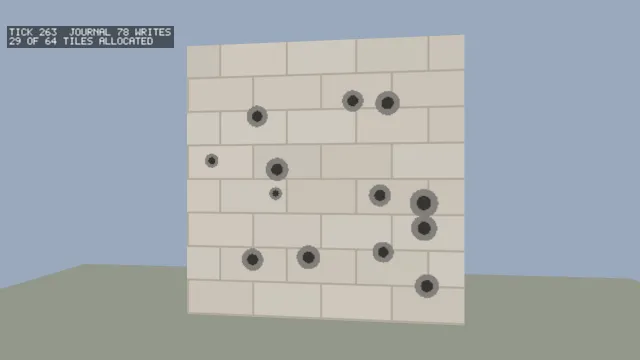
Starts examples/scorch in this page, on WebGPU where your browser has it.
The overlay
/** The wall's texture, 256 texels square, as eight by eight tiles of 32 the overlay allocates. */
const RESOLUTION = 256;
const overlay = createOverlay(32, { tilesAcross: 8 });
const journal = createOverlayJournal();

/** One shot: a soot halo and a darker core, each written into the three colour channels. */
function scorch(tick: number, u: number, v: number, radius: number): void {
  const marks: [number, number][] = [
    [radius, 0.22],
    [radius * 0.5, 0.06],
  ];
  for (const [r, shade] of marks) {
    for (let channel = 0; channel < 3; channel += 1) {
      writeOverlay(overlay, u, v, r, channel, shade);
      recordOverlayWrite(journal, tick, u, v, r, channel, shade);
    }
  }
}createOverlay(tileSize, { tilesAcross, addressMode }) covers the unit square of a texture's
coordinates with tilesAcross tiles a side of tileSize texels each. Only tiles a write touches
are allocated, so a mark on one wall does not allocate a layer for the building:
overlayTileCount and overlayTiles say which exist. The address mode is the base texture's,
ADDRESS_CLAMP or ADDRESS_WRAP, so a mark near the edge of a wrapping texture lands on the far side
where the base repeats.
writeOverlay(overlay, u, v, radius, channel, value) writes value into one channel of every texel
within radius of (u, v), a disc, with the radius in texture coordinates. A texel carries
OVERLAY_CHANNELS (4) channels, and the overlay remembers which channels of which texels were
written, so a scorch that darkens the colour leaves a channel it did not touch to the base.
Drawing it
/** The wall as the base with every written channel of every written texel laid over it. */
const pixels = new ImageData(RESOLUTION, RESOLUTION);
const sampled = new Float32Array(OVERLAY_CHANNELS);
function paint(): ImageData {
  for (let y = 0; y < RESOLUTION; y += 1) {
    for (let x = 0; x < RESOLUTION; x += 1) {
      const u = (x + 0.5) / RESOLUTION;
      const v = (y + 0.5) / RESOLUTION;
      const at = (y * RESOLUTION + x) * OVERLAY_CHANNELS;
      const mask = writtenMaskAt(overlay, u, v);
      if (mask !== 0) sampleOverlay(overlay, u, v, sampled);
      for (let c = 0; c < OVERLAY_CHANNELS; c += 1) {
        const value = (mask & (1 << c)) !== 0 ? (sampled[c] ?? 0) : (base[at + c] ?? 0);
        /* sRGB for the canvas, from the linear values the wall is authored in. */
        pixels.data[at + c] = c === 3 ? 255 : Math.round(Math.pow(value, 1 / 2.2) * 255);
      }
    }
  }
  return pixels;
}writtenMaskAt(overlay, u, v) says which channels of a texel are written, a bit each, and
sampleOverlay(overlay, u, v, out) reads them, returning false where nothing is. The base shows
through everywhere else. compositeOverlay(out, base, overlay, written) does the same for whole
arrays of texels, such as one tile against the base's matching tile. The example composites onto
an image and replaces its surface texture with updateSurfaceTexture, which re-uploads it and is
done only on a frame where something was written.
The journal
createOverlayJournal() holds the writes, and recordOverlayWrite(journal, frame, u, v, radius, channel, value) adds one at the frame it happened on, beside the input that caused it.
journalLength counts them.
/** The simulation's tick, which the switch runs forwards or backwards. */
let tick = 0;
let backwards = flag('clock', 'forwards') === 'backwards';
let dirty = true;
controls([
  {
    key: 'clock',
    label: 'clock',
    value: backwards ? 'backwards' : 'forwards',
    options: ['forwards', 'backwards'].map((c) => ({ text: c, value: c })),
    change: (value) => {
      backwards = value === 'backwards';
      /* Going forwards from here: what the journal holds past now never happened. */
      if (!backwards) truncateJournalFrom(journal, tick + 1);
    },
  },
]);

function step(): void {
  if (backwards) {
    if (tick === 0) return;
    tick -= 1;
    /* A write cannot be undone, so the wall is rebuilt from the journal up to the earlier tick. */
    rewindOverlay(overlay, journal, tick);
    dirty = true;
    return;
  }
  tick += 1;
  if (!exported<ByTick<boolean>>(turret, 'fires')(tick)) return;
  scorch(
    tick,
    exported<ByTick<number>>(turret, 'aimU')(tick),
    exported<ByTick<number>>(turret, 'aimV')(tick),
    exported<ByTick<number>>(turret, 'size')(tick),
  );
  dirty = true;
}applyOverlayJournal(overlay, journal, upToFrame)replays every write up to a frame onto what the overlay already holds, which is how a live session catches up frame by frame.rewindOverlay(overlay, journal, upToFrame)puts the overlay back as it was at a frame: it clears it and replays. A write cannot be undone, since two marks on one texel leave no record of what was underneath, so a rollback rebuilds.truncateJournalFrom(journal, frame)drops the writes from a frame on. Call it when the simulation resumes from an earlier frame: the frames it re-simulates record their writes again, and a journal that still held the old ones would draw both what happened and what was undone.clearOverlayempties an overlay, andemptyLike(overlay)makes an empty one of the same shape, which is what a replay starts from.
A journal travels as bytes: encodeOverlayJournal writes JOURNAL_ENTRY_BYTES (24) an entry
after a JOURNAL_MAGIC and JOURNAL_VERSION header, and decodeOverlayJournal returns null for
bytes that are not one, never half a journal, since a replay against half a log diverges partway
for no visible reason.
Behaviour that replays
The turret's rules are a DriftScript module, and every answer is a function of the tick alone:
// A shot every third of a second, at sixty ticks a second.
fn fires(tick: u32) -> bool {
    return tick % 20 == 0
}

// Where it lands, as a fraction of the wall across and up.
fn aimU(tick: u32) -> f32 {
    return random.range(tick, 0.08, 0.92)
}

fn aimV(tick: u32) -> f32 {
    return random.range(tick + 1, 0.1, 0.9)
}

// How wide the scorch is, as a fraction of the wall.
fn size(tick: u32) -> f32 {
    return random.range(tick + 2, 0.02, 0.05)
}drift/random draws from a seed and nothing else, so re-simulating the same ticks fires the same
shots, which is what makes the journal and the simulation agree after the clock has run backwards.
Edit a rule under npm run examples and the shots from then on follow it; the marks already made
stay as they were made.
/** The turret's rules, hosted. They read nothing but the tick. */
const turret = hostScript(turretScript);
type ByTick<T> = (tick: number) => T;
if (import.meta.hot) {
  import.meta.hot.accept('./turret.drs', (next) => {
    if (next !== undefined) patchModule(turret, next as Record<string, unknown>, {});
  });
}