 DriftEngine
Systems
Display and the host
The window, the screen and the shell as capabilities a game asks about: window mode and size, orientation, focus and quitting, files, and the boot badge.
npm install @driftengine/core
A game runs in a browser tab, in a desktop shell, or on a phone, and each can do different things
with its window. The engine does not guess which it is in. It declares what it needs as a handful of
capabilities, a host supplies them, and a game asks them what is possible before it draws a control.
A browser host ships with the engine for each, and each answers false or null where a browser
genuinely cannot, instead of doing nothing quietly.
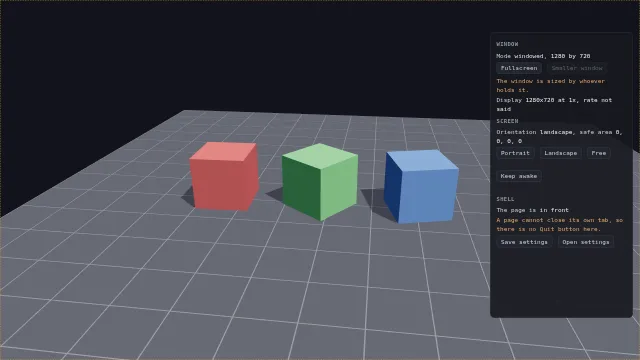
Starts examples/display in this page, on WebGPU where your browser has it.
The example is a video settings screen over a turning test card. Every line is what the host answered, every button is drawn from what it allows, and where the answer is no the panel says why.
The host
/* The host, as four capabilities. A shell passes its own; a page in a browser uses these. */
const display: DisplayControl = new BrowserDisplay(document.documentElement);
const screen: ScreenPresentation = new BrowserScreenPresentation();
const lifecycle: Lifecycle = new BrowserLifecycle();
const files: FileDialogs = new BrowserFileDialogs();Four capabilities, each an interface with a browser implementation beside it. A desktop shell
passes its own, and a game written against the interfaces runs in both without asking which it is
in. A packaged game takes all of them from createHost, which
Packaging an application covers:
| Capability | What it answers |
|---|---|
DisplayControl |
The window's mode and size, whether it can be resized, the displays and their refresh rate |
ScreenPresentation |
Orientation and locking it, the safe area, keeping the screen awake |
Lifecycle |
Focus, whether the game can quit, and a request to quit from outside |
FileDialogs |
Opening and saving a file through the platform's picker |
The window
/* Each control is drawn from the host's own answer, read when it is drawn. */
function drawWindow(): void {
  const { width, height } = display.size();
  say('mode', display.mode());
  say('size', `${Math.round(width)} by ${Math.round(height)}`);
  /* A browser never sizes its own window; a shell will, except while it covers a display. */
  $<HTMLButtonElement>('smaller').disabled = !display.canSetSize();
  say('size-note', display.canSetSize() ? '' : 'The window is sized by whoever holds it.');
  const shown = display.displays();
  say(
    'displays',
    shown
      .map(
        (d) =>
          `${d.label} at ${d.scale}x, ${d.refreshHz === null ? 'rate not said' : `${d.refreshHz} Hz`}`,
      )
      .join('; '),
  );
}

$('fullscreen').addEventListener('click', () => {
  /* Fullscreen needs a gesture, which this click is. `false` means refused, never an error. */
  void display
    .setMode(display.mode() === 'fullscreen' ? 'windowed' : 'fullscreen')
    .then(drawWindow);
});
$('smaller').addEventListener('click', () => {
  const { width, height } = display.size();
  void display.setSize(Math.round(width * 0.8), Math.round(height * 0.8)).then(drawWindow);
});
addEventListener('resize', drawWindow);
document.addEventListener('fullscreenchange', drawWindow);mode() is 'windowed' or 'fullscreen', read each time and never remembered, and setMode
answers false when the platform refused, which a browser does outside a gesture. There are two
modes and not three, because Chromium never takes an exclusive fullscreen.
canSetSize() asks whether setSize would work, without performing one. A browser never resizes
its own window, and a shell will not while the window covers a display, so a settings screen reads
it each time it draws and greys its resolution control. displays() lists what the platform admits
to: a browser knows the screen it is on and nothing about any other, and leaves refreshHz null
because it will not say.
The screen
/* What a phone has instead of a window. The safe area is drawn as an outline, so a notch shows. */
function drawScreen(): void {
  say('orientation', screen.orientation());
  const inset = screen.safeArea();
  const frame = $('safe-area');
  frame.style.inset = `${inset.top}px ${inset.right}px ${inset.bottom}px ${inset.left}px`;
  say('insets', `${inset.top}, ${inset.right}, ${inset.bottom}, ${inset.left}`);
}

for (const choice of ['portrait', 'landscape', 'free'] as const) {
  $(`lock-${choice}`).addEventListener('click', () => {
    const wanted: ScreenOrientation | null = choice === 'free' ? null : choice;
    void screen.lockOrientation(wanted).then((done) => {
      say('lock-note', done ? `Locked to ${choice}.` : 'This platform will not lock it.');
      drawScreen();
    });
  });
}

let awake = false;
$('awake').addEventListener('click', () => {
  awake = !awake;
  void screen.keepAwake(awake).then((held) => {
    say(
      'awake-note',
      awake
        ? held
          ? 'The screen stays on.'
          : 'There is no wake lock here.'
        : 'The screen may sleep.',
    );
  });
});What a phone has instead of a window. lockOrientation answers false where the platform refuses,
which iOS always does and a desktop browser does too. safeArea() is the logical pixels the
platform has taken from each edge for a notch or a home bar, zero on a plain window; the example
outlines it. keepAwake holds a wake lock while a game is being watched and not touched, and
answers whether it got one.
Focus and quitting
/* The test card stops while the page is not in front, and Quit exists only where it works. */
let focused = true;
lifecycle.onFocusChange((now) => {
  focused = now;
  say('focus', now ? 'in front' : 'behind something');
});
lifecycle.onQuitRequest(() => {
  /* A shell waits for this before it closes; a browser never calls it. */
  saveSettings();
});
$('quit').hidden = !lifecycle.canQuit;
say(
  'quit-note',
  lifecycle.canQuit ? '' : 'A page cannot close its own tab, so there is no Quit button here.',
);
$('quit').addEventListener('click', () => lifecycle.requestQuit());onFocusChange tells a game when it goes behind something, which is when to pause. canQuit is
what an exit button is drawn from: a page cannot close its own tab and an iOS app does not exit, so
a menu that always shows Quit has a button that does nothing on two platforms, and a game that
branches on whether it is in a shell has written down an assumption that stops being true. A shell
calls onQuitRequest when its window is asked to close and waits for the game; a browser never
calls it.
Files
/* The settings as a file the player keeps. A shell's picker is a native dialog; a browser's is the
   File System Access picker where it has one, and throws where it has none. */
interface Settings {
  mode: string;
  cursor: string;
}
let cursorColor = flag('cursor', 'amber');

function saveSettings(): void {
  const settings: Settings = { mode: display.mode(), cursor: cursorColor };
  const bytes = new TextEncoder().encode(JSON.stringify(settings, null, 2));
  files.saveFile('settings.json', bytes).then(
    (saved) => say('file-note', saved ? 'Saved.' : 'Not saved.'),
    () => say('file-note', 'There is no file picker in this browser.'),
  );
}

$('save').addEventListener('click', saveSettings);
$('open').addEventListener('click', () => {
  files.openFile(['.json']).then(
    (opened) => {
      if (opened === null) return say('file-note', 'Nothing opened.');
      const settings = JSON.parse(new TextDecoder().decode(opened.bytes)) as Partial<Settings>;
      if (typeof settings.cursor === 'string') applyCursor(settings.cursor);
      say('file-note', `Opened ${opened.name}.`);
    },
    () => say('file-note', 'There is no file picker in this browser.'),
  );
});openFile(accept) answers the file's name and bytes, or null when the player cancelled, and
saveFile(name, bytes) answers whether it was saved. Both throw where there is no picker at all: a
shell supplies a native dialog, and a browser uses the File System Access picker where it has one.
Store features
/**
 * Achievements and presence, from whatever store the shell is built for. The engine never calls
 * these on its own and ships nothing for them, so a game that never asks for an achievement
 * carries no store SDK. Neither may throw: a store that is offline is an ordinary state.
 */
export function storeServices(store: {
  unlock(id: string): Promise<void>;
  presence(text: string): void;
}): PlatformServices {
  return {
    unlockAchievement(id) {
      store
        .unlock(id)
        .catch((error: unknown) => console.warn('achievement not unlocked', id, error));
    },
    setRichPresence(text) {
      store.presence(text);
    },
  };
}Achievements and presence are PlatformServices, and there is no browser version of it: there is
nothing honest a page can do with an achievement. A shell built for a store supplies one, the engine
never calls it on its own, and a game that never asks for an achievement ships no store SDK. Neither
method may throw.
A cursor of its own
/* A cursor drawn from a grid of characters, at the device pixel ratio, recoloured at will. */
const ARROW = [
  'x.......',
  'xx......',
  'xox.....',
  'xoox....',
  'xooox...',
  'xoooox..',
  'xooxxxx.',
  'xx......',
];
const INKS: Record<string, string> = { amber: '#f0a437', cyan: '#4fd6e0', white: '#f2f4f8' };

function applyCursor(name: string): void {
  cursorColor = name in INKS ? name : 'amber';
  canvas.style.cursor = pixelCursor(
    ARROW,
    { x: '#0b0d12', o: INKS[cursorColor] as string },
    {
      scale: 3,
      hotspotX: 0,
      hotspotY: 0,
    },
  );
}
applyCursor(cursorColor);
controls([
  {
    key: 'cursor',
    label: 'cursor',
    value: cursorColor,
    options: Object.keys(INKS).map((ink) => ({ text: ink, value: ink })),
    change: (value) => applyCursor(value),
  },
]);pixelCursor(rows, palette, options) builds a CSS cursor from a grid of characters, each mapped to
a colour and absent ones transparent. It is drawn at the device pixel ratio so it stays sharp, costs
no image file, and can be recoloured to match whatever the game is wearing.
Filling a phone's screen
/* On a phone, the first tap anywhere fills the screen, once. On a desktop this does nothing. */
requestFullscreenOnGesture(document.documentElement);A phone's browser keeps its address bar, and a page fills the screen only by being an installed app
that asks for it in its manifest, or by calling fullscreen from a gesture.
requestFullscreenOnGesture(element) does the second, on the first tap anywhere, once per page
load, and only where the pointer is coarse. A desktop player chose their window's size and is never
asked, and a player who leaves fullscreen is not asked again. iPhone Safari has no element
fullscreen, so there only the installed route works.
The badge a game boots behind
/**
 * The badge is on unless a page declines it: a canvas that is one part of a page, or a tool that
 * opens into its own interface, is not a game booting.
 */
export async function toolRenderer(canvas: HTMLCanvasElement) {
  return createRenderer(canvas, {}, { splash: false });
}

/** Or held longer, for a game whose first frame comes before it has anything to show. */
export async function gameRenderer(canvas: HTMLCanvasElement) {
  return createRenderer(canvas, {}, { splash: { minMs: 4000 } });
}createRenderer shows the engine badge over the page until the first frame reaches the screen,
before it even probes for a device, so a web game has a cover while it loads without writing one. It
stays at least three seconds, lifts at the first frame after that, and never stays more than twenty;
the loop is held while it shows, so the first seconds of a game are not spent behind it. splash: false declines it, which is right for a canvas that is one part of a page or a tool that opens into
its own interface, and { minMs } holds it longer. ?splash=0 and ?splash=1 in the address
override it either way on a deployed build. A packaged shell shows its own and suppresses this one.
A game whose first screen takes longer to load than its first frame can hold the badge for it:
holdSplash(promise, { capMs }) keeps it up until the promise settles, either way, as well as until
the first frame. Frames run while the game loads behind it, since a load may need them, and are held
for whatever is left of the three seconds once it has settled. capMs is the game's own ceiling in
place of the twenty seconds. It returns whether there was a badge to hold.