 DriftEngine
Getting started
Your first game
A complete 3D game. An arena with physics, a character, crates to push, orbs to gather against the clock, sound, shadows, a HUD, and rules in DriftScript.
npm install @driftengine/core @driftengine/audio @driftengine/script
This chapter builds a complete game: walk an arena, push crates out of the way, jump up a platform, and gather eight orbs before sixty seconds run out. It has physics, a character controller, shadows, a synthesised sound, a HUD, pause and restart, and it plays with a keyboard, a gamepad or a touch screen.
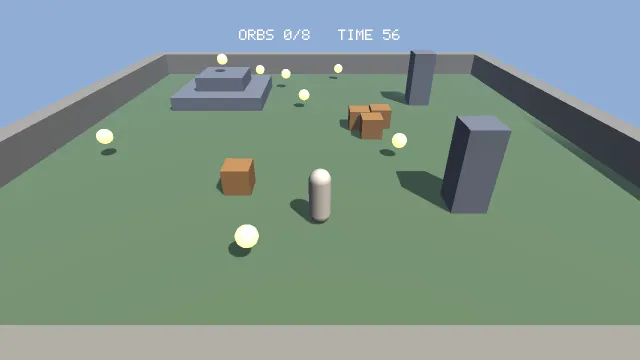
Starts examples/first-game in this page, on WebGPU where your browser has it.
Move with WASD, the arrow keys, the left stick or a thumb on the left of a touch screen. Jump with Space, the bottom face button or a hold on the right of the screen. P pauses, and R starts a new round once one has ended.
The program is two files. examples/first-game/main.ts holds everything that touches the engine:
the renderer, the physics world, the player, input and sound. examples/first-game/round.drs holds
the round's rules in DriftScript, the engine's scripting language: how long a round lasts, how close
counts as reaching an orb, and when the round is won or lost. Each section here is one region of
them, in the order the program runs.
The rules
/** Half the arena's width, in metres. */
const ARENA = 12;
const ORB_COUNT = 8;
/** The same seed lays out the same rounds, in the same order, on every machine. */
const SEED = 2026;Constants first, so the shape of the game is one block. The seed matters more than it looks: everything random in the game draws from a generator made from it, which is what lets a round be replayed. The numbers a round is tuned by, its length and how close the player has to come to an orb, are not here; they are in the script, below, where changing them does not restart the game.
A renderer with shadows
const canvas = document.querySelector<HTMLCanvasElement>('#stage');
if (canvas === null) throw new Error('the page must carry <canvas id="stage">');

const { renderer, backend } = await createRenderer(canvas, {
  maxDevicePixelRatio: 1.75,
  directionalShadows: true,
});

const readout = document.querySelector('#backend');
if (readout !== null) readout.textContent = backend;

renderer.resize();
addEventListener('resize', () => renderer.resize());The same call as Hello world, with directionalShadows turned on. That option
allocates the sun's shadow map; the game still has to draw into it each frame, which happens at the
end of this chapter.
Light that makes orbs glow
const SKY: Vec3 = [0.56, 0.68, 0.84];

const ENV = createEnvironment({
  directionalDir: [0.35, 0.8, 0.45],
  directionalColor: [1, 0.95, 0.86],
  ambient: [0.34, 0.38, 0.46],
  ambientGround: [0.14, 0.12, 0.1],
  // The emissive master switch. At 0 nothing glows, whatever emissiveGain says.
  nightFactor: 1,
  emissiveGain: 1.6,
  fogColor: SKY,
  fogDensity: 0.01,
  fogHeightFalloff: 0.06,
  fogBaseY: 0,
});Fog takes the sky's colour, so the far wall fades into the sky instead of into grey. nightFactor
is 1 because it is the switch that lets emissive surfaces glow, and the orbs are emissive.
The level
const world = new PhysicsWorld({ substeps: 4 });
const level = new MeshBuilder();
const footprints: { x: number; z: number; hx: number; hz: number }[] = [];

/** One box, in the picture and in the physics from the same numbers, so the two cannot disagree. */
function solid(
  x: number,
  y: number,
  z: number,
  hx: number,
  hy: number,
  hz: number,
  color: Vec3,
): void {
  level.addBox([x, y, z], [hx, hy, hz], color);
  world.addBody({ type: BODY_STATIC, shape: boxShape(hx, hy, hz), x, y, z, friction: 0.8 });
  footprints.push({ x, z, hx, hz });
}

const GRASS: Vec3 = [0.4, 0.5, 0.36];
const WALL: Vec3 = [0.62, 0.6, 0.56];
const STONE: Vec3 = [0.5, 0.52, 0.58];

solid(0, -0.5, 0, ARENA, 0.5, ARENA, GRASS);
for (const side of [-1, 1]) {
  solid(side * (ARENA + 0.5), 0.75, 0, 0.5, 0.75, ARENA + 1, WALL);
  solid(0, 0.75, side * (ARENA + 0.5), ARENA, 0.75, 0.5, WALL);
}
// Two tiers, each low enough to jump onto, with an orb waiting on top.
solid(-6, 0.4, -6, 2.6, 0.4, 2.6, STONE);
solid(-6, 1.2, -6, 1.4, 0.4, 1.4, STONE);
solid(6, 1.5, -5, 0.6, 1.5, 0.6, STONE);
solid(5, 1.5, 6, 0.6, 1.5, 0.6, STONE);

const levelMesh = renderer.createMesh(level.build());
const PLATFORM_TOP = 1.6;Every solid thing in the level is one call to solid, which adds a box to the picture and the same
box to the physics world. Keeping both in one function is the simplest way to make sure the walls
you see are the walls you hit.
PhysicsWorld is the engine's own rigid-body solver, and it is deterministic: the same inputs give
the same result, which is what replays and rollback networking rely on. BODY_STATIC bodies never move. boxShape takes
half extents, like MeshBuilder.addBox. substeps is a quality dial: more substeps resolve
contacts more accurately for more time per step, and the behaviour stays the same.
All the boxes go into one MeshBuilder, so the whole level is a single mesh and a single draw.
Crates
const CRATE = 0.5;
const crateMesh = renderer.createMesh(
  new MeshBuilder().addBox([0, 0, 0], [CRATE, CRATE, CRATE], [0.74, 0.52, 0.3]).build(),
);

const crates: number[] = [];
for (const [x, z] of [
  [2, -1],
  [3.1, -1.2],
  [2.5, 0.1],
  [-3, 5],
]) {
  crates.push(
    world.addBody({
      type: BODY_DYNAMIC,
      shape: boxShape(CRATE, CRATE, CRATE),
      x,
      y: CRATE,
      z,
      friction: 0.6,
    }),
  );
}

/** Position and rotation per crate, before and after the last step, for drawing between them. */
const crateBefore = new Float32Array(crates.length * 7);
const crateAfter = new Float32Array(crates.length * 7);

function recordCrates(out: Float32Array): void {
  const b = world.bodies;
  for (let i = 0; i < crates.length; i += 1) {
    const body = crates[i];
    const o = i * 7;
    out[o] = b.posX[body];
    out[o + 1] = b.posY[body];
    out[o + 2] = b.posZ[body];
    out[o + 3] = b.rotX[body];
    out[o + 4] = b.rotY[body];
    out[o + 5] = b.rotZ[body];
    out[o + 6] = b.rotW[body];
  }
}Crates are BODY_DYNAMIC: gravity, contacts and friction move them. The world keeps body state in
flat typed arrays, posX, rotW and so on, indexed by the number addBody returned, which is
cheap to read every step.
The game records every crate's position and rotation before and after each step. Like every moving
thing, a crate is drawn between the two at alpha.
The player
const player = new CharacterController({ maxSpeed: 7, jumpSpeed: 7, pushStrength: 2 });
const START: Vec3 = [0, 1.2, 7];

const playerMesh = renderer.createMesh(
  new MeshBuilder()
    .addCapsule([0, 0, 0], player.radius, player.halfHeight, [0.92, 0.88, 0.82])
    .build(),
);

/** Where the player was before the last step, for the same reason the crates keep one. */
const playerBefore = { x: 0, y: 0, z: 0 };CharacterController is a capsule moved by the controller, not by forces. It slides along walls,
steps up anything lower than stepHeight, stands on slopes up to slopeCos, buffers a jump pressed
just before landing and still allows one just after walking off an edge. pushStrength is how hard
it shoves dynamic bodies it walks into, which is all it takes to push a crate.
The capsule's mesh is built from the controller's own radius and halfHeight, so the picture and
the collision shape match.
Orbs
interface Orb {
  x: number;
  y: number;
  z: number;
  taken: boolean;
}

const random = mulberry32(SEED);
const orbs: Orb[] = [];
const orbMesh = renderer.createMesh(
  new MeshBuilder().addSphere([0, 0, 0], 0.32, [1, 0.78, 0.36], 1).build(),
);

function blocked(x: number, z: number): boolean {
  return footprints.some(
    (f) => f.hx < ARENA && Math.abs(x - f.x) < f.hx + 0.8 && Math.abs(z - f.z) < f.hz + 0.8,
  );
}

/** Lay out a round. Called between rounds, never per frame, so building the list is fine here. */
function scatter(): void {
  orbs.length = 0;
  while (orbs.length < ORB_COUNT - 1) {
    const x = (random() * 2 - 1) * (ARENA - 1.5);
    const z = (random() * 2 - 1) * (ARENA - 1.5);
    if (!blocked(x, z)) orbs.push({ x, y: 0.9, z, taken: false });
  }
  orbs.push({ x: -6, y: PLATFORM_TOP + 0.9, z: -6, taken: false });
}mulberry32(SEED) is a seeded random generator. Seven orbs are scattered where nothing stands, and
the eighth always waits on top of the platform, so every round asks for one climb.
The fourth argument to addSphere is the emissive strength: these orbs glow.
Input
const input = new InputSource(canvas, ['Space', 'ArrowUp', 'ArrowDown', 'ArrowLeft', 'ArrowRight']);

const actions = new ActionMap(input, {
  move: {
    stick: 'left',
    up: ['KeyW', 'ArrowUp'],
    down: ['KeyS', 'ArrowDown'],
    left: ['KeyA', 'ArrowLeft'],
    right: ['KeyD', 'ArrowRight'],
  },
  jump: { keys: ['Space'], buttons: ['faceDown'] },
  restart: { keys: ['KeyR', 'Enter'], buttons: ['start'] },
  pause: { keys: ['KeyP', 'Escape'], buttons: ['select'] },
});

/** A thumb stick on the left of a touch screen, and a tap or hold on the right. */
const touch = new TouchControls(input);
const move = { x: 0, y: 0 };Moving things explains the three layers. The game binds move to a stick and four
key directions, and jump, restart and pause to keys and buttons.
Sound
// A browser lets a page make sound only after a gesture, so the graph is made on the first press.
let sound: AudioGraph | null = null;
let soundAsked = false;
async function startSound(): Promise<void> {
  if (soundAsked) return;
  soundAsked = true;
  const graph = await AudioGraph.create({ stemCount: 0 });
  if (graph === null) return;
  graph.registry.register('orb', {
    urls: [],
    synth: (ctx) => toneBuffer(ctx, 0.2, 660, 1320, 3),
  });
  sound = graph;
  await graph.registry.load(graph.context);
}
addEventListener('pointerdown', () => void startSound());
addEventListener('keydown', () => void startSound());

function chime(): void {
  sound?.play(sound.registry.get('orb'), 0.45);
}@driftengine/audio gives every sound a named slot. A slot lists files to try and a function that
synthesises a stand-in when none of them loads. This one lists no files, so the chime is always the
stand-in: a sine sweep from 660 to 1320 Hz. Drop an orb.opus into the game's assets and add it to
urls, and the real sound replaces it with no other change.
A browser starts audio only after the player touches something, and warns about a page that makes
an audio context before then, so the game makes its graph on the first key or tap. Until then, and
in a browser with no audio at all, where AudioGraph.create returns null, sound is null and
chime plays nothing.
The round, in DriftScript
// How long a round lasts, in seconds, and how close the player has to come to an orb, in metres.
let ROUND_SECONDS: f32 = 60
let REACH: f32 = 1

// Where a round is: still being played, or over one way or the other.
enum Phase {
    Playing
    Won
    Lost
}

// One round, which the page owns and hands to every rule below.
data Round {
    remaining: f32 = 60
    gathered: u32 = 0
    total: u32 = 8
    phase: Phase = Phase.Playing
}The round's state is a data record, Round, and the two numbers it is tuned by are constants
beside it. Where the round is, playing, won or lost, is an enum, Phase, so a misspelt phase is a
compile error and the page reads which one it is as round.phase.tag. A .drs file is compiled by the bundler like any other import, so it needs no build step
of its own, and it is checked before the page loads: a misspelt field or a number where a string
belongs is an error in the terminal, not a surprise in the browser.
// A new round: a full clock, nothing gathered yet, and the number of orbs the page laid out.
fn start(round: mut Round, total: u32) {
    round.remaining = ROUND_SECONDS
    round.gathered = 0
    round.total = total
    round.phase = Phase.Playing
}

// Whether the player, this far from an orb on each axis, is close enough to take it. Pure: it reaches
// nothing outside its arguments and the constants above, which the compiler checks.
@pure
fn reaches(dx: f32, dy: f32, dz: f32) -> bool {
    return dx * dx + dy * dy + dz * dz < REACH * REACH
}

fn gather(round: mut Round) {
    round.gathered = round.gathered + 1
}// The clock, once a step. Every orb taken wins the round; the clock reaching zero first loses it.
// Deterministic: the same round and the same step give the same answer on every machine, so a
// recorded round replays exactly. Reading input or the wall clock here would not compile.
@deterministic
fn tick(round: mut Round, dt: f32) {
if round.phase != Phase.Playing {
return
}
round.remaining = round.remaining - dt
if round.gathered == round.total {
round.phase = Phase.Won
} else if round.remaining <= 0 {
round.remaining = 0
round.phase = Phase.Lost
}
}Each rule is a function the page calls. round: mut Round is the record the page passes in,
which the function may change. Nothing here can reach the renderer, the physics world or the
player: the page works out how far the player is from an orb and asks reaches, and the script
answers. That is the split this whole engine is written around. A script decides; the page, which
holds the engine's objects, acts.
/*
 * The round's rules are a DriftScript module. Loading it builds the module, binding it hands it
 * the engine capabilities it imports, which here is none, and `createRound` makes the record it
 * keeps the round in. The page owns that record and passes it to every rule.
 */
const roundModule = loadModule(roundScript as Record<string, unknown>);
const bound = bindModule(roundModule, {});
if (!bound.bound) throw new Error(bound.reason);

/* A variant reaches the page as its tag: `round.phase.tag` is `'Playing'`, `'Won'` or `'Lost'`. */
interface Round {
  remaining: number;
  gathered: number;
  total: number;
  phase: { tag: 'Playing' | 'Won' | 'Lost' };
}
/* Read through the module each call, so a rule patched by a save is the rule that runs. */
const rules = roundModule.exports as unknown as {
  createRound(): Round;
  start(round: Round, total: number): void;
  reaches(dx: number, dy: number, dz: number): boolean;
  gather(round: Round): void;
  tick(round: Round, dt: number): void;
};
const round = rules.createRound();

/* Saving `round.drs` replaces its functions and keeps `round` as it was: the clock carries on. */
if (import.meta.hot) {
  import.meta.hot.accept('./round.drs', (next) => {
    if (next !== undefined)
      patchModule(roundModule, next as Record<string, unknown>, { Round: [round] });
  });
}loadModule turns the compiled file into a module, and bindModule gives it the engine
capabilities it imports, here none. createRound is made by the compiler from the data
declaration, and the record it returns belongs to the page from then on. The rules are read
through the module on every call, so a function replaced by a save is the one that runs next.
Run the example with npm run examples, start a round, then change ROUND_SECONDS or the tick
rule and save: the game carries on with the clock where it was and plays by the new rule from the
next step. That is the point of keeping rules in a script. DriftScript in a game
says what belongs in one and what does not, and Setting up scripts
covers the build and the hot reload in full.
A round
let paused = false;

function newRound(): void {
  scatter();
  rules.start(round, orbs.length);
  player.teleport(START[0], START[1], START[2]);
  playerBefore.x = player.x;
  playerBefore.y = player.y;
  playerBefore.z = player.z;
}newRound lays out new orbs, has the script start a round over them, and puts the player back at the
start.
It also resets playerBefore, so the first frame of a round doesn't draw the player sliding back
from wherever the last round ended.
The step
function simulate(dt: number): void {
  if (round.phase.tag !== 'Playing') {
    if (actions.consumePress('restart') || touch.consumePrimaryPress()) newRound();
    return;
  }

  // Keys and the pad follow the stick convention, where up is negative. The touch stick reports
  // up as positive, so it is flipped here, once.
  actions.vector('move', move);
  if (touch.moveX !== 0 || touch.moveY !== 0) {
    move.x = touch.moveX;
    move.y = -touch.moveY;
  }

  playerBefore.x = player.x;
  playerBefore.y = player.y;
  playerBefore.z = player.z;
  player.move(world, dt, {
    moveX: move.x * player.maxSpeed,
    moveZ: move.y * player.maxSpeed,
    jump: actions.down('jump') || touch.primaryHeld,
  });

  recordCrates(crateBefore);
  world.step(dt);
  recordCrates(crateAfter);

  for (let i = 0; i < orbs.length; i += 1) {
    const orb = orbs[i];
    if (orb.taken) continue;
    const dx = orb.x - player.x;
    const dy = orb.y - player.y;
    const dz = orb.z - player.z;
    if (rules.reaches(dx, dy, dz)) {
      orb.taken = true;
      rules.gather(round);
      chime();
    }
  }

  if (player.y < -10) player.teleport(START[0], START[1], START[2]);

  rules.tick(round, dt);
}The order is the whole design:
- Read input into a direction.
- Move the player against the world.
- Step the world, so crates the player pushed respond, recording crates before and after.
- Collect any orb the rules say is close enough.
- Let the rules count the clock down and decide whether the round is over.
Everything here reads state, the step's input and the seeded generator. Nothing reads the time of day, so a recording of the inputs replays the round exactly.
The camera
const camera = new Camera();
camera.fovYDeg = 55;
const eye = { x: START[0], y: START[1] + 6, z: START[2] + 9 };

/** Ease toward a spot behind and above the player. Presentation only, so it runs on frame time. */
function follow(x: number, y: number, z: number, frameDt: number): void {
  eye.x = damp(eye.x, x, 5, frameDt);
  eye.y = damp(eye.y, y + 6, 5, frameDt);
  eye.z = damp(eye.z, z + 9, 5, frameDt);
  camera.position[0] = eye.x;
  camera.position[1] = eye.y;
  camera.position[2] = eye.z;
  camera.lookAt(x, y + 0.6, z);
  camera.updateMatrices(renderer.cssHeight > 0 ? renderer.cssWidth / renderer.cssHeight : 1);
}The camera eases toward a spot behind and above the player. The easing runs on frameDt in the
frame, because it's presentation: it doesn't change the game, only how it's seen.
Placing everything for the frame
/** One node per thing that moves, built once, so a frame writes matrices and allocates nothing. */
const still = new SceneNode();
still.updateWorld();
const playerNode = new SceneNode();
const crateNodes = crates.map(() => new SceneNode());
const orbNodes = Array.from({ length: ORB_COUNT }, () => new SceneNode());
let clock = 0;

function placeEverything(alpha: number): void {
  playerNode.setPosition(
    lerp(playerBefore.x, player.x, alpha),
    lerp(playerBefore.y, player.y, alpha),
    lerp(playerBefore.z, player.z, alpha),
  );
  playerNode.updateWorld();

  for (let i = 0; i < crates.length; i += 1) placeCrate(crateNodes[i], i, alpha);

  for (let i = 0; i < orbs.length; i += 1) {
    const orb = orbs[i];
    orbNodes[i].setPosition(orb.x, orb.y + Math.sin(clock * 2.4 + i) * 0.12, orb.z);
    orbNodes[i].setRotationAxisAngle(0, 1, 0, clock * 1.5 + i);
    orbNodes[i].updateWorld();
  }
}

/** Position by lerp and rotation by normalised lerp. A step turns a crate very little, so that is enough. */
function placeCrate(node: SceneNode, i: number, alpha: number): void {
  const a = crateBefore;
  const b = crateAfter;
  const o = i * 7;
  // q and -q are the same rotation; flip one so the blend goes the short way round.
  const dot = a[o + 3] * b[o + 3] + a[o + 4] * b[o + 4] + a[o + 5] * b[o + 5] + a[o + 6] * b[o + 6];
  const sign = dot < 0 ? -1 : 1;
  const r = node.rotation;
  for (let k = 0; k < 4; k += 1) r[k] = lerp(a[o + 3 + k] * sign, b[o + 3 + k], alpha);
  const length = Math.hypot(r[0], r[1], r[2], r[3]);
  for (let k = 0; k < 4; k += 1) r[k] /= length;
  node.position[0] = lerp(a[o], b[o], alpha);
  node.position[1] = lerp(a[o + 1], b[o + 1], alpha);
  node.position[2] = lerp(a[o + 2], b[o + 2], alpha);
  node.markMoved();
  node.updateWorld();
}Each moving thing gets its own SceneNode, made once at load. Each frame writes their positions
between the last two steps and updates their world matrices, and nothing is allocated.
Rotations are quaternions. Blending two of them component by component and normalising, the normalised lerp, is accurate for the small turn a crate makes in one step. The sign check makes the blend go the short way round, because a quaternion and its negative are the same rotation.
Shadows and the frame
/**
 * Everything in the world, said once. The shadow pass and the colour pass both draw from this,
 * so nothing can cast a shadow without being seen, or be seen without casting one.
 */
const casters: ShadowCasters = (sink) => {
  sink.mesh(levelMesh, still.worldMatrix);
  sink.mesh(playerMesh, playerNode.worldMatrix);
  for (let i = 0; i < crateNodes.length; i += 1) sink.mesh(crateMesh, crateNodes[i].worldMatrix);
  for (let i = 0; i < orbs.length; i += 1) {
    if (!orbs[i].taken) sink.mesh(orbMesh, orbNodes[i].worldMatrix);
  }
};

const lightMatrix = new Float32Array(16);
ENV.lightViewProj = lightMatrix;
ENV.shadowStrength = 0.8;casters is one function that names everything in the world. The shadow pass calls it to draw depth
from the sun, and the colour pass calls it to draw the picture, so nothing can be visible without
casting a shadow, or cast one without being visible.
function render(alpha: number, frameDt: number): void {
  // Input is sampled here, at the edge of the simulation: a step reads what this left behind.
  touch.tick(performance.now());
  // Read here, not in simulate: while paused, simulate is not called at all.
  if (actions.consumePress('pause')) paused = !paused;
  if (!paused) clock += frameDt;
  placeEverything(alpha);
  const at = playerNode.position;
  follow(at[0], at[1], at[2], frameDt);

  // The shadow map covers 16 metres around the player, which is everything the camera sees.
  ENV.shadowDepthSpan = computeLightMatrix(
    ENV.directionalDir,
    at[0],
    at[1],
    at[2],
    16,
    renderer.shadowMapSize,
    lightMatrix,
  );
  renderer.beginShadowPass(lightMatrix, 'static');
  renderer.drawShadowCasters(casters);
  renderer.endShadowPass();

  renderer.beginFrame(SKY);
  renderer.bindMeshPass(camera, ENV);
  renderer.drawSceneCasters(casters);
  drawHud();
  renderer.endFrame();
}computeLightMatrix aims the sun's shadow map at the 16 metres around the player, which is all the
camera ever shows, so the map's resolution is spent where you're looking. It returns the depth span
the shading needs, and the environment carries both to the mesh pass.
The frame then runs the shadow pass, opens the colour frame, binds the camera and environment, draws the casters, draws the HUD and ends.
The HUD
const hud = renderer.createText();
let hudStyle: typeof DEFAULT_TEXT_STYLE = {
  ...DEFAULT_TEXT_STYLE,
  color: [1, 0.98, 0.92],
  glow: 0.7,
};
/** What the text last said, so a new string is built only when a number on it changes. */
const shown = { gathered: -1, seconds: -1, phase: '', paused: false };

function drawHud(): void {
  const seconds = Math.ceil(round.remaining);
  if (
    round.gathered !== shown.gathered ||
    seconds !== shown.seconds ||
    round.phase.tag !== shown.phase ||
    paused !== shown.paused
  ) {
    shown.gathered = round.gathered;
    shown.seconds = seconds;
    shown.phase = round.phase.tag;
    shown.paused = paused;
    renderer.setText(
      hud,
      paused
        ? 'PAUSED. PRESS P TO CARRY ON'
        : round.phase.tag === 'Won'
          ? 'ALL GATHERED. PRESS R OR TAP TO PLAY AGAIN'
          : round.phase.tag === 'Lost'
            ? 'OUT OF TIME. PRESS R OR TAP TO PLAY AGAIN'
            : `ORBS ${round.gathered}/${round.total}   TIME ${seconds}`,
    );
  }

  const width = renderer.cssWidth;
  const height = renderer.cssHeight;
  // The style is rebuilt only when a resize moves the cell size.
  const cell = Math.max(2, Math.round(Math.min(width, height) / 220));
  if (cell !== hudStyle.cellSize) hudStyle = { ...hudStyle, cellSize: cell };
  renderer.drawText(
    hud,
    width,
    height,
    Math.round(width / 2 - renderer.textWidth(hud, cell) / 2),
    Math.round(height * 0.08) + cell * 7,
    hudStyle,
    0,
  );
}The built-in pixel font needs no asset. A text handle is laid out once per string, so the HUD builds a new string only when a number on it changes, and the style object is rebuilt only when a resize changes the size of a cell.
Starting it
newRound();
startLoop({ simulate, render, shouldSimulate: () => !paused });A round, then the loop, with pause wired to shouldSimulate.
Where to take it
The game is small on purpose, and every part of it has somewhere to grow:
- Replace the boxes with a model from Blender or glTF, and the capsule with a skinned, animated character.
- Swap the follow camera for the third-person rig, which keeps the lens out of walls.
- Turn on bloom, so the orbs glow past their edges.
- Record the inputs for each tick and play a round back, which the fixed step already makes exact.
- Move more of the game into
round.drs: a bonus orb that adds time, crates that score when pushed off the platform, a round that gets shorter each time it is won.
Next, A 2D game shows that the same engine draws a flat game with no special mode, and Shipping to the web turns either into something you can put online.