 DriftEngine
Rendering
DriftRay
Light that bounces, traced on the GPU through signed distance fields into the probe grid every frame, so a room follows its own changes. WebGPU only.
npm install @driftengine/core @driftengine/assets
Light that arrives at a surface after bouncing off another is what makes a room with a red wall pink. DriftRay is the engine's ray tracing: rays marched through signed distance fields in compute shaders, a few hundred per probe, which fill the probe grid the shading already reads. WebGPU exposes no ray-tracing hardware, so the rays step through distance fields instead of triangles.
What DriftRay adds over a probe grid baked once is that it follows. A baked grid keeps the light it was baked with; a traced one refreshes five probes a frame, so when a wall is repainted or the sun moves, the bounce changes with it over the next sweeps of the grid. The example's 32 probes come round every seven frames. In the example the sunlit wall turns from red to blue every six seconds; with DriftRay off, the far wall keeps the bounce from when the room loaded.
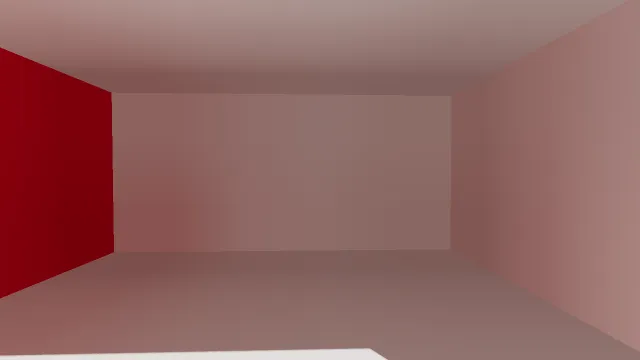
Starts examples/driftray in this page, on WebGPU where your browser has it.
Turning it on
/**
 * Indirect light only where it runs, and a probe array for it to write into. Turning it on or off
 * changes what the renderer is built with, so the switch builds a new one in place.
 */
const quality = (traced: string) => (backend: string) => ({
  indirectLight: traced === 'on' && backend === 'webgpu',
  reflectionProbeSize: 64,
  directionalShadows: true,
  directionalShadowMaxDistance: 12,
  outputTransform: 'aces' as const,
});
const scene = await openScene(quality(flag('driftray', 'on')), build);indirectLight is a quality option, off by default and WebGPU only. Asked for on WebGL2, it lights
nothing and says so once on the console, and the grid keeps its baked light; passing quality as a
function of the backend, as here, asks each backend only for what it does. The traced light is
written into the probe array, so reflectionProbeSize must allocate one.
What the rays can hit
/** Each slab as a distance field, baked at its own origin and placed by a matrix. */
const placed = slabs.map((slab) => ({
  slab,
  field: bakeObjectSdf(new MeshBuilder().addBox([0, 0, 0], slab.half, WHITE).build(), 64),
  model: new Float32Array([1, 0, 0, 0, 0, 1, 0, 0, 0, 0, 1, 0, ...slab.centre, 1]),
}));

/** Declared every frame: what the rays may hit, and what colour each surface is. */
function declareFields(renderer: RendererApi, paint: Vec3): void {
  for (const { slab, field, model } of placed)
    renderer.addDistanceField(field, model, slab.painted ? paint : WHITE);
}A ray can only hit what has a distance field. bakeObjectSdf(mesh, resolution) from
@driftengine/assets bakes one from mesh data: resolution is voxels along the mesh's longest axis,
and the voxels are cubes, so a thin wall keeps its thickness. The sign comes from how many surfaces
separate a point from the open air around the grid, not from triangle winding, so single-sided walls,
rooms open to the sky and models exported inside out all bake correctly. A gap narrower than about a
voxel reads as sealed.
Baking is offline work in a real game. The .drft format carries a model's fields as an SDFV
chunk, and streamDrft hands them over through onFields.
addDistanceField(field, model, albedo) declares a field for this frame: where it stands, by a
matrix with uniform scale only, and what colour its surface is, which is what a bounce off it
carries. Declarations are cleared at every beginFrame, so a scene declares its fields every frame,
and a field it stops declaring stops lighting. The renderer composes them into one world field around
the camera at endFrame.
The probes
/** A grid of probes through the room, rasterised once so the first frame is already lit. */
renderer.setProbeGrid({
  origin: [-1.8, -0.6, -1.8],
  spacing: [1.2, 1.2, 1.2],
  counts: [4, 2, 4],
});
env.shadowDepthSpan = computeLightMatrix(
  env.directionalDir,
  0,
  0,
  0,
  6,
  renderer.shadowMapSize,
  lightMatrix,
);
renderer.beginShadowPass(lightMatrix, 'static');
renderer.drawShadowCasters(casters);
renderer.endShadowPass();
renderer.bakeProbeGrid([0, 0, 0], (probeCamera) => {
  renderer.bindMeshPass(probeCamera, env);
  renderer.drawMesh(rooms.red, fixed.worldMatrix);
});setProbeGrid places the probes, on a lattice through the space to be lit. The rasterised
bakeProbeGrid before the first frame is optional: a traced grid starting black climbs to the same
answer on its own, and the bake only means the first frames are already lit.
declareFields(renderer, blue ? BLUE : RED);Each frame then traces five probes, 256 directions each, and each refresh keeps four fifths of what
its probe held, which removes the shimmer two refreshes of the same probe would otherwise show.
renderer.indirectBakeMs reports what the last refresh took on the device, where the device can
time itself.
What gets bounced
Rays that hit a surface light it with the sun, the frame's exact point lights, each shadowed through the distance field, and the light DriftLight summed, so a brazier's light bounces as well as the sun's. Rays that escape read the sky the frame drew.
Measured against a path tracer of the example's kind of room, the far wall's red comes out at 187.7 where the reference says 194.6 to 218.0. A hit takes the colour of its field cell's nearest surface, and the world field's finest cells are 17 centimetres, so a corner where two colours meet bounces a little of each.
Baked bounce, without DriftRay
Every probe grid bounces light once, traced or not. A grid baked with bakeProbeGrid captures the
lit room from each probe, so a WebGL2 frame still has a bounce; it is the light the room had when it
was baked. Reflections covers probes in full: baking, a single environment probe,
and loading a sky.