 DriftEngine
Worlds
Large worlds
The cell grid a large world streams in, streaming by where the camera will be, and freezing cells so streaming never changes what the simulation computes.
npm install @driftengine/core @driftengine/texture @driftengine/script
Coordinates explains the rule a large world rests on: the simulation keeps absolute positions in double precision and never rebases, and rendering subtracts an origin that moves a whole cell at a time. This chapter is the rest of it. The world is a sparse grid of cells, and a cell is the unit that streams in, streams out and freezes.
The example is a town three thousand kilometres from the origin, where a 32-bit float counts in quarters of a metre. The camera circles through it, cells arrive as it approaches, and people walk about wherever the simulation reaches. Each cell takes a second and a half to arrive, standing in for a slow network: switch prediction off and the town builds itself in front of the camera. Paint the cells to see which are simulating and which are frozen.
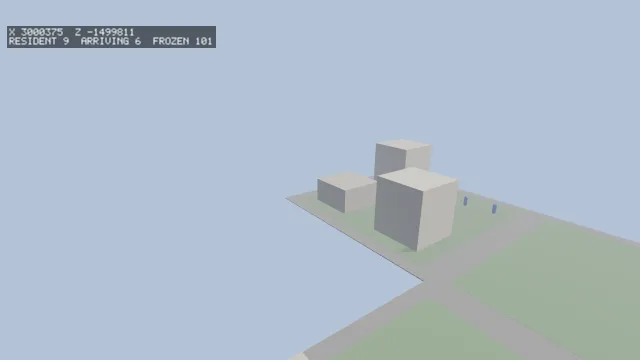
Starts examples/streaming in this page, on WebGPU where your browser has it.
The cell grid
A cell is addressed by three whole grid coordinates, packed into one number:
cellCoord(value, size)is the grid coordinate a world coordinate falls in. It isMath.floor, so a position on a boundary belongs to exactly one cell, and negative coordinates work.cellIdFrom(cx, cy, cz)packs three coordinates into one identifier, andcellIdFor(x, y, z, size)does it from a world position.cellCoordsOf(id, out)unpacks one into anInt32Array, andcellBounds(id, size, out)writes a cell's minimum corner and size into aFloat64Array.
The packing holds ±65,536 cells an axis: ±16,777 km at 256-metre cells, ±4,194 km at 64. A
coordinate outside that throws a RangeError and never wraps, because a wrapped identifier belongs
to a different, real cell, and two distant places would silently share one. cellCoordInRange(c)
asks first.
cellsInRadius(x, y, z, radius, size, out) lists every cell within a radius of a point. It is
conservative: it lists every cell that the cube round the sphere reaches, because a cell too many is
a wasted load and a cell too few is a hole.
cellsInFrustum(grid, viewProjection, out) lists the cells a view looks into, in coordinate order.
The view-projection is in absolute world units and should be built in double precision past 2²⁴,
where a single float no longer places a plane to the metre. createCellGrid(size, maxCells) makes
the grid it walks; a view that would walk more than maxCells (65,536 by default) throws, and so
does a view with no far plane, since a view that reaches infinity bounds no cells.
Streaming cells
/** How long a cell takes to arrive, in seconds of wall clock: a stand-in for a slow network. */
const ARRIVAL_SECONDS = 1.5;

interface Resident {
  mesh: MeshHandle;
  /** The cell's minimum corner, absolute, for drawing it relative to the render origin. */
  x: number;
  z: number;
}
const resident = new Map<number, Resident>();
const arriving = new Map<number, number>();
const coords = new Int32Array(3);

/**
 * Where a cell's contents live. Only the layer of cells at ground level holds a town; the layers
 * above and below hold nothing, so they count as loaded at once.
 */
const store: CellStore = {
  loaded(id) {
    cellCoordsOf(id, coords);
    return coords[1] !== 0 || resident.has(id);
  },
  load(id) {
    if (!arriving.has(id)) arriving.set(id, performance.now() + ARRIVAL_SECONDS * 1000);
  },
  unload(id) {
    /* Only a frozen cell may be unloaded: freezing first is a no-op for one that already is. */
    if (byCell.has(id)) freezeCell(world, frozen, id);
    const cell = resident.get(id);
    if (cell !== undefined) renderer.disposeMesh(cell.mesh);
    resident.delete(id);
    arriving.delete(id);
  },
};

/** The stream: cells within 110 metres are wanted, and dropped after two seconds unwanted. */
const stream = createCellStream({ store, size: CELL, radius: 110, hysteresis: 120 });
const predictor = cellPredictor(stream);A CellStore is whatever holds a cell's contents: it answers loaded(id), and is told
load(id, priority) and unload(id). A lower priority is sooner. The store decides what a load
is. The example builds a few boxes from the cell's coordinates after a delay; a game fetches a
region of a .drft file.
createCellStream(options) takes the store and:
size, the cell's edge in world units.radius, how far around a view cells are wanted.hysteresis, how many pumps a cell may go unwanted before it is dropped. A camera that turns round does not reload what it just left, and a walk back and forth across a boundary does not reload a cell every few frames.origin, the render origin the views are relative to, whichsetCellStreamOriginmoves.projection, the lens the views are drawn through. With it the stream also wants the cells each view looks into, out to its far plane, nearest first; without it, only those withinradius.maxCells, the most cells one view's query may walk.
/* The render origin follows the camera a whole cell at a time, and the stream is told it. */
pathAt(time, eye);
renderOrigin(eye[0] as number, eye[1] as number, eye[2] as number, CELL, origin);
setCellStreamOrigin(stream, origin[0] as number, origin[1] as number, origin[2] as number);
predictedTime = time;
runPrediction(handle, predictor, predict ? 120 : 1, predict ? 1 / 60 : 0, 32);
pumpCellStream(stream, eye[0] as number, eye[1] as number, eye[2] as number);Each frame, pumpCellStream(stream, x, y, z) marks the cells around the camera as wanted now and
unloads those that have gone unwanted longer than the hysteresis. It returns how many it dropped.
Marking the present is what keeps a camera that stands still from unloading the ground it stands on.
By where the camera will be
cellPredictor(stream) turns a stream into a predictor, which runPrediction from
@driftengine/texture drives: it saves the simulation, runs it forward, asks what each predicted
view needs, requests what is missing and puts the simulation back exactly as it was.
/**
 * What prediction runs forward. The view here depends only on the camera's path, so the handle
 * saves, advances and restores the clock alone; a game whose camera follows a simulated player
 * advances its real step.
 */
let predictedTime = 0;
let savedTime = 0;
const lens = new Camera();
const at = new Float64Array(3);
const ahead = new Float64Array(3);
const local = new Float32Array(3);
const handle: SimulationHandle = {
  save: () => {
    savedTime = predictedTime;
  },
  restore: () => {
    predictedTime = savedTime;
  },
  advance: (dt) => {
    predictedTime += dt;
  },
  viewAt(out) {
    aimAt(lens, predictedTime);
    lens.updateMatrices(renderer.cssWidth / Math.max(1, renderer.cssHeight));
    out.set(lens.view);
  },
};

/** Put a camera on the path at a time, in render space, looking three seconds ahead. */
function aimAt(view: Camera, when: number): void {
  pathAt(when, at);
  pathAt(when + 3, ahead);
  toRenderSpace(at[0] as number, at[1] as number, at[2] as number, stream.origin, local);
  view.position[0] = local[0] as number;
  view.position[1] = local[1] as number;
  view.position[2] = local[2] as number;
  toRenderSpace(ahead[0] as number, 0, ahead[2] as number, stream.origin, local);
  view.lookAt(local[0] as number, local[1] as number, local[2] as number);
}runPrediction(simulation, predictor, frames, dt, budget) takes a SimulationHandle with four
methods: save, restore, advance(dt), which must be the step the simulation really runs, and
viewAt(out), which writes the current view matrix. It requests at most budget cells across all
the predicted frames, nearer frames first, so a distant frame cannot starve a near one. A
misprediction costs a wasted fetch, and the cell arrives as late as it would have without
prediction.
The views a renderer takes are single precision and in render space, so the stream is told the
render origin and adds it back in double precision before anything is put in a cell.
cameraPositionFrom(view, out) recovers a camera's position from a view matrix, rotation and all.
Texture tiles stream by the same prediction.
Freezing
A cell outside the simulated radius freezes: everything in it stops simulating, and its state is captured exactly. Freezing is a simulation decision and unloading is a memory decision. A frozen cell does not simulate whether or not its contents are loaded, and only a frozen cell may be unloaded, so streaming changes where the bytes live and never what the simulation computes. If unloading caused freezing, the simulation would depend on how much memory a machine had, and one player's computer would diverge from everyone else's.
/** The walkers, hosted. Each is a record the page holds, so an edited script keeps them all. */
const walkers = hostScript(walkerScript);
interface Walker {
  x: number;
  z: number;
  heading: number;
  untilTurn: number;
  seed: number;
  turns: number;
}
const createWalker = exported<() => Walker>(walkers, 'createWalker');
type Step = (walker: Walker, dt: number, cellSize: number) => void;

const people: Walker[] = [];
const homes: number[] = [];
const walking: boolean[] = [];
const byCell = new Map<number, number[]>();

/** Four people to a cell, placed from the cell's identifier when the cell first comes near. */
function populate(id: number): void {
  const living: number[] = [];
  for (let i = 0; i < 4; i += 1) {
    const walker = createWalker();
    walker.seed = (id + i * 977) >>> 0;
    walker.x = 6 + hashToUnit(walker.seed) * (CELL - 12);
    walker.z = 6 + hashToUnit(walker.seed + 1) * (CELL - 12);
    living.push(people.length);
    people.push(walker);
    homes.push(id);
    walking.push(true);
  }
  byCell.set(id, living);
}

/** What freezing needs of the world: who lives in a cell, and their state as numbers. */
const world: FreezableWorld = {
  entitiesIn: (cell) => byCell.get(cell) ?? [],
  readState(entity, out) {
    const w = people[entity] as Walker;
    out[0] = w.x;
    out[1] = w.z;
    out[2] = w.heading;
    out[3] = w.untilTurn;
    out[4] = w.turns;
    return 5;
  },
  writeState(entity, values) {
    const w = people[entity] as Walker;
    w.x = values[0] as number;
    w.z = values[1] as number;
    w.heading = values[2] as number;
    w.untilTurn = values[3] as number;
    w.turns = values[4] as number;
  },
  simulating: (entity) => walking[entity] === true,
  setSimulating(entity, on) {
    walking[entity] = on;
  },
};
const frozen = createFrozenCells();Freezing needs five things of a world, given as a FreezableWorld: the entities whose home is a
cell, readState and writeState to copy an entity's state out as numbers and back, and
simulating and setSimulating. Core has no entity store of its own, so a game passes whichever it
keeps.
/**
 * People live in every cell within 240 metres of the camera, and walk only within 40; the rest are
 * frozen. A cell is peopled frozen, so it is the simulated radius alone that sets anyone walking.
 * Both are conservative: a cell any part of the radius's square reaches is in it.
 */
const PEOPLED_M = 240;
const SIMULATED_M = 40;
let time = 0;
const eye = new Float64Array(3);
const near: number[] = [];
const nearSet = new Set<number>();

function simulate(dt: number): void {
  time += dt;
  pathAt(time, eye);
  cellsInRadius(eye[0] as number, 0, eye[2] as number, PEOPLED_M, CELL, near);
  for (const id of near) {
    cellCoordsOf(id, coords);
    if (coords[1] !== 0 || byCell.has(id)) continue;
    populate(id);
    freezeCell(world, frozen, id);
  }
  cellsInRadius(eye[0] as number, 0, eye[2] as number, SIMULATED_M, CELL, near);
  nearSet.clear();
  for (const id of near) {
    cellCoordsOf(id, coords);
    if (coords[1] === 0) nearSet.add(id);
  }
  /* Freezing is decided here, by the simulation's own camera, and never by what is loaded. */
  for (const id of nearSet) thawCell(world, frozen, id);
  for (const id of byCell.keys()) {
    if (!nearSet.has(id) && !isCellFrozen(frozen, id)) freezeCell(world, frozen, id);
  }
  const step = exported<Step>(walkers, 'step');
  for (let i = 0; i < people.length; i += 1) {
    if (walking[i] === true) step(people[i] as Walker, dt, CELL);
  }
}createFrozenCells()holds what has been frozen.freezeCell(world, frozen, cell)stops a cell's entities simulating and captures their state, in ascending entity order so the capture is deterministic. It returnsfalseif the cell was already frozen.thawCell(world, frozen, cell)puts every entity back exactly as it was frozen and lets it simulate again. Never where it would have got to: a thaw that extrapolated would make an unloaded region quietly diverge from a loaded one.isCellFrozenandfrozenEntitiesanswer what is frozen.frozenFingerprintContribution(frozen, cell)is a digest of a frozen cell's state, taken once when it froze. Feed it into the world's fingerprint beside the live entities, so a streamed run and one that kept every cell loaded agree at every frame, and not only once everything has thawed.
What freezing costs is a decision a game has to know about: an entity in a frozen cell does not walk anywhere, does not age and does not finish what it was doing. The engine's own gate walks a world at six magnitudes, from the origin to the far end of the packing, and asserts that the streamed walk fingerprints identically to one holding every cell; it also asserts that freezing by residency diverges, so the gate cannot pass by accident.
Behaviour in a cell, in DriftScript
The walkers are DriftScript records, and their positions are metres from the corner of their own cell:
fn step(walker: mut Walker, dt: f32, cellSize: f32) {
    walker.untilTurn = walker.untilTurn - dt
    if walker.untilTurn <= 0 {
        walker.turns = walker.turns + 1
        let draw = walker.seed * 7919 + walker.turns
        walker.heading = random.range(draw, 0, 6.2831855)
        walker.untilTurn = random.range(draw + 1, 1.5, 4)
    }
    // A brisk walk, kept two metres inside the cell's edge.
    let pace = 1.4
    walker.x = math.clamp(walker.x + math.cos(walker.heading) * pace * dt, 2, cellSize - 2)
    walker.z = math.clamp(walker.z + math.sin(walker.heading) * pace * dt, 2, cellSize - 2)
}A script's numbers are 32-bit, so a script never holds an absolute coordinate in a large world: it
works in a cell's frame and the page adds the cell's corner in double precision when it draws. The
next turn comes from the walker's seed and how many turns it has made, so a walker that froze and
thawed turns exactly as one that never stopped. Save the file under npm run examples and every
walking figure takes the new rules on its next step.