 DriftEngine
Interface
Sprites and tilemaps
The 2D layer: textured quads batched in the order drawn, sheets cut into frames, tilemaps that cost the view, and a camera for a 2D world.
npm install @driftengine/ui2d
@driftengine/ui2d is the engine's 2D layer: quads with a texture on them, batched, drawn in the
order you submitted them. It draws a whole 2D game, a heads-up display over a 3D one, or the
interface tree in the next chapter, and it is 8.8 KB gzipped on top of core.
The example is a garden, all of it one sprite pass over one sheet painted when the page loads: a
tilemap, a gardener walking it, and flowers to pick. garden.drs walks the gardener, keeps it out of
the pond, picks a flower by rewriting its tile, and draws both. The switches zoom the camera, change
how the sheet is filtered, and repaint it at dusk.
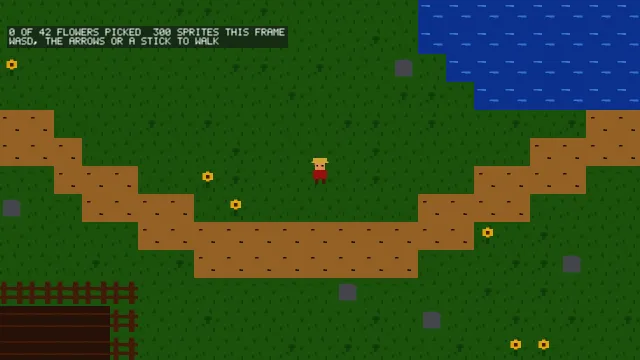
Starts examples/sprites in this page, on WebGPU where your browser has it.
A sprite pass
/* One pass of sprites, drawn wherever in the frame it is asked for, over one sheet. A sheet of
   pixel art is filtered nearest, so its texels stay square at any zoom. */
const pass = createSpritePass({ capacity: 4096, slots: 1, label: 'garden' });
const handle = renderer.registerPass(pass);
const painted = new OffscreenCanvas(SHEET_WIDTH, SHEET_HEIGHT);
let palette = flag('light', 'day') === 'dusk' ? DUSK : DAY;
let filter: 'nearest' | 'linear' = flag('filter', 'nearest') === 'linear' ? 'linear' : 'nearest';
function upload(): void {
  pass.setTexture(0, paintSheet(painted, palette), { filter });
}
upload();
const sheet = namedSheet(0, SHEET_WIDTH, SHEET_HEIGHT, ENTRIES);createSpritePass({ capacity, slots, label }) makes the pass, and renderer.registerPass(pass)
hands it to the renderer. It draws through that seam rather than through a verb on the renderer,
which is what lets it be a package a game that never draws a sprite does not carry, and
renderer.drawPass(handle) draws it wherever in the frame you call it: after the scene for a
heads-up display, or alone for a 2D game. setTexture(slot, source, options) uploads a picture to a
slot, from an ImageBitmap, a canvas or an OffscreenCanvas, and white is a slot of its own
holding one white texel, so a solid rectangle needs no sheet.
Each frame: reset(), setTransform(affine), then draw into batch. There is no depth, so the
order sprites were submitted in is the order they are layered. Consecutive sprites on one slot
are one run and one draw call; a change of slot starts a run, and going back to the first starts
another rather than reordering the picture. A batch has a fixed capacity and never grows: past it,
a draw counts into dropped instead of allocating in the frame.
drawSprite(batch, slot, placement, frame, tint) places one. The placement is a corner, a width and
a height, and an optional rotation; a negative width mirrors it, which is a character facing the
other way. The frame is the part of the texture it shows, or the whole texture for null, and the
tint multiplies its colour.
Two spaces
screenToNdc(width, height, out) is CSS pixels from the top-left, the space of an overlay: y counts
down, and a placement's corner is its top-left. worldToNdc(camera, width, height, out) is a 2D
world seen through a Camera2D: y counts up, a placement's corner is its bottom-left, and a platform
above a floor has a larger y. A camera is where it looks, x and y, how far in, zoom in pixels
per world unit, and rotation. A picture keeps its top up in both: a frame's top row is drawn at the
top of the sprite whichever way y counts. Both functions fill an affine made once with
createAffine2D().
Sheets
A sheet is the rectangles of one texture that each hold a picture. gridSheet(slot, width, height, cellWidth, cellHeight) cuts a texture into equal cells, row by row, and namedSheet(slot, width, height, entries) takes whatever rectangles a packer put where, by name. frameOf(sheet, name) is a
frame's index, and sheetFrame(sheet, index, out) writes its texture rectangle into a frame made
once with createSpriteFrame(), so drawing one allocates nothing. sheetFrameWidth and
sheetFrameHeight are its size in texels.
A cell that would run off the texture's edge is not cut, and a frame index the sheet does not have draws the whole texture: nothing may throw in the frame loop, and a whole atlas where one picture should be is impossible to miss.
Tilemaps
/* The garden, a tile a world unit: grass and clover, a path, a pond, a fenced patch of soil, some
   stones, and flowers scattered over the grass. Row 0 is the bottom, because the world's y is up. */
const COLUMNS = 48;
const ROWS = 36;
const map = createTilemap(COLUMNS, ROWS, 1, 1);
const tileOf = (name: string): number => frameOf(sheet, name);
let seed = 7;
const random = (): number => {
  seed = (Math.imul(seed, 1103515245) + 12345) >>> 0;
  return seed / 0x100000000;
};
for (let row = 0; row < ROWS; row += 1) {
  for (let column = 0; column < COLUMNS; column += 1) {
    const pond = ((column - 34) / 7) ** 2 + ((row - 24) / 5) ** 2 < 1;
    const patch = column >= 8 && column <= 17 && row >= 6 && row <= 13;
    const edge = patch && (column === 8 || column === 17 || row === 6 || row === 13);
    const path = Math.abs(row - (17 + Math.sin(column / 5) * 3)) < 1;
    let name = random() < 0.2 ? 'clover' : 'grass';
    if (path) name = 'path';
    if (pond) name = 'water';
    if (patch) name = edge && !(row === 13 && column === 12) ? 'fence' : 'soil';
    if (name === 'grass' && random() < 0.05) name = 'flower';
    if (name === 'grass' && random() < 0.015) name = 'stone';
    setTile(map, column, row, tileOf(name));
  }
}
const flowers = (): number => {
  let count = 0;
  for (const tile of map.tiles) if (tile === tileOf('flower')) count += 1;
  return count;
};
const planted = flowers();createTilemap(columns, rows, tileWidth, tileHeight) is a grid of frames of one sheet, from
map.x and map.y. setTile and tileAt write and read a cell, and TILE_EMPTY is a cell with
nothing in it. drawTilemap(batch, map, sheet, view, tint) draws the cells the view rectangle
covers and no others: the span is arithmetic on four numbers, so a million-cell map costs the few
hundred on screen. Which way the rows run is the space's business: row 0 is the top row on the
screen and the bottom row of a world.
Filtering
filter is nearest by default, because a sheet is usually pixel art and filtering is what makes
pixel art look smeared. Switch the example to linear and every tile shows a seam: a texel on a
cell's edge is blended with the cell beside it on the sheet. colorSpace is srgb by default, which
is right for anything painted to be looked at. A sheet of glyphs drawn smaller than it was made
wants mipmap: true, and then the cells want padding, since a smaller level blends neighbours the
packer put side by side.
From DriftScript
drift/2d is imported under a name, because a module's namespace is the last part of its path and
2d is not a name a script can write: import { tilemap } from "drift/2d" as sprites. It has
sprite, tinted and frame to draw, named and frames to read a sheet, tilemap, tile,
setTile, columns and rows for a map, and count and dropped for the batch, over the
SpriteBatch, SpriteSheet and Tilemap the host hands in. Reading a sheet or a cell is a read
of the scene a @deterministic system may make, and drawing is not.
// Steered by the move action, an axis at a time, so it slides along a fence it walks into.
fn walk(g: mut Gardener, actions: Actions, map: Tilemap, sheet: SpriteSheet, dt: f32) {
    let dx = input.axisX(actions, "move")
    // A stick's up is negative, and the garden's is positive.
    let dy = -input.axisY(actions, "move")
    if math.abs(dx) > math.abs(dy) {
        if dx > 0 {
            g.facing = Facing.Right
        } else {
            g.facing = Facing.Left
        }
    } else if dy > 0 {
        g.facing = Facing.Up
    } else if dy < 0 {
        g.facing = Facing.Down
    }
    let nx = g.x + dx * g.speed * dt
    let ny = g.y + dy * g.speed * dt
    if open(map, sheet, nx, g.y) {
        g.x = nx
    }
    if open(map, sheet, g.x, ny) {
        g.y = ny
    }
    g.stride += (math.abs(dx) + math.abs(dy)) * g.speed * dt
    pick(g, map, sheet)
}// A flower underfoot is picked: its tile becomes plain grass, and the count goes up.
fn pick(g: mut Gardener, map: Tilemap, sheet: SpriteSheet) {
let column = cell(g.x)
let row = cell(g.y)
if sprites.tile(map, column, row) == sprites.named(sheet, "flower") {
sprites.setTile(map, column, row, sprites.named(sheet, "grass"))
g.picked += 1
}
}// The tilemap, only what the view holds, then the gardener over it: its row by the way it faces,
// and one of two steps by how far it has walked.
fn draw(g: Gardener, batch: SpriteBatch, map: Tilemap, sheet: SpriteSheet, viewX: f32, viewY: f32, viewW: f32, viewH: f32) {
sprites.tilemap(batch, map, sheet, viewX, viewY, viewW, viewH)
// Three steps a tile, alternating feet.
let pace = g.stride * 3
var step: i32 = 0
if pace - math.floor(pace / 2) * 2 >= 1 {
step = 1
}
let first = sprites.named(sheet, "down0")
sprites.frame(batch, sheet, first + row(g.facing) + step, g.x - 0.5, g.y - 0.15, 1, 1)
}The page hosts the script with the actions it reads, and each frame works out the view the camera sees and asks the script to draw it:
const input = new InputSource(canvas, ['ArrowUp', 'ArrowDown', 'ArrowLeft', 'ArrowRight']);
const actions = new ActionMap(input, {
  move: {
    stick: 'left',
    up: ['KeyW', 'ArrowUp'],
    down: ['KeyS', 'ArrowDown'],
    left: ['KeyA', 'ArrowLeft'],
    right: ['KeyD', 'ArrowRight'],
  },
});
const script = hostScript(gardenScript);
interface Gardener {
  x: number;
  y: number;
  picked: number;
}
const gardener = exported<() => Gardener>(script, 'createGardener')();
type Walk = (
  gardener: Gardener,
  actions: ActionMap,
  map: Tilemap,
  sheet: SpriteSheet,
  dt: number,
) => void;
type Draw = (
  gardener: Gardener,
  batch: SpriteBatch,
  map: Tilemap,
  sheet: SpriteSheet,
  x: number,
  y: number,
  w: number,
  h: number,
) => void;
if (import.meta.hot) {
  import.meta.hot.accept('./garden.drs', (next) => {
    if (next !== undefined) {
      patchModule(script, next as Record<string, unknown>, { Gardener: [gardener] });
    }
  });
}/* The camera follows the gardener, and the view it sees, in tiles, is what the tilemap draws. */
const width = canvas.clientWidth;
const height = canvas.clientHeight;
const seenW = width / zoom;
const seenH = height / zoom;
/* Kept inside the garden, so its edge is never in view. */
view.x = Math.min(Math.max(gardener.x, seenW / 2), COLUMNS - seenW / 2);
view.y = Math.min(Math.max(gardener.y, seenH / 2), ROWS - seenH / 2);
view.zoom = zoom;
pass.reset();
pass.setTransform(worldToNdc(view, width, height, affine));
exported<Draw>(script, 'draw')(
gardener,
pass.batch,
map,
sheet,
view.x - seenW / 2,
view.y - seenH / 2,
seenW,
seenH,
);
renderer.beginFrame(palette === DUSK ? [0.08, 0.1, 0.14] : [0.3, 0.45, 0.25]);
renderer.drawPass(handle);