 DriftEngine
Rendering
Particles
Sparks, smoke and motes from a pool and a batch, deterministic emission, textured sprites and flipbooks, particles placed by your own plan, and birds.
npm install @driftengine/core
A particle effect is two things: a pool that simulates the particles, where each one is, how old and how big, and a batch that draws them with a particle material. The example's fire uses three pairs, one each for sparks, smoke and motes.
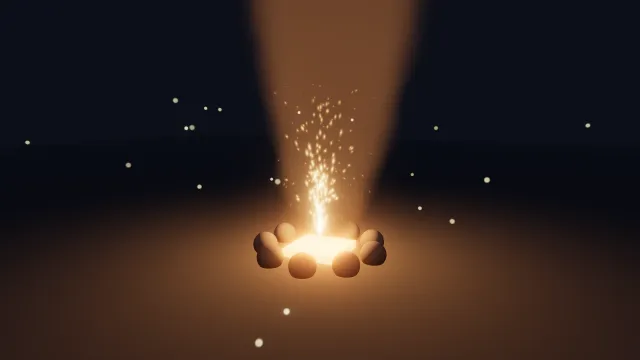
Starts examples/particles in this page, on WebGPU where your browser has it.
The pool
/** Each pool is the simulation: where its particles are, how old, how big and what colour. */
const sparks = new ParticlePool({
  capacity: 600,
  lifeSec: 1.4,
  sizeStart: 0.05,
  sizeEnd: 0.01,
  colorStart: [4, 2.2, 0.8],
  colorEnd: [1.4, 0.3, 0.05],
  gravity: 4,
  drag: 0.6,
  rise: 0,
});
const smoke = new ParticlePool({
  capacity: 300,
  lifeSec: 6,
  sizeStart: 0.5,
  sizeEnd: 2.4,
  colorStart: [0.18, 0.17, 0.17],
  colorEnd: [0.3, 0.3, 0.32],
  gravity: 0,
  drag: 0.4,
  rise: 0.7,
  alphaStart: 0.3,
  alphaEnd: 0,
});
const motes = new ParticlePool({
  capacity: 200,
  lifeSec: 8,
  sizeStart: 0.04,
  sizeEnd: 0.04,
  colorStart: [1.6, 1.4, 0.8],
  colorEnd: [0.6, 0.5, 0.3],
  gravity: 0,
  drag: 0.2,
  rise: 0.05,
  alphaStart: 1,
  alphaEnd: 0,
});A ParticlePool holds up to capacity particles. Each lives lifeSec seconds and moves from its
start size, colour and opacity to its end ones over that life. A size is a half-width, metres from
the centre to an edge, so a particle of size 0.5 is a metre across. gravity pulls it down, drag
slows it per second, and rise pushes it up steadily, which is what makes smoke behave like smoke.
Leave alphaStart and alphaEnd out and a particle stays opaque and fades by colour, which suits
additive sparks; give them, and it fades for real, which smoke needs.
Colours are linear and may go past one: a spark at four times white is what bloom finds.
Emitting
simulate(dt) {
  tick += 1;
  time += dt;
  /* A few sparks every tick, a puff of smoke every other one, and a mote now and then. */
  for (let i = 0; i < 4; i += 1) {
    const seed = tick * 8 + i;
    const a = hashToUnit(seed) * Math.PI * 2;
    const out = hashToUnit(seed + 1) * 1.2;
    sparks.emit(
      0,
      0.3,
      0,
      Math.cos(a) * out,
      2.5 + hashToUnit(seed + 2) * 3,
      Math.sin(a) * out,
      seed,
    );
  }
  if (tick % 2 === 0) {
    const seed = tick;
    smoke.emit(
      (hashToUnit(seed) - 0.5) * 0.4,
      0.6,
      (hashToUnit(seed + 5) - 0.5) * 0.4,
      0.15,
      0.6,
      0,
      seed,
    );
  }
  if (tick % 12 === 0) {
    const seed = tick;
    const a = hashToUnit(seed) * Math.PI * 2;
    const r = 1.5 + hashToUnit(seed + 3) * 3;
    motes.emit(
      Math.cos(a) * r,
      0.3 + hashToUnit(seed + 4) * 2,
      Math.sin(a) * r,
      0,
      0.05,
      0,
      seed,
    );
  }
  sparks.update(dt);
  smoke.update(dt);
  motes.update(dt);
},emit(x, y, z, vx, vy, vz, seed, sizeScale, lifeScale) adds a particle with a position and a
velocity. The seed drives its variation, its spin and the noise its material animates by, in place
of Math.random, so emitting from the fixed step with the tick as the seed makes the same fire
every run, which a replay needs. When the pool is full, the oldest particle is reused.
update(dt) advances every particle and rebuilds the data the batch draws. Call it from the
simulation step, as here, or from the render step for an effect that is pure decoration.
Drawing
/** Each batch is how its pool is drawn: which material, how it blends, which way it faces. */
const sparkBatch = renderer.createParticles(600, {
  material: 'spark',
  blend: 'additive',
  stretchSec: 0.05,
  coreGain: 2,
});
const smokeBatch = renderer.createParticles(300, {
  material: 'smoke',
  blend: 'alpha',
  erosion: 0.6,
});
const moteBatch = renderer.createParticles(200, { material: 'mote', blend: 'additive' });createParticles(capacity, options) makes a batch, and its material names how a particle looks:
'spark': a hot point stretched along its velocity bystretchSecseconds of travel, withcoreGainsaying how far past white its core may go. A spark is a streak, because it moved while the eye was looking.'smoke': a soft puff eroded by noise,erosionfrom 0 to 1.'mote': an unlit point exactly its own colour. It ignores fog unlessfog: true.
blend is 'additive' for what emits light and 'alpha' for what covers it. facing is
'camera', the default, for one quad facing the viewer, 'cross' for two blades fixed in the
world, or 'velocity' for a quad facing the viewer with its length along the particle's travel.
cameraOffset moves every particle that many metres toward the eye, so a spark born inside a body
is drawn in front of it. Several batches of one material can share its compiled program with reuse, so four kinds of
smoke cost one shader.
/* After the opaque scene: what covers first, then what adds light. */
renderer.drawParticles(smokeBatch, smoke.particles, camera, env, time);
renderer.drawParticles(sparkBatch, sparks.particles, camera, env, time);
renderer.drawParticles(moteBatch, motes.particles, camera, env, time);drawParticles(batch, pool.particles, camera, env, time) draws a pool after the opaque scene. Draw
what covers before what adds light. Sparks and smoke are fogged with the rest of the world.
Sprites
/**
 * Smoke from a flipbook: an image of four by four cells, blended back to front, softened where it
 * meets the ground and faded as it reaches the eye.
 */
export function smokeSprites(
  renderer: RendererApi,
  flipbook: SurfaceTextureHandle,
): ParticleHandle {
  return renderer.createParticles(300, {
    material: 'sprite',
    blend: 'alpha',
    texture: flipbook,
    cells: [4, 4],
    blendCells: true,
    softDepth: 0.2,
    cameraFade: 1.5,
    sort: true,
  });
}

/** After the pool's update: each particle's cell from its age, the sixteen cells over its life. */
export function stepFlipbook(particles: ParticleInstances): void {
  const frames = particles.frames;
  if (frames === undefined) return;
  for (let i = 0; i < particles.count; i += 1) frames[i] = (particles.ages[i] ?? 0) * 15.999;
}The 'sprite' material draws an image, unlit, multiplied by each particle's colour and opacity.
texture is a surface texture of your own, and cells divides it into a flipbook of columns and
rows, counted across then down from the top-left; each particle's frames value names its cell,
and with blendCells its fraction blends toward the next. A pool leaves frames at zero, so step
it yourself after update, as above. heights gives a card a half-height of its own beside its
size, for one that is not square.
Three options keep a flat card from looking like one. softDepth fades a sprite over that many
metres where it meets the opaque scene, instead of cutting a hard line through the floor; it reads
the frame's depth, which needs screenEffects. cameraFade fades it out over that many metres in
front of the eye, so a puff the camera walks through does not fill the screen. And sort draws a
blended batch farthest first, the order an alpha blend assumes; additive light needs no order.
Particles from your own plan
/**
 * A ring of embers placed by a plan, not simulated: positions are a function of time, so a clip
 * exported frame by frame draws exactly what the preview drew.
 */
export function drawRing(
  renderer: RendererApi,
  batch: ParticleHandle,
  data: ParticleInstances,
  camera: Camera,
  env: Environment,
  time: number,
): void {
  const count = data.positions.length / 3;
  for (let i = 0; i < count; i += 1) {
    const a = (i / count) * Math.PI * 2 + time * 0.5;
    const at = i * 3;
    data.positions[at] = Math.cos(a) * 3;
    data.positions[at + 1] = 1 + Math.sin(time + i) * 0.2;
    data.positions[at + 2] = Math.sin(a) * 3;
    data.velocities[at] = -Math.sin(a);
    data.velocities[at + 1] = 0;
    data.velocities[at + 2] = Math.cos(a);
    data.colors[at] = 3;
    data.colors[at + 1] = 1.4;
    data.colors[at + 2] = 0.4;
    data.sizes[i] = 0.05;
    data.alphas[i] = 1;
  }
  data.count = count;
  renderer.drawParticles(batch, data, camera, env, time);
}A pool is a simulation, and some effects are not: a ring of embers orbiting a mage, streamers around
a star, anything whose position is a function of time. Fill a ParticleInstances yourself, its
positions, velocities, sizes, colours and opacities, set count, and draw it. Nothing integrates the
velocity; it is only the direction a spark is stretched along. Because nothing is simulated, the
same time draws the same frame however the frames were spaced, which is what an exported clip needs.
Particles a compute shader writes
/** `GPUBufferUsage.STORAGE | VERTEX`, as values: the globals exist only in a browser. */
const STORAGE_VERTEX = 0x0080 | 0x0020;

/** A buffer a compute shader fills with `capacity` particles and a pool then draws. WebGPU only. */
export function particleBuffer(device: GPUDevice, capacity: number): DeviceParticles {
  const buffer = device.createBuffer({
    size: capacity * DEVICE_PARTICLE_FLOATS * 4,
    usage: STORAGE_VERTEX,
  });
  return { buffer, count: capacity };
}

/** Each frame: step the simulation on the device, then draw what it wrote, where it lies. */
export function drawSimulated(
  renderer: RendererApi,
  simulate: ComputeHandle,
  batch: ParticleHandle,
  particles: DeviceParticles,
  camera: Camera,
  env: Environment,
  time: number,
): void {
  renderer.dispatchCompute(simulate);
  renderer.drawDeviceParticles(batch, particles, camera, env, time);
}On WebGPU a simulation can run entirely on the device: a compute shader of your own, registered with
registerCompute (see Custom passes and compute), writes its particles into a
buffer of yours, and drawDeviceParticles draws a pool's material from that buffer where it lies,
with nothing read back. Each particle is DEVICE_PARTICLE_FLOATS (16) floats: position, half-width,
roll, colour, opacity, age, seed, velocity, a sprite's frame and its half-height, the streams of a
ParticleInstances interleaved in that order. The buffer needs VERTEX usage beside STORAGE. A
slot whose half-width is 0 draws nothing, so a fixed-size buffer can hold fewer live particles than
it has room for. The particles are drawn as written and not sorted; an alpha-blended set that must
be drawn far to near sorts itself. WebGL2 has no compute stage: there it says so once and draws
nothing, so check computeSupported and fall back to a pool.
Birds
/** Birds circling a point, every one's path a function of its index and the clock. */
export function birds(renderer: RendererApi): (camera: Camera, time: number) => void {
  const flock = renderer.createFlock(40);
  const circling: FlockParams = {
    center: [0, 0, 0],
    radius: 30,
    height: 25,
    count: 40,
    speed: 9,
    scale: 0.4,
  };
  const dark: Vec3 = [0.1, 0.1, 0.12];
  return (camera, time) => renderer.drawFlock(flock, camera, time, circling, dark);
}createFlock(count) and drawFlock(flock, camera, time, params, tint, windX, windZ) draw birds
circling a centre at a radius and height, flapping as they go. Each bird's path is a function of its
index and the clock, so a flock costs no simulation. scale is half the wingspan in metres.
Other effects with chapters of their own: plumes of fire and smoke in Light in the air, rain and lightning in Fog and weather.