 DriftEngine
Systems
Recording and clips
Saving a still, recording a clip as it plays with the mix underneath, and rendering one frame by frame with every frame stamped at its own instant.
npm install @driftengine/core @driftengine/media @driftengine/audio
A game can keep what is on screen three ways. A still is one frame as a picture. A recording keeps
frames as they play, in real time, with whatever the mix is doing. A render draws each frame at the
instant it belongs to and encodes it with that instant, so the file is exact however long the
machine took to make it. Core does the first two, and @driftengine/media does the third, which
carries the encoder and its muxer so a game that never renders a clip never downloads them.
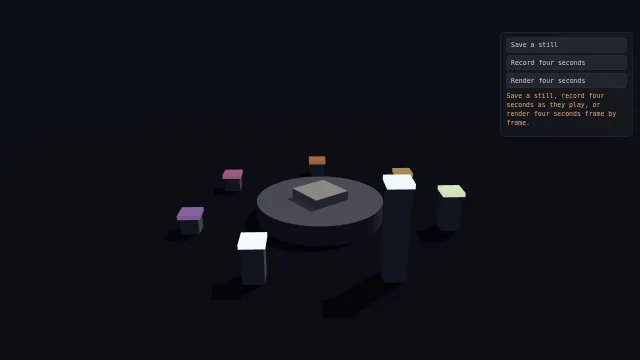
Starts examples/recording in this page, on WebGPU where your browser has it.
The example's panel saves a still, records four seconds, or renders four seconds, and shows what it made. The strip picks the clip's shape, its rate, and whether it carries a mark.
A show that is a function of time
// One cycle, in seconds, and how many pillars it lights in turn.
let PERIOD: f32 = 4
let PILLARS: f32 = 7
// How long a pillar stays up, as a share of the cycle.
let HELD: f32 = 0.35

data Show {
    time: f32 = 0
}

fn step(show: mut Show, dt: f32) {
    show.time = show.time + dt
}

// Where pillar `slot` is in its own rise, from 0 just as it lights to 1 as it settles. Below zero
// or above one, it is down.
@pure
fn rise(time: f32, slot: f32) -> f32 {
    let cycle = time / PERIOD - slot / PILLARS
    let into = cycle - math.floor(cycle)
    return into / HELD
}// How tall a pillar stands and how brightly its cap glows.
@pure
fn height(time: f32, slot: f32) -> f32 {
let r = rise(time, slot)
if r < 0 || r > 1 {
return 0.4
}
return 0.4 + 1.6 * math.sin(r * 3.14159265)
}
@pure
fn glow(time: f32, slot: f32) -> f32 {
let r = rise(time, slot)
if r < 0 || r > 1 {
return 0
}
return math.max(0, 1 - r)
}
// Whether pillar `slot` lit between two instants: the moment a chime belongs to.
@pure
fn lit(from: f32, to: f32, slot: f32) -> bool {
let start = math.floor(from / PERIOD - slot / PILLARS)
let end = math.floor(to / PERIOD - slot / PILLARS)
return end > start
}
// The plinth turns once a cycle, and the camera goes round the other way, slower.
@pure
fn turn(time: f32) -> f32 {
return time / PERIOD * 6.28318531
}
@pure
fn orbitX(time: f32) -> f32 {
return math.sin(0 - time * 0.25) * 11
}
@pure
fn orbitZ(time: f32) -> f32 {
return math.cos(0 - time * 0.25) * 11
}Every rule in the show takes a time and answers where something is at that time. That is what lets
one page play it live and render it for a clip: the live loop steps a record with the frame's time,
the render steps a record of its own by exactly one frame each time, and both draw through the same
function. A chime belongs to the instant a pillar lights, which lit says for any two instants, so
the live mix and a rendered score ring at the same moments.
A still
/* Asked for here, taken inside the next frame: a WebGL drawing buffer is only readable before the
   page composites it. */
let stillWanted = false;
function takeStill(): void {
  const frame = stillFrame(
    canvas,
    marked ? MARK : undefined,
    clock(() => live.time),
  );
  if (frame === null) return say('This browser cannot copy the frame.');
  frame.toBlob((png) => {
    if (png !== null) present(png, 'still.png', 'image');
    say(`A still at ${frame.width} by ${frame.height}, the size of the canvas.`);
  }, 'image/png');
}stillFrame(canvas, overlay, drawFrame) copies the canvas into a new 2D canvas at the canvas's own
size, with the mark and the live layer a clip would carry. Call it inside the render pass, after
endFrame and in the same task: a WebGL drawing buffer is only readable until the page composites
it, and a copy taken later is black. A button sets a flag and the next frame takes the still.
A mark and a clock
/* Baked once per frame size: the engine's name in the corner. The clock is drawn live into every
   frame, after the scene and the mark, because it changes. */
const MARK: FrameOverlay = {
  texts: [{ text: 'DRIFTENGINE', x: 0.04, y: 0.05, cell: 0.006, color: '#e9edf5', alpha: 0.85 }],
};

function clock(time: () => number) {
  return (ctx: CanvasRenderingContext2D, width: number, height: number): void => {
    const size = Math.round(Math.min(width, height) * 0.035);
    ctx.font = `${size}px ui-monospace, monospace`;
    ctx.textAlign = 'right';
    ctx.fillStyle = 'rgba(233, 237, 245, 0.85)';
    ctx.fillText(`${time().toFixed(1)} s`, width * 0.96, height * 0.94);
  };
}A FrameOverlay is drawn into the picture rather than over the page, so it is in the file: texts
placed as fractions of the frame, sized as a share of its shorter side, baked once per frame size.
Anything that changes from frame to frame, a clock or a speedometer, goes in drawFrame, which draws
straight into each composed frame after the scene and the mark.
Recording as it plays
/* Real time: the frame is locked to the clip's shape, the mark is composited into every frame, and
   the recorder keeps every n-th animation frame at the rate asked for, with the live mix. */
let recorder: FrameRecorder | null = null;
let recordedFor = 0;

async function record(): Promise<void> {
  const graph = await startSound();
  const { width, height } = FORMATS[format];
  recorder = new FrameRecorder({
    fps: rate,
    /* Only a mix that is playing. A suspended context's stream is a live track that never carries
       a sample, and a recorder waiting on it keeps about half a second of picture. */
    audio: graph !== null && graph.audible ? graph.captureStream() : null,
    target: {
      source: canvas,
      surface: renderer,
      width,
      height,
      ...(marked ? { overlay: MARK } : {}),
      drawFrame: clock(() => live.time),
      presentedFrames: () => renderer.presentedFrames,
    },
  });
  const size = recorder.prepare();
  recorder.start();
  recordedFor = 0;
  busy(true);
  say(`Recording ${size?.width ?? width} by ${size?.height ?? height} for ${SECONDS} seconds.`);
}

async function stopRecording(): Promise<void> {
  const ending = recorder;
  if (ending === null) return;
  recorder = null;
  /* Read before stopping: `stop` gives the surface back, and the pacing goes with it. */
  const pacing = ending.pacing;
  const mime = describeClipMime(ending.mimeType);
  const file = await ending.stop();
  busy(false);
  if (file === null) return say('The recording came back empty.');
  present(file, `recorded.${mime.container === 'unknown' ? 'webm' : mime.container}`, 'video');
  say(
    `Recorded ${mime.container === 'unknown' ? 'a clip' : `an ${mime.container.toUpperCase()}`}${mime.audio === 'unspecified' ? '' : ` with ${mime.audio === 'aac' ? 'AAC' : 'Opus'} audio`}${mime.shareable ? '' : ', which some share targets will not take'}. ${pacing === null ? '' : `It kept ${pacing.captured} frames, ${pacing.capturedFps.toFixed(1)} a second against ${pacing.targetFps} asked, the worst gap ${pacing.worstGapMs.toFixed(0)} ms.`}`,
  );
}stage.run({
simulate(dt) {
if (rendering) return;
const before = live.time;
rules().step(live, dt);
if (sound !== null) chime(sound, before, live.time);
if (recorder !== null) {
recordedFor += dt;
if (recordedFor >= SECONDS) void stopRecording();
}
},
render() {
/* The offline render owns the canvas while it runs. */
if (rendering) return;
recorder?.captureDue(performance.now());
draw(live.time, canvas.height > 0 ? canvas.width / canvas.height : 1);
renderer.endFrame();
if (stillWanted) {
stillWanted = false;
takeStill();
}
recorder?.frameRendered();
},
});FrameRecorder records a fixed-size frame whatever shape the window is. prepare locks the
renderer's drawing buffer to the clip's size before the first frame, so the camera composes for the
clip's aspect, and start begins. Each frame the loop calls captureDue(now) before it draws and
frameRendered() after endFrame; the recorder keeps every n-th animation frame, n chosen from the
loop's measured rate, so the frames are evenly spaced and so is what they show. stop gives the
surface back and answers the file. Read pacing before stopping: it says how many frames were kept
and at what rate, and the example held 30.0 a second against 30 asked.
A recording runs in real time and cannot be given more. MediaRecorder stamps each frame with the
moment it arrived, so a slow machine makes a slower clip. Pass the mix as audio only while it is
playing: graph.captureStream() answers a stream even for a suspended context, and a recording
waiting on a track that never carries a sample kept about half a second of picture in a test, with
no error. describeClipMime(recorder.mimeType) says what the browser chose; only MP4 with AAC is
shareable, the file every phone's share targets take as it is.
Rendering frame by frame
/* Offline: no clock at all. Each frame is drawn at the instant it belongs to and stamped with it,
   and the score is rendered on an offline audio context from the same rules, so the file is exact
   however long it took to make. */
const nextFrame = (): Promise<number> => new Promise((resolve) => requestAnimationFrame(resolve));
let rendering = false;

async function renderClip(): Promise<void> {
  busy(true);
  try {
    /* The round trip first: on some configurations every frame reaches the encoder empty while
       every call reports success, and the file comes out solid green. */
    if ((await framesReachEncoder()) === 'empty') {
      return say('This browser hands its encoder empty frames, so a rendered clip would be blank.');
    }
    const { width, height } = FORMATS[format];
    const fps = rate;
    const bitrate = clipBitrate(width, height, fps);
    if (!(await clipEncodingSupported({ width, height, fps, bitrate }))) {
      return say(`This browser cannot encode ${width} by ${height} at ${fps} fps.`);
    }
    const frames = SECONDS * fps;

    /* The score, scheduled at the instant of each frame on an offline context. */
    const offline = new OfflineAudioContext(2, SECONDS * 48000, 48000);
    const score = await AudioGraph.create({ stemCount: 0, context: offline });
    if (score === null) return say('No audio graph on an offline context.');
    registerChimes(score);
    await score.registry.load(offline);
    for (let i = 1; i < frames; i += 1) {
      score.at(i / fps);
      chime(score, (i - 1) / fps, i / fps);
    }
    const audio = await offline.startRendering();

    const encoder = await ClipEncoder.open({ width, height, fps, bitrate, sampleRate: 48000 });
    rendering = true;
    renderer.lockDrawingBuffer(width, height);
    const clip = exported<() => Show>(show, 'createShow')();
    for (let i = 0; i < frames; i += 1) {
      await nextFrame();
      draw(clip.time, width / height);
      renderer.endFrame();
      const frame = stillFrame(
        canvas,
        marked ? MARK : undefined,
        clock(() => clip.time),
      );
      if (frame !== null) await encoder.addFrame(frame, i);
      rules().step(clip, 1 / fps);
      say(`Rendering frame ${i + 1} of ${frames}.`);
    }
    await encoder.addAudio(audio);
    const file = await encoder.finish();
    if (file === null) return say(`The encoder gave up: ${encoder.error ?? 'no reason given'}.`);
    present(file, 'rendered.mp4', 'video');
    say(
      `Rendered ${frames} frames at ${width} by ${height}, H.264 with ${encoder.audioCodec === 'aac' ? 'AAC' : 'Opus'} audio, each frame stamped at its own instant.`,
    );
  } finally {
    if (rendering) renderer.unlockDrawingBuffer();
    rendering = false;
    busy(false);
  }
}ClipEncoder encodes frames and samples into an MP4 on a timeline the page chooses: frame i is
stamped frameTimestampUs(i, fps), so nothing in the file depends on how busy the machine was. The
score is rendered first on an OfflineAudioContext, with graph.at(seconds) before each frame's
chimes so every one lands where its frame is, and handed over whole with addAudio. The example's
render came out at 120 frames and 4.000 seconds exactly. A recording's audio was measured leading
its picture by 51 ms in one run and 85 ms in the next, which is the error this path does not have.
Two checks come first. clipEncodingSupported asks whether this browser encodes this size at this
rate. framesReachEncoder encodes a magenta frame, decodes it and reads the colour back, once a
session: some configurations hand the encoder empty frames while every call reports success, and
the file comes out solid green with its audio intact. It answers 'empty' only when it saw that
happen, and 'unknown' lets the render through.
audioCodec says whether the file carries AAC or Opus. AAC where the browser has an encoder for it,
and Opus otherwise, which some apps that take a video will not open.
Before offering a button
/**
 * What to offer, asked once before anything is built: a still always, a recording where the
 * browser has a recorder, and a render where it can encode a clip of this size and hands its
 * encoder real pictures.
 */
export async function whatToOffer(width: number, height: number, fps: number) {
  const recordable = supportedClipMimeType();
  const renderable =
    offlineEncodingSupported() &&
    (await clipEncodingSupported({
      width,
      height,
      fps,
      bitrate: clipBitrate(width, height, fps),
    })) &&
    (await framesReachEncoder()) !== 'empty';
  return {
    still: true,
    record: recordable !== null,
    /* MP4 with AAC is the one file every phone's share targets take as it is. */
    recordShareable: recordable !== null && describeClipMime(recordable).shareable,
    render: renderable,
  };
}Ask once, before building anything: supportedClipMimeType is null where the browser cannot record,
offlineEncodingSupported says whether it has the encoders at all, and the size check and the round
trip say whether a render would work and come out right. A still needs nothing.
Sharing a clip
/** A finished clip to the share sheet where there is one, and a download where there is not. */
export async function share(clip: Blob): Promise<void> {
  await offerClip(clip, clip.type.includes('mp4') ? 'clip.mp4' : 'clip.webm');
}offerClip(blob, filename) opens the device's share sheet where there is one and the file can go
through it, and downloads the file otherwise.
A smaller frame on a slower device
/**
 * The frame to record at, from what the renderer is managing in the window. A device below the
 * clip's rate records at two thirds the size, which keeps its rate: a slightly softer clip that
 * holds 30 fps reads better than a sharp one that judders.
 */
export function recordingSize(window: HTMLCanvasElement, measuredFps: number) {
  return exportSizeFor(1080, 1920, measuredFps, 30, window.width * window.height);
}A recording keeps its rate by recording smaller. exportSizeFor(width, height, measuredFps, targetFps, windowPixels) compares what the renderer is managing in the window, scaled to the clip's
pixel count, with the rate asked for, and answers two thirds of the size per side when the device
would fall short. Pass the measurement as measuredFps in FrameRecorder's target and prepare
does the same.
The pacer on its own
/**
 * The pacer alone, for a page that captures frames some other way. It keeps every n-th animation
 * frame, n chosen from the loop's measured rate, so the frames kept are evenly spaced and so is
 * what they show; `report` says what it managed.
 */
const pacer = new FramePacer(30);

export function onAnimationFrame(nowMs: number, capture: () => void): void {
  if (!pacer.due(nowMs)) return;
  capture();
  pacer.offer(nowMs);
}

export function howItWent(): string {
  const { capturedFps, worstGapMs, slipped } = pacer.report;
  return `${capturedFps.toFixed(1)} fps, worst gap ${worstGapMs.toFixed(0)} ms, ${slipped} slipped`;
}FramePacer is what the recorder keeps frames with, for a page that captures frames some other
way. due(now) asks before drawing whether this frame will be kept, offer(now) commits with the
same instant, and report says what it managed: frames kept, their rate, the worst gap, and how many
slipped.