 DriftEngine
Getting started
A 2D game
A complete breakout game drawn in the XY plane by the same 3D renderer, with a camera that makes it read as flat and one mesh tinted per brick.
npm install @driftengine/core
There's no 2D mode in DriftEngine, and a flat game doesn't need one. Lay the world out in the XY plane, put the camera down the Z axis looking back at it, and the screen has X to the right and Y up, exactly as a 2D game expects. This page builds breakout that way: a paddle, a ball, rows of bricks, a score, three lives, and a win and a loss.
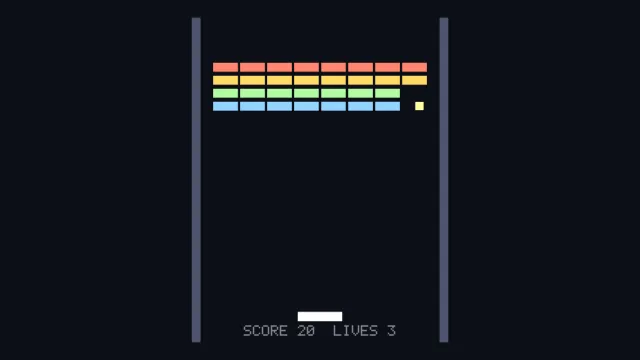
Starts examples/game-2d in this page, on WebGPU where your browser has it.
Move the paddle with the mouse or the arrow keys. The program is examples/game-2d/main.ts.
For sprite sheets, tilemaps and a retained interface tree, the engine also has a dedicated 2D layer
in @driftengine/ui2d. This page is about the other route: drawing a 2D game with the renderer you
already know, which gets lighting and depth for nothing.
The field
const FIELD_X = 7;
const FIELD_TOP = 9.5;
const FIELD_BOTTOM = -9.5;
const PADDLE_Y = -8;
const PADDLE_HALF = 1.3;
const BALL_R = 0.24;
const COLS = 8;
const ROWS = 4;
const BRICK_HALF_X = 0.72;
const BRICK_HALF_Y = 0.26;Everything is measured in world units in the plane. The field is 14 units wide and 19 tall.
Even light
/** Flat-on light, so the board reads evenly rather than falling off toward one corner. */
const FLAT = createEnvironment({
  directionalDir: [0.25, 0.45, 1],
  directionalColor: [1, 0.97, 0.92],
  ambient: [0.34, 0.36, 0.42],
  ambientGround: [0.2, 0.21, 0.26],
  emissiveGain: 1,
  nightFactor: 0,
  fogColor: [0.05, 0.06, 0.09],
  fogDensity: 0,
  fogHeightFalloff: 0,
  fogBaseY: 0,
});The light comes almost straight down the view, so the board reads evenly instead of falling off toward one corner. Each brick is still a lit box, and its sides shade like one.
The stage
const stage = await openStage({ directionalShadows: false, sceneSamples: 4 });openStage is a helper shared by the engine's examples. It does what Hello world
does by hand: finds the canvas, creates the renderer, wires resize, makes a camera and starts the
loop. sceneSamples: 4 turns on multisampling, which matters here because long horizontal edges
are exactly where aliasing shows.
One mesh for every brick
/*
 * One unit brick, drawn once per live brick with a different tint. `drawMesh` takes an
 * optional colour multiplier that is reset after the call, which is what lets a single
 * flat-shaded mesh stand in for four rows of different colours without four meshes.
 */
const brickMesh = new MeshBuilder();
brickMesh.addBox([0, 0, 0], [BRICK_HALF_X, BRICK_HALF_Y, 0.24], [1, 1, 1]);
const brick = stage.renderer.createMesh(brickMesh.build());

const paddleMesh = new MeshBuilder();
paddleMesh.addBox([0, 0, 0], [PADDLE_HALF, 0.26, 0.24], [0.82, 0.86, 0.95]);
const paddle = stage.renderer.createMesh(paddleMesh.build());

const ballMesh = new MeshBuilder();
ballMesh.addBox([0, 0, 0], [BALL_R, BALL_R, BALL_R], [1, 0.86, 0.5]);
const ball = stage.renderer.createMesh(ballMesh.build());

const wallMesh = new MeshBuilder();
wallMesh.addBox([0, 0, 0], [0.25, FIELD_TOP, 0.24], [0.24, 0.26, 0.34]);
const wall = stage.renderer.createMesh(wallMesh.build());There is one brick mesh, white. drawMesh takes an optional tint that multiplies the mesh's colour
for that one draw, so four rows of different colours are four tints on the same mesh instead of four
meshes.
The bricks
const ROW_TINTS: [number, number, number][] = [
  [0.95, 0.42, 0.35],
  [0.95, 0.68, 0.32],
  [0.55, 0.78, 0.5],
  [0.45, 0.66, 0.95],
];

/** Reused for every draw: set, update, draw, set again. Nothing is allocated in the frame. */
const place = new SceneNode();

interface Brick {
  readonly x: number;
  readonly y: number;
  readonly row: number;
  alive: boolean;
}

const bricks: Brick[] = [];
function rack(): void {
  bricks.length = 0;
  for (let row = 0; row < ROWS; row += 1) {
    for (let col = 0; col < COLS; col += 1) {
      bricks.push({
        x: (col - (COLS - 1) / 2) * (BRICK_HALF_X * 2 + 0.14),
        y: 6.6 - row * (BRICK_HALF_Y * 2 + 0.24),
        row,
        alive: true,
      });
    }
  }
}
rack();The game's own state is plain data: a list of bricks with a position, a row and whether they're
still standing. One SceneNode is reused for every draw: set its position, update it, draw, and set
it again for the next thing.
let paddleX = 0;
let ballX = 0;
let ballY = PADDLE_Y + 1;
let previousBallX = ballX;
let previousBallY = ballY;
let velX = 4.4;
let velY = 7.6;
let score = 0;
let lives = 3;
let over = '';The ball keeps its previous position, like every moving thing, so the frame can draw it between steps.
Input
/* Pointer drives the paddle; the arrow keys do too, so the example works without a mouse. */
let pointerTarget: number | null = null;
const held = new Set<string>();
addEventListener('pointermove', (event) => {
  const half = stage.renderer.cssWidth / 2;
  pointerTarget = ((event.clientX - half) / half) * FIELD_X;
});
addEventListener('keydown', (event) => held.add(event.key));
addEventListener('keyup', (event) => held.delete(event.key));
addEventListener('pointerdown', () => {
  if (over !== '') {
    score = 0;
    lives = 3;
    over = '';
    rack();
    serve();
  }
});

function serve(): void {
  ballX = paddleX;
  ballY = PADDLE_Y + 1;
  previousBallX = ballX;
  previousBallY = ballY;
  velX = 4.4 * (Math.random() < 0.5 ? -1 : 1);
  velY = 7.6;
}This example reads the DOM directly to stay on one subject. A real game would use an ActionMap, as
Moving things describes, and get gamepads and touch for free.
A camera that looks flat
const hud = stage.renderer.createText();

stage.camera.fovYDeg = 14;
stage.camera.position[0] = 0;
stage.camera.position[1] = 0;
stage.camera.position[2] = 86;
stage.camera.lookAt(0, 0, 0);The engine's camera is a perspective camera. What makes it read as flat is a narrow field of view
from a long way back. The visible height at distance d is 2 * d * tan(fov / 2), so a 19-unit
board at 14 degrees needs about 86 units of distance. At that distance the lines of sight have
barely spread by the time they cross the board, and the picture is orthographic to the eye. Widen
fovYDeg and the outer bricks start to show their sides.
The step
simulate(dt) {
  if (over !== '') return;

  if (held.has('ArrowLeft')) paddleX -= 14 * dt;
  if (held.has('ArrowRight')) paddleX += 14 * dt;
  if (pointerTarget !== null) paddleX += (pointerTarget - paddleX) * Math.min(1, dt * 14);
  paddleX = Math.max(-FIELD_X + PADDLE_HALF, Math.min(FIELD_X - PADDLE_HALF, paddleX));

  previousBallX = ballX;
  previousBallY = ballY;
  ballX += velX * dt;
  ballY += velY * dt;

  /* Walls and ceiling. Reflect and push back out, so a fast ball cannot stick to an edge. */
  if (ballX < -FIELD_X + BALL_R) {
    ballX = -FIELD_X + BALL_R;
    velX = Math.abs(velX);
  } else if (ballX > FIELD_X - BALL_R) {
    ballX = FIELD_X - BALL_R;
    velX = -Math.abs(velX);
  }
  if (ballY > FIELD_TOP - BALL_R) {
    ballY = FIELD_TOP - BALL_R;
    velY = -Math.abs(velY);
  }

  /*
   * The paddle steers rather than merely reflecting: where the ball lands across its width
   * sets the outgoing angle. Without that a game of this shape has exactly one rally in it.
   */
  if (
    velY < 0 &&
    ballY - BALL_R < PADDLE_Y + 0.26 &&
    ballY > PADDLE_Y - 0.6 &&
    Math.abs(ballX - paddleX) < PADDLE_HALF + BALL_R
  ) {
    ballY = PADDLE_Y + 0.26 + BALL_R;
    const offset = (ballX - paddleX) / PADDLE_HALF;
    const speed = Math.hypot(velX, velY);
    const angle = offset * 1.0;
    velX = Math.sin(angle) * speed;
    velY = Math.cos(angle) * speed;
  }

  for (const b of bricks) {
    if (!b.alive) continue;
    if (
      Math.abs(ballX - b.x) < BRICK_HALF_X + BALL_R &&
      Math.abs(ballY - b.y) < BRICK_HALF_Y + BALL_R
    ) {
      b.alive = false;
      score += 10;
      /* Reflect on the shallower overlap, so a corner hit does not pass through. */
      const overlapX = BRICK_HALF_X + BALL_R - Math.abs(ballX - b.x);
      const overlapY = BRICK_HALF_Y + BALL_R - Math.abs(ballY - b.y);
      if (overlapY < overlapX) velY = -velY;
      else velX = -velX;
      break;
    }
  }

  if (bricks.every((b) => !b.alive)) over = 'CLEARED';

  if (ballY < FIELD_BOTTOM) {
    lives -= 1;
    if (lives <= 0) over = 'GAME OVER';
    else serve();
  }
},Breakout needs no physics engine. The ball moves by its velocity each step and bounces by flipping a component of it. The paddle steers: where the ball lands across its width sets the outgoing angle, which is what gives the game more than one rally. A brick hit reflects on the axis with the smaller overlap, so a corner hit doesn't pass through.
The frame
render(alpha) {
  const drawX = previousBallX + (ballX - previousBallX) * alpha;
  const drawY = previousBallY + (ballY - previousBallY) * alpha;

  stage.renderer.beginFrame([0.05, 0.06, 0.09]);
  stage.renderer.bindMeshPass(stage.camera, FLAT);

  for (const side of [-1, 1]) {
    place.setPosition(side * (FIELD_X + 0.25), 0, 0);
    place.updateWorld();
    stage.renderer.drawMesh(wall, place.worldMatrix);
  }

  for (const b of bricks) {
    if (!b.alive) continue;
    place.setPosition(b.x, b.y, 0);
    place.updateWorld();
    stage.renderer.drawMesh(brick, place.worldMatrix, undefined, ROW_TINTS[b.row]);
  }

  place.setPosition(paddleX, PADDLE_Y, 0);
  place.updateWorld();
  stage.renderer.drawMesh(paddle, place.worldMatrix);

  place.setPosition(drawX, drawY, 0);
  place.updateWorld();
  stage.renderer.drawMesh(ball, place.worldMatrix);

  const width = stage.renderer.cssWidth;
  const height = stage.renderer.cssHeight;
  const cell = Math.max(2, Math.round(Math.min(width, height) / 260));
  stage.renderer.setText(
    hud,
    over === '' ? `SCORE ${score}  LIVES ${lives}` : `${over} - CLICK TO PLAY AGAIN`,
  );
  stage.renderer.drawText(
    hud,
    width,
    height,
    Math.round(width * 0.5 - stage.renderer.textWidth(hud, cell) / 2),
    Math.round(height * 0.93),
    {
      ...DEFAULT_TEXT_STYLE,
      cellSize: cell,
      color: [0.92, 0.94, 1],
      glow: 0,
      alpha: 1,
      reveal: 1,
    },
    0,
  );

  stage.renderer.endFrame();
},Walls, live bricks with their row tint, the paddle and the ball at its interpolated position, then the score in the built-in pixel font, centred by measuring the string.