 DriftEngine
Interface
Input
Keyboard, mouse, gamepads and touch through one action map, with rebinding and saving, prompts for the device in use, rumble, and scripts that read it.
npm install @driftengine/core
Moving things introduces the three layers: an InputSource that
captures the devices, an ActionMap that names what the player means, and TouchControls for a
touch screen. This chapter goes further: every device at once, gamepads by what they are, a
controls screen that rebinds and saves, rumble, touch in detail, and scripts that read all of it.
The example is a puck in an arena. The keyboard, a gamepad and a touch screen all drive it, because its script asks an action map what the player means and never which device said so. The panel on the right rebinds boost and brake to the next key or button pressed, and the prompts name whatever the player last used: a key, the label printed on their pad, or a tap.
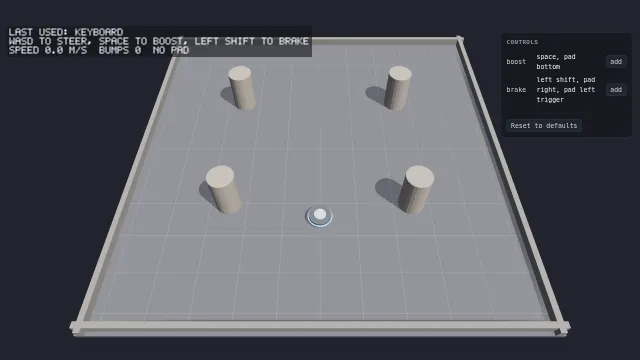
Starts examples/input in this page, on WebGPU where your browser has it.
Every device at once
/* Every device at once. The keys listed are kept from the page, so Space does not scroll it. */
const input = new InputSource(canvas, [
  'Space',
  'ArrowUp',
  'ArrowDown',
  'ArrowLeft',
  'ArrowRight',
  'ShiftLeft',
]);
const actions = new ActionMap(input, {
  move: {
    stick: 'left',
    up: ['KeyW', 'ArrowUp'],
    down: ['KeyS', 'ArrowDown'],
    left: ['KeyA', 'ArrowLeft'],
    right: ['KeyD', 'ArrowRight'],
  },
  boost: { keys: ['Space'], buttons: ['faceDown'] },
  brake: { keys: ['ShiftLeft'], buttons: ['faceRight', 'l2'] },
});
/* A stick where the left thumb lands, and taps and holds on the right of the screen. */
const touch = new TouchControls(input, {
  stickBase: document.querySelector<HTMLElement>('#stick-base') ?? undefined,
  stickNub: document.querySelector<HTMLElement>('#stick-nub') ?? undefined,
});new InputSource(target, preventDefaultCodes, options) reads the keyboard, the mouse, touches and
gamepads together. The codes listed keep their browser default from happening, so Space does not
scroll the page. The options turn a device off with sources, which leaves it inert, never taking
the prompts, and stops the gamepad poll outright; set the stick deadzone, DEFAULT_DEADZONE when
omitted; and with autoPoll: false leave the sampling to you, calling poll() at the start of each
fixed step so a recorded replay samples the same input on every run. setSourceEnabled(source, enabled) does the same at run time, which is the example's gamepad switch.
lastDevice is the device the player last actually used, never one that is merely connected: a
pad left on the desk changes nothing until it is pressed or its stick moved, and the mouse counts
only after it has travelled a little way. onDeviceChange(listener) is told when that changes and
only then. Prompts follow it, so a player who picks up a pad sees its buttons and one who goes back
to the keyboard sees keys. A key typed into a text field is not the game's, and isTypingTarget(element)
is the test the source applies.
Gamepads
pads is every connected pad and pad(index) one of them, as a GamepadView, up to four for
local play. Buttons are named by position, faceDown, faceRight, faceLeft and faceUp, the
shoulders l1, r1 and the triggers l2, r2, select, start, the stick clicks l3 and r3,
the d-pad and guide, so a binding means the same place on every pad. A view answers down,
pressed and consumePress for a button, axis for a stick, deadzoned, and trigger for how far
a trigger is pulled. On a pad whose mapping is not standard, button(index) and
rawAxis(index) read it by number.
identity says what the pad is. Its family is xbox, playstation, nintendo or generic,
read from the vendor, and label(button) is what is printed on the plastic: faceDown is A on one
family, Cross on another and B on a third. glyph(button) is a stable key such as xbox.a for an
icon set of your own; the engine ships no art.
A pad can rumble where the browser can drive its motors, which most cannot. canRumble says so,
and a settings screen greys the control out when it is false. rumble(durationMs, strong, weak)
drives the low and high motors, from 0 to 1, for at most MAX_RUMBLE_MS, and stopRumble stops
it. Both answer whether the platform took the request, and false is a real answer, never an error.
An action map forwards all three to the pad it reads.
Rebinding and saving
function bind(binding: Binding, said: string): void {
  if (waiting === null) return;
  const displaced = actions.rebind(waiting, binding);
  actions.save(store, SAVED);
  if (note !== null) {
    note.textContent =
      displaced.length > 0 ? `${said} was taken from ${displaced.join(' and ')}` : '';
  }
  waiting = null;
  drawRows();
}

addEventListener('keydown', (event) => {
  if (waiting === null) return;
  event.preventDefault();
  bind({ device: 'keyboard', code: event.code }, keyName(event.code));
});

/** Called each frame while a row is waiting: the first button any pad pressed. */
function listenToPads(): void {
  if (waiting === null) return;
  for (const pad of input.pads) {
    for (const button of BUTTONS) {
      if (pad.pressed(button)) {
        bind({ device: 'gamepad', button }, pad.identity.label(button));
        return;
      }
    }
  }
}bindingsFor(action) is what currently satisfies an action, and rebind(action, binding) adds one:
a key by its code, a pad button by its position, or a mouse button, { device: 'mouse', button: 'left' }, which a digital action also takes from its definition as mouseButtons. A mouse button
is pressed over the source's target; a game binding the right one cancels contextmenu on its
canvas, so the browser's menu does not open on the release. It returns the actions that lost that binding,
because what to do when a key already serves another action is a decision for your game, to take
it, to warn, or to refuse; the example takes it and says so. resetToDefaults() restores every
action, or one when named.
/* What the player changed survives a reload. Only the changes are written, so a default the game
   alters later still reaches a player who never touched it. */
const store = defaultStore();
const SAVED = 'driftengine.examples.input';
actions.load(store, SAVED);save(store, key) writes only what the player changed, so an action the game adds or a default it
alters in a later version still reaches every player who never touched it. load(store, key)
applies the record over the defaults; a record that cannot be read leaves the defaults in force and
says so once. The store is any KeyValueStore: defaultStore() is the browser's own storage,
MemoryStore keeps it in memory for a test, and a packaged game passes its own.
A directional action is read two ways. vector shortens the keys and the stick to the rim
together, so a keyboard diagonal is no faster than a straight line, which is right for walking.
axis reads each on its own, so two keys held give a full 1 on each, which is right for a
throttle and steering. The example's stick switch moves between them.
Touch
new TouchControls(input, options) divides the screen. The left part, splitRatio of it, is a
stick that appears where the thumb lands, stickRadiusPx wide with its own stickDeadzone; the
right part is taps, holds and flicks. It reports signals and never verbs:
moveXandmoveY, the stick, up negative as a gamepad stick's is.primaryHeld, a thumb held on the right, andconsumePrimaryPress(), a tap, claimed once. A tap fires on release, sotapMaxMsis the action's latency, andfireOnHolddecides whether a still thumb also fires it.secondaryHeld, a downward flick being held, for a slide or a crouch, andconsumeLook(out), the drag since you last asked, for a camera.
classifyRightGesture is the rule that decides whether a drag on the right is a look or a flick,
and when in doubt it is a look: a missed flick costs one slide, a look wrongly taken costs the
camera for the whole gesture. gestureMovePx, swipeMaxMs and swipeDominance tune it. Call
tick(performance.now()) once a frame, so a hold resolves on time. The stick needs no page
elements, and stickBase and stickNub are where it is drawn when you want it seen.
From DriftScript
drift/input reads an action map and a touch screen the host hands a script as Actions and
Touch. down, pressed, axisX and axisY, shortened to the rim, and rawAxisX and
rawAxisY read actions; touchX, touchY, touchHeld, touchTap and touchSlide read touch;
canRumble, rumble and stopRumble drive the pad. The puck takes whichever device is pushed
furthest:
// The stick, the keys or a thumb on the screen, whichever is pushed furthest: a keyboard and a
// touch screen at once never add up to more than one stick.
fn steer(puck: mut Puck, actions: Actions, touch: Touch, dt: f32) {
    var sx = input.axisX(actions, "move")
    var sz = input.axisY(actions, "move")
    if puck.raw {
        sx = input.rawAxisX(actions, "move")
        sz = input.rawAxisY(actions, "move")
    }
    if math.abs(input.touchX(touch)) > math.abs(sx) {
        sx = input.touchX(touch)
    }
    if math.abs(input.touchY(touch)) > math.abs(sz) {
        sz = input.touchY(touch)
    }
    if puck.rest > 0 {
        puck.rest -= dt
    }
    let tapped = input.touchTap(touch)
    if (input.pressed(actions, "boost") || tapped) && puck.rest <= 0 {
        puck.boost = 0.5
        puck.rest = 1.2
    }
    var push = PUSH
    if puck.boost > 0 {
        push = PUSH * 2.6
        puck.boost -= dt
    }
    puck.braking = input.down(actions, "brake") || input.touchHeld(touch)
    var drag = DRAG
    if puck.braking {
        drag = DRAG * 5
    }
    puck.vx += (sx * push - puck.vx * drag) * dt
    puck.vz += (sz * push - puck.vz * drag) * dt
    puck.x += puck.vx * dt
    puck.z += puck.vz * dt
}And rumbles on a hit, where the pad has motors:
// Off the walls and the pillars with some of its speed lost, and the pad, where it has motors,
// rumbles with how hard the puck hit.
fn bounce(puck: mut Puck, actions: Actions, speed: f32) {
    let hard = math.min(1, speed / 12)
    puck.bumps += 1
    puck.hit = math.max(puck.hit, hard)
    if puck.shake && input.canRumble(actions) {
        input.rumble(actions, 60 + 140 * hard, hard, 0.3 * hard)
    }
}A device is outside the determinism boundary, so a
@deterministic system cannot read one: it is handed what the host sampled at the start of the
step. Rebinding stays with the host too, since a controls screen is the game's own interface, and a
rebind changes what a script's Actions answer without the script knowing:
const script = hostScript(puckScript);
interface Puck {
  x: number;
  z: number;
  vx: number;
  vz: number;
  boost: number;
  braking: boolean;
  bumps: number;
  hit: number;
  raw: boolean;
  shake: boolean;
}
const puck = exported<() => Puck>(script, 'createPuck')();
type Drive = (puck: Puck, actions: ActionMap, touch: TouchControls, dt: number) => void;
if (import.meta.hot) {
  import.meta.hot.accept('./puck.drs', (next) => {
    if (next !== undefined) patchModule(script, next as Record<string, unknown>, { Puck: [puck] });
  });
}