 DriftEngine
Rendering
Water
One water for sea, lake, fountain and canal: waves the wind builds, Fresnel and planar reflections, caustics, and the view from below.
npm install @driftengine/core
The sea, a lake, a fountain basin and a flooded corridor are the same water with different numbers: every body gets the waves, the Fresnel reflection, the highlight, the fog and the mirror, and differs only in how dense it is, how built-up its waves are and whether it has edges. The example is the open sea beside a pier; switch the wind in the strip and watch the sea change.
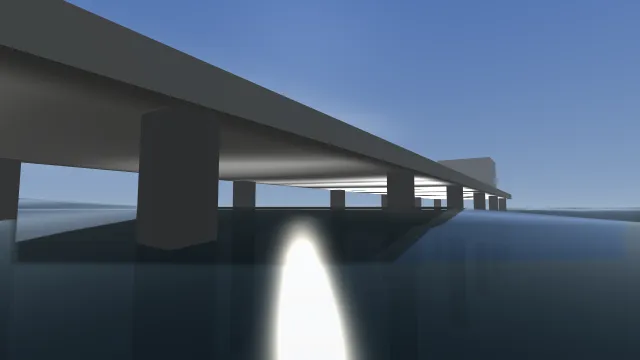
Starts examples/water in this page, on WebGPU where your browser has it.
The sea
/** The sea: no bounds, so it is endless and follows the camera; dense, so it hides its floor. */
const sea = renderer.createWater();
const seaBody: WaterBody = {
  level: 0,
  deepColor: [0.03, 0.07, 0.1],
  shallowColor: [0.08, 0.16, 0.18],
  density: 0.95,
};createWater() builds the surface: a grid that follows the camera and is snapped to whole cells, so
a fixed number of vertices covers an endless ocean without the surface sliding underfoot, with a
flat skirt carrying it to the horizon. The waves are Gerstner waves, so crests are sharp and troughs
broad. Its optional arguments are the cells per side of the wave-bearing sheet, its width in metres
(500) and how far the skirt reaches (4,000).
A WaterBody describes what is drawn:
level, the resting height of the surface.deepColorandshallowColor.density, 0 to 1: how much of what lies beneath the water hides, looking straight down. A sea hides its floor; a fountain shows its tiles; 0 is glass. At a grazing angle every water surface is a mirror, which is Fresnel and not a property of the liquid.visibility, 0 to 1, fades the whole surface; 0 draws nothing.mirror, 0 to 1, how much it reflects regardless of angle. Zero is physics, right for the sea; a pool is looked into from above, where Fresnel alone reflects a few per cent, so it may cheat.waveScale, the waves as a multiple of what the wind builds: 1 for open sea, a fraction for a basin.agitation, 0 to 1, for water the weather cannot reach. Omitted, the body takes its state from the wind.
renderer.beginFrame(HORIZON);
/* The world again, mirrored across the water's plane, for the next water draw to sample. */
const mirrored = renderer.beginPlanarReflection(camera, seaBody.level, HORIZON);
if (mirrored !== null) {
  drawWorld(mirrored);
  renderer.endPlanarReflection();
}
drawWorld(camera);
renderer.drawWater(sea, camera, time, seaBody, env, wind.velocityX, wind.velocityZ);
renderer.drawCaustics(caustics, camera, time, env, wind.velocityX, wind.velocityZ);
renderer.endFrame();drawWater(water, camera, time, body, env, windX, windZ) draws a body after the opaque scene and
after the sky, since its far edge fades into what is behind it. Pass the scene's one wind: wind
builds waves, it does not just push them, so a calm sea is nearly flat and a gale raises steep
crests that break into foam. seaStateForWind(speed) returns the same steepness and foam the
renderer uses, for anything in the game that needs to agree with what is drawn.
Bounded bodies
/** A fountain basin: clear enough to see the tiles, a little mirror, and only a breath of wave. */
export const basin: WaterBody = {
  level: 0.6,
  deepColor: [0.05, 0.12, 0.14],
  shallowColor: [0.2, 0.32, 0.3],
  density: 0.25,
  mirror: 0.35,
  waveScale: 0.12,
  bounds: { centreX: 0, centreZ: 0, halfM: 2.5 },
};bounds turns the endless sea into a rectangle of water exactly where it is put: a centre, and half
extents either as one halfM for a square or as halfX across and halfZ along.
/** A canal three metres across and forty long, running north-east. */
export const canal: WaterBody = {
  level: -0.4,
  deepColor: [0.03, 0.06, 0.05],
  shallowColor: [0.08, 0.14, 0.1],
  density: 0.8,
  waveScale: 0.3,
  bounds: { centreX: 20, centreZ: -10, halfX: 1.5, halfZ: 20, forwardX: 1, forwardZ: -1 },
};forwardX and forwardZ turn the rectangle to point where a canal runs, given as a direction
because a channel usually arrives as one, from a road graph or a spline's tangent. A canal that bends
is one body per straight run.
/** A flooded corridor: the wind never reaches it, so it says how stirred it is itself. */
export const tank: WaterBody = {
  level: -1,
  deepColor: [0.02, 0.03, 0.03],
  shallowColor: [0.06, 0.08, 0.07],
  density: 0.9,
  agitation: 0.15,
  bounds: { centreX: 0, centreZ: 40, halfX: 2, halfZ: 12 },
};

/** The sea state the renderer would use for a wind, for gameplay that wants the same answer. */
export const choppy = seaStateForWind(8);Reflections
The example's frame opens with a planar reflection: beginPlanarReflection(camera, level, clear)
returns a camera mirrored across the water's plane, the scene is drawn again from it, and
endPlanarReflection finishes the target that the next water draw samples. Draw the same things in
both passes, with the water left out of its own reflection; a function that draws the world for a
given camera, like the example's drawWorld, keeps the two the same. It returns null when the
profile has no reflection target, so a scene skips the pass without a second branch.
The reflection is one plane, so it is exact for one water level. The target exists when the
water and waterReflections quality options are on, which they are by default, or when
planarReflections asks for it in a scene with no water; waterReflectionScale sets its size
against the frame, and waterReflectionFilterTaps, 1, 5 or 9, how much water blurs it. A wet road
can sample the same mirror, as Wet surfaces shows; other surfaces reflect probes,
in Reflections.
Caustics
/** The underside of the deck, two centimetres below it, as a sheet the water lights from below. */
const caustics = renderer.createCaustics([
  {
    spans: [
      { x0: -3, z0: 2, x1: 3, z1: 2, y: 1.58 },
      { x0: -3, z0: -40, x1: 3, z1: -40, y: 1.58 },
    ],
    waterY: 0,
  },
]);Light passing through waves gathers into a moving net on whatever is near the water: the floor of a
pool, the underside of a bridge or a jetty, a cave mouth. createCaustics(sheets) takes the lit
surfaces as sheets, each a row of cross-sections, and the waterY of the water lighting it. Place a
sheet a couple of centimetres off the surface it lights, on the side it is seen from, as the example
does under the deck. drawCaustics(caustics, camera, time, env, windX, windZ, strength) adds the
light after the opaque scene; it is computed from the same wave field as the surface, so the net
moves with the crests above it. It fades out within about a dozen metres of the water.
createCaustics returns null when the profile has water off or there are no sheets, and
drawCaustics accepts null, so a world without caustics needs no branch.
Under the surface
With env.underwater set, a camera below surfaceY sees the water column: distance fades to the
water's colour, the sky is replaced by it, and crossing the surface is a smooth transition over
transitionDepth. See Fog and weather.
Quality
| Option | Default | What it does |
|---|---|---|
water |
true |
Whether water is drawn at all. Off, every water and caustics call does nothing. |
waterResolution |
128 | Cells per side of the wave-bearing sheet. |
waterReflections |
true |
The planar reflection target, for water. |
planarReflections |
false |
The same target in a scene without water. |
waterReflectionScale |
1 | The reflection target's size against the frame. |
waterReflectionFilterTaps |
9 | Blur taps on the reflection: 1, 5 or 9. |
underwaterAtmosphere |
true |
The water column's own fog under the surface. |