 DriftEngine
Rendering
Sky and atmosphere
A procedural sky with sun, moon, stars and clouds, a celestial clock for a real latitude and date, and a palette that lights the hours.
npm install @driftengine/core
The sky is drawn, not loaded: a gradient with a sun disc, a sunset band that follows the sun's
height, a moon with its phase, stars at night and clouds carried by the wind. Where the sun and moon
stand comes from a celestial clock, and what the hours look like from a palette you write. The
example runs a midsummer day at forty degrees north in ninety seconds; ?hour=19 starts it at dusk.
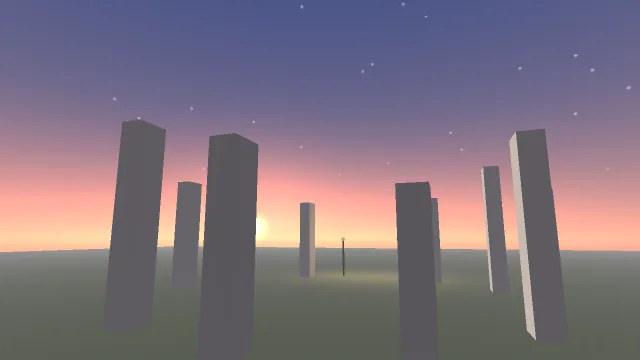
Starts examples/sky in this page, on WebGPU where your browser has it.
Drawing the sky
renderer.beginFrame(sky.horizon);
renderer.bindMeshPass(camera, env);
renderer.drawMesh(setMesh, still.worldMatrix);
/* Last, so it fills only what the world left empty. */
renderer.drawSky(camera, sky, env);
renderer.endFrame();drawSky(camera, sky, env) is the frame's last opaque draw and fills only the pixels the world left
empty. Its SkyColors say:
top,horizonanddeep: the zenith, the horizon, and the colour below the horizon.sunDirandsunColor: where the sun is and how bright its disc is.sunAngularRadius, in radians, is how large the disc looks, independent of how much light it gives.moonDir,moonColor,moonAngularRadiusandmoonPhase, 0 to 1 across the cycle: the moon is a shaded sphere lit from the side its phase says.nightFactor: how much of the night sky shows, which is the stars.cloudOffsetXandcloudOffsetZ: how far the cloud layer has drifted, in metres. Accumulate the same wind the smoke and the grass answer to, so the biggest moving thing in the frame agrees with the smallest.
The sunset band is driven by the sun's elevation alone. It is strongest as the sun touches the horizon and gone once the sun is well up or well down, so a sun pointing straight down, which is how a world says it has no sun, gives no sunset. The sun and moon fade out below the horizon. The sky is fogged by the same atmosphere as the world, so a distant hill and the horizon behind it agree.
The celestial clock
/** A site names where the sky is: forty degrees north, on the meridian, keeping UTC. */
const SITE = { latitudeDeg: 40, longitudeDeg: 0, utcOffsetHours: 0 };
/** Midsummer, and a day that lasts ninety seconds, starting before sunrise or at `?hour=`. */
const MIDSUMMER = Date.UTC(2026, 5, 21);
const DAY_SECONDS = 90;
const START_HOUR = flagNumber('hour', 3.5);
/** Where the world's north points, as an angle in the xz plane from +x toward +z: here, -z. */
const NORTH = -Math.PI / 2;

const celestial = createCelestialState();

function hourAt(seconds: number): number {
  return (START_HOUR + (seconds / DAY_SECONDS) * 24) % 24;
}celestialStateAt(whenMs, north, out, site) writes the sun's and the moon's directions, the
dayFactor and nightFactor, each 0 to 1 and smooth across twilight, and the moonPhase. north
is where the world's north points, as an angle in the xz plane from +x toward +z.
With a CelestialSite, the sun is placed by the standard solar-position arithmetic: a declination
from the day of the year, an hour angle from the clock, and an altitude and azimuth from those and
latitudeDeg. Naming longitudeDeg or utcOffsetHours makes whenMs a UTC instant and derives
the site's own hour from it, so every machine draws the same sky for the same arguments.
dayOfYear overrides the date for a world on a calendar of its own, and obliquityDeg changes the
planet's tilt.
Without a site, the sun swings through a fixed arc that peaks at 66 degrees every day, and the hour is read through the host machine's time zone. Worlds tuned against that arc keep it.
The clock is presentation. Derive whenMs from your game's own time, as the example does, and keep
it out of anything the simulation decides; see Determinism.
moonIllumination(phase) is the lit fraction of the moon, for scaling moonlight.
A daylight palette
/** The day's light, keyed by how much day there is: night, the warm edge of dusk, and noon. */
const palette = createDaylightPalette([
  {
    at: 0,
    sunColor: [0, 0, 0],
    moonColor: [0.16, 0.2, 0.3],
    skyTop: [0.004, 0.006, 0.016],
    skyHorizon: [0.02, 0.03, 0.06],
    skyDeep: [0.01, 0.012, 0.02],
    ambient: [0.02, 0.025, 0.04],
    ambientGround: [0.01, 0.01, 0.014],
    fogColor: [0.02, 0.025, 0.04],
    fogDensity: 0.01,
    shadowStrength: 0.5,
    emissiveGain: 2,
    exposure: 2.4,
  },
  {
    at: 0.35,
    sunColor: [1.6, 0.8, 0.4],
    moonColor: [0, 0, 0],
    skyTop: [0.12, 0.16, 0.32],
    skyHorizon: [0.9, 0.5, 0.3],
    skyDeep: [0.2, 0.15, 0.15],
    ambient: [0.18, 0.16, 0.2],
    ambientGround: [0.08, 0.06, 0.05],
    fogColor: [0.5, 0.36, 0.3],
    fogDensity: 0.008,
    shadowStrength: 0.7,
    emissiveGain: 1,
    exposure: 1.4,
  },
  {
    at: 1,
    sunColor: [2, 1.9, 1.7],
    moonColor: [0, 0, 0],
    skyTop: [0.18, 0.36, 0.78],
    skyHorizon: [0.62, 0.74, 0.9],
    skyDeep: [0.3, 0.34, 0.4],
    ambient: [0.3, 0.36, 0.48],
    ambientGround: [0.14, 0.12, 0.1],
    fogColor: [0.6, 0.7, 0.85],
    fogDensity: 0.005,
    shadowStrength: 0.9,
    emissiveGain: 0,
    exposure: 1,
  },
]);
const light = createDaylightState();A day's lighting is data: sun and moon colours, the three sky colours, the hemispheric ambient, fog
colour and density, shadow strength, emissive gain and exposure, at points along any number you
choose. The example keys it by dayFactor; a courtyard might key it by the sun's elevation in
degrees, or a game by the hour. resolveDaylight(at, palette, out) blends the two nearest keys,
linearly for colours and in stops for exposure, and allocates nothing.
const hour = hourAt(time);
celestialStateAt(MIDSUMMER + hour * 3_600_000, NORTH, celestial, SITE);
resolveDaylight(celestial.dayFactor, palette, light);

/* Whichever body is up lights the world; the sky draws both and hides what has set. */
const body = celestial.dayFactor > 0.5 ? celestial.sunDir : celestial.moonDir;
env.directionalDir = body;
const moonlight = moonIllumination(celestial.moonPhase);
for (let c = 0; c < 3; c += 1)
  env.directionalColor[c] = light.sunColor[c] + light.moonColor[c] * moonlight;
env.ambient = light.ambient;
env.ambientGround = light.ambientGround;
env.fogColor = light.fogColor;
env.fogDensity = light.fogDensity;
env.shadowStrength = light.shadowStrength;
env.emissiveGain = light.emissiveGain;
env.nightFactor = celestial.nightFactor;

sky.top = light.skyTop;
sky.horizon = light.skyHorizon;
sky.deep = light.skyDeep;
sky.sunDir = celestial.sunDir;
sky.moonDir = celestial.moonDir;
sky.moonPhase = celestial.moonPhase;
sky.nightFactor = celestial.nightFactor;
sky.cloudOffsetX = time * 1.5;
sky.cloudOffsetZ = time * 0.6;

exposure = easeExposure(exposure, light.exposure, time - shownAt, 1.5);
renderer.setOutputExposure(exposure);
shownAt = time;Every frame the example asks the clock, resolves the palette, and copies the answer into the
environment and the sky. Whichever body is up is the directional light, and its shadow follows it.
Lamps come on with nightFactor, on a steeper curve so they are off all afternoon.
Exposure through the day
Noon and midnight differ by more than a screen can show, so the exposure moves with the light.
easeExposure(current, target, dt, halfLife) moves toward the palette's exposure in stops, with the
half-life you choose, and renderer.setOutputExposure applies it. Easing it, instead of setting it,
is what reads as an eye adapting. Exposure needs outputTransform: 'aces'; see
Colour and motion.
Lighting from the sky
The sky colours the picture, and the hemispheric ambient lights the world. For reflections of the sky, and for lighting from a photographed sky loaded from an HDR image, see Reflections.