 DriftEngine
Simulation
Queries and colliders
Rays, swept shapes and overlaps against the world, sensors and contact events, a collider set for kinematic movement, and scenery that streams in by region.
npm install @driftengine/physics @driftengine/script
A game asks the physics world questions as often as it steps it: what is in front of the gun, is there room to stand up, what just walked into the trigger. Every query here fills a buffer the caller owns and allocates nothing.
The example is a room of crates and balls pushed about by a sliding wall. A laser on a post, a DriftScript module, casts a ray every tick and lights what it meets, and a square of floor is a sensor that counts what is standing on it.
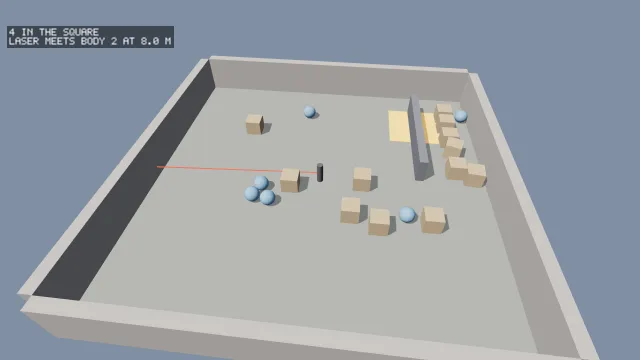
Starts examples/queries in this page, on WebGPU where your browser has it.
Rays, sweeps and overlaps
fn scan(laser: mut Laser, world: PhysicsWorld, dt: f32) {
    laser.angle = laser.angle + dt * 0.7
    let dx = math.cos(laser.angle)
    let dz = math.sin(laser.angle)
    // From half a metre up the post, level, any layer.
    if physics.raycast(world, 0, 0.5, 0, dx, 0, dz, laser.reach, -1) {
        laser.hit = physics.hitBody(world)
        laser.distance = physics.hitFraction(world) * laser.reach
    } else {
        laser.hit = -1
        laser.distance = laser.reach
    }
}raycast(ox, oy, oz, dx, dy, dz, maxDistance, out, filter)finds the nearest body a ray meets and fills aRayHitfromcreateRayHit(): thebody, thefractionofmaxDistanceit travelled, the pointx,y,zand the normalnx,ny,nz. A ray that starts inside a body reports that body at fraction zero: a line of sight that started inside a wall does not see past it.shapecast(shape, pose, dx, dy, dz, out, filter)sweeps a convex shape, posed by aShapePoseof position and quaternion, along a displacement and reports the first body it touches.overlap(shape, pose, out, filter)writes every body overlapping a shape into anInt32Arrayand returns how many.
A QueryFilter narrows any of them: ignore, a body to skip, usually the one asking; layer, the
asker's own layer tested against each body's mask; and mask, the layers it wants, tested against
each body's layer. raycastWorld, shapecastWorld and overlapWorld are the same queries over a
BodySet and its tree, for a caller holding those without a world, and isStaticBody says whether
a hit is scenery.
Rays against a triangle mesh are two-sided, though its contacts are one-sided: a sight line that saw through a wall from behind is a worse answer than one that did not.
Sensors and contact events
/** Who is in the square: entered on one tick, still there until an exit says otherwise. */
const inside = new Set<number>();
function drainEvents(): void {
  const events = world.events;
  for (let i = 0; i < events.count; i += 1) {
    const kind = events.data[i * 3];
    const a = events.data[i * 3 + 1] ?? -1;
    const b = events.data[i * 3 + 2] ?? -1;
    const other = a === zone ? b : b === zone ? a : -1;
    if (other < 0) continue;
    if (kind === EVENT_ENTER) inside.add(other);
    if (kind === EVENT_EXIT) inside.delete(other);
  }
}A body added with sensor: true reports overlap and is never pushed out of it. Events from every
contact and every sensor collect during the tick and are drained after it, from world.events:
count triples of kind, first body and second body in data, where the kind is EVENT_ENTER,
EVENT_STAY or EVENT_EXIT. They are ordered by pair, so a replay sees them in the order it
recorded them. They are never callbacks during the solve: a callback that removed a body mid-solve
would invalidate every index the solver holds. Drain them completely each tick, since a dropped exit
leaves a game believing something is still inside a trigger.
From DriftScript, contactCount, contactKind, contactA and contactB read the same events.
A kinematic body
/** The floor and four walls, the things on it, the sliding wall and the sensor square. */
const world = new PhysicsWorld();
world.addBody({ type: BODY_STATIC, shape: boxShape(8, 0.5, 8), y: -0.5 });
for (const [x, z, hx, hz] of [
  [8.25, 0, 0.25, 8],
  [-8.25, 0, 0.25, 8],
  [0, 8.25, 8, 0.25],
  [0, -8.25, 8, 0.25],
] as const) {
  world.addBody({ type: BODY_STATIC, shape: boxShape(hx, 1, hz), x, y: 1, z });
}

const things: { body: number; mesh: MeshHandle }[] = [];
const crate = renderer.createMesh(
  new MeshBuilder().addBox([0, 0, 0], [0.4, 0.4, 0.4], [0.72, 0.56, 0.38]).build(),
);
const ball = renderer.createMesh(
  new MeshBuilder().addSphere([0, 0, 0], 0.35, [0.35, 0.6, 0.85], 0, 18, 9).build(),
);
for (let i = 0; i < 18; i += 1) {
  const x = (hashToUnit(i * 2) - 0.5) * 12;
  const z = (hashToUnit(i * 2 + 1) - 0.5) * 12;
  const round = i % 3 === 0;
  const body = world.addBody({
    type: BODY_DYNAMIC,
    shape: round ? sphereShape(0.35) : boxShape(0.4, 0.4, 0.4),
    x: Math.abs(x) < 1 ? x + 2 : x,
    y: 0.5,
    z,
    density: 200,
  });
  things.push({ body, mesh: round ? ball : crate });
}

/** A wall that slides back and forth across the room: kinematic, so it pushes and is not pushed. */
const sweeper = world.addBody({
  type: BODY_KINEMATIC,
  shape: boxShape(0.2, 0.6, 3),
  x: 0,
  y: 0.6,
  z: -3.5,
});

/** A square of floor that reports what overlaps it and stops nothing. */
const zone = world.addBody({
  type: BODY_STATIC,
  shape: boxShape(1.5, 0.3, 1.5),
  x: 5,
  y: 0.3,
  z: -5,
  sensor: true,
});The sliding wall is BODY_KINEMATIC: never pushed and never integrated. The page sets its position
each tick and gives it the velocity it is moving at, so the solver knows how fast it pushes the
crates in its way.
A collider set
Not everything that moves needs dynamics. A ColliderSet is a spatial hash of convex colliders
that a kinematic body is swept against one axis at a time, which is what the
character controller and the cameras use. boxCollider(cx, cy, cz, hx, hy, hz)
makes a box, and colliderFromShape(shape) wraps any convex shape in a world-space position;
triangle meshes are refused, since the sweep tests a fixed list of axes and a mesh has none.
const colliders = new ColliderSet([boxCollider(0, -0.5, 0, 20, 0.5, 20)]);
const body: Body = { x: 0, y: 2, z: 0, hx: 0.35, hy: 0.9, hz: 0.35 };

/** How far it actually travelled along each axis, which is less where something was in the way. */
export const across = moveAxis(body, colliders, AXIS_X, 0.05);
export const down = moveAxis(body, colliders, AXIS_Y, -0.02);moveAxis(body, set, axis, delta) moves a Body, a box by its centre and half extents, as far as
it can along one axis and returns how far it went. ejectFromSolid pushes a body that has ended up
inside geometry back out, and reports it as the event it is. segmentHit tests a segment against
the set's boxes for drawing, never for the simulation. bodyBounds and aabbFromCenter build the
boxes these read.
Streaming the colliders
A set follows the player: build it empty, add the colliders of each region as it comes into
reach, and remove the group a region was added as when it leaves. Only that group's cells are
touched, so a crossing cost 0.090 milliseconds in the engine's own measurement, where rebuilding a
set of the same size cost about 41, and queries on a streamed set ran at 1.25 to 1.31 times the
speed of a freshly built one. One set for the player keeps an index meaning one thing; a set per
region would make every query result a pair.
count is the live colliders and capacity the slots; after the first remove the live ones are
sparse, so a walk over every slot skips those where liveAt(i) is false. A set built by its
constructor cannot be streamed: those colliders belong to a group remove refuses, so a streamed
set starts empty. bytes() says what the resident ring costs, and absorb(other) folds one set
into another without rehashing. fingerprintColliders hashes a set; on a set that has been
streamed it means the same set with the same history.
From DriftScript, beginColliderGroup, addColliderBox, endColliderGroup and
removeColliderGroup edit a Colliders set, and anyWithin, nearestWithin, nearCollider,
nearX, nearY, nearZ and nearDistance ask it what is close.
Scenery by region
A streamed world's scenery is one static triangle-mesh body a region, added as the region streams
in and removed as it streams out. StaticRegions keeps the books:
/** One static mesh body a region, added as it streams in and removed as it streams out. */
const world = new PhysicsWorld();
const scenery = new StaticRegions(world);

export function streamIn(region: number, positions: Float32Array, indices: Uint32Array): void {
  scenery.add(region, { type: BODY_STATIC, shape: meshShape(positions, indices) });
}

export function streamOut(region: number): void {
  scenery.remove(region);
}

/** The body a region stands as now, which changes as other regions leave. */
export const bodyOf = (region: number): number => scenery.bodyOf(region);A region of hundreds of boxes as one mesh body is one add and one remove, and the mesh carries its
own tree. removeBody fills the removed body's slot with the world's last body, which may be
another region's, so StaticRegions follows each move and bodyOf always answers the index a
region stands as now. A world that also holds bodies someone else tracks by index has to remove
them through one place that follows them all.
A .drft hands over what a region collides as: its regions carry collision triangles, and
DrftLoader exposes the file's colliders as hulls, its navigation mesh and its entities,
which a streaming reader also receives through onColliders, onNavigation and onEntities.