 DriftEngine
Systems
Saves and preferences
The store a game saves to, preferences checked field by field, saves to a server that answers later, and a world written out and read back across a change.
npm install @driftengine/core @driftengine/entities
A game keeps two kinds of thing between sessions. Preferences are small and are read before the first frame: the volume, the controls, how fast the game runs. A save is the game itself, written when the player asks or on a timer, and read back when they return, sometimes by a version of the game that has changed since. The engine gives both one synchronous store to write to, a record of preferences that checks what it reads, a store that saves to a server behind that same seam, and a way to write an entity world out and read it back.
The example is a garden bed that sows a seed a second until it is full, with the sowing and the growing in DriftScript. Save, Load and Clear are on the right. The saves go to a server that is the page pretending, a moment away, which keeps what it is sent in your browser's storage so a reload finds it; the strip makes it slow or takes it offline. The pace and the season are preferences: change one and reload, and it stays.
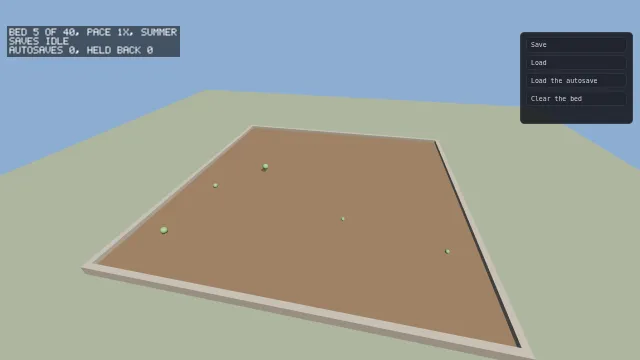
Starts examples/saves in this page, on WebGPU where your browser has it.
One store, read at once
KeyValueStore is three calls: read(key), which answers a string or null, write(key, value)
and remove(key). It is synchronous on purpose. Preferences are read while the game boots, before
the first frame, and a store that answered later would draw that frame with the wrong settings and
correct it in front of the player.
BrowserStore keeps its values in the page's local storage and in memory beside it, so a browser
that blocks storage or runs out of room still has them until the page closes. MemoryStore keeps
them only in memory, for a test or a game that saves nothing, and hydrate fills it from entries
read elsewhere. defaultStore() is one BrowserStore shared by everything that asks for it, so
give every key a prefix of your own.
Preferences
/* What the player chose, validated field by field: a pace outside its range is clamped, and a
   season that is not one of the two falls back to summer. */
interface GardenPreferences {
  pace: number;
  season: string;
}
const SCHEMA: PreferenceSchema<GardenPreferences> = {
  key: 'driftengine.examples.saves.preferences',
  defaults: { pace: 1, season: 'summer' },
  ranges: { pace: [0.25, 4] },
  options: { season: ['summer', 'autumn'] },
};
const preferences = new PreferenceStore(SCHEMA);A PreferenceSchema names the storage key, every field and the value it falls back to in
defaults, an inclusive range for a number in ranges, and the allowed strings for a string in
options. A field may be a number, a boolean or a string. A schema with any other kind of field is
refused the first time it is used, since such a value would be written and never read back.
PreferenceStore loads the record when it is made and checks it field by field. A number outside
its range is clamped, a string that is not one of its options falls back to its default, and a
field of the wrong type, or one the stored record does not have, takes its default too. A stored
record always lags the code that reads it, so one field gone wrong keeps its default and the rest
are still what the player chose. value is the record. update(patch) checks the fields it is
given and, if any changed, saves the record and tells every subscribe listener; nothing changed
means nothing is written and nobody is told, which keeps a listener that writes back from looping.
reset() puts the defaults back. loadPreferences and savePreferences do the reading and the
writing without a live record.
A PreferenceStore writes to the default store unless it is given another. Preferences that should
follow a player from one machine to the next go to a store like the one below.
A server that answers later
/* A server that is this page pretending. It answers after a delay, keeps what it is sent in the
   browser's own storage so that a reload finds it, and fails when the strip says it is down. */
type Server = 'online' | 'slow' | 'offline';
let server = flag('server', 'online') as Server;
const HELD = 'driftengine.examples.saves.server';
const local = defaultStore();
const answer = (): Promise<void> =>
  new Promise((done) => setTimeout(done, server === 'slow' ? 2500 : 300));

const backend: SaveBackend = {
  async load() {
    await answer();
    if (server === 'offline') throw new Error('the server did not answer');
    return JSON.parse(local.read(HELD) ?? '[]') as [string, string][];
  },
  async save(changes) {
    await answer();
    if (server === 'offline') throw new Error('the server did not answer');
    const held = new Map(JSON.parse(local.read(HELD) ?? '[]') as [string, string][]);
    for (const [key, value] of changes) {
      if (value === null) held.delete(key);
      else held.set(key, value);
    }
    local.write(HELD, JSON.stringify([...held]));
  },
};A save kept on a server, in a desktop shell's file or in a platform's cloud is behind a call that
answers later. SaveBackend is what a game writes for one. load() answers every entry it holds,
and is called once. save(changes) takes a batch: a map from each key to its new value, or to
null for a key removed. A backend whose API takes one key at a time loops inside save, and one
that stores a whole document writes it in one request. save resolves when the batch has landed
and rejects to have it tried again, so a backend that resolved before it knew would turn the
store's status into decoration.
/* The synchronous seam over the server: reads come from a copy loaded once, and writes are batched,
   sent after a quiet quarter second, and retried with a growing delay when the server fails. */
const saves = new RemoteSaveStore(backend, defaultSaveTimer(), {
  flushDelayMs: 250,
  maxAttempts: 3,
  retryDelayMs: 1000,
});
await saves.load();
/* A write is durable once the server has it. Leaving the page is the last chance to send one. */
addEventListener('pagehide', () => void saves.flush());RemoteSaveStore puts that backend behind KeyValueStore, so everything that reads and writes a
store uses it unchanged. load() is awaited once at boot and fills a copy that every read answers
from. A write changes that copy at once and queues the key. Writes made close together go out as
one batch after flushDelayMs of quiet, which is how a slider dragged across sixty frames becomes
one request. A batch that fails is tried again after retryDelayMs, then after twice that, up to
maxAttempts tries. Giving up on the attempt does not give up the changes: they stay queued and go
out with the next write or flush(), and a key written again in the meantime goes with its newer
value.
Nothing throws. status is idle, pending while changes wait, saving while a batch is out, or
failed once the tries are spent, with pending the number of keys waiting and lastError what
the backend said. Show it: a game that says it saved over a queue that has been failing for ten
minutes is worse than one that says nothing. A write is safe once the server has it, so a player
who closes the page inside the quiet period loses it unless something calls flush(). The engine
does not listen for the page going away, because which event means that depends on the platform;
the example flushes on pagehide, and a desktop shell's close hook makes the same call.
defaultSaveTimer() is the browser's timer, and a SaveTimer of your own replaces it in a test or
on a platform without one.
Take the example's server offline and press Save: the status goes to saving, then to failing with one change kept, and the script stops writing autosaves while that one waits. Put the server back online and the kept save goes out at once.
Writing a world out
component Plant {
    x: f32 = 0
    z: f32 = 0
    // Seconds grown, and how tall the plant stands once it is grown, in metres.
    age: f32 = 0
    tall: f32 = 1
}

// The bed: its own seed, how many seeds have gone in, and how fast it grows, which the page writes
// from the player's preference.
component Bed {
    seed: u32 = 7
    sown: u32 = 0
    pace: f32 = 1
}/* The bed and every plant, written out with each component's schema beside it. */
const SLOT = 'driftengine.examples.saves.slot';
const written = (): string => JSON.stringify(serializeWorld(world, [type('Bed'), type('Plant')]));
function save(): string {
saves.write(SLOT, written());
return `saved ${world.count(type('Plant'))} plants; the store sends them`;
}
/* Into a fresh world, which replaces the running one only if every entity loaded. */
function load(key: string): string {
const text = saves.read(key);
if (text === null) return 'nothing is saved there yet';
const fresh = new World();
const result = deserializeWorld(fresh, JSON.parse(text) as SerializedScene, [
type('Bed'),
type('Plant'),
]);
if (!result.loaded) return result.reason;
const found = result.entities.find((entity) => fresh.has(entity, type('Bed')));
if (found === undefined) return 'that save holds no bed';
world = fresh;
bed = found;
return `loaded ${fresh.count(type('Plant'))} plants`;
}serializeWorld(world, types) writes every entity that holds any of the given component types,
each component's values under a stable field id, with each component's schema beside them. It is
handed the types to save, not every store the world has, since a world keeps a store for anything
that was ever asked about and a save is a decision about what matters. The result is plain data,
which the example writes as JSON through the store.
deserializeWorld(world, scene, types) reads one back. It answers loaded: true with the
entities it made, or loaded: false with a sentence, having written nothing: it checks every
entity before it touches the world, so a refusal at the fifth leaves no four behind. Every entity
is made fresh, and a field declared Entity is pointed at the new handle; a number that happens to
hold a handle is a number, and is left alone. The example loads into a new world and swaps it in
only once the load has succeeded.
The file carries the schema each component had when it was written, so a save loads across a
change to the game. A field added since takes the value the component declares for it: with
water: f32 = 0.5 added to Plant, every plant in a garden saved before has a water of 0.5. A
field declared without a value starts at zero, false or empty. A field removed since is dropped,
and one whose type changed is refused by name instead of guessed at. Renaming a field gives it a new
id, which drops the old value; @id("old") on the renamed field keeps the old one. Try it with the
example running: save, add a field to Plant in garden.drs, reload the page, and press Load.
A random sequence that a save should continue is saved the same way: savableMulberry32 answers
its position from save and goes back to it on restore, as Determinism
shows. The garden needs no generator, because the bed seeds each plant from its own count of seeds
sown, and that count is in the save.
From a script
data Autosave {
    // Seconds between autosaves, and since the last one.
    every: f32 = 5
    since: f32 = 0
    written: u32 = 0
    // How many were held back because the one before had not landed.
    held: u32 = 0
}

// The page offers the garden once a second and the script decides whether it is written. An
// autosave waits while the last one is still on its way, so a slow server is never handed a queue.
fn autosave(auto: mut Autosave, store: Store, garden: String, dt: f32) -> bool {
    auto.since = auto.since + dt
    if auto.since < auto.every {
        return false
    }
    if persistence.pendingSaves(store) > 0 {
        auto.held = auto.held + 1
        return false
    }
    persistence.write(store, "driftengine.examples.saves.auto", garden)
    auto.since = 0
    auto.written = auto.written + 1
    return true
}drift/persistence gives a script the store its host handed it: read, write and remove by
key, and saveStatus and pendingSaves to ask how the saving is going. A script cannot make a
store, so the host passes one in as an argument, the way it passes an input map. None of these is
deterministic, since what a store holds depends on what the player did in another session. The
example's page offers the garden to the script once a second, and the script decides whether it is
written: every five seconds, and never while the last save is still waiting, so a slow server is
not handed a queue of autosaves.
Input saves a player's rebound controls through the same store, and only the bindings they changed.