 DriftEngine
Worlds
Procedural solids
Closed solids built in code, from boxes and lathes to sweeps, combined by booleans, smoothed, painted and handed to the renderer as meshes.
npm install @driftengine/core @driftengine/script
A baker that builds a city from templates, or a game that generates its own buildings, needs shapes it can combine: a wall with windows cut out of it, a tower with a doorway carved into its foot. The solids in core are closed surfaces with outward normals, and the booleans between them keep them closed.
The example is a gatehouse built entirely in code. Change how many windows the wall has and how they are cut, and switch the round solids between faceted and smooth.
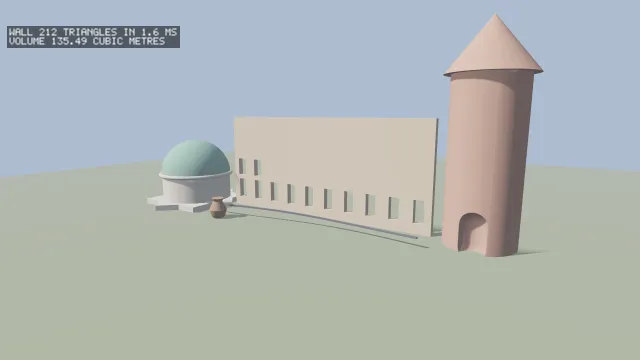
Starts examples/solids in this page, on WebGPU where your browser has it.
Shape before paint
A Solid is shape alone: positions, normals, uvs and counter-clockwise indices. It has no
colour, emissive or roughness yet, because booleans, smoothing and transforms are defined on shape,
and carrying a dozen per-vertex channels through a boolean would mean deciding how each one
interpolates across a cut. A finished solid is painted once with solidToMesh(solid, colour, emissive), which returns the MeshData that createMesh takes.
Solids are built at load or bake time, never per frame, so every function here allocates its
result. Every primitive is closed except solidQuad, and the engine's tests check each one with the
divergence theorem: its volume, measured from its surface, is the volume of the shape it claims to
be.
The primitives
All of them are centred on the origin unless stated, take full extents and not half, give texture coordinates from 0 to 1 across each face or around and along a round one, and wind counter-clockwise seen from outside.
| Solid | Shape |
|---|---|
solidBox(x, y, z) |
A box, four vertices a face |
solidRoundedBox(x, y, z, radius, segments) |
A box with every edge rounded |
solidQuad(x, y) |
A single-sided plane in XY facing +Z, the one open solid |
solidPrism(x, y, z, right) |
A triangular section in XY extruded along Z; right puts a right angle at its left end |
solidExtrude(profile, height, centre) |
A polygon in XZ, convex or not, extruded up Y |
solidSweep(profile, path, capEnds, up) |
A section swept along a polyline |
solidCylinder(radius, length, segments, smooth) |
Along Y, capped |
solidCone(radius, length, segments, smooth) |
Base at −length/2, apex at +length/2 |
solidFrustum(bottom, top, length, segments, smooth) |
A cone with its top cut off |
solidTube(radius, thickness, length, segments, smooth) |
A hollow cylinder along Y; four segments make a square frame |
solidSphere(radius, segments, smooth) |
segments around, half as many from pole to pole |
solidHemisphere(radius, segments, smooth) |
A dome toward +Y on a flat base at the origin |
solidCapsule(radius, length, segments, smooth) |
A cylinder with hemispherical ends, along Y |
solidTorus(major, minor, segments, sides, smooth) |
Around +Y |
solidLathe(profile, segments, smooth) |
A profile of radius and height pairs, bottom to top, turned around +Y |
solidIcosphere(radius, level, smooth) |
A subdivided icosahedron |
smooth shares vertices around a round solid and gives it radial normals; without it each face has
its own. A polygon handed to solidExtrude or solidSweep may be wound either way and may be
concave: caps are ear-clipped. A sweep's frame at each point of the path keeps the section's x to
the right and its y up, up being +Y unless stated. Its corners are not mitred, so a path that
turns sharply wants more points.
/** A plinth: an eight-pointed star in plan, extruded up 0.6 metres. */
const star: number[] = [];
for (let i = 0; i < 16; i += 1) {
  const a = (i / 16) * Math.PI * 2;
  const r = i % 2 === 0 ? 6 : 4.6;
  star.push(Math.cos(a) * r, Math.sin(a) * r);
}
const plinth = solidExtrude(star, 0.6);

/** A pavilion on it: a ring of wall, a dome, and a torus where the two meet. */
const drum = transformSolid(solidTube(4, 0.4, 3, 32), at(0, 2.1, 0));
const dome = transformSolid(solidHemisphere(4.1, 32), at(0, 3.6, 0));
const band = transformSolid(solidTorus(4.15, 0.22, 48, 10), at(0, 3.6, 0));
const pavilion = transformSolid(mergeSolids([plinth, drum, band]), at(-17, 0, 2));
const roof = transformSolid(dome, at(-17, 0, 2));

/** An urn turned on a lathe from a profile of radius and height pairs, bottom to top. */
const urn = transformSolid(
  solidLathe([0.5, 0, 0.7, 0.2, 0.9, 0.9, 0.6, 1.5, 0.45, 1.8, 0.65, 2.1], 24),
  at(-9, 0, 6),
);

/** A rail swept along a curve in front of the wall: a small square section, both ends capped. */
const path: number[] = [];
for (let i = 0; i <= 24; i += 1) {
  const x = -12 + i;
  path.push(x, 1 + Math.sin(i * 0.25) * 0.15, 4 + Math.cos(i * 0.2) * 0.8);
}
const rail = solidSweep([-0.08, -0.08, 0.08, -0.08, 0.08, 0.08, -0.08, 0.08], path, true);transformSolid(solid, model) moves a solid by a column-major matrix. Normals go through the inverse
transpose, so a unit cylinder scaled into a post is still lit as round, and a mirroring matrix
reverses the winding so the result is not inside out. mergeSolids(solids) joins several into one
without combining their volumes, emptySolid() is a solid with nothing in it, and
solidVolume(solid) measures one.
Booleans
/** A round tower with a doorway carved into its foot: a capsule taken out of a cylinder. */
const shaft = transformSolid(solidCylinder(3, 14, 32), at(16, 7, 0));
const arch = transformSolid(solidCapsule(1.1, 1.8, 24), at(16, 1.4, 3));
const tower = mergeSolids([
  solidSubtract(shaft, arch),
  transformSolid(solidCone(3.6, 4.5, 32), at(16, 16.25, 0)),
]);solidUnion(a, b), solidSubtract(a, b) and solidIntersect(a, b) combine any two closed
solids by binary space partitioning, the method made well known by Evan Wallace's csg.js. Positions,
normals and texture coordinates are interpolated wherever a plane splits a face, so a cut face keeps
the texture of the face it was cut from.
Only what the other operand reaches is split: a face clear of the other solid's bounds passes through whole. That keeps the end faces of a wall cut five times at two triangles each instead of eight, and took a cut city wall from 4.5 million triangles to 0.75 million. A face the other operand does reach is split along every plane of it that crosses the face, and nothing is merged again afterwards, so a heavily cut solid still grows. The pieces meet with T-junctions: closed as a surface, with an exact volume, but not edge for edge. Weld after a bake if that matters.
Boxes on the axes
/** The windows, as the script lays them out, cut out of a wall 24 metres long and 10.5 high. */
const layout = hostScript(wallScript);
type Rule<T> = (value: number) => T;

function openings(count: number): [number, number, number, number, number, number][] {
  const perRow = exported<Rule<number>>(layout, 'perRow')(count);
  const height = exported<Rule<number>>(layout, 'windowHeight');
  const width = exported<Rule<number>>(layout, 'windowWidth');
  const boxes: [number, number, number, number, number, number][] = [];
  let y = 1;
  for (let i = 0; i < count; i += 1) {
    const row = Math.floor(i / perRow);
    const column = i % perRow;
    if (column === 0 && row > 0) y += height(row - 1) + 0.5;
    const x = -12 + (24 / perRow) * (column + 0.5);
    const w = width(row) / 2;
    boxes.push([x - w, y, -1, x + w, y + height(row), 1]);
  }
  return boxes;
}

/** Boxes on the three axes: exact over the grid of their coordinates, faces merged. */
function cutByGrid(holes: [number, number, number, number, number, number][]): Solid {
  const operations: BoxOperation[] = [{ box: [-12, 0, -0.3, 12, 10.5, 0.3], op: 'union' }];
  for (const box of holes) operations.push({ box, op: 'subtract' });
  return solidBoxBoolean(operations);
}

/** The general boolean: any closed solid from any other, one subtraction at a time. */
function cutByBsp(holes: [number, number, number, number, number, number][]): Solid {
  let wall = transformSolid(solidBox(24, 10.5, 0.6), at(0, 5.25, 0));
  for (const [x0, y0, z0, x1, y1, z1] of holes) {
    const hole = solidBox(x1 - x0, y1 - y0, z1 - z0);
    wall = solidSubtract(
      wall,
      transformSolid(hole, at((x0 + x1) / 2, (y0 + y1) / 2, (z0 + z1) / 2)),
    );
  }
  return wall;
}Boxes that share the three axes need none of that. solidBoxBoolean(operations) applies a list of
BoxOperations, each a box as [x0, y0, z0, x1, y1, z1] and an op of 'union', 'subtract' or
'intersect', from nothing, left to right. It splits space into the grid of every coordinate the
boxes have, decides each cell by applying the operations to its centre, and builds the surface
between cells that differ, merged into the largest rectangles that fit. The result is exact, and as
few faces as it has: a wall with twenty openings is a few hundred triangles where the general
boolean once made 325,187. The grid costs a byte a cell, so boxBooleanCells(operations) says how
many it would allocate before a call with hundreds of boxes.
The example's wall can be cut either way; the figures report the triangles and the time each took, and the volume, which agrees.
How many windows a row holds and how big each row's are is a DriftScript module, so editing it under
npm run examples cuts the wall again:
// Openings across one row: all of them while there are few, ten at most.
fn perRow(openings: u32) -> u32 {
    if openings < 10 {
        return openings
    }
    return 10
}

// Tall windows at the bottom, squarer toward the top.
fn windowHeight(row: u32) -> f32 {
    return math.max(2.2 - 0.3 * f32.nearest(row), 1.0)
}

fn windowWidth(row: u32) -> f32 {
    return math.min(1.0 + 0.1 * f32.nearest(row), 1.4)
}Smoothing and painting
/** Every solid painted once and handed to the renderer; built again when a switch changes. */
function build(): void {
  for (const mesh of meshes) renderer.disposeMesh(mesh);
  meshes.length = 0;
  const holes = openings(count);
  const started = performance.now();
  const wall = method === 'grid' ? cutByGrid(holes) : cutByBsp(holes);
  const took = performance.now() - started;
  const shade = (solid: Solid): Solid => (smooth ? smoothSolidNormals(solid, 40) : solid);
  const paint = (solid: Solid, colour: Vec3): void => {
    meshes.push(renderer.createMesh(solidToMesh(shade(solid), colour)));
  };
  paint(wall, STONE);
  paint(tower, [0.66, 0.4, 0.32]);
  paint(pavilion, [0.86, 0.82, 0.74]);
  paint(roof, [0.32, 0.58, 0.5]);
  paint(urn, [0.5, 0.3, 0.2]);
  paint(rail, [0.2, 0.2, 0.24]);
  readout.set(0, `WALL ${wall.indices.length / 3} TRIANGLES IN ${took.toFixed(1)} MS`);
  readout.set(1, `VOLUME ${solidVolume(wall).toFixed(2)} CUBIC METRES`);
}smoothSolidNormals(solid, creaseDeg) averages each vertex's normal over the faces that meet at its
position within the crease angle of its own, so a cylinder's side goes round while its rim stays
sharp. The average is weighted by the angle each face makes at the vertex, not by its area, so it
does not lean toward whichever side a quad happened to be split on. It changes normals only: the
vertices, indices and texture coordinates are as they were.
For a single object of a few parts, MeshBuilder is shorter. Solids are
for shapes that need cutting, joining or generating.