 DriftEngine
Tools
In-game tools
An inspector, a console, a profiler and a network panel over a running game on a key, with undoable edits, plus core's frame meter and contact probe.
npm install @driftengine/tools @driftengine/core
Trouble on a tester's machine, on a console devkit or in a release build happens where no debugger
is attached. @driftengine/tools is four of the editor's panels packaged so the game can
carry them: an inspector, a console, a profiler and a network panel, with the command stack that
makes an edit undoable and an overlay that puts them over the scene on a key. A game that never
imports the package carries none of it. Core adds two smaller instruments, a frame meter and a
contact probe.
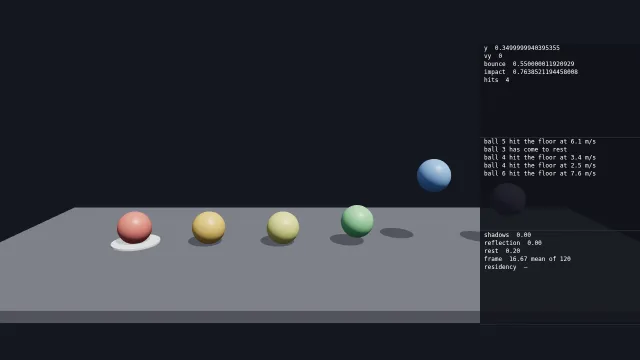
Starts examples/tools in this page, on WebGPU where your browser has it.
The example drops six balls on a floor. F3 opens the overlay: the selected ball's fields, a console
the page writes to as the balls land, and a profiler of the frame. Tab selects the next ball, [
and ] give it less or more bounce, Ctrl+Z takes the change back, and R drops them all again.
What the panels read
component Ball {
    y: f32 = 3
    vy: f32 = 0
    // The share of its speed a ball keeps at each bounce.
    bounce: f32 = 0.75
    // How hard it last hit the floor, in metres a second, and how many times it has.
    impact: f32 = 0
    hits: u32 = 0
}The balls are entities with one DriftScript component, and a system in the same file moves them. Nothing in the script knows about the tools.
/* What each panel reads. The inspector reads the entity world through an adapter; the console a
   ring of entries the page appends to; the profiler the frame's times and the GPU's. */
const selection = createSelection();
selectOnly(selection, entities[0] as number);
const inspectable = entitiesInspectable(world, [Ball]);
/* Five lines, which the console shows whole on a phone held sideways: the overlay does not scroll
   it yet, so a longer ring would show its oldest lines and hide the newest. */
const log = createLogRing(5);
const ROW = 16;
const consoleView = createConsoleView({ rowHeight: ROW });
consoleView.filter.minSeverity = level(flag('level', 'debug'));
const history = createFrameHistory(120);
const timings = createGpuPassTimings();

function panels() {
  return [
    bindPanel(
      inspectorPanel,
      () => ({ world: inspectable }),
      createInspectorView({ selection, rowHeight: ROW }),
    ),
    bindPanel(consolePanel, () => ({ log }), consoleView),
    bindPanel(
      profilerPanel,
      () => ({ timings, history, residency: null }),
      createProfilerView({ rowHeight: ROW }),
    ),
  ];
}bindPanel(panel, world, view) joins a panel to what it reads and to its view, the state that
belongs to the panel itself. The world function is called on every build, so a panel always reads
the current thing.
Each panel reads its own shape. The inspector reads an InspectableWorld, which addresses a
component by name, and entitiesInspectable(world, types) adapts an entity world to it, so a row
built from a stale schema finds no component and writes nothing. The console reads a LogRing,
the profiler reads pass timings, a FrameHistory and a texture residency table where there is one,
and the network panel reads a session.
The inspector's subject is a Selection. selectOnly, addToSelection, toggleSelection and
selectRange change it, primarySelection answers the entity most recently added, and a field the
selected entities disagree on shows —.
The overlay
/* Closed until F3. The overlay lays itself out in a column of its own space and paints through
   four calls, which here go to a 2D canvas over the stage. Where that space sits on the page is the
   page's choice: here, below the hint and above the switches, so the page's own controls stay
   clear. */
let side: 'left' | 'right' = flag('side', 'right') === 'left' ? 'left' : 'right';
let overlay: ToolsOverlay = makeOverlay(flag('open', 'no') === 'yes');
function makeOverlay(open: boolean): ToolsOverlay {
  return createToolsOverlay({ panels: panels(), key: 'F3', side, visible: open });
}

const layer = document.querySelector<HTMLCanvasElement>('#tools');
const ink = layer?.getContext('2d') ?? null;
const painter: OverlayPainter = {
  rect(x, y, w, h, colour) {
    if (ink === null) return;
    ink.fillStyle = colour;
    ink.fillRect(x, y, w, h);
  },
  text(content, x, y, colour) {
    if (ink === null) return;
    ink.fillStyle = colour;
    ink.font = '12px ui-monospace, monospace';
    ink.fillText(content, x + 8, y);
  },
  clip(x, y, w, h) {
    if (ink === null) return;
    ink.save();
    ink.beginPath();
    ink.rect(x, y, w, h);
    ink.clip();
  },
  unclip() {
    ink?.restore();
  },
};

let top = 0;
function fit(): void {
  if (layer === null || ink === null) return;
  const scale = devicePixelRatio;
  const above = document.querySelector('#hint')?.getBoundingClientRect().bottom ?? 0;
  const below = document.querySelector('#controls')?.getBoundingClientRect().top ?? innerHeight;
  top = Math.round(above + 8);
  layer.width = Math.round(innerWidth * scale);
  layer.height = Math.round(innerHeight * scale);
  ink.setTransform(scale, 0, 0, scale, 0, top * scale);
  overlay.resize(innerWidth, Math.max(0, Math.round(below - 8) - top));
}
addEventListener('resize', fit);createToolsOverlay stacks the panels down one edge, right unless side says left, in a column
320 pixels wide unless width says otherwise, and opens and closes on key, F3 by default. It lays
out in its own space from the top left, at the size resize gives it. Where that space sits on the
page is the page's choice: the example moves it below its hint line with the painter's transform,
and shifts pointer events by the same amount.
It draws through four calls, a rectangle, a line of text, a clip and its end, and the page supplies them. A 2D canvas is one way, a sprite batch is another, and a test writes them into an array, which is how the package's own tests run with no graphics device.
Input goes to the overlay first
/* Every event goes to the overlay first; what it takes, the game never sees. */
addEventListener('keydown', (event) => {
  if (overlay.route(keyEvent(event.key, event.shiftKey, event.ctrlKey))) {
    event.preventDefault();
    return;
  }
  if (event.key === 'Tab') {
    event.preventDefault();
    const at = entities.indexOf(primarySelection(selection) ?? -1);
    selectOnly(selection, entities[(at + 1) % entities.length] as number);
    overlay.invalidate();
  } else if (event.key === '[' || event.key === ']') {
    nudgeBounce(event.key === ']' ? 0.05 : -0.05);
  } else if (event.key === 'r' || event.key === 'R') {
    drop();
    selectOnly(selection, entities[0] as number);
    appendLog(log, 'info', 'every ball dropped again');
    overlay.invalidate();
  }
});
/* Pointer events in the overlay's space, which starts `top` pixels down the page. */
addEventListener('pointerdown', (event) => {
  if (overlay.route(pointerEvent('down', event.clientX, event.clientY - top, event.button)))
    event.preventDefault();
});
addEventListener('pointerup', (event) => {
  overlay.route(pointerEvent('up', event.clientX, event.clientY - top, event.button));
});
addEventListener(
  'wheel',
  (event) => {
    if (overlay.route(wheelEvent(event.clientX, event.clientY - top, event.deltaX, event.deltaY)))
      event.preventDefault();
  },
  { passive: false },
);route answers whether the overlay took an event, and an event it took is not the game's. Its key
is answered whether the overlay is open or closed. While it is closed it refuses everything else, so
a game that never presses F3 pays a few comparisons an event. While it is open, Ctrl+Z undoes and
Ctrl+Y redoes, a pointer goes to the panel under it in that panel's own coordinates, and other keys
go to the panel last clicked. Ctrl+Shift+Z is meant to redo as well, and does not: a browser reports
its key as a capital Z, which the overlay does not match.
An edit is a command
/* An edit is a command: pushed onto the overlay's stack, it is applied once and can be taken
   back with Ctrl+Z while the overlay is open. */
function nudgeBounce(by: number): void {
  const ball = primarySelection(selection);
  if (ball === null) return;
  const now = world.read(ball, Ball, 'bounce') as number;
  const next = Math.round(Math.min(0.95, Math.max(0, now + by)) * 100) / 100;
  const command = setFieldCommand(inspectable, [ball], 'Ball', ['bounce'], [next]);
  if (command === null) return;
  overlay.undo.push(command);
  appendLog(
    log,
    'debug',
    `ball ${entities.indexOf(ball) + 1} bounce ${now.toFixed(2)} to ${next.toFixed(2)}`,
  );
  overlay.invalidate();
}A panel is handed its world read-only and can change it only by returning a Command, an object
that can apply itself and revert itself. setFieldCommand(world, entities, component, fields, values) makes one that writes a field across the whole selection, and the three fields of a vector
together, as one entry, and remembers each entity's own previous value. It answers null where an
entity lacks the component. addComponentCommand and removeComponentCommand are the same for a
whole component.
overlay.undo.push(command) applies it once, and Ctrl+Z reverts it. In the example, ] twice took
the first ball's bounce from 0.55 to 0.65, and Ctrl+Z put it back to 0.60. createUndoStack(limit)
is the same stack for a game that keeps its own, and a command with a merge method can absorb the
one after it, so a drag of sixty small moves undoes as one.
The inspector shows rows and does not yet edit them: its route answers null. A game edits
through setFieldCommand as the example does, and the edit is still undoable. Its rows also print a
32-bit float field with the digits of its storage, 0.550000011920929 for 0.55.
The console
/* What the balls did this step, said once each. Every entry names where the rule lives, so a click
   on it in the console moves the source cursor there. */
const seen = new Map<Entity, { hits: number; resting: boolean }>();
function report(): void {
  entities.forEach((ball, index) => {
    const hits = world.read(ball, Ball, 'hits') as number;
    const resting = (world.read(ball, Ball, 'vy') as number) === 0;
    const before = seen.get(ball) ?? { hits: 0, resting: false };
    if (hits > before.hits) {
      const impact = world.read(ball, Ball, 'impact') as number;
      const severity: Severity = impact > 6 ? 'warn' : 'info';
      appendLog(
        log,
        severity,
        `ball ${index + 1} hit the floor at ${impact.toFixed(1)} m/s`,
        'examples/tools/balls.drs',
        26,
      );
    }
    if (resting && !before.resting) appendLog(log, 'info', `ball ${index + 1} has come to rest`);
    seen.set(ball, { hits, resting });
  });
}appendLog(log, severity, text, file, line) writes into a ring of fixed length, and the oldest entry
goes when it is full. A repeat of the newest entry is counted, shown as (3) after it, and a repeat
of anything older is written again, so the order stays the order things happened in.
consoleView.filter holds a minSeverity, one of debug, info, warn and error, and a text
matched without regard to case; the example's console switch sets the first.
An entry may name a file and a line. Clicking it moves consoleView.cursor there, as a command, so
an editor can open the file at the line, and undo takes the cursor back to where it was.
The overlay does not scroll the console yet. The console keeps a scroll position that follows the newest entry, and the overlay draws the list from its top, so a long ring shows its oldest lines and hides the newest. The example keeps a ring of five, which the console shows whole.
The profiler
/* The frame's time from the clock, and the GPU's in the engine's three brackets: the renderer
   opens shadows and reflection itself, and the game opens rest around the rest of its drawing.
   A sample arrives a few frames after its frame, and never where the device cannot time. */
pushFrame(history, now - last);
meter.sample((now - last) / 1000, now);
last = now;
const timer = renderer.gpuTimer;
timer.beginFrame();
drawShadows();
renderer.beginFrame([0.08, 0.09, 0.12]);
timer.begin('rest');
drawScene();
timer.end();
renderer.endFrame();
timer.endFrame();
const sample = timer.poll();
if (sample !== null) recordGpuSample(timings, sample);pushFrame(history, ms) keeps the last frames' times, and the profiler shows their mean. The GPU
rows come from the renderer's own timer, in three brackets: shadows and reflection, which the
renderer opens itself, and rest, which the game opens around everything else it draws.
gpuTimer.poll() answers a sample a few frames after the frame it measured, since reading one
sooner would stall the GPU it is measuring, and recordGpuSample writes it into
createGpuPassTimings().
Both backends time one frame in eight. WebGL2 needs the EXT_disjoint_timer_query_webgl2
extension, which most mobile browsers lack. WebGPU needs the adapter's timestamp-query feature and
gpuTiming: true in the quality settings, because timing attaches a timestamp block to every render
pass in the frame, and the example sets it. Where a row has no measurement it shows —. A measured
zero shows 0.00, so a pass that was never timed cannot pass for a free one.
Painting it
/* The overlay over all of it, rebuilt each frame because the profiler changes every frame. */
if (ink !== null) ink.clearRect(0, -top, innerWidth, innerHeight);
overlay.invalidate();
overlay.frame(now);
paintOverlay(painter, overlay);invalidate says something the overlay shows has changed, and frame lays it out again only then.
The profiler changes every frame, so the example invalidates every frame. While the overlay is
closed, frame returns before it builds anything and paintOverlay paints nothing.
overlay.sites() answers where each panel sits. Each panel is drawn on a dark background under a
title row PANEL_TITLE_HEIGHT pixels tall, and the panel's own space starts below that row.
The network panel
/**
 * A lockstep session as the network panel reads it: handed over as it is. The loop the game made is
 * read beside it for how far each tick rewound, which the session does not count.
 */
export function networkTools(
  session: LockstepSession<WorldSnapshot>,
  loop: RewindLoop<WorldSnapshot>,
  snapshotBytes: number,
): { panel: PanelBinding; afterTick(): void } {
  const recorder = createSessionRecorder();
  const view = createNetworkView({});
  let replayed = loop.stats.replayedTicks;
  return {
    panel: bindPanel(
      networkPanel,
      () => ({ session: sessionReadout(session, recorder, snapshotBytes) }),
      view,
    ),
    /** Once a tick, after the session has advanced: any new disagreement, and how far it rewound. */
    afterTick() {
      observeSession(recorder, session);
      const now = loop.stats.replayedTicks;
      pushRollback(view.rollback, now - replayed);
      replayed = now;
    },
  };
}The network panel shows the input delay, the number of peers, how many snapshots the rewind window
holds and what they weigh, how deep each recent tick rewound, and the first tick two peers stopped
agreeing on, with both fingerprints. Where they agree it says so in words, and where there is no
session it says No session, so agreement and nobody checking never look alike.
A session's desync holds the same disagreement on every frame until the next one, so
observeSession records one only when its tick or peer is new, and keeps the last 32. The size of a
snapshot is the game's to supply, because the rewind loop does not know what it stores. Where the
game hashes each component as well, sessionReadout takes both sides' hashes as its last argument
and the panel names the components that differ. Networking and rollback
covers sessions and fingerprints.
A LockstepSession is passed as it is: rewindDepth answers how many snapshots its loop holds. A
game that keeps its own record of a session can still hand over a shape with participants,
inputDelay, desync and loop: { depth }, which is SessionLike.
The frame meter
new FpsMeter(options) adds an element to the page, #fps-meter unless id says otherwise, and
sample(seconds, nowMs) once a frame keeps it current, in the profiler code above. It shows the
rate, the mean frame time and the slowest frame over the last 60 frames, rewrites its text at most
every 250 milliseconds, and adds the class over-budget while the slowest frame is more than one and
a half times frameBudgetMs, 16.7 by default. fps, meanMs and worstMs answer the numbers it
last showed, for a game that wants them as well.
The contact probe
/**
 * What is around the player, into the console, when a key asks. The reports are filled in place,
 * so asking every frame allocates nothing but the text.
 */
const reports = createContactReports();
const scratch = new Int32Array(256);

export function logContacts(colliders: ColliderSet, player: Aabb, log: LogRing): void {
  const count = describeContacts(colliders, player, 0.25, scratch, reports);
  if (count === 0) appendLog(log, 'info', 'no collider within 25 cm');
  for (let at = 0; at < count; at += 1) {
    const near = reports[at] as ContactReport;
    /* Overlap on all three axes is inside, and the smallest is the way out. */
    const inside = near.depthX > 0 && near.depthY > 0 && near.depthZ > 0;
    const depth = Math.min(near.depthX, near.depthY, near.depthZ);
    appendLog(
      log,
      inside ? 'warn' : 'info',
      inside
        ? `collider ${near.index} is ${(depth * 100).toFixed(1)} cm inside`
        : `collider ${near.index} is ${(near.distanceM * 100).toFixed(1)} cm away`,
    );
  }
}describeContacts(colliders, box, radius, scratch, reports) describes every collider overlapping a
box or within radius of it, and answers how many reports it filled. Each report holds the
collider's bounds and its overlap with the box along each axis, positive inside and negative for a
gap, so a body 5 cm into a floor and one 5 cm above it read differently, which a single distance
would not show. distanceM is the straight line between the two boxes and is zero exactly when they
overlap on all three axes. A collider that is a hull says so in hull, and its box is then only the
broad phase. Reports come in the order the spatial hash finds them; sort by distanceM to show
them nearest first. createContactReports() makes CONTACT_LIMIT of them, 32, to be filled again
on every call.
Leaving the tools out of a release
There is no flag. A build that imports @driftengine/tools contains it, and one that does not
contains none of it, which the engine's size gate checks: no other package's size changes because
this one exists. A game that wants the tools in development builds only imports them behind its
bundler's dead-code elimination, as it would any optional dependency.