 DriftEngine
Rendering
Materials
Surfaces from vertex values or image maps, compressed blocks for every device, shading models for metal, hair, skin and eyes, lightmaps and surface dials.
npm install @driftengine/core
A surface in DriftEngine can be described two ways, and they combine:
- Per vertex, in the mesh: colour, emissive, specular, roughness, grain and relief. A whole world can be made this way with no images at all, and a merged mesh of many colours is still one draw.
- By image maps, set as a material before the draws that use it: albedo, normal, occlusion-roughness-metalness, and emissive. This is the glTF model, so an imported model's materials arrive as exactly this.
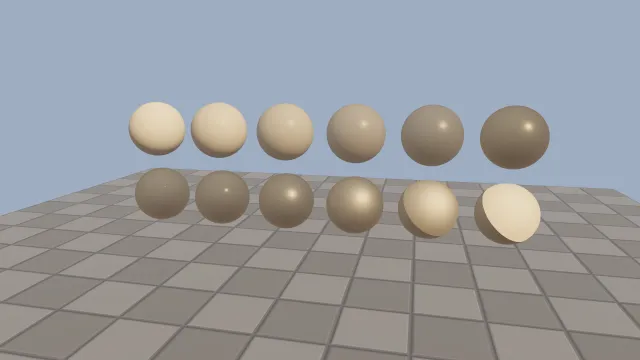
Starts examples/materials in this page, on WebGPU where your browser has it.
Images
renderer.createSurfaceTexture(source, options) uploads anything the browser calls a
TexImageSource: an image element, an ImageBitmap, a canvas or a video frame. The engine ships no
images and fetches none, so loading the file is yours.
/** A small canvas of one colour: the whole of an ORM map whose value does not vary. */
function solid(r: number, g: number, b: number): HTMLCanvasElement {
  const canvas = document.createElement('canvas');
  canvas.width = 4;
  canvas.height = 4;
  const ctx = canvas.getContext('2d');
  if (ctx !== null) {
    ctx.fillStyle = `rgb(${r * 255}, ${g * 255}, ${b * 255})`;
    ctx.fillRect(0, 0, 4, 4);
  }
  return canvas;
}The option that matters most is colorSpace. A picture, such as an albedo or emissive map, is
'srgb'. A map whose values are numbers, such as a normal map or an ORM map, is 'linear'; uploaded
as sRGB, its values bend toward zero and every surface looks like glass. The other options are
wrap ('repeat' or 'clamp'), filter for magnification, mipmap, on by default, and
anisotropy for textures seen at a grazing angle.
updateSurfaceTexture replaces the pixels and keeps the binding, and disposeSurfaceTexture frees
one. createSurfaceTextureArray uploads several images of one size as one texture whose layer each
face picks; see Texture arrays.
Compressed images
createSurfaceTexture also takes compressed blocks as they are: a CompressedTextureSource names
its format, its size and its levels, the stored mip chain from level 0. BC ('bc1' to 'bc5',
and 'bc7') is what desktops sample; ETC2 ('etc2-rgb8', 'etc2-rgb8a1', 'etc2-rgba8'), EAC
('eac-r11', 'eac-rg11') and ASTC ('astc-4x4' to 'astc-12x12') are what phones sample. A
block texture costs a byte a texel or less on the GPU, against four for the same image decoded, and
keeps the chain its author built. colorSpace decides between a format and its sRGB twin, as it
does for an image; the one- and two-channel formats have none.
renderer.compressedFormats lists what this device samples, and
uploadsCompressed(format, srgb, width, height, renderer.compressedFormats) answers for one source.
A source the device cannot take is refused by name, because core ships no decoder.
updateSurfaceTexture takes blocks as well as an image: they replace the image behind the handle
every draw already holds.
The model loader in @driftengine/assets asks before it uploads. A BC texture goes up as its blocks
where the device samples BC, and is decoded at load where it does not, so an imported model's images
reach every device. Name a worker for that, new DrftLoader(renderer, { bcWorker: spawnBcWorker })
with spawnBcWorker from @driftengine/assets/bcWorkers; without one the decode runs on the main
thread and the loader says so once. On a phone, the worker does more: where the device samples
ETC2 and not BC, a second worker re-encodes each decoded texture as ETC2 or EAC and swaps it in
behind its handle, at half a byte a texel, or a byte with alpha, where the decoded image holds four.
The picture arrives when it did before; the encode follows on a core of its own, about 0.7 s
for a 2048² image on a desktop processor and several times that on a phone's.
Textures compressed for a phone ahead of time skip both steps. readKtx2 from @driftengine/assets
reads an uncompressed KTX2 file of ASTC, ETC2, EAC or BC as the blocks it carries, and says which
colour space its format names. encodeEtc2Chain makes ETC2 or EAC blocks and their chain from
pixels you hold; run it in a worker. A two-channel BC5 or EAC normal map keeps its two channels and
the lit stage rebuilds the third.
Metalness and roughness
/**
 * Occlusion in red, roughness in green, metalness in blue. These are data, not colours, so they
 * are uploaded as linear: read as sRGB they would bend toward zero and every surface would look
 * like glass.
 */
function orm(roughness: number, metal: number): SurfaceTextureHandle {
  return renderer.createSurfaceTexture(solid(1, roughness, metal), { colorSpace: 'linear' });
}

const STEPS = 6;
/** Top row: metalness from 0 to 1 at middling roughness. Bottom row: roughness at full metal. */
const metals = Array.from({ length: STEPS }, (_, i) => orm(0.35, i / (STEPS - 1)));
const roughs = Array.from({ length: STEPS }, (_, i) => orm(0.05 + (i / (STEPS - 1)) * 0.9, 1));An ORM map packs three values into one image: ambient occlusion in red, roughness in green and
metalness in blue. Metalness splits a surface into metal, which colours its reflection, and
everything else, which reflects white. Roughness widens and softens the highlight. A material can
scale each channel: roughnessScale, metallicScale and occlusionStrength are glTF's factors.
A physical highlight
A lamp's highlight is normally a look control: it peaks at 1 times the specular value however rough
the surface, so strength and width can be set apart. A material that sets physicalSpecular: true
takes GGX's own term instead, π · D · Vis · F · N·L, as a physically based renderer shades and
as skin and the eye already do here. The peak is then 1 / (4 α²) of the light head-on, where α is the roughness
squared, so a polished surface's highlight is several times the look's and a rough one's lower and
wider. The per-vertex specular value becomes the reflectance at normal incidence, F0: about
0.04 for most surfaces that are not metal. Fresnel then brightens every surface toward a grazing angle,
not only a metal. It reaches lamps and the sun, on the standard, lightmap and anisotropic models; a
rectangle's highlight is integrated over the rectangle with the same F0 already, so it does not
change. Without hdrScene an 8-bit frame clips the brighter peak. The code is compiled into the lit
programs the first time a material asks for it, so a scene that never does pays nothing.
A material
/** A tile pattern for the albedo, which is a picture and so is sRGB. */
function tiles(): HTMLCanvasElement {
  const canvas = document.createElement('canvas');
  canvas.width = 256;
  canvas.height = 256;
  const ctx = canvas.getContext('2d');
  if (ctx !== null) {
    ctx.fillStyle = '#6b6560';
    ctx.fillRect(0, 0, 256, 256);
    ctx.fillStyle = '#8a837b';
    ctx.fillRect(4, 4, 120, 120);
    ctx.fillRect(132, 132, 120, 120);
    ctx.fillStyle = '#7a736b';
    ctx.fillRect(132, 4, 120, 120);
    ctx.fillRect(4, 132, 120, 120);
  }
  return canvas;
}

/** A normal map from the same tile layout: grooves between tiles, and a gentle bevel. */
function tileNormals(): HTMLCanvasElement {
  const size = 256;
  const canvas = document.createElement('canvas');
  canvas.width = size;
  canvas.height = size;
  const ctx = canvas.getContext('2d');
  if (ctx === null) return canvas;
  const image = ctx.createImageData(size, size);
  const height = (x: number, y: number): number => {
    const u = ((x % 128) + 128) % 128;
    const v = ((y % 128) + 128) % 128;
    const edge = Math.min(u, 127 - u, v, 127 - v);
    return Math.min(1, edge / 6);
  };
  for (let y = 0; y < size; y += 1) {
    for (let x = 0; x < size; x += 1) {
      const dx = height(x + 1, y) - height(x - 1, y);
      const dy = height(x, y + 1) - height(x, y - 1);
      const length = Math.hypot(dx, dy, 1);
      const i = (y * size + x) * 4;
      image.data[i] = ((-dx / length) * 0.5 + 0.5) * 255;
      image.data[i + 1] = ((-dy / length) * 0.5 + 0.5) * 255;
      image.data[i + 2] = ((1 / length) * 0.5 + 0.5) * 255;
      image.data[i + 3] = 255;
    }
  }
  ctx.putImageData(image, 0, 0);
  return canvas;
}

/** `planarUvs` gives the ground texture coordinates; a normal map also needs tangents. */
const groundData = new MeshBuilder()
  .addBox([0, -0.1, 0], [8, 0.1, 6], [1, 1, 1])
  .build({ planarUvs: true });
if (groundData.uvs !== undefined) {
  groundData.tangents = generateTangents(
    groundData.positions,
    groundData.normals,
    groundData.uvs,
    groundData.indices,
  );
}
const ground = renderer.createMesh(groundData);

const groundMaterial = {
  albedo: renderer.createSurfaceTexture(tiles(), { colorSpace: 'srgb' }),
  normal: renderer.createSurfaceTexture(tileNormals(), { colorSpace: 'linear' }),
  orm: orm(0.75, 0),
  uScale: 0.5,
  vScale: 0.5,
};A normal map turns the shading normal per pixel, through the mesh's tangent frame, so a mesh that
uses one needs texture coordinates and tangents. build({ planarUvs: true }) projects texture
coordinates in metres, and generateTangents derives the tangents from them. normalStrength
scales the effect.
The rest of the fields:
uScaleandvScalerepeat every map of the material across the mesh's coordinates.uOffsetandvOffsetmove where the maps start, after the scale: a surface samplesuv * scale + offset. That picks one cell of a flipbook or an atlas through the material, so one quad draws any cell. A strip of four frames isuScale: 0.25withuOffset: frame * 0.25. A cutout's shadow is cut from the same cell.cutoutdiscards fragments whose albedo alpha is below it: leaves, grilles, fences. A cutout also shapes the shadow the surface casts.cutoutMode: 'dithered'keeps a pixel by the share of it the texture covers rather than by a line through it, so a strand of hair, a lash or a fringe of leaves has a soft edge instead of a stair of pixels. The frame decides how the dither becomes coverage: a temporal resolve averages it over time, a multisampled frame turns it into samples, and a frame with neither tests hard, because a dither nothing averages is grain. A translucent draw tests hard whatever this says.doubleSideddraws both faces, for a curtain or a leaf card.emissiveandemissiveScaleshape where a mesh glows and in what colour. A map modulates the mesh's own emission and never creates it, glTF's rule: what is emitted is the mesh's emissive times its emissive colour, or its albedo where it has none, times the map, times the scale. A mesh built with no emissive stays dark whatever map it is drawn with, andemissiveScalewith no map bound does nothing.
Drawing with a material
render() {
  const angle = Math.sin(time * 0.15) * 0.35;
  camera.position[0] = Math.sin(angle) * 9;
  camera.position[1] = 3.2;
  camera.position[2] = Math.cos(angle) * 9;
  camera.lookAt(0, 1.2, 0);

  renderer.beginFrame([0.62, 0.68, 0.76]);
  renderer.bindMeshPass(camera, ENV);

  renderer.setMaterial(groundMaterial);
  renderer.drawMesh(ground, still.worldMatrix);

  for (let i = 0; i < STEPS; i += 1) {
    const x = (i - (STEPS - 1) / 2) * 1.5;
    renderer.setMaterial({ orm: metals[i] });
    place.setPosition(x, 2.2, 0);
    place.updateWorld();
    renderer.drawMesh(sphere, place.worldMatrix);

    renderer.setMaterial({ orm: roughs[i] });
    place.setPosition(x, 0.7, 0);
    place.updateWorld();
    renderer.drawMesh(sphere, place.worldMatrix);
  }
  renderer.setMaterial(null);
  renderer.endFrame();
},setMaterial is pass state: it applies to every drawMesh after it until it changes, and
bindMeshPass clears it. Group draws by material where you can. Each change costs a slot in a
per-frame ring, and repeating one mesh many times under one material is what
instancing is for.
A screen showing another camera
/** A 1024 by 576 capture, made once with the scene, and the camera that films it. */
export function createBroadcast(renderer: RendererApi) {
  const feed = renderer.createSceneCapture(1024, 576);
  const camera = new Camera();
  camera.fovYDeg = 35;
  return { feed, camera, screen: { emissive: feed } };
}

/** Each frame: film the world first, then draw the frame with the screen showing the film. */
export function drawWithScreen(
  renderer: RendererApi,
  broadcast: ReturnType<typeof createBroadcast>,
  viewer: Camera,
  env: Environment,
  clear: Vec3,
  drawWorld: () => void,
  screenMesh: MeshHandle,
  screenPlacement: Float32Array,
): void {
  renderer.beginFrame(clear);
  renderer.captureScene(broadcast.feed, broadcast.camera, clear, (filming) => {
    renderer.bindMeshPass(filming, env);
    drawWorld();
  });
  renderer.bindMeshPass(viewer, env);
  drawWorld();
  renderer.setMaterial(broadcast.screen);
  renderer.drawMesh(screenMesh, screenPlacement);
  renderer.setMaterial(null);
  renderer.endFrame();
}createSceneCapture(width, height) makes a texture the scene can be drawn into, and
captureScene draws it from a camera of your own: the callback is handed the camera, its matrices
shaped to the capture, and draws the world exactly as it would to the screen. The texture then goes
wherever an image goes, most often as a material's emissive, for a stadium screen, a monitor or a
security feed. Capture before the frame binds its own camera, and bind it again afterwards.
A capture holds light rather than display pixels, at the colour format a reflection probe takes,
half floats under hdrScene. The output transform is held off while it is drawn, so the frame
grades the screen once, with everything around it. It is the world's mesh pass alone: the sky,
water and particles are in it only if the callback draws them, and no temporal resolve, bloom or
other effect runs on it. It has no mip chain, so a screen seen small and far can shimmer. An
emissive surface glows by the environment's nightFactor, so a screen meant to glow by day wants
the factor up, or the capture as its albedo on an unlit draw.
Shading models
Most surfaces are the standard model: a diffuse term and one highlight whose width the roughness
sets. A few are made of something it cannot describe, and a material names one of four others with
model, made by a factory that checks the numbers and freezes them. Leave model out, or pass
null, for the standard model.
anisotropicModel({ strength, rotation }), for brushed metal, satin and grooved plastic: the highlight stretched along the mesh's tangent bystrength, 0 to 1, its direction turned byrotationradians toward the bitangent. At strength 0 it is the standard highlight exactly. The environment is reflected about a normal bent toward the stretch, so a brushed disc shows a streak of sky.hairModel({ shift, scatter, backlit }), for strands along the mesh's tangent, running from root to tip: a white highlight shifted toward the root, a coloured second one toward the tip, a glow when a light is behind (backlitscales it), and the light scattered through many strands (scatter, 0 to 1).shiftis the tilt of the strand's cuticle in radians, 3° by default. A card authored tip to root swaps its two highlights' ends and takes a negative shift.skinModel({ scatterColor, radius, transmission, profile }), for light that leaves skin a little way from where it entered: a softer, redder terminator on curved parts, a red edge to a shadow, and light through thin parts from a lamp behind them, as much astransmissionlets through. Each colour travelsradiusmetres times its share ofscatterColoron average before it leaves, 1.2 cm for red by default; Burley's profile does that at two fifths of the distance, with a tail of light reaching about three and a half times it. Until 4.8.7 the radius was the profile's own distance, so light went two and a half times as far: a skin authored then and looking right with'pre-integrated'keeps its look withradiusraised by 2.5. Scale matters: at a person's size a cheek scatters; at a statue's ten times larger, almost nothing does.eyeModel({ irisRadius, irisDepth, ior, corneaRoughness, axis, joint }), for an iris seen through a cornea: the cornea bends the eye's ray, so the iris moves under it as the eye turns and reads less foreshortened than a painted one. The iris is lit as the shallow cone it is, light pooling on the side away from the source, under the cornea's sharp highlight.axisis the eye's forward direction in the mesh andjointthe bone it turns with.
modelMap is an image of a model's own channels, read at the albedo's coordinates and uploaded as
'linear':
- anisotropic: red and green a direction in the surface, glTF's packing of −1 to 1, and blue a scale on the strength.
- hair: green varies each strand's tilt by up to half of it either way, and blue is occlusion.
- skin: red is thickness, 1 being two centimetres, and green curvature, 1 being a radius of a centimetre.
- eye: red is the iris, 1 inside it, and green the cornea's height above it as a share of
irisDepth.
Without a map each model has its own answer: the anisotropic stretch follows the tangent, skin reads
its curvature from the screen and takes a part's thickness to be its curvature's diameter, and the
iris is a disc of irisRadius about the texture's centre.
Hair, skin and the eye ignore the per-vertex specular value: their highlights are physical, set by
their own index of refraction, and their width is the material's roughness, or the cornea's.
Anisotropic metal takes its colour and strength from the ORM map as any metal does.
A model costs a pipeline of its own, compiled the first time a draw asks for it, so a scene that names
none pays nothing. The models belong to the forward path; the GPU-driven
pipeline's materials have none. One more kind goes in model, lightmapModel, which is not a way of
answering light but a page of light baked earlier; see Baked lightmaps.
Skin in the picture
The skin model's scattering is a fit evaluated per pixel, and it cannot see past the pixel it is
shading. skinScattering: 'screen-space', a renderer quality option, adds Burley's blur in the
picture as well. Each skin draw writes the light its diffuse is made of, shaded as if the skin were
white, to a target of its own, which is spread across the pixels its scatter distance covers; the
skin's colour goes to a second target and multiplies the light once it has spread, and the sum is
added back before anything blended is drawn. So light crosses a shadow's edge and a nostril's rim on
screen, while a brow, a freckle or a lip line painted in the albedo stays where it is drawn rather
than smearing into the skin around it. Under it the fit steps back to Lambert's and the blur does
the scattering; light through thin parts stays with the fit, because the picture cannot see the far
side.
What it costs: every skin draw is drawn three times, there are three half-float targets the size of
the frame and two more under multisampling, and two full-screen passes run that leave at once
wherever no skin was drawn. It needs the composite (screenEffects) and, on WebGL2, the EXT_color_buffer_float
extension; without either, skin stays pre-integrated and the renderer says so once. profile picks
which of eight scatter distances the blur uses, and the last material to name a profile sets it. A
skin drawn after something blended in the same frame, or in an instanced batch, is drawn
pre-integrated.
Baked lightmaps
A stage built in another tool often carries its static light baked: the light bounced off its
walls, the soft shadow in its corners, most of the colour a reference render shows. A lightmap
brings that bake in. Decode it into pages, each an image of irradiance and an image of the
direction the light arrives from, and give every lightmapped mesh a second set of texture
coordinates on its page. examples/lightmaps/ bakes a room on the CPU, a lamp and the soft
shadow of a box, and draws it this way.
/** A floor lit by the left half of a page: the page uploaded, the mesh given its coordinates. */
export function bakedFloor(
  renderer: RendererApi,
  page: LightmapPage,
  floor: MeshData,
  lightmapUvs: Float32Array,
  albedo: SurfaceTextureHandle,
) {
  const lightmap = renderer.createLightmap(page);
  const mesh = renderer.createMesh({ ...floor, lightmapUvs });
  /* Where the floor is on the page, as [scaleU, scaleV, biasU, biasV]. */
  const material: SurfaceMaterial<SurfaceTextureHandle> = {
    albedo,
    model: lightmapModel({ region: [0.5, 1, 0, 0] }),
    modelMap: lightmap,
  };
  return { mesh, material };
}A LightmapPage is a width and height, irradiance as three linear floats a texel in the
units every other light here is in, and direction as four bytes a texel: a first-order spherical
harmonic in the engine's axes, each value stored as v * 0.5 + 0.5. createLightmap uploads it as
two layers of four bytes a texel: the irradiance packed as an rgb9e5 word, three 9-bit mantissas
over a shared exponent, and the direction. Hand irradiance over as three floats a texel, or as a
Uint32Array of words already packed, which is how a bake usually arrives and which uploads with
no copy. A material made with lightmapModel({ region }) takes it as its modelMap,
and region says where the material's surfaces are on the page: uv2 * scale + bias, the whole
page by default. The surface adds albedo * (1 - metal) * irradiance * max(0, dot(d, n) + w) to
its diffuse, with n its shading normal, on top of the dynamic lights and the ambient. A bake that
already holds the sky's light wants the ambient taken out of those draws, which
setAmbientSH with nine zero coefficients does.
/** Pillars in one batch, each lit by its own column of one page. */
export function bakedPillars(count: number): MeshInstances {
  const instances = {
    ...createMeshInstances(count),
    lightmapRegions: new Float32Array(count * 4),
  };
  for (let i = 0; i < count; i += 1) {
    instances.lightmapRegions.set([1 / count, 1, i / count, 0], i * 4);
  }
  instances.count = count;
  return instances;
}Copies of one mesh in one batch each sit in their own part of the page, so an instanced batch with a
lightmapped material carries lightmapRegions, four numbers an instance, applied before the
material's own region. A batch needs them: one drawn without reads its tints as regions, and the
renderer says so once.
What a lightmap gives up, because everything it would take was already spent:
- The second coordinates ride the grain and relief attributes, so a lightmapped surface has no procedural grain or relief, and a mesh naming both is refused. They are stored below zero, so the same mesh drawn without its page simply has neither.
- An instance's region rides its tint and opacity, so a lightmapped batch has no per-instance tint.
- A lightmapped material takes no other shading model, since the page is its model map.
- No importer reads a second set of coordinates yet and the
.drftcontainer does not carry them, so the mesh is built by your own code; the GPU-driven pipeline reads no page.
Surface dials
A few properties apply to the draws that follow, without a map:
setSurfaceReflectivity(amount): how much of the environment a surface mirrors, 0 to 1. Metal reflects by itself; this is for a varnished or wet dielectric.setEnvironmentGain(gain): how bright the reflected environment is, for a room too dim for its metal to read.setSurfaceGrain(amount)andsetSurfaceRelief(amount, cyclesPerMetre): procedural mineral texture and microscopic bumps, so stone reads as stone up close.setSurfaceTextureRelief(scale): bumps from the bound albedo's own brightness, for a texture with no normal map.setEmissiveGain(gain): scale emissive for the next draws, for anything that pulses.setSurfaceFog(enabled): take the next draws out of the fog and the global medium's haze, or put them back. For a medium that should darken one thing and not another: a floor receding into the distance under figures that keep their full value however far away they stand. A translucent draw's ownfogoption still decides for that draw.
Each resets with bindMeshPass, so a pass starts from the defaults.
A material can state the first two for its own draws: reflectivity and environmentGain on a
SurfaceMaterial override what the setters say for every draw under that material, and a material
stating neither leaves its draws to the setters. That is how a static list carries them, since a
list keeps each entry's material and none of the renderer's state between draws: a stage whose
batches each mirror their own share of a baked reflection gives each its own material.
Overlays: a rim, a dissolve, wrinkles
setSurfaceOverlay(overlay) lays something over the surfaces of the draws that follow, beyond their
materials: one character's whole set of materials changes together while another's does not. Like
the dials above it is per draw and resets with bindMeshPass; pass null to take it off.
/** A character in its heat: an orange rim over all of it, and its edges burning away. */
export function drawInHeat(
  renderer: RendererApi,
  character: readonly Part[],
  atlas: SurfaceTextureHandle,
): void {
  const noise = { scale: [0.5, 0.5], offset: [0, 0] } as const;
  renderer.setSurfaceOverlay({
    maps: atlas,
    rim: {
      colour: [1, 0.45, 0.1],
      intensity: 2,
      noise: { region: noise, scroll: [0, 0.2], tiling: 3 },
      pulse: { rate: 1.257, low: 0.6, high: 1 },
    },
    dissolve: {
      noise: { region: noise },
      threshold: 0.4,
      edgeColour: [0.3, 0.8, 1],
      edgeIntensity: 4,
    },
  });
  for (const part of character) renderer.drawMesh(part.mesh, part.model);
  renderer.setSurfaceOverlay(null);
}rim(SurfaceRim) glows along the silhouette: an edge(1 − N·V)^falloff, leaning toward normals that face up, raised to a contrast, times a noise laid in screen space and scrolled, a slow pulse on the environment'ssurfaceTime, and a mask in the mesh's uv that erases it. It is added to what the surface emits and, unlike emission, is not gated onnightFactor. Withmode: 'blend'it is a colour rather than a light: the base colour is pulled toward the rim's by that edge timesalpha, before any light reads it, so the edge is lit as the surface is and stays dark where no light reaches. Therecolourtimesintensityis held at 1 a channel, as a base colour is, and analphaabove 1 saturates the edge sooner.dissolve(SurfaceDissolve) cuts the surface away where a noise in its uv falls underthreshold, with a glowing band of widthedgejust above it, and can lay a colour over the surface through the same noise. 0 keeps everything and 1 cuts everything.wrinkle(SurfaceWrinkle) blends a second normal map into the surface's by six region weights, read through two masks: the first mask's red, green and blue carry regions 1 to 3, the second's regions 4 to 6. A face's expressions, or veins brought up all over.
Every image is a region of one atlas, maps, named by an OverlayRegion: its size and its
corner in the atlas's uv. The lit stage has no sampler to spare for images of their own, so the
atlas is read where the frame's refraction copy goes. Paint the noise, the masks and the wrinkle
normal into one image, uploaded colorSpace: 'linear' with mipmap: false. Without maps, no image
is read: a rim is smooth, and nothing dissolves or wrinkles.
What it gives up:
- A draw that refracts or is glass reads none of the overlay's images, because its own copy of the frame takes that slot. It keeps its refraction, and the engine says so once.
- The dissolve cuts the lit pass only. Shadows and depth-only passes still see the whole surface.
- The GPU-driven pipeline draws no overlay; a character wearing one is drawn with
drawMesh. - On WebGL2 the overlay takes fifteen fragment uniform vectors, which a part offering 256 has no
room for at the eight-light budget. There the overlay is refused, said once, and the draws wear
none; a lower
maxLightsmakes the room. WebGL2 also cannot copy a compressed atlas into the 2D image the stage reads, so upload the atlas from an image.
Maps placed by the world
A material can take its texture coordinates from where a point is in the world rather than from the mesh. Ground imported with flat coordinates, or none worth reading, then shows its texture at the size the material asks, and a wall or a rock wears one without the stretch a single projection gives a steep face.
/** Sand, two repeats a metre across the ground, whatever coordinates its mesh carries. */
export function sand(
  colour: SurfaceTextureHandle,
  normal: SurfaceTextureHandle,
): SurfaceMaterial<SurfaceTextureHandle> {
  return { albedo: colour, normal, projection: { kind: 'planar', scale: 2 } };
}

/** Rock, once a metre on all three planes, blended where the surface turns between them. */
export function rock(
  colour: SurfaceTextureHandle,
  orm: SurfaceTextureHandle,
): SurfaceMaterial<SurfaceTextureHandle> {
  return { albedo: colour, orm, projection: { kind: 'triplanar', scale: 1, sharpness: 6 } };
}projection: { kind: 'planar', scale } lays every map across the two horizontal axes at scale
repeats a metre. 'triplanar' reads each map on the three planes across x, y and z and blends them
by how squarely the surface faces each; sharpness, 4 unless given, is how quickly one plane gives
way to the next. A normal map follows either: on three planes it is blended so each keeps its own
detail. It is compiled into the lit stage the first time a material asks, so a scene that never asks
pays nothing for it.
What it gives up:
- The world's coordinates do not move with a mesh, so a moving mesh slides under its texture. Projection is for ground, walls and rock that stand still.
- Triplanar reads every map three times, and a texture is mirrored on the far side of each plane.
- The material's
uScale,vScaleand offsets do not apply: they scale the mesh's coordinates, which a projection does not read. - A cut-out projected material casts by its mesh's coordinates, since shadow and depth passes read the cutout where the mesh lays it.
- On WebGL2 it takes one fragment uniform vector, refused, said once, on a part with no room left
at the light budget; a lower
maxLightsmakes the room.
Layers blended by a mask
Rock with moss on it, a path worn through grass, sand drifted against a wall: one surface made of
several, each with its own colour, normals and roughness at its own repeat. layers blends up to
five of them by a mask.
/**
 * Three layers in three arrays — rock, moss, sand, the same order in each — and a mask whose red
 * lays the moss and green the sand. The rock repeats forty times across the mesh, the moss three.
 */
export function mossyRock(
  albedo: SurfaceTextureHandle,
  normal: SurfaceTextureHandle,
  orm: SurfaceTextureHandle,
  mask: SurfaceTextureHandle,
): SurfaceMaterial<SurfaceTextureHandle> {
  return { albedo, normal, orm, layers: { mask, repeats: [40, 3, 12] } };
}Layer i is layer i of each array, so albedo, normal and orm are arrays whose layers are the
material's in the same order, each read at the mesh's coordinates times its own repeat. The mask is
read at the mesh's own coordinates and lays each layer over the ones before it: red lays layer 1 over
the base, green layer 2, blue layer 3, alpha layer 4. emissiveLayer gives the emissive map to one
layer, glowing where that layer shows; absent, it glows everywhere, as on any material. It is
compiled into the lit stage the first time a material asks.
Other families of layered surface blend differently, and layers takes them too:
mask: 'orm'reads the mask from the ORM array's layer just past the material's layers, which leaves the model's slot to a lightmap's page, so a lightmapped surface blends its layers.mask: 'vertex'takes the weights from the vertex colour's red, green and blue, which then tints nothing.blend: 'sum'mixes the base toward the sum of each layer times its weight, by the weights' sum held to 1, where the default lays each over the ones before it.- Under a
projectionthe layers are placed by the world, each at its own repeats a metre, andaddMask: { layer, repeat, intensity }adds a mask placed the same way, the ORM array's next layer, to one layer's weight: sand drifting into the gravel at a scale of its own. facing: { layer, bias, sharpness }weighs one layer by how much the surface faces up,saturate(bias + sharpness × (up / 2 + 1/2)), in place of its channel: snow on the tops of rocks.meshNormal: truelays a normal map read at the mesh's own coordinates, the normal array's layer just past the layers, under the layers' blended normal: a cliff's large shape beneath detail that repeats forty times across it.
Layers shared between materials
A texture worn by many materials, in a different tint on each, is one texture. arrayLayers picks
which layer of the albedo, normal and ORM arrays each of a material's layers reads, so materials
share one array of each kind, and looks gives each layer what used to be baked into its pixels:
/**
 * Two cliffs that share one array of each kind, every texture in it once. Each cliff picks its
 * layers by index and gives them a look of its own; its own mask and its occlusion sit past the
 * shared textures, at `extrasAt` in the ORM array.
 */
export function sharedCliffs(
  albedo: SurfaceTextureHandle,
  normal: SurfaceTextureHandle,
  orm: SurfaceTextureHandle,
): SurfaceMaterial<SurfaceTextureHandle>[] {
  const warm: SurfaceLayers<SurfaceTextureHandle> = {
    mask: 'orm',
    repeats: [8, 4, 16],
    /* Rock, moss and sand: textures 0, 5 and 2 of every array. */
    arrayLayers: [0, 5, 2],
    /* This cliff's mask is the ORM array's layer 30, and its occlusion the one after. */
    extrasAt: 30,
    meshOcclusion: 0.8,
    looks: [{ tint: [1.2, 1, 0.85], roughness: [0.6, 0.95] }, { normalStrength: 2 }],
  };
  /* The same rock, darker and smoother, under a different moss: nothing new uploaded. */
  const cold: SurfaceLayers<SurfaceTextureHandle> = {
    ...warm,
    arrayLayers: [0, 7, 2],
    extrasAt: 32,
    looks: [{ tint: [0.7, 0.75, 0.85], roughness: [0.3, 0.6] }],
  };
  return [
    { albedo, normal, orm, layers: warm },
    { albedo, normal, orm, layers: cold },
  ];
}arrayLayersnames an array layer for each of the material's layers, base first. The same index reads all three arrays, so a texture's colour, normal and ORM sit at the same layer of each.extrasAtis where this material's own maps start: an ORM mask, an added mask and a mesh occlusion in that order in the ORM array, and a mesh normal in the normal array. Absent, they sit just past the layers, which is no place for them once arrays are shared.looks, one for each layer, base first: atintmultiplying its colour, linear and allowed above 1; theroughnessandmetalnessranges its ORM's green and blue are spread over, 0 to 1 where absent; anormalStrengthits normal map's slopes are scaled by, 0 lying flat; and aspecularin the units a mesh's vertices carry theirs, blended as the colours are, the surface's own where absent.- A repeat may be a pair, across and down apart: moss stretched along a trunk at
[4, 0.5]. meshOcclusiondarkens the surface by the red of the ORM layer after the masks, read at the mesh's own coordinates, by a strength from 0 to 1: the large shading of a cliff, asmeshNormalcarries its large shape. A number darkens the blended colour, and so every light on it. The object form,{ strength, into, range }, can send itinto: 'ambient'instead, darkening the ambient light alone as an ambient occlusion does and leaving the sun and the lamps as they were, and spreads its red over arange.
These four are compiled into the lit stage the first time a material names one, as the layers are. A layered material that names none of them draws as it did, whether or not another one has.
What it gives up:
- Every layer present is read wherever any shows: five layers are fifteen reads where one material is three.
- A mask that is a map is read where a shading model's map goes, so such a material carries no
modelMap; given both, it is drawn as one layer, said once. A mask in the ORM array or the vertex colour leaves the slot free. Upload a mask as data,colorSpace: 'linear'. - A mask, an added mask or a mesh normal in an array shares its size and format, so a four-channel mask wants an ORM array that stores four.
- A triplanar projection lays layers on the horizontal plane, said once: every layer read on three planes would be three times the reads.
- Layers share an array, so they share its size and format, and a cutout reads the base layer's alpha.
- On WebGL2 it takes four fragment uniform vectors, refused, said once, where a part has no room.
Shared arrays and looks take fifteen more, refused on their own, said once, where a part has room
for the layers and not for them: the layers then read layer
iof their arrays, untinted, at one repeat each.
Light through a thin surface
A banner lit from behind, a leaf against the sun and a lampshade all show the light on their far side
through themselves. diffuseTransmission, 0 to 1, is how much of it a material lets through: the
sun, lamps, area lights and DriftLight falling on the far side reach the eye through the surface,
coloured by its own colour, and are added to what lights its near side. A metal lets none through.
/** Cloth seen from either side, letting most of the light behind it through. */
export function banner(cloth: SurfaceTextureHandle): SurfaceMaterial<SurfaceTextureHandle> {
  return { albedo: cloth, doubleSided: true, diffuseTransmission: 0.7 };
}transmissionColor names the colour the light takes instead, linear: a printed banner whose cloth
glows a flat red behind the print, rather than lit through in the colours of the print.
The surface is treated as thin: a sheet, not a volume, so a thick object lets as much through as a sheet would, and what passes is not blurred. A lamp's own shadow does not hide its light from the surface it shines through. Glass has its own way through (see Translucent and additive meshes) and ignores this.
Reflections
A metal is only as convincing as what it reflects. With nothing else set up, it reflects a sky and ground gradient. Reflections covers baked probes, environment images, planar mirrors and screen-space reflections.
Four things that look wrong
- A material that does nothing on a sphere.
MeshBuildershapes carry no texture coordinates unless you ask withplanarUvs, and without them every pixel samples the same texel. - A normal map that shades oddly or not at all. The mesh has no tangents. Add them with
generateTangents. - Every surface looks like glass. The ORM map was uploaded as sRGB, so its roughness collapsed toward zero.
- Hair whose bright highlight sits toward the tips. The cards' tangents run tip to root. Pass
hairModela negativeshift.