 DriftEngine
Rendering
The GPU-driven pipeline
A second pipeline for very large scenes on WebGPU: the device culls, picks detail and draws clusters, and shades once per material.
npm install @driftengine/core @driftengine/assets
The forward renderer draws what you tell it to, one call at a time, and a frame of ten thousand objects is ten thousand calls. The GPU-driven pipeline moves those decisions onto the device. Each frame the GPU culls every object against the view, chooses the level of detail each one has earned, culls the surviving clusters of triangles against a depth pyramid built that frame, compacts what is left into one indirect draw into a visibility buffer, and shades it with one dispatch per material. The CPU uploads the scene once and, each frame, says where the camera is. The example draws 2,500 rocks, each its own mesh.
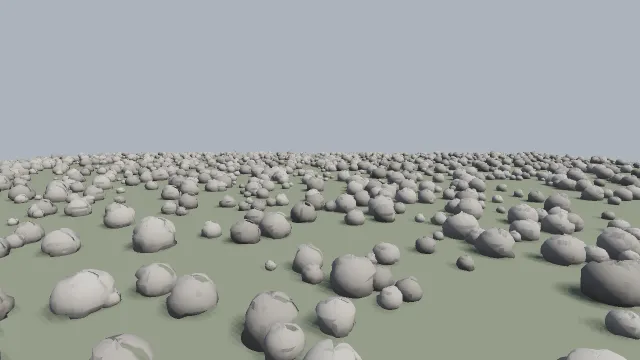
Starts examples/gpu-driven in this page, on WebGPU where your browser has it.
It needs indirect draws and compute, so it runs on WebGPU only.
Asking for it
/** The pipeline is a renderer option, and asking for it where it cannot run throws. */
const stage = await openStage(
  { outputTransform: 'aces', hdrScene: true, directionalShadows: false },
  { pipeline: 'gpu-driven' },
).catch((error: unknown) => {
  const readout = document.querySelector('#backend');
  if (readout !== null) readout.textContent = 'This example needs WebGPU, and this page has none.';
  console.info(error);
  return null;
});pipeline: 'gpu-driven' among createRenderer's options is the permission, and asking for it
where it cannot run throws, with the reason. It does not fall back, because a silent fallback ships
a game a pipeline it does not have, and the difference would only show as a frame time on somebody
else's machine. The example catches the refusal and says so on the page.
The pass writes linear light for the end of the frame to grade, so a profile with a tone curve also
needs hdrScene; without it the pass warns that the picture will be flat.
What it draws
Its material is a subset of the forward path's: vertex colour, one directional light with its
highlight and its shadow, the hemispheric ambient, reflections from a probe, metalness, roughness, an
emissive add, DriftTexture materials decoded on the device, alpha-tested cutouts, blended and glass
surfaces. A scene holds at most 64 materials. setMaterial, surface grain and relief, point lights
and skinning do not reach it. Read that list before reaching for it: it is a pipeline for a lot
of static geometry, a city, a forest, a voxel world, and the forward path draws the rest.
Clusters
/** A mesh, split into clusters of about 128 triangles: the unit the device culls and draws. */
function clustered(mesh: MeshData, material: number): GpuDrivenMesh {
  const set = buildClusters(mesh, 128);
  return {
    positions: mesh.positions,
    normals: mesh.normals,
    colours: mesh.colors,
    clusters: {
      count: set.count,
      triangleOffsets: set.triangleOffsets,
      triangleCounts: set.triangleCounts,
      boundsCentre: set.boundsCentre,
      boundsRadius: set.boundsRadius,
      coneAxis: set.coneAxis,
      coneCutoff: set.coneCutoff,
      /* One level of detail: every cluster is its own finest and coarsest. */
      ownError: new Float32Array(set.count),
      parentError: new Float32Array(set.count).fill(Infinity),
      indices: set.indices,
    },
    material,
  };
}The unit the device culls and draws is a cluster of about 128 triangles. buildClusters(mesh, 128)
from @driftengine/assets splits a mesh into them, each with a bounding sphere and a cone of normals,
so a cluster facing away or hidden behind nearer geometry is skipped without being drawn.
ownError and parentError drive the level of detail. With one level, as here, every cluster is its
own finest and coarsest. buildClusterDag(set, mesh) builds a graph of simplified levels, and the
device then draws, for each part of a mesh, the coarsest level whose error projects to less than
lodThreshold pixels. Clustering is build work: a million triangles take about 650 milliseconds.
The .drft format stores a mesh's clusters and their level graph as an MSHL chunk.
The scene
/** Every rock a mesh of its own, placed by a transform; the ground is material 1. */
const random = mulberry32(11);
const meshes: GpuDrivenMesh[] = [];
const ROCKS = 2500;
for (let i = 0; i < ROCKS; i += 1) {
  const shade = 0.4 + random() * 0.25;
  const rock = new MeshBuilder().addBlob(
    [0, 0.3, 0],
    (u, v) => 0.5 + hashToUnit(i * 977 + Math.floor(u * 7) * 31 + Math.floor(v * 5)) * 0.2,
    [shade, shade * 0.97, shade * 0.92],
  );
  meshes.push(clustered(rock.build(), 0));
}
meshes.push(
  clustered(new MeshBuilder().addBox([0, -0.1, 0], [80, 0.1, 80], [0.3, 0.34, 0.26]).build(), 1),
);

const transforms = new Float32Array(meshes.length * 16);
for (let i = 0; i < meshes.length; i += 1) {
  const s = i < ROCKS ? 0.4 + random() * 1.4 : 1;
  const x = i < ROCKS ? (random() - 0.5) * 150 : 0;
  const z = i < ROCKS ? (random() - 0.5) * 150 : 0;
  transforms.set([s, 0, 0, 0, 0, s, 0, 0, 0, 0, s, 0, x, 0, z, 1], i * 16);
}
const scene = streamingScene(meshes, transforms);

const materials: GpuDrivenMaterial[] = [
  { tint: [1, 1, 1], emissive: 0, roughness: 0.8 },
  { tint: [1, 1, 1], emissive: 0, roughness: 0.95 },
];streamingScene(meshes, transforms) packs a scene that is filled once: every mesh with its
clusters, a material index each, and one transform each. A world that changes while it runs, chunks
streaming in as a player walks or remeshed as they dig, builds a StreamingScene with a capacity of
vertices, indices, clusters and meshes, then calls add(mesh, transform, material) and remove(handle)
from the frame loop. add allocates only when a mesh larger than any before it arrives.
The vertex buffer is bound as one storage binding, so a capacity has to fit the device's
maxStorageBufferBindingSize: vertices × VERTEX_FLOATS × 4 bytes.
The pass
/** The pipeline is a pass like any other: registered once, drawn where the frame says. */
const pass = new GpuDrivenPass(scene, materials);
const handle = renderer.registerPass(pass);GpuDrivenPass is a pass like any other: registered once, drawn where the frame calls
drawPass. A third argument configures its own shadow map: mapSize, maxDistance, maxSlope and
taps, as the forward path's shadow options are.
/** What the pass needs of the camera and the light, refreshed in place every frame. */
const view: GpuDrivenView = {
  viewProj: camera.viewProjection,
  eye,
  lightDir: env.directionalDir,
  lightColour: env.directionalColor,
  ambient: env.ambient,
  ambientGround: env.ambientGround ?? env.ambient,
  lodThreshold: 1.5,
  fovY: (55 * Math.PI) / 180,
};The view is the camera's view-projection and position, the light, and lodThreshold with the field
of view the level-of-detail choice projects errors with. Pass fog from atmosphereFog(env, eyeY, underwater) to fog the pipeline exactly as the forward path fogs, and emissiveGain and
nightFactor from the same environment so both pipelines glow alike.
/* Before the frame opens: the pass records its culling and drawing against this view. */
pass.resize(renderer.sceneWidth, renderer.sceneHeight);
pass.setView(view);

renderer.beginFrame([0.55, 0.62, 0.72]);
renderer.bindMeshPass(camera, env);
renderer.drawPass(handle);
renderer.endFrame();resize and setView come before beginFrame, because that is when the pass records its culling.
Size it from renderer.sceneWidth and sceneHeight, not the canvas: with DriftTR the scene is
smaller than the canvas.
With the forward path
Both pipelines can draw in one frame: GPU-driven terrain with forward characters, particles and
interface on it. presentDepth: true in the shadow options hands the frame the pass's depth as well
as its colour, so a forward mesh can stand behind GPU-driven geometry; without it the two have no
depth relationship. It costs one more texture read and a depth write over the pixels the pass
covered.
pass.totalMs is what the pipeline cost the device last frame, and stageTime(stage) each stage,
where the device can time itself; both are null otherwise.