 DriftEngine
Antialiasing
sceneSamples at 1 and at 4, on the edges where the difference is visible.
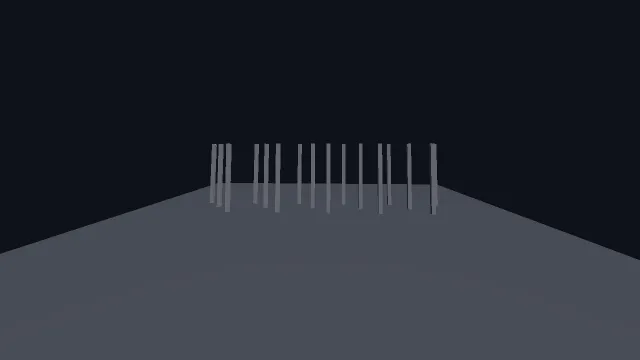
Starts examples/antialiasing in this page, on WebGPU where your browser has it.
Its comments explain it as it goes, starting from the top of main.ts.
From a checkout of the engine, npm run examples serves it at /antialiasing/.
Source
main.ts
examples/antialiasing/main.ts
/**
 * Antialiasing, on the edges where it is actually visible.
 *
 * `sceneSamples` is multisampling on the scene pass: 1 is off, 4 is the usual on. It is a
 * construction-time option because the sample count decides how the attachments are
 * allocated, so the switch builds a new renderer in place and the scene carries on.
 *
 * The scene is deliberately made of *near-vertical* edges rather than a cube's clean ones. A
 * 45-degree edge aliases into a tidy staircase that reads almost as a texture; an edge a few
 * degrees off vertical produces long runs of one pixel then a jump, which is the case that
 * looks broken without multisampling and fixed with it. Lean in — the difference is a pixel
 * wide, and a comparison you have to zoom into is still a real one.
 */
import { MeshBuilder, SceneNode } from '@driftengine/core';
import type { RendererApi } from '@driftengine/core';
import { DAYLIGHT, controls, flag, openScene } from '../common/stage';
import type { SceneHooks } from '../common/stage';

/*
 * Built once, held, and never rebuilt in the frame loop. A `SceneNode` per post is the cheap
 * way to keep sixteen world matrices that do not change: computing them once here is sixteen
 * matrix multiplies for the whole run rather than sixteen every frame.
 */
const fence: SceneNode[] = [];
for (let i = 0; i < 16; i += 1) {
  const node = new SceneNode();
  node.setPosition(-6 + i * 0.8, 0, -1.5 + (i % 3) * 0.9);
  node.setRotationAxisAngle(0, 0, 1, (i - 8) * 0.012);
  node.updateWorld();
  fence.push(node);
}
const still = new SceneNode();
still.updateWorld();

/** What one renderer draws: a picket fence, each post leaning a little differently. */
function build(renderer: RendererApi): SceneHooks {
  const posts = new MeshBuilder();
  posts.addBox([0, -0.25, 0], [9, 0.25, 9], [0.32, 0.34, 0.38]);
  const ground = renderer.createMesh(posts.build());
  const postMesh = new MeshBuilder();
  postMesh.addBox([0, 1.6, 0], [0.09, 1.6, 0.09], [0.82, 0.84, 0.88]);
  const post = renderer.createMesh(postMesh.build());

  return {
    render() {
      renderer.beginFrame([0.06, 0.07, 0.1]);
      renderer.bindMeshPass(scene.camera, DAYLIGHT);
      renderer.drawMesh(ground, still.worldMatrix);
      for (const node of fence) renderer.drawMesh(post, node.worldMatrix);
      renderer.endFrame();
    },
  };
}

// #region quality
/** The sample count decides how the scene target is allocated, so changing it builds a new renderer. */
const quality = (samples: string) => ({ sceneSamples: Number(samples), directionalShadows: true });
const scene = await openScene(quality(flag('samples', '1')), build);

controls([
  {
    key: 'samples',
    label: 'sceneSamples',
    value: flag('samples', '1'),
    options: [
      { text: '1 (off)', value: '1' },
      { text: '4', value: '4' },
    ],
    change: (value) => scene.rebuild(quality(value)),
  },
]);
// #endregion

scene.camera.position[0] = 0.6;
scene.camera.position[1] = 3.1;
scene.camera.position[2] = 12;
scene.camera.lookAt(0, 1.5, 0);