 DriftEngine
Display
A video settings screen drawn from what the host says it can do, and why where it cannot.
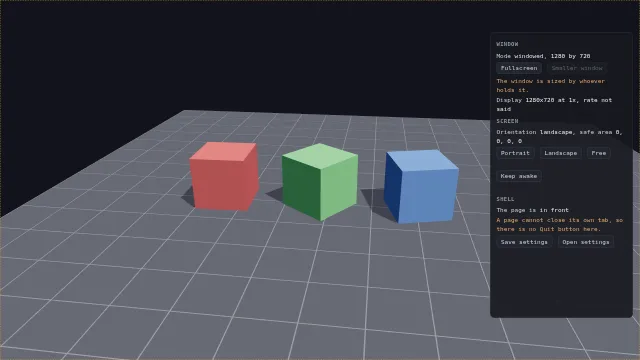
Starts examples/display in this page, on WebGPU where your browser has it.
Display and the host is the chapter that walks through it.
From a checkout of the engine, npm run examples serves it at /display/.
Source
main.ts
examples/display/main.ts
/**
 * A video settings screen, asked of the host rather than assumed.
 *
 * Behind the panel, a test card turns; it stops while the page does not have focus. The panel asks
 * the host what it can do and draws each control from the answer: the window's mode and size, the
 * display it is on, the screen's orientation, safe area and wake lock, whether there is a way to
 * quit, and a file to save the settings to. In a browser several answers are no, and the panel says
 * which and why instead of offering a button that does nothing. The strip recolours the cursor.
 */
import {
  BrowserDisplay,
  BrowserFileDialogs,
  BrowserLifecycle,
  BrowserScreenPresentation,
  MeshBuilder,
  computeLightMatrix,
  createEnvironment,
  pixelCursor,
  requestFullscreenOnGesture,
} from '@driftengine/core';
import type {
  DisplayControl,
  FileDialogs,
  Lifecycle,
  ScreenOrientation,
  ScreenPresentation,
  Vec3,
} from '@driftengine/core';
import { controls, flag, openStage } from '../common/stage';

const stage = await openStage({
  directionalShadows: true,
  outputTransform: 'aces',
  sceneSamples: 4,
});
const { renderer, camera, canvas } = stage;

// #region host
/* The host, as four capabilities. A shell passes its own; a page in a browser uses these. */
const display: DisplayControl = new BrowserDisplay(document.documentElement);
const screen: ScreenPresentation = new BrowserScreenPresentation();
const lifecycle: Lifecycle = new BrowserLifecycle();
const files: FileDialogs = new BrowserFileDialogs();
// #endregion

const $ = <T extends HTMLElement>(id: string): T => {
  const found = document.getElementById(id);
  if (found === null) throw new Error(`the page has no #${id}`);
  return found as T;
};
const say = (id: string, text: string): void => {
  $(id).textContent = text;
};

// #region window
/* Each control is drawn from the host's own answer, read when it is drawn. */
function drawWindow(): void {
  const { width, height } = display.size();
  say('mode', display.mode());
  say('size', `${Math.round(width)} by ${Math.round(height)}`);
  /* A browser never sizes its own window; a shell will, except while it covers a display. */
  $<HTMLButtonElement>('smaller').disabled = !display.canSetSize();
  say('size-note', display.canSetSize() ? '' : 'The window is sized by whoever holds it.');
  const shown = display.displays();
  say(
    'displays',
    shown
      .map(
        (d) =>
          `${d.label} at ${d.scale}x, ${d.refreshHz === null ? 'rate not said' : `${d.refreshHz} Hz`}`,
      )
      .join('; '),
  );
}

$('fullscreen').addEventListener('click', () => {
  /* Fullscreen needs a gesture, which this click is. `false` means refused, never an error. */
  void display
    .setMode(display.mode() === 'fullscreen' ? 'windowed' : 'fullscreen')
    .then(drawWindow);
});
$('smaller').addEventListener('click', () => {
  const { width, height } = display.size();
  void display.setSize(Math.round(width * 0.8), Math.round(height * 0.8)).then(drawWindow);
});
addEventListener('resize', drawWindow);
document.addEventListener('fullscreenchange', drawWindow);
// #endregion

// #region screen
/* What a phone has instead of a window. The safe area is drawn as an outline, so a notch shows. */
function drawScreen(): void {
  say('orientation', screen.orientation());
  const inset = screen.safeArea();
  const frame = $('safe-area');
  frame.style.inset = `${inset.top}px ${inset.right}px ${inset.bottom}px ${inset.left}px`;
  say('insets', `${inset.top}, ${inset.right}, ${inset.bottom}, ${inset.left}`);
}

for (const choice of ['portrait', 'landscape', 'free'] as const) {
  $(`lock-${choice}`).addEventListener('click', () => {
    const wanted: ScreenOrientation | null = choice === 'free' ? null : choice;
    void screen.lockOrientation(wanted).then((done) => {
      say('lock-note', done ? `Locked to ${choice}.` : 'This platform will not lock it.');
      drawScreen();
    });
  });
}

let awake = false;
$('awake').addEventListener('click', () => {
  awake = !awake;
  void screen.keepAwake(awake).then((held) => {
    say(
      'awake-note',
      awake
        ? held
          ? 'The screen stays on.'
          : 'There is no wake lock here.'
        : 'The screen may sleep.',
    );
  });
});
// #endregion

// #region lifecycle
/* The test card stops while the page is not in front, and Quit exists only where it works. */
let focused = true;
lifecycle.onFocusChange((now) => {
  focused = now;
  say('focus', now ? 'in front' : 'behind something');
});
lifecycle.onQuitRequest(() => {
  /* A shell waits for this before it closes; a browser never calls it. */
  saveSettings();
});
$('quit').hidden = !lifecycle.canQuit;
say(
  'quit-note',
  lifecycle.canQuit ? '' : 'A page cannot close its own tab, so there is no Quit button here.',
);
$('quit').addEventListener('click', () => lifecycle.requestQuit());
// #endregion

// #region files
/* The settings as a file the player keeps. A shell's picker is a native dialog; a browser's is the
   File System Access picker where it has one, and throws where it has none. */
interface Settings {
  mode: string;
  cursor: string;
}
let cursorColor = flag('cursor', 'amber');

function saveSettings(): void {
  const settings: Settings = { mode: display.mode(), cursor: cursorColor };
  const bytes = new TextEncoder().encode(JSON.stringify(settings, null, 2));
  files.saveFile('settings.json', bytes).then(
    (saved) => say('file-note', saved ? 'Saved.' : 'Not saved.'),
    () => say('file-note', 'There is no file picker in this browser.'),
  );
}

$('save').addEventListener('click', saveSettings);
$('open').addEventListener('click', () => {
  files.openFile(['.json']).then(
    (opened) => {
      if (opened === null) return say('file-note', 'Nothing opened.');
      const settings = JSON.parse(new TextDecoder().decode(opened.bytes)) as Partial<Settings>;
      if (typeof settings.cursor === 'string') applyCursor(settings.cursor);
      say('file-note', `Opened ${opened.name}.`);
    },
    () => say('file-note', 'There is no file picker in this browser.'),
  );
});
// #endregion

// #region cursor
/* A cursor drawn from a grid of characters, at the device pixel ratio, recoloured at will. */
const ARROW = [
  'x.......',
  'xx......',
  'xox.....',
  'xoox....',
  'xooox...',
  'xoooox..',
  'xooxxxx.',
  'xx......',
];
const INKS: Record<string, string> = { amber: '#f0a437', cyan: '#4fd6e0', white: '#f2f4f8' };

function applyCursor(name: string): void {
  cursorColor = name in INKS ? name : 'amber';
  canvas.style.cursor = pixelCursor(
    ARROW,
    { x: '#0b0d12', o: INKS[cursorColor] as string },
    {
      scale: 3,
      hotspotX: 0,
      hotspotY: 0,
    },
  );
}
applyCursor(cursorColor);
controls([
  {
    key: 'cursor',
    label: 'cursor',
    value: cursorColor,
    options: Object.keys(INKS).map((ink) => ({ text: ink, value: ink })),
    change: (value) => applyCursor(value),
  },
]);
// #endregion

// #region handheld
/* On a phone, the first tap anywhere fills the screen, once. On a desktop this does nothing. */
requestFullscreenOnGesture(document.documentElement);
// #endregion

drawWindow();
drawScreen();
say('focus', 'in front');
addEventListener('resize', drawScreen);

/* The test card: three cubes in the primaries over a grid, turning. */
const floor = new MeshBuilder().addBox([0, -0.05, 0], [8, 0.05, 8], [0.14, 0.15, 0.18]);
for (let line = -8; line <= 8; line += 1) {
  floor.addBox([line, 0.002, 0], [0.01, 0.002, 8], [0.3, 0.31, 0.35]);
  floor.addBox([0, 0.002, line], [8, 0.002, 0.01], [0.3, 0.31, 0.35]);
}
const floorMesh = renderer.createMesh(floor.build());
const COLORS: Vec3[] = [
  [0.85, 0.2, 0.2],
  [0.25, 0.75, 0.3],
  [0.2, 0.4, 0.9],
];
const cubes = COLORS.map((color) =>
  renderer.createMesh(new MeshBuilder().addBox([0, 0, 0], [0.6, 0.6, 0.6], color).build()),
);
const env = createEnvironment({
  directionalDir: [0.4, 0.85, 0.35],
  directionalColor: [1.4, 1.35, 1.25],
  ambient: [0.3, 0.32, 0.4],
  ambientGround: [0.1, 0.1, 0.12],
});
const lightMatrix = new Float32Array(16);
env.lightViewProj = lightMatrix;
env.shadowStrength = 0.6;
env.shadowDepthSpan = computeLightMatrix(
  env.directionalDir,
  0,
  1,
  0,
  10,
  renderer.shadowMapSize,
  lightMatrix,
);
const IDENTITY = new Float32Array([1, 0, 0, 0, 0, 1, 0, 0, 0, 0, 1, 0, 0, 0, 0, 1]);
const models = cubes.map(() => new Float32Array(IDENTITY));
let angle = 0;

stage.run({
  simulate(dt) {
    if (focused) angle += dt * 0.7;
  },
  render() {
    camera.fovYDeg = 45;
    camera.position[0] = 0;
    camera.position[1] = 4.5;
    camera.position[2] = 9;
    camera.lookAt(-1.2, 0.6, 0);
    cubes.forEach((_, i) => {
      const a = angle + i * 0.9;
      const model = models[i] as Float32Array;
      model.set([
        Math.cos(a),
        0,
        -Math.sin(a),
        0,
        0,
        1,
        0,
        0,
        Math.sin(a),
        0,
        Math.cos(a),
        0,
        (i - 1) * 2.2 - 1.2,
        0.6,
        0,
        1,
      ]);
    });
    renderer.beginShadowPass(lightMatrix, 'static');
    renderer.drawShadowCasters((sink) => {
      cubes.forEach((cube, i) => sink.mesh(cube, models[i] as Float32Array));
    });
    renderer.endShadowPass();
    renderer.beginFrame([0.07, 0.08, 0.11]);
    renderer.bindMeshPass(camera, env);
    renderer.drawMesh(floorMesh, IDENTITY);
    cubes.forEach((cube, i) => renderer.drawMesh(cube, models[i] as Float32Array));
    renderer.endFrame();
  },
});