 DriftEngine
A 2D game
A whole game — paddle, ball, bricks, score, lives, win and loss — laid out in the XY plane.
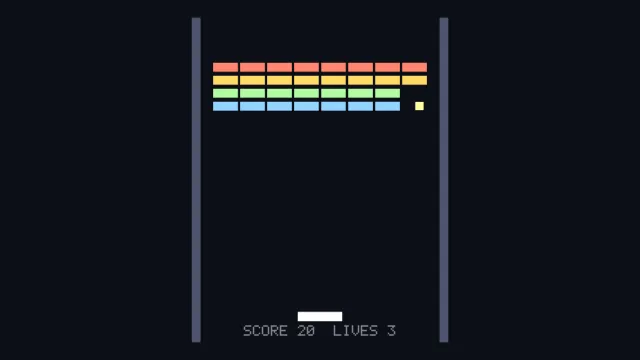
Starts examples/game-2d in this page, on WebGPU where your browser has it.
A 2D game is the chapter that walks through it.
From a checkout of the engine, npm run examples serves it at /game-2d/.
Source
main.ts
examples/game-2d/main.ts
/**
 * A whole 2D game — paddle, ball, bricks, score, lives, win and loss — on a 3D engine.
 *
 * **There is no 2D mode, and none is wanted.** A 2D game here is the world laid out in the XY
 * plane with the camera parked down the Z axis: `lookAt` then gives exactly the screen basis
 * you expect, X to the right and Y up. The camera is perspective — that is the only kind this
 * engine builds — so the trick that makes it read as flat is a *narrow* field of view from a
 * *long* way back. The distance is not a taste: visible height is `2 * d * tan(fov / 2)`, so a
 * 19-unit board at 14 degrees needs 86 units of it, and at 60 the paddle is simply off the
 * bottom of the screen. At that distance the frustum has barely diverged by the time it
 * crosses the board and the result is orthographic to the eye. Widen `fovYDeg` and watch the
 * outer bricks start to show their sides.
 *
 * What that buys, and a sprite renderer would not: every brick is lit by the same directional
 * light and casts into the same depth buffer, so the board has real shading for free, and the
 * whole thing is one flat-shaded mesh drawn with a per-draw tint rather than 33 textures.
 *
 * Input is plain DOM here to keep the file to one subject. The engine ships `InputSource` and
 * `TouchControls` for keyboard, gamepad and touch together — see the README's input section.
 */
// #region imports
import { DEFAULT_TEXT_STYLE, MeshBuilder, SceneNode, createEnvironment } from '@driftengine/core';
import { openStage } from '../common/stage';
// #endregion

// #region field
const FIELD_X = 7;
const FIELD_TOP = 9.5;
const FIELD_BOTTOM = -9.5;
const PADDLE_Y = -8;
const PADDLE_HALF = 1.3;
const BALL_R = 0.24;
const COLS = 8;
const ROWS = 4;
const BRICK_HALF_X = 0.72;
const BRICK_HALF_Y = 0.26;
// #endregion

// #region light
/** Flat-on light, so the board reads evenly rather than falling off toward one corner. */
const FLAT = createEnvironment({
  directionalDir: [0.25, 0.45, 1],
  directionalColor: [1, 0.97, 0.92],
  ambient: [0.34, 0.36, 0.42],
  ambientGround: [0.2, 0.21, 0.26],
  emissiveGain: 1,
  nightFactor: 0,
  fogColor: [0.05, 0.06, 0.09],
  fogDensity: 0,
  fogHeightFalloff: 0,
  fogBaseY: 0,
});
// #endregion

// #region stage
const stage = await openStage({ directionalShadows: false, sceneSamples: 4 });
// #endregion

// #region meshes
/*
 * One unit brick, drawn once per live brick with a different tint. `drawMesh` takes an
 * optional colour multiplier that is reset after the call, which is what lets a single
 * flat-shaded mesh stand in for four rows of different colours without four meshes.
 */
const brickMesh = new MeshBuilder();
brickMesh.addBox([0, 0, 0], [BRICK_HALF_X, BRICK_HALF_Y, 0.24], [1, 1, 1]);
const brick = stage.renderer.createMesh(brickMesh.build());

const paddleMesh = new MeshBuilder();
paddleMesh.addBox([0, 0, 0], [PADDLE_HALF, 0.26, 0.24], [0.82, 0.86, 0.95]);
const paddle = stage.renderer.createMesh(paddleMesh.build());

const ballMesh = new MeshBuilder();
ballMesh.addBox([0, 0, 0], [BALL_R, BALL_R, BALL_R], [1, 0.86, 0.5]);
const ball = stage.renderer.createMesh(ballMesh.build());

const wallMesh = new MeshBuilder();
wallMesh.addBox([0, 0, 0], [0.25, FIELD_TOP, 0.24], [0.24, 0.26, 0.34]);
const wall = stage.renderer.createMesh(wallMesh.build());
// #endregion

// #region bricks
const ROW_TINTS: [number, number, number][] = [
  [0.95, 0.42, 0.35],
  [0.95, 0.68, 0.32],
  [0.55, 0.78, 0.5],
  [0.45, 0.66, 0.95],
];

/** Reused for every draw: set, update, draw, set again. Nothing is allocated in the frame. */
const place = new SceneNode();

interface Brick {
  readonly x: number;
  readonly y: number;
  readonly row: number;
  alive: boolean;
}

const bricks: Brick[] = [];
function rack(): void {
  bricks.length = 0;
  for (let row = 0; row < ROWS; row += 1) {
    for (let col = 0; col < COLS; col += 1) {
      bricks.push({
        x: (col - (COLS - 1) / 2) * (BRICK_HALF_X * 2 + 0.14),
        y: 6.6 - row * (BRICK_HALF_Y * 2 + 0.24),
        row,
        alive: true,
      });
    }
  }
}
rack();
// #endregion

// #region state
let paddleX = 0;
let ballX = 0;
let ballY = PADDLE_Y + 1;
let previousBallX = ballX;
let previousBallY = ballY;
let velX = 4.4;
let velY = 7.6;
let score = 0;
let lives = 3;
let over = '';
// #endregion

// #region input
/* Pointer drives the paddle; the arrow keys do too, so the example works without a mouse. */
let pointerTarget: number | null = null;
const held = new Set<string>();
addEventListener('pointermove', (event) => {
  const half = stage.renderer.cssWidth / 2;
  pointerTarget = ((event.clientX - half) / half) * FIELD_X;
});
addEventListener('keydown', (event) => held.add(event.key));
addEventListener('keyup', (event) => held.delete(event.key));
addEventListener('pointerdown', () => {
  if (over !== '') {
    score = 0;
    lives = 3;
    over = '';
    rack();
    serve();
  }
});

function serve(): void {
  ballX = paddleX;
  ballY = PADDLE_Y + 1;
  previousBallX = ballX;
  previousBallY = ballY;
  velX = 4.4 * (Math.random() < 0.5 ? -1 : 1);
  velY = 7.6;
}
// #endregion

// #region camera
const hud = stage.renderer.createText();

stage.camera.fovYDeg = 14;
stage.camera.position[0] = 0;
stage.camera.position[1] = 0;
stage.camera.position[2] = 86;
stage.camera.lookAt(0, 0, 0);
// #endregion

stage.run({
  // #region simulate
  simulate(dt) {
    if (over !== '') return;

    if (held.has('ArrowLeft')) paddleX -= 14 * dt;
    if (held.has('ArrowRight')) paddleX += 14 * dt;
    if (pointerTarget !== null) paddleX += (pointerTarget - paddleX) * Math.min(1, dt * 14);
    paddleX = Math.max(-FIELD_X + PADDLE_HALF, Math.min(FIELD_X - PADDLE_HALF, paddleX));

    previousBallX = ballX;
    previousBallY = ballY;
    ballX += velX * dt;
    ballY += velY * dt;

    /* Walls and ceiling. Reflect and push back out, so a fast ball cannot stick to an edge. */
    if (ballX < -FIELD_X + BALL_R) {
      ballX = -FIELD_X + BALL_R;
      velX = Math.abs(velX);
    } else if (ballX > FIELD_X - BALL_R) {
      ballX = FIELD_X - BALL_R;
      velX = -Math.abs(velX);
    }
    if (ballY > FIELD_TOP - BALL_R) {
      ballY = FIELD_TOP - BALL_R;
      velY = -Math.abs(velY);
    }

    /*
     * The paddle steers rather than merely reflecting: where the ball lands across its width
     * sets the outgoing angle. Without that a game of this shape has exactly one rally in it.
     */
    if (
      velY < 0 &&
      ballY - BALL_R < PADDLE_Y + 0.26 &&
      ballY > PADDLE_Y - 0.6 &&
      Math.abs(ballX - paddleX) < PADDLE_HALF + BALL_R
    ) {
      ballY = PADDLE_Y + 0.26 + BALL_R;
      const offset = (ballX - paddleX) / PADDLE_HALF;
      const speed = Math.hypot(velX, velY);
      const angle = offset * 1.0;
      velX = Math.sin(angle) * speed;
      velY = Math.cos(angle) * speed;
    }

    for (const b of bricks) {
      if (!b.alive) continue;
      if (
        Math.abs(ballX - b.x) < BRICK_HALF_X + BALL_R &&
        Math.abs(ballY - b.y) < BRICK_HALF_Y + BALL_R
      ) {
        b.alive = false;
        score += 10;
        /* Reflect on the shallower overlap, so a corner hit does not pass through. */
        const overlapX = BRICK_HALF_X + BALL_R - Math.abs(ballX - b.x);
        const overlapY = BRICK_HALF_Y + BALL_R - Math.abs(ballY - b.y);
        if (overlapY < overlapX) velY = -velY;
        else velX = -velX;
        break;
      }
    }

    if (bricks.every((b) => !b.alive)) over = 'CLEARED';

    if (ballY < FIELD_BOTTOM) {
      lives -= 1;
      if (lives <= 0) over = 'GAME OVER';
      else serve();
    }
  },
  // #endregion

  // #region render
  render(alpha) {
    const drawX = previousBallX + (ballX - previousBallX) * alpha;
    const drawY = previousBallY + (ballY - previousBallY) * alpha;

    stage.renderer.beginFrame([0.05, 0.06, 0.09]);
    stage.renderer.bindMeshPass(stage.camera, FLAT);

    for (const side of [-1, 1]) {
      place.setPosition(side * (FIELD_X + 0.25), 0, 0);
      place.updateWorld();
      stage.renderer.drawMesh(wall, place.worldMatrix);
    }

    for (const b of bricks) {
      if (!b.alive) continue;
      place.setPosition(b.x, b.y, 0);
      place.updateWorld();
      stage.renderer.drawMesh(brick, place.worldMatrix, undefined, ROW_TINTS[b.row]);
    }

    place.setPosition(paddleX, PADDLE_Y, 0);
    place.updateWorld();
    stage.renderer.drawMesh(paddle, place.worldMatrix);

    place.setPosition(drawX, drawY, 0);
    place.updateWorld();
    stage.renderer.drawMesh(ball, place.worldMatrix);

    const width = stage.renderer.cssWidth;
    const height = stage.renderer.cssHeight;
    const cell = Math.max(2, Math.round(Math.min(width, height) / 260));
    stage.renderer.setText(
      hud,
      over === '' ? `SCORE ${score}  LIVES ${lives}` : `${over} - CLICK TO PLAY AGAIN`,
    );
    stage.renderer.drawText(
      hud,
      width,
      height,
      Math.round(width * 0.5 - stage.renderer.textWidth(hud, cell) / 2),
      Math.round(height * 0.93),
      {
        ...DEFAULT_TEXT_STYLE,
        cellSize: cell,
        color: [0.92, 0.94, 1],
        glow: 0,
        alpha: 1,
        reveal: 1,
      },
      0,
    );

    stage.renderer.endFrame();
  },
  // #endregion
});