 DriftEngine
Interface
A pause menu and options over a running scene: laid out, themed, clipped, in DriftScript.
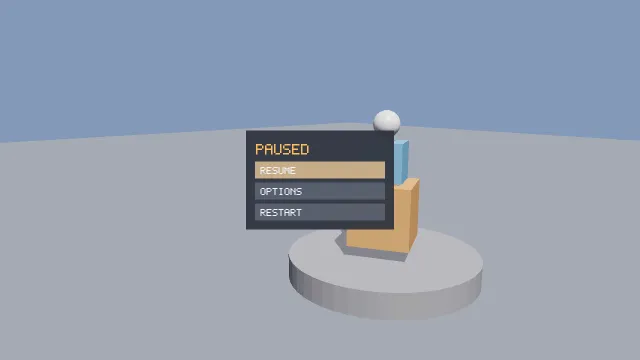
Starts examples/interface in this page, on WebGPU where your browser has it.
Interfaces is the chapter that walks through it.
From a checkout of the engine, npm run examples serves it at /interface/.
Source
main.ts
examples/interface/main.ts
/**
 * A pause menu and an options screen over a scene that keeps running behind them.
 *
 * The page builds the interface as a tree of nodes, lays nothing out by hand, and draws it as one
 * sprite pass with the pixel font over it. `menu.drs` routes the pointer and the keys to the tree,
 * answers what was activated, and paints each button from its own state: Resume closes the menu,
 * Options opens a second panel whose toggles change the scene, and its list scrolls inside its own
 * box. The mouse, the keyboard and a gamepad all reach it. The switches move the menu and change its
 * theme on the running page.
 */
import {
  DEFAULT_TEXT_STYLE,
  InputSource,
  MeshBuilder,
  computeLightMatrix,
  createEnvironment,
} from '@driftengine/core';
import type { TextHandle, TextStyle } from '@driftengine/core';
import {
  addUiChild,
  createAffine2D,
  createSpritePass,
  createTheme,
  createUiNode,
  deriveTheme,
  drawUiTree,
  routeScrollWheel,
  screenToNdc,
  themeRgba,
} from '@driftengine/ui2d';
import type { UiNode, UiNodeOptions, UiRect } from '@driftengine/ui2d';
import { patchModule } from 'driftscript';
import { exported, hostScript } from '../common/script';
import { controls, flag, openStage } from '../common/stage';
import * as menuScript from './menu.drs';

const stage = await openStage({ directionalShadows: true, outputTransform: 'aces' });
const { renderer, camera, canvas } = stage;

// #region tree
/* The interface as nodes: a root that fills the screen, the pause menu, and the options panel with
   its toggles and a list that clips and scrolls. Sizes are numbers, `fit` or `grow`; nothing is
   placed by hand. */
const BUTTON: UiNodeOptions = { width: 260, height: 34, interactive: true, focusable: true };
const root = createUiNode({
  direction: 'column',
  width: 'grow',
  height: 'grow',
  justify: 'center',
  padding: 40,
});
const add = (parent: UiNode, options: UiNodeOptions): UiNode =>
  addUiChild(parent, createUiNode(options));
const menu = add(root, {
  direction: 'column',
  padding: 18,
  gap: 8,
  name: 'menu',
  background: [0, 0, 0, 1],
});
add(menu, { width: 260, height: 36, text: 'PAUSED', name: 'title' });
add(menu, { ...BUTTON, text: 'RESUME', name: 'resume' });
add(menu, { ...BUTTON, text: 'OPTIONS', name: 'options' });
add(menu, { ...BUTTON, text: 'RESTART', name: 'restart' });
const options = add(root, {
  direction: 'column',
  padding: 18,
  gap: 8,
  name: 'optionsPanel',
  hidden: true,
  background: [0, 0, 0, 1],
});
add(options, { width: 260, height: 36, text: 'OPTIONS', name: 'optionsTitle' });
add(options, { ...BUTTON, text: 'SPIN  ON', name: 'spin' });
add(options, { ...BUTTON, text: 'SHADOWS  ON', name: 'shadows' });
const help = add(options, {
  direction: 'column',
  width: 260,
  height: 112,
  padding: 8,
  gap: 6,
  clip: true,
  name: 'help',
  background: [0, 0, 0, 1],
});
for (const line of [
  'THE WHEEL SCROLLS IT',
  'TAB OR ARROWS MOVE',
  'ENTER OR SPACE PRESS',
  'ESCAPE GOES BACK',
  'A PAD: D-PAD AND A',
  'START PAUSES',
  'THE LIST CLIPS ROWS',
  'AND SCROLLS IN PLACE',
]) {
  add(help, { width: 'grow', height: 16, text: line });
}
add(options, { ...BUTTON, text: 'BACK', name: 'back' });
// #endregion

// #region theme
/* Colours by name, packed as 0xRRGGBBAA. The light theme is the dark one with four overrides. */
const DARK = createTheme({
  panel: 0x14161dee,
  well: 0x0b0c10ff,
  text: 0xe6e8eeff,
  title: 0xf0b45cff,
});
const LIGHT = deriveTheme(DARK, {
  panel: 0xf2f3f6ee,
  well: 0xdfe2e8ff,
  text: 0x1a1c22ff,
  title: 0xb4602aff,
});
let theme = flag('theme', 'dark') === 'light' ? LIGHT : DARK;
const textColour = new Float32Array(4);
let bodyStyle: TextStyle = DEFAULT_TEXT_STYLE;
let titleStyle: TextStyle = DEFAULT_TEXT_STYLE;
/* Written into the nodes' own colours, and the label styles built here, once a change of theme. */
function applyTheme(): void {
  themeRgba(theme, 'panel', 0x000000ff, menu.background as Float32Array);
  themeRgba(theme, 'panel', 0x000000ff, options.background as Float32Array);
  themeRgba(theme, 'well', 0x000000ff, help.background as Float32Array);
  themeRgba(theme, 'text', 0xffffffff, textColour);
  bodyStyle = {
    ...DEFAULT_TEXT_STYLE,
    cellSize: 2,
    color: [textColour[0] ?? 1, textColour[1] ?? 1, textColour[2] ?? 1],
  };
  themeRgba(theme, 'title', 0xffffffff, textColour);
  titleStyle = {
    ...DEFAULT_TEXT_STYLE,
    cellSize: 3,
    color: [textColour[0] ?? 1, textColour[1] ?? 1, textColour[2] ?? 1],
  };
}
applyTheme();
// #endregion

// #region script
const script = hostScript(menuScript);
interface Menu {
  open: boolean;
  spin: boolean;
  shadows: boolean;
  light: boolean;
  restarts: number;
}
const state = exported<() => Menu>(script, 'createMenu')();
state.light = theme === LIGHT;
exported<(tree: UiNode) => void>(script, 'begin')(root);
type Update = (
  menu: Menu,
  tree: UiNode,
  width: number,
  height: number,
  x: number,
  y: number,
  down: boolean,
  key: string,
) => void;
if (import.meta.hot) {
  import.meta.hot.accept('./menu.drs', (next) => {
    if (next !== undefined) patchModule(script, next as Record<string, unknown>, { Menu: [state] });
  });
}
// #endregion

// #region devices
/* The pointer in CSS pixels, the wheel, the one key pressed this frame, and a pad's buttons named
   as the keys they stand for. The script is handed all of it and routes it to the tree. */
const pointer = { x: -1, y: -1, down: false };
let pressedKey = '';
const ROUTED = new Set(['Escape', 'ArrowDown', 'ArrowUp', 'Enter', ' ', 'Tab']);
canvas.addEventListener('pointermove', (event) => {
  pointer.x = event.offsetX;
  pointer.y = event.offsetY;
});
canvas.addEventListener('pointerdown', () => {
  pointer.down = true;
});
addEventListener('pointerup', () => {
  pointer.down = false;
});
canvas.addEventListener(
  'wheel',
  (event) => {
    event.preventDefault();
    routeScrollWheel(root, event.offsetX, event.offsetY, event.deltaX, event.deltaY);
  },
  { passive: false },
);
addEventListener('keydown', (event) => {
  if (!ROUTED.has(event.key)) return;
  event.preventDefault();
  pressedKey = event.key;
});
const input = new InputSource(canvas);
function padKey(): string {
  const pad = input.pad(0);
  if (pad === null) return '';
  if (pad.pressed('dpadDown')) return 'ArrowDown';
  if (pad.pressed('dpadUp')) return 'ArrowUp';
  if (pad.pressed('faceDown')) return 'Enter';
  if (pad.pressed('faceRight') || pad.pressed('start')) return 'Escape';
  return '';
}
// #endregion

controls([
  {
    key: 'align',
    label: 'menu',
    value: flag('align', 'centre'),
    options: ['centre', 'left'].map((a) => ({ text: a, value: a })),
    change: (value) => {
      root.align = value === 'left' ? 'start' : 'center';
    },
  },
  {
    key: 'theme',
    label: 'theme',
    value: theme === LIGHT ? 'light' : 'dark',
    options: ['dark', 'light'].map((t) => ({ text: t, value: t })),
    change: (value) => {
      theme = value === 'light' ? LIGHT : DARK;
      state.light = theme === LIGHT;
      applyTheme();
    },
  },
]);
root.align = flag('align', 'centre') === 'left' ? 'start' : 'center';

/* The scene behind it: a sculpture on a plinth, which spins while the menu says so. */
const scene = renderer.createMesh(
  new MeshBuilder()
    .addCylinder([0, 0.2, 0], 1.6, 0.2, 'y', [0.42, 0.42, 0.45], 0, 48)
    .addBox([0, -0.05, 0], [30, 0.05, 30], [0.3, 0.33, 0.38])
    .build(),
);
const sculpture = renderer.createMesh(
  new MeshBuilder()
    .addBox([0, 1.1, 0], [0.5, 0.5, 0.5], [0.85, 0.45, 0.2])
    .addBox([0, 1.95, 0], [0.32, 0.32, 0.32], [0.25, 0.55, 0.85])
    .addSphere([0, 2.55, 0], 0.22, [0.9, 0.9, 0.92], 0, 16, 8, 0.6)
    .build(),
);
const env = createEnvironment({
  directionalDir: [0.5, 0.8, 0.3],
  directionalColor: [1.6, 1.55, 1.45],
  ambient: [0.38, 0.4, 0.48],
  ambientGround: [0.14, 0.14, 0.15],
});
const lightMatrix = new Float32Array(16);
env.lightViewProj = lightMatrix;
env.shadowDepthSpan = computeLightMatrix(
  env.directionalDir,
  0,
  1,
  0,
  4,
  renderer.shadowMapSize,
  lightMatrix,
);
const IDENTITY = new Float32Array([1, 0, 0, 0, 0, 1, 0, 0, 0, 0, 1, 0, 0, 0, 0, 1]);
const model = new Float32Array(IDENTITY);

// #region draw
/* One sprite pass for the panels and buttons, and the pixel font over them: the tree says where
   each label goes and how much of it a clip leaves, and the page draws it. */
const pass = createSpritePass({ capacity: 256, slots: 1, label: 'interface' });
const handle = renderer.registerPass(pass);
const affine = createAffine2D();
const labels = new Map<UiNode, TextHandle>();
const queued: UiNode[] = [];
const sink = {
  content(node: UiNode, visible: UiRect): void {
    /* A label in a row a clip has cut is left out, rather than drawn over the list's edge. */
    if (visible.h < node.rect.h) return;
    queued.push(node);
  },
};
function drawLabels(width: number, height: number, time: number): void {
  for (const node of queued) {
    let label = labels.get(node);
    if (label === undefined) {
      label = renderer.createText();
      labels.set(node, label);
    }
    renderer.setText(label, node.text);
    const big = node.name === 'title' || node.name === 'optionsTitle';
    const style = big ? titleStyle : bodyStyle;
    const cell = big ? 3 : 2;
    const x = node.rect.x + (node.interactive ? 12 : 4);
    const baseline = node.rect.y + node.rect.h / 2 + (cell * 7) / 2;
    renderer.drawText(label, width, height, x, baseline, style, time);
  }
  queued.length = 0;
}
// #endregion

let time = 0;
let angle = 0;
stage.run({
  simulate(dt) {
    time += dt;
    if (state.spin) angle += dt * 0.6;
  },
  render() {
    const width = canvas.clientWidth;
    const height = canvas.clientHeight;
    // #region frame
    const key = pressedKey !== '' ? pressedKey : padKey();
    pressedKey = '';
    exported<Update>(script, 'update')(
      state,
      root,
      width,
      height,
      pointer.x,
      pointer.y,
      pointer.down,
      key,
    );
    pass.reset();
    pass.setTransform(screenToNdc(width, height, affine));
    drawUiTree(pass.batch, root, pass.white, sink);
    // #endregion

    camera.fovYDeg = 45;
    camera.position[0] = 4.5;
    camera.position[1] = 3;
    camera.position[2] = 5.5;
    /* Framed off to the right, so the sculpture shows beside the menu rather than behind it. */
    camera.lookAt(-1.6, 1.4, 0);
    env.shadowStrength = state.shadows ? 0.7 : 0;
    const c = Math.cos(angle);
    const s = Math.sin(angle);
    model.set([c, 0, s, 0, 0, 1, 0, 0, -s, 0, c, 0, 0, 0, 0, 1]);
    renderer.beginShadowPass(lightMatrix, 'static');
    renderer.drawShadowCasters((caster) => caster.mesh(sculpture, model));
    renderer.endShadowPass();
    renderer.beginFrame([0.52, 0.6, 0.72]);
    renderer.bindMeshPass(camera, env);
    renderer.drawMesh(scene, IDENTITY);
    renderer.drawMesh(sculpture, model);
    renderer.drawPass(handle);
    drawLabels(width, height, time);
    if (!state.open) {
      const prompt = labels.get(root) ?? renderer.createText();
      labels.set(root, prompt);
      renderer.setText(prompt, 'ESCAPE OR START TO PAUSE');
      renderer.drawText(prompt, width, height, 24, height - 90, bodyStyle, time);
    }
    renderer.endFrame();
  },
});menu.drs
examples/interface/menu.drs
// The pause menu: routing the pointer and the keys to the tree, answering what was activated, and
// painting each button from its own state. The page builds the tree and draws it; this decides what
// it does.
//
// Under `npm run examples`, change a rule and save: the menu answers by it from the next frame. Try
// arrow keys that wrap round, a button that says how many times it was pressed, or other colours.

import { activated, focus, focused, hovered, key, layout, point, pressed, setText, show, tint } from "drift/ui"

data Menu {
    open: bool = true
    inOptions: bool = false
    spin: bool = true
    shadows: bool = true
    // Whether the page's theme is the light one, which the button colours follow.
    light: bool = false
    restarts: u32 = 0
}

// The keyboard starts on Resume, so the menu can be used without touching the mouse.
fn begin(tree: UiTree) {
    ui.focus(tree, "resume")
}

// #region route
// Lay the tree out in the space it has, then give it the pointer and the key pressed this frame,
// and answer whatever either of them activated. Arrow keys move the focus as Tab does.
fn update(menu: mut Menu, tree: UiTree, width: f32, height: f32, px: f32, py: f32, down: bool, pressedKey: String) {
    ui.layout(tree, 0, 0, width, height)
    if pressedKey == "Escape" {
        if menu.inOptions {
            leaveOptions(menu, tree)
        } else {
            toggle(menu, tree)
        }
    }
    if !menu.open {
        return
    }
    ui.point(tree, px, py, down)
    respond(menu, tree)
    if pressedKey == "ArrowDown" {
        ui.key(tree, "Tab", false)
    } else if pressedKey == "ArrowUp" {
        ui.key(tree, "Tab", true)
    } else if pressedKey == "Enter" || pressedKey == " " || pressedKey == "Tab" {
        ui.key(tree, pressedKey, false)
    }
    respond(menu, tree)
    paint(menu, tree, "resume")
    paint(menu, tree, "options")
    paint(menu, tree, "restart")
    paint(menu, tree, "spin")
    paint(menu, tree, "shadows")
    paint(menu, tree, "back")
}
// #endregion

// #region respond
fn respond(menu: mut Menu, tree: UiTree) {
    if ui.activated(tree, "resume") {
        toggle(menu, tree)
    }
    if ui.activated(tree, "options") {
        menu.inOptions = true
        ui.show(tree, "menu", false)
        ui.show(tree, "optionsPanel", true)
        ui.focus(tree, "spin")
    }
    if ui.activated(tree, "back") {
        leaveOptions(menu, tree)
    }
    if ui.activated(tree, "restart") {
        menu.restarts += 1
    }
    if ui.activated(tree, "spin") {
        menu.spin = !menu.spin
        label(tree, "spin", menu.spin, "SPIN  ON", "SPIN  OFF")
    }
    if ui.activated(tree, "shadows") {
        menu.shadows = !menu.shadows
        label(tree, "shadows", menu.shadows, "SHADOWS  ON", "SHADOWS  OFF")
    }
}
// #endregion

fn leaveOptions(menu: mut Menu, tree: UiTree) {
    menu.inOptions = false
    ui.show(tree, "optionsPanel", false)
    ui.show(tree, "menu", true)
    ui.focus(tree, "options")
}

fn toggle(menu: mut Menu, tree: UiTree) {
    menu.open = !menu.open
    ui.show(tree, "menu", menu.open && !menu.inOptions)
    ui.show(tree, "optionsPanel", menu.open && menu.inOptions)
    if menu.open {
        ui.focus(tree, "resume")
    }
}

fn label(tree: UiTree, name: String, on: bool, yes: String, no: String) {
    if on {
        ui.setText(tree, name, yes)
    } else {
        ui.setText(tree, name, no)
    }
}

// #region paint
// A button paints itself from its own state: held down, under the pointer or holding the keyboard,
// or at rest, in the colours of the theme the page is showing.
fn paint(menu: Menu, tree: UiTree, name: String) {
    if ui.pressed(tree, name) {
        ui.tint(tree, name, 0.9, 0.5, 0.25, 1)
    } else if ui.hovered(tree, name) || ui.focused(tree, name) {
        if menu.light {
            ui.tint(tree, name, 0.95, 0.75, 0.45, 1)
        } else {
            ui.tint(tree, name, 0.85, 0.55, 0.3, 1)
        }
    } else if menu.light {
        ui.tint(tree, name, 0.86, 0.87, 0.9, 1)
    } else {
        ui.tint(tree, name, 0.17, 0.19, 0.24, 1)
    }
}
// #endregion