 DriftEngine
2D overlay and text
Screen-space panels and the built-in font, a keycap prompt, and a portrait in a box of its own.
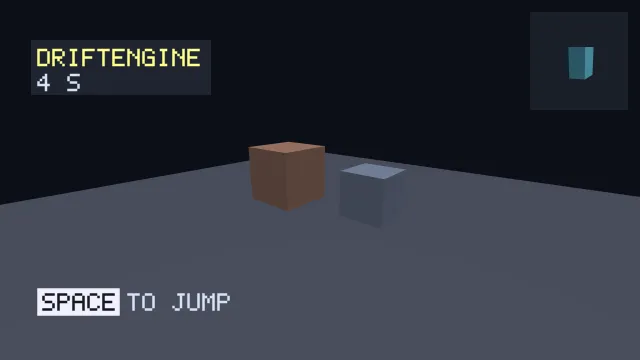
Starts examples/overlay-text in this page, on WebGPU where your browser has it.
Text and overlays is the chapter that walks through it.
From a checkout of the engine, npm run examples serves it at /overlay-text/.
Source
main.ts
examples/overlay-text/main.ts
/**
 * The 2D layer: screen-space panels and text over a 3D scene, a keycap prompt, and a portrait of an
 * object in a box of its own.
 *
 * There is no separate 2D renderer. An interface here is panels and a bitmap font drawn in *pixel*
 * coordinates over the finished scene, which is why `drawText` takes a viewport and a baseline
 * rather than a world matrix. The font is built in: `createText()` takes no arguments and fetches
 * nothing, so a heads-up display costs no assets at all.
 */
import { Camera, DEFAULT_TEXT_STYLE, MeshBuilder, SceneNode } from '@driftengine/core';
import type { TextStyle } from '@driftengine/core';
import { DAYLIGHT, openStage } from '../common/stage';

const stage = await openStage({ directionalShadows: true, sceneSamples: 4 });
const { renderer, camera } = stage;

const solids = new MeshBuilder();
solids.addBox([0, -0.25, 0], [9, 0.25, 9], [0.32, 0.34, 0.4]);
solids.addBox([-1.6, 1, 0], [1, 1, 1], [0.66, 0.5, 0.42]);
solids.addBox([1.7, 0.75, -0.6], [0.75, 0.75, 0.75], [0.5, 0.56, 0.66]);
const scene = renderer.createMesh(solids.build());
const still = new SceneNode();
still.updateWorld();

// #region text
/** One handle per message, laid out once and again only when its string changes. */
const title = renderer.createText();
const timer = renderer.createText();
const prompt = renderer.createText();
const keycap = renderer.createText();
renderer.setText(title, 'DRIFTENGINE');
renderer.setText(prompt, 'TO JUMP');
renderer.setText(timer, '0 S');
/** A solid plate of cells behind the key: SPACE is 29 cells wide, and two of margin all round. */
renderer.setPlate(keycap, 33, 11, -2);
const keyLabel = renderer.createText();
renderer.setText(keyLabel, 'SPACE');
// #endregion

// #region styles
/** Styles are rebuilt only when the screen's size changes the cell size, never per frame. */
let cell = 0;
let titleStyle: TextStyle = DEFAULT_TEXT_STYLE;
let bodyStyle: TextStyle = DEFAULT_TEXT_STYLE;
let plateStyle: TextStyle = DEFAULT_TEXT_STYLE;
let keyStyle: TextStyle = DEFAULT_TEXT_STYLE;
function restyle(size: number): void {
  cell = size;
  titleStyle = { ...DEFAULT_TEXT_STYLE, cellSize: size, color: [1, 0.85, 0.35], glow: 1 };
  bodyStyle = { ...DEFAULT_TEXT_STYLE, cellSize: size, color: [0.8, 0.84, 0.92] };
  plateStyle = { ...DEFAULT_TEXT_STYLE, cellSize: size, color: [0.9, 0.9, 0.95] };
  keyStyle = { ...plateStyle, color: [0.08, 0.09, 0.12] };
}
// #endregion

/** The portrait's subject, turning in a box of its own in the corner. */
const gem = renderer.createMesh(
  new MeshBuilder().addCylinder([0, 0, 0], 0.6, 0.6, 'y', [0.4, 0.8, 0.9], 0.3, 6).build(),
);
const gemNode = new SceneNode();
const portrait = new Camera();
portrait.position[2] = 3;
portrait.position[1] = 0.6;
portrait.lookAt(0, 0, 0);

camera.position[0] = 5.5;
camera.position[1] = 3.4;
camera.position[2] = 6.5;
camera.lookAt(0, 1, 0);

let seconds = 0;
let shownSecond = 0;

stage.run({
  simulate(dt) {
    seconds += dt;
  },
  render() {
    const width = renderer.cssWidth;
    const height = renderer.cssHeight;
    const size = Math.max(2, Math.round(Math.min(width, height) / 160));
    if (size !== cell) restyle(size);
    if (Math.floor(seconds) !== shownSecond) {
      shownSecond = Math.floor(seconds);
      renderer.setText(timer, `${shownSecond} S`);
    }

    renderer.beginFrame([0.05, 0.06, 0.09]);
    renderer.bindMeshPass(camera, DAYLIGHT);
    renderer.drawMesh(scene, still.worldMatrix);

    // #region hud
    /* A backing panel first, then the glyphs over it, in CSS pixels from the top left. */
    const left = Math.round(width * 0.06);
    const baseline = Math.round(height * 0.18);
    renderer.fillPanel(
      { left: left - cell * 3, top: baseline - cell * 10, width: cell * 72, height: cell * 22 },
      [0.14, 0.16, 0.22],
      0.8,
    );
    renderer.drawText(title, width, height, left, baseline, titleStyle, seconds);
    renderer.drawText(timer, width, height, left, baseline + cell * 10, bodyStyle, seconds);
    // #endregion

    // #region keycap
    /* A key drawn as a plate with its letters over it, then the words after it. */
    const keyX = left;
    const keyY = Math.round(height * 0.86);
    renderer.drawText(keycap, width, height, keyX, keyY, plateStyle, seconds);
    renderer.drawText(keyLabel, width, height, keyX + cell * 2, keyY, keyStyle, seconds);
    renderer.drawText(prompt, width, height, keyX + cell * 36, keyY, bodyStyle, seconds);
    // #endregion

    // #region inset
    /* A box in the corner with its own camera and its own backdrop, drawn into the same frame. */
    const box = { left: width - 220, top: 24, width: 196, height: 196 };
    const aspect = renderer.beginInset(box, [0.1, 0.12, 0.16]);
    gemNode.setRotationAxisAngle(0, 1, 0, seconds);
    gemNode.updateWorld();
    portrait.updateMatrices(aspect);
    renderer.bindMeshPass(portrait, DAYLIGHT);
    renderer.drawMesh(gem, gemNode.worldMatrix);
    renderer.endInset();
    // #endregion

    renderer.endFrame();
  },
});