 DriftEngine
Picking
Hover and click: what is under the pointer.
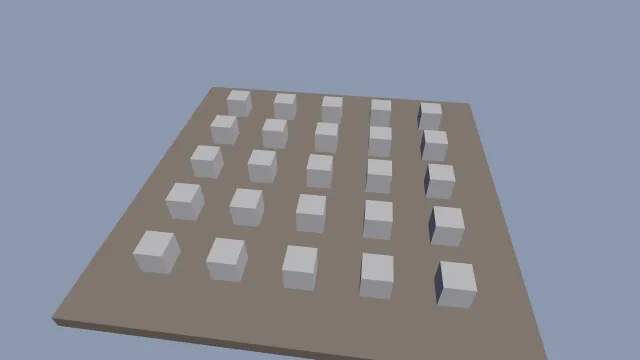
Starts examples/picking in this page, on WebGPU where your browser has it.
Picking is the chapter that walks through it.
From a checkout of the engine, npm run examples serves it at /picking/.
Source
main.ts
examples/picking/main.ts
/**
 * Twenty-five shapes on a table. The one under the pointer lights up; a click lifts it, and a second
 * click puts it down.
 *
 * Picking answers one question, what is under this pixel, against meshes registered for it. Hover,
 * press and drag are the game's: the engine says what was hit, where, and how far away.
 */
import { MeshBuilder, SceneNode } from '@driftengine/core';
import type { Vec3 } from '@driftengine/core';
import { DAYLIGHT, openStage } from '../common/stage';

const stage = await openStage({
  directionalShadows: true,
  sceneSamples: 4,
  outputTransform: 'aces',
});
const { renderer, camera, canvas } = stage;

const table = renderer.createMesh(
  new MeshBuilder().addBox([0, -0.2, 0], [6, 0.2, 6], [0.35, 0.3, 0.26]).build(),
);
const still = new SceneNode();
still.updateWorld();

// #region register
/** Each shape is drawn and registered for picking, with the same geometry and the same matrix. */
const shapeData = new MeshBuilder()
  .addBox([0, 0.4, 0], [0.4, 0.4, 0.4], [0.75, 0.75, 0.78])
  .build();
const shape = renderer.createMesh(shapeData);
const nodes: SceneNode[] = [];
const handles: number[] = [];
const lifted: boolean[] = [];
for (let row = 0; row < 5; row += 1)
  for (let column = 0; column < 5; column += 1) {
    const node = new SceneNode();
    node.setPosition((column - 2) * 2, 0, (row - 2) * 2);
    node.updateWorld();
    nodes.push(node);
    handles.push(renderer.registerPickable(shapeData, node.worldMatrix));
    lifted.push(false);
  }
// #endregion

// #region pointer
/** Where the pointer is, in the canvas's CSS box, and whether a click is waiting. */
let pointerX = -1;
let pointerY = -1;
let clicked = false;
canvas.addEventListener('pointermove', (event) => {
  const box = canvas.getBoundingClientRect();
  pointerX = event.clientX - box.left;
  pointerY = event.clientY - box.top;
});
canvas.addEventListener('pointerleave', () => {
  pointerX = -1;
});
canvas.addEventListener('click', () => {
  clicked = true;
});
// #endregion

const PLAIN: Vec3 = [1, 1, 1];
const HOVER: Vec3 = [1.6, 1.25, 0.6];
let time = 0;

stage.run({
  simulate(dt) {
    time += dt;
  },
  render() {
    camera.fovYDeg = 50;
    camera.position[0] = Math.sin(time * 0.1) * 3;
    camera.position[1] = 9;
    camera.position[2] = 10;
    camera.lookAt(0, 0, 0);

    // #region pick
    /* What is under the pointer: the nearest registered mesh along its ray, or nothing. */
    const hit = pointerX < 0 ? null : renderer.pickAt(camera, pointerX, pointerY);
    const hovered = hit === null ? -1 : handles.indexOf(hit.handle);
    if (clicked && hovered >= 0) {
      lifted[hovered] = !lifted[hovered];
      const node = nodes[hovered];
      node.setPosition(node.position[0], lifted[hovered] ? 1 : 0, node.position[2]);
      node.updateWorld();
      /* A pickable that moves is told where it went. */
      renderer.updatePickable(handles[hovered], node.worldMatrix);
    }
    clicked = false;
    // #endregion

    renderer.beginFrame([0.55, 0.6, 0.68]);
    renderer.bindMeshPass(camera, DAYLIGHT);
    renderer.drawMesh(table, still.worldMatrix);
    for (let i = 0; i < nodes.length; i += 1)
      renderer.drawMesh(shape, nodes[i].worldMatrix, 0, i === hovered ? HOVER : PLAIN);
    renderer.endFrame();
  },
});